JetSync
JetSync — professional JetEngine successor for WordPress: migrate CPTs, taxonomies, meta fields, relations and listings with zero data loss
by Google DeepMind Antigravity · github.com/sorinciupitu/jetsync · website
Install
No release zip yet. The repository archive installs, but the folder name will carry the branch suffix and updates will not flow:
wp plugin install https://github.com/sorinciupitu/jetsync/archive/refs/heads/main.zipProfessional JetEngine successor for WordPress: migrate, host, and manage Custom Post Types, Taxonomies, Meta Fields, Relations, and Listings — without disrupting production data.
What is JetSync?
JetSync is an enterprise-grade WordPress plugin designed as a clean, independent alternative to JetEngine. It detects structures created with JetEngine, imports them into its own versioned registry, and takes over native registration — so you can eventually deactivate JetEngine with zero data loss.
Core promise: clone definitions, keep WordPress objects. Posts, terms, post meta, featured images, authors, and statuses stay intact. Only the configuration layer moves.
Key capabilities
- Custom Post Types — detect, clone, edit, and natively register (
register_post_type) - Custom Taxonomies — labels, rewrite, hierarchical flags, object-type mapping
- Meta Boxes / Meta Fields — neutral internal schema, compatible meta keys, runtime save/load
- Object Relations — post-to-post and related mappings with dedicated storage, integrity checker, and
get_related_items/set_related_itemsAPI - Listings Engine (MVP) — query source, field mapping, loop rendering,
[jetsync_listing]shortcode, Gutenberg block foundation - Migration Center — scan, full import, incremental sync, dry-run, reports, rollback points
- Readiness Checklist — validates what is migrated, what still depends on JetEngine, and when it is safe to deactivate
Migration workflow
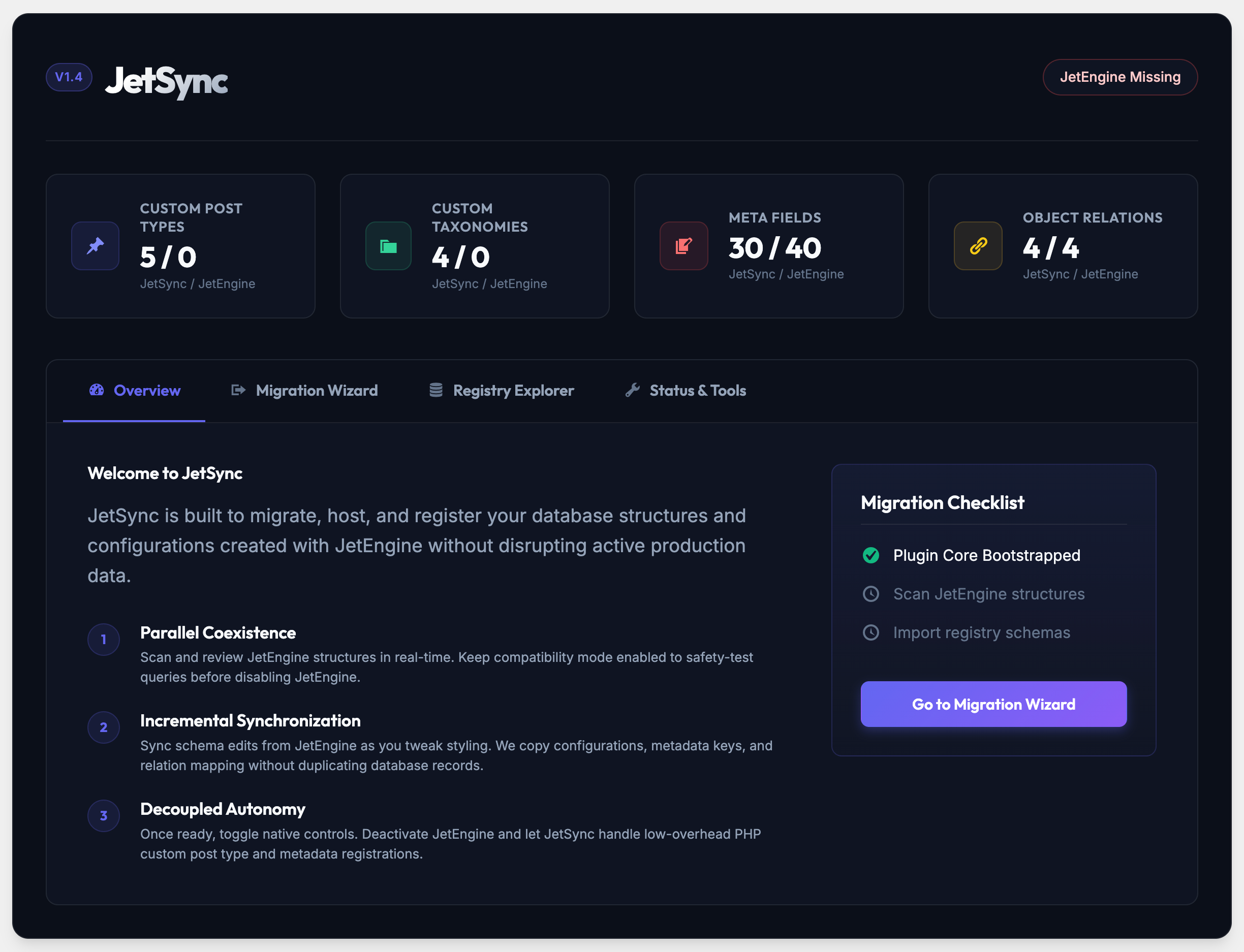
- Parallel Coexistence — run JetSync alongside JetEngine. Scan structures in real time, keep compatibility mode on.
- Incremental Synchronization — sync schema edits (configurations, meta keys, relation mappings) without duplicating records.
- Decoupled Autonomy — run validations, confirm readiness, deactivate JetEngine. JetSync handles CPT, taxonomy, and metadata registration natively with low overhead.
Admin path: JetSync → Overview → Migration Wizard → Registry Explorer → Status & Tools (re-sync, validate, repair, export/import, relation rebuild, cache clear).
Requirements
- WordPress 6.0+
- PHP 8.1+
- Optional: JetEngine (active, only during import), Elementor (dynamic tags / loop grid bridge), Gutenberg
Installation
- Upload the plugin folder to
/wp-content/plugins/jetsync - Activate via Plugins → JetSync
- Open JetSync → Overview, then run the Migration Wizard
Architecture
Modular, OOP, namespaced, PSR-4-style autoloading:
jet-sync.php
src/
  Core/            bootstrap, autoloader, installer, capabilities, logger
  Compatibility/   JetEngine detector + import adapters (CPT, taxonomy, fields, relations)
  Registry/        internal versioned store for types, taxonomies, fields, relations, listings
  Runtime/         native registration, meta handling, relations engine, listing renderer
  Migration/       scan, plan, runner, integrity checker, export/import
  Admin/           dashboard, wizard, CRUD screens, tools
  Integration/     Elementor dynamic tags, loop integration, Gutenberg bridge
uninstall.php
Storage: wp_options for definitions, custom tables only where justified (relations, internal config), standard postmeta / termmeta wherever possible.
Security & quality
Nonces, capability checks, sanitization/escaping throughout. No destructive operation without explicit confirmation. Nothing is deleted from JetEngine automatically. Uninstall behavior is explicit and conservative.
Screenshot
Dashboard preview (assets/images/screenshot-dashboard.png): JetSync v1.4 overview with CPT / taxonomy / meta / relation counters, Migration Wizard entry, and Migration Checklist.
Note: save the dashboard screenshot as
assets/images/screenshot-dashboard.pngto render it above on the GitHub homepage.
License
GPL-2.0-or-later. See plugin header in jet-sync.php.