PassWP Posts WP Registry grade C-. High-severity findings · 1 findingWP RegistryHigh-severity findings · 1 findingOpen the reportC-
A simple password protection plugin for WordPress—no usernames, no accounts, just one shared password. Share the password with those who need access and they're in. Perfect for situations where you need quick, hassle-free access control without user management.
Install
Upload it under Plugins → Add New Plugin → Upload Plugin, then activate.
Install straight from GitHub with WP-CLI:
wp plugin install https://github.com/soderlind/passwp-posts/releases/download/1.4.3/passwp-posts.zipOn Packagist as soderlind/passwp-posts:
composer require soderlind/passwp-postsA simple password protection plugin for WordPress—no usernames, no accounts, just one shared password. Share the password with those who need access and they're in. Perfect for situations where you need quick, hassle-free access control without user management.
When to Use This Plugin
PassWP Posts is ideal when you need simple shared access without the overhead of user accounts:
- Staging Sites — Share a password with clients to preview their site before launch
- Client Portals — Protect project documentation or deliverables with a single password
- Pre-launch Sites — Keep your "Coming Soon" site private while you finish development
- Private Blogs — Share personal content with family or friends using one easy password
- Internal Resources — Protect company wikis or documentation from public access
- Event Websites — Limit access to event details, schedules, or member areas
- Photography Galleries — Share client proofs with a simple password (no login required)
- Educational Content — Protect course materials for a class or workshop
Note: This is NOT a membership or user management plugin. If you need individual user accounts, different access levels, or tracking who accessed what, use a membership plugin instead.
Features
- One Password, No Username — Visitors just enter the password—no account creation, no login forms
- Front Page Always Public — Your homepage remains accessible to everyone
- Logged-in User Bypass — WordPress users (editors, admins) skip the password prompt
- Flexible Protection — Protect all content (with exclusions) or only selected pages/posts
- Customizable Form — Match your brand with colors, typography, logo, and preset themes
- Remember Me — Visitors stay authenticated for a configurable duration
- Secure — Uses WordPress-native password hashing and secure cookies
Installation
- Download
passwp-posts.zip - Upload via Plugins > Add New > Upload Plugin
- Activate the plugin.
Plugin updates are handled automatically via GitHub. No need to manually download and install updates.
Configuration
Go to Settings → PassWP Posts to configure the plugin.
General Settings
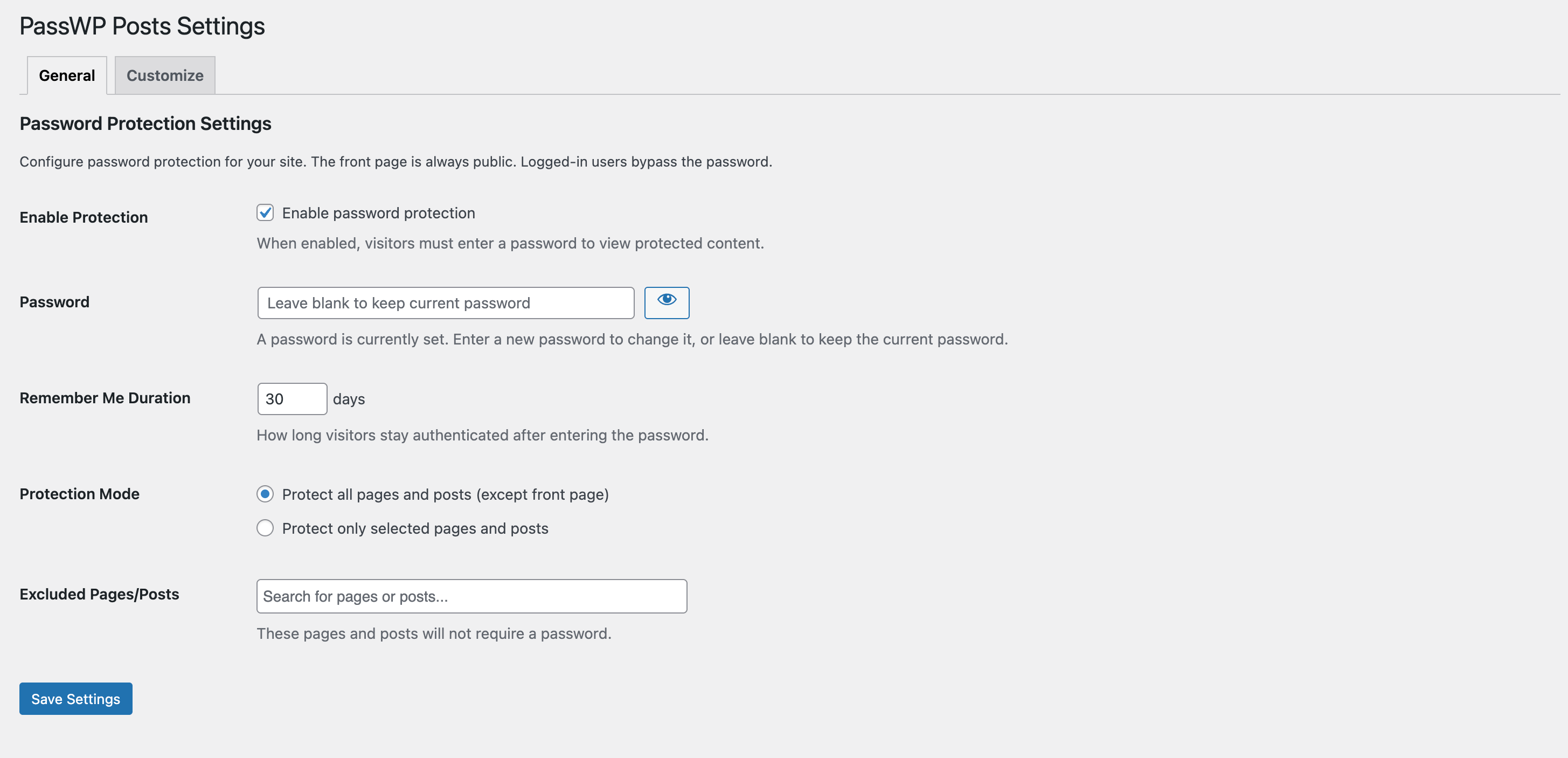
| Setting | Description |
|---|---|
| Enable Protection | Toggle password protection on or off for your entire site |
| Password | The shared password that visitors must enter to access any protected content on your site |
| Remember Me Duration | Number of days the browser will remember the password so visitors don't need to re-enter it (default: 30 days) |
| Protection Mode | Choose between protecting all pages and posts (with optional exclusions) or protecting only specific selected content |
| Excluded Pages/Posts | When "Protect all" is selected: choose specific pages or posts that should remain publicly accessible without a password |
| Protected Pages/Posts | When "Protect selected" is chosen: select the specific pages or posts that require password protection |
Customize Settings
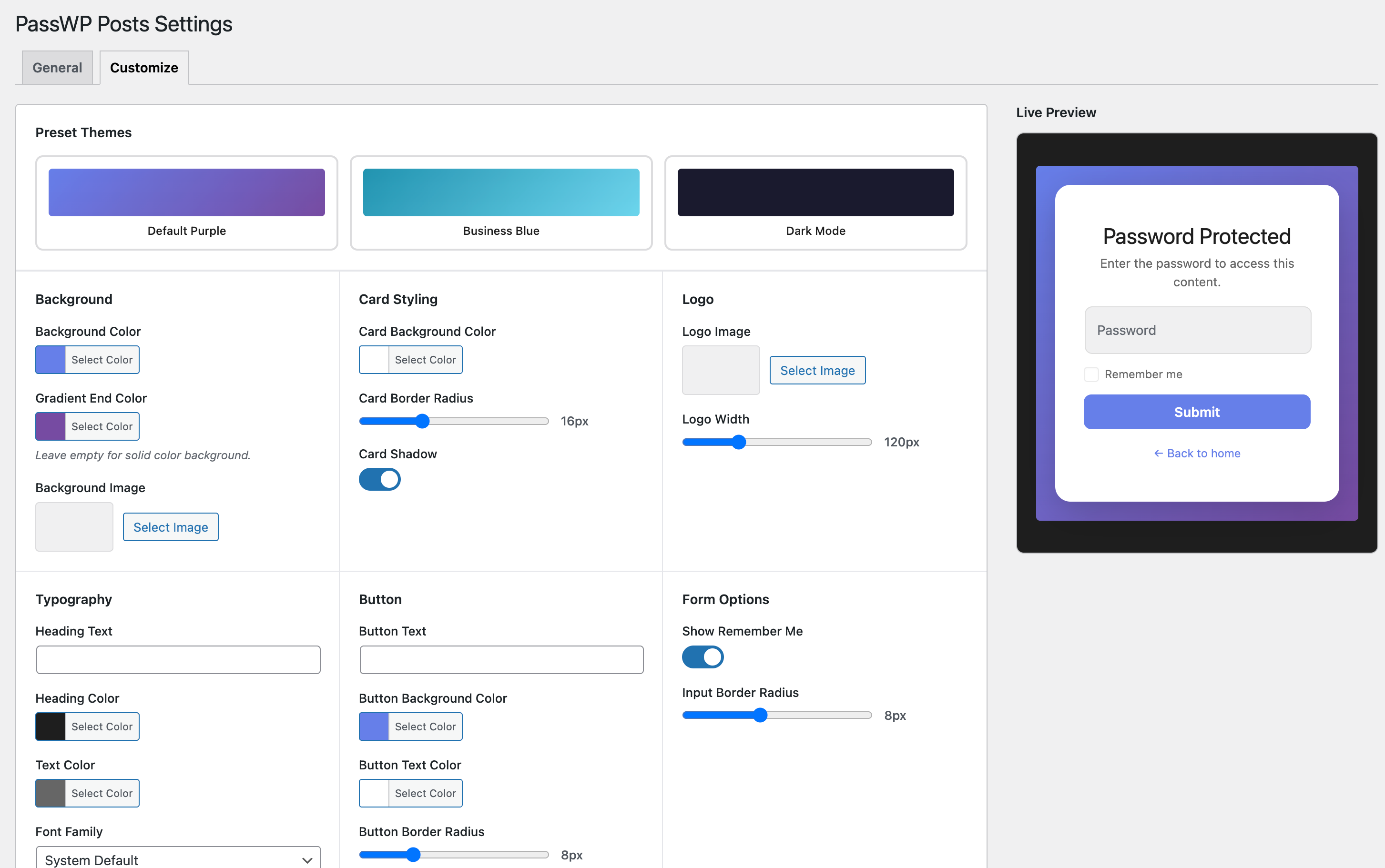
| Setting | Description |
|---|---|
| Preset Themes | Quick-apply a complete theme with one click: Default Purple, Business Blue, or Dark Mode |
| Background | Customize the page background with a solid color, gradient blend, or upload a background image |
| Card Styling | Style the password form card: background color, corner radius, and drop shadow intensity |
| Logo | Upload your company or site logo to display above the password form, with adjustable width |
| Typography | Customize the heading text, text colors, and choose from available font families |
| Button | Style the submit button: custom text, background and hover colors, and corner radius |
| Form Options | Toggle the "Remember Me" checkbox visibility and set the input field corner radius |
| Footer | Add custom footer text below the form with an optional link URL |
How It Works
- When a visitor tries to access a protected page or post, they are shown a password form
- If they enter the correct password, a secure cookie is set
- The cookie allows them to browse freely for the configured duration
- Logged-in users are never prompted for a password (use incognito or private browsing mode to test protection).
- The front page is always public regardless of protection mode
Security
- Passwords are stored using
wp_hash_password()(same as WordPress user passwords) - Cookies contain a SHA256 hash of the password hash combined with
wp_salt('auth') - All form submissions are protected with WordPress nonces
- Admin actions require
manage_optionscapability
Development
Requirements
- PHP 8.3+
- WordPress 6.8+
Running Tests
PHP Tests (PHPUnit with Brain\Monkey):
composer install
composer test
JavaScript Tests (Vitest):
npm install
npm test
Building Translations
# Generate POT file
wp i18n make-pot . languages/passwp-posts.pot

# Generate MO file from PO
wp i18n make-mo languages/passwp-posts-nb_NO.po

# Generate PHP translation file (WordPress 6.5+)
wp i18n make-php languages
Directory Structure
passwp-posts/
├── assets/
│   ├── css/
│   │   ├── admin.css
│   │   ├── customize-admin.css
│   │   └── password-form.css
│   ├── js/
│   │   ├── admin.js
│   │   └── customize.js
│   └── vendor/
│       └── select2/
├── includes/
│   ├── class-admin-settings.php
│   ├── class-cookie-handler.php
│   └── class-protection.php
├── languages/
│   ├── passwp-posts.pot
│   ├── passwp-posts-nb_NO.po
│   ├── passwp-posts-nb_NO.mo
│   └── passwp-posts-nb_NO.l10n.php
├── templates/
│   └── password-form.php
├── tests/
│   ├── js/
│   └── php/
├── passwp-posts.php
├── composer.json
├── package.json
└── README.md
Hooks
Filters
// Modify the password form template path
add_filter( 'passwp_posts_form_template', function( $template ) {
    return get_stylesheet_directory() . '/passwp-posts-form.php';
});
Translations
The plugin is translation-ready with the text domain passwp-posts. Available translations:
- English (default)
- Norwegian Bokmål (nb_NO)
License
GPL v2 or later
Changelog
See CHANGELOG.md for a detailed list of changes.
Releases
19 releases. Each count is every asset in that release; expand a row for the breakdown.