AI Alt Text WP Registry grade D+. High-severity findings · 2 findingsWP RegistryHigh-severity findings · 2 findingsOpen the reportD+
Generate alt text for images using AI. Supports multiple AI providers including OpenAI, Claude, Gemini, Ollama, Azure OpenAI, and Grok.
Install
Upload it under Plugins → Add New Plugin → Upload Plugin, then activate.
Install straight from GitHub with WP-CLI:
wp plugin install https://github.com/soderlind/ai-alt-text/releases/download/1.0.3/ai-alt-text.zipOn Packagist as soderlind/ai-alt-text:
composer require soderlind/ai-alt-textGenerate alt text for images using AI. Supports multiple AI providers including OpenAI, Claude, Gemini, Ollama, Azure OpenAI, and Grok.
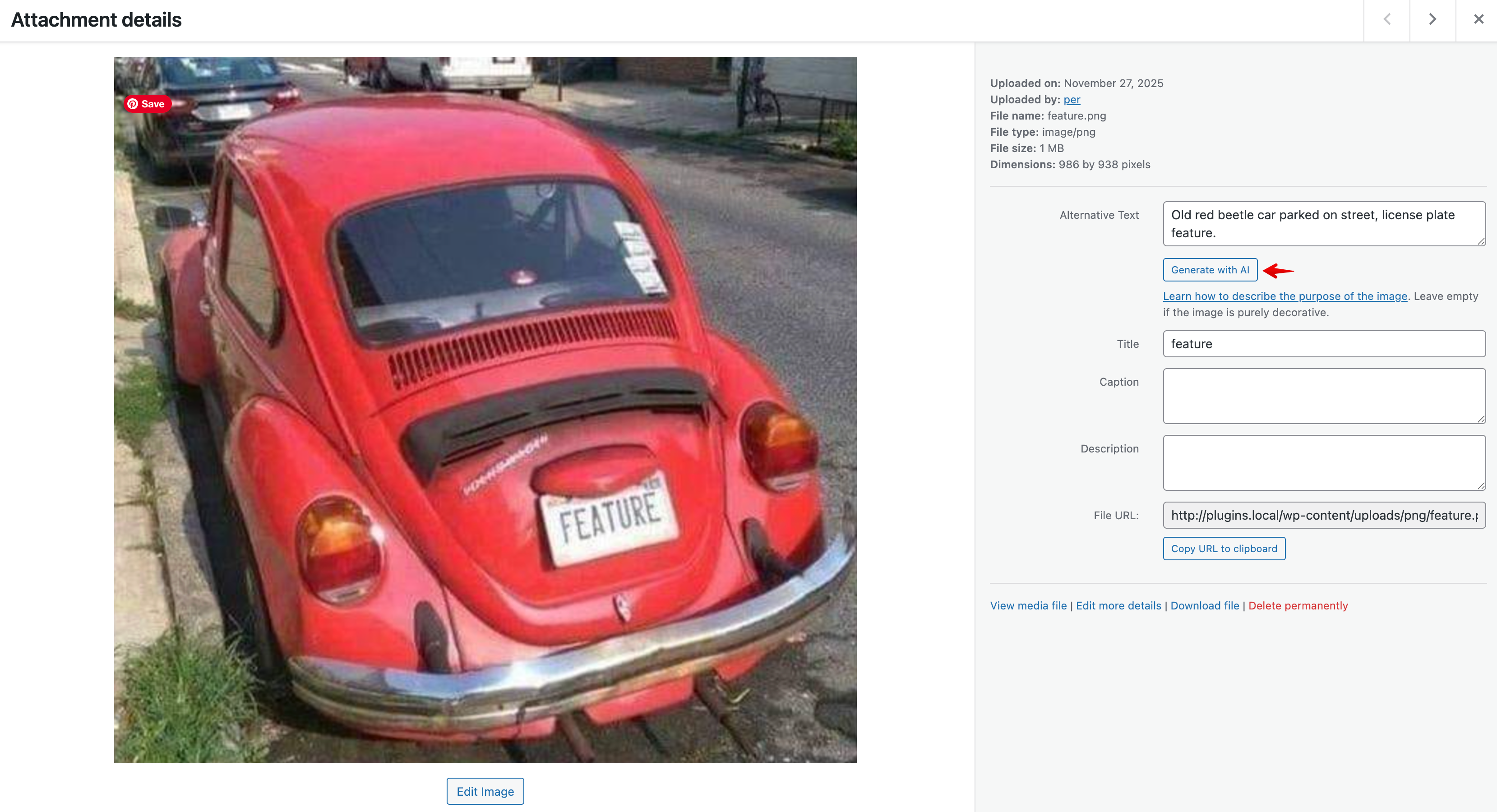
Features
- Bulk Update: Update alt text for multiple images at once from the media library
- Block Editor Integration: Generate alt text directly from the image block in the editor
- Multiple AI Providers: Choose from OpenAI (GPT-4o), Anthropic Claude, Google Gemini, Azure OpenAI, Ollama (local), or Grok
- Language Detection: Automatically uses WordPress language settings for generated alt text
- Flexible Configuration: Configure via constants, environment variables, or the admin settings page
Requirements
- WordPress 6.8 or higher
- PHP 8.3 or higher
- API key for your chosen AI provider (except Ollama which runs locally)
Installation
-
Quick Install
- Download
ai-alt-text.zip - Upload via Plugins > Add New > Upload Plugin
- Activate the plugin.
- Go to Settings → AI Alt Text to configure your AI provider
- Download
-
Composer Install
composer require soderlind/ai-alt-text -
Updates
- Plugin updates are handled automatically via GitHub. No need to manually download and install updates.
Configuration
Via Admin Settings
Navigate to Settings → AI Alt Text and configure:
- Select your AI provider
- Enter your API key
- Optionally customize the model and other settings
Via Constants (wp-config.php)
// AI Provider: 'openai', 'anthropic', 'gemini', 'azure', 'ollama', 'grok'
define( 'AI_ALT_TEXT_PROVIDER', 'openai' );

// API Key
define( 'AI_ALT_TEXT_API_KEY', 'your-api-key-here' );

// Optional: Custom model
define( 'AI_ALT_TEXT_MODEL', 'gpt-4o' );

// Azure-specific settings
define( 'AI_ALT_TEXT_AZURE_ENDPOINT', 'https://your-resource.openai.azure.com' );
define( 'AI_ALT_TEXT_AZURE_DEPLOYMENT', 'your-deployment-name' );

// Ollama-specific settings
define( 'AI_ALT_TEXT_OLLAMA_HOST', 'http://localhost:11434' );
Via Environment Variables
AI_ALT_TEXT_PROVIDER=openai
AI_ALT_TEXT_API_KEY=your-api-key-here
AI_ALT_TEXT_MODEL=gpt-4o
Usage
Bulk Update
- Go to Media → Library (list view)
- Select images you want to update
- Choose "Generate AI Alt Text" from the bulk actions dropdown
- Click "Apply"
From the Block Editor
- Add or select an image block
- In the sidebar, find the "AI Alt Text" panel
- Click "Generate Alt Text with AI"
AI Providers
| Provider | Model | Notes |
|---|---|---|
| OpenAI | gpt-4o | Requires API key from OpenAI |
| Anthropic | claude-sonnet-4-20250514 | Requires API key from Anthropic |
| Google Gemini | gemini-2.0-flash | Requires API key from Google AI Studio |
| Azure OpenAI | gpt-4o | Requires Azure subscription and deployment |
| Ollama | llava | Free, runs locally. Install from ollama.ai |
| Grok | grok-2-vision-1212 | Requires API key from xAI |
For detailed configuration instructions, see AI Provider Documentation.
Hooks & Filters
Modify Generated Alt Text
add_filter( 'ai_alt_text_generated', function( $alt_text, $attachment_id ) {
    // Modify the generated alt text
    return $alt_text;
}, 10, 2 );
Customize the AI Prompt
add_filter( 'ai_alt_text_prompt', function( $prompt, $language ) {
    // Customize the prompt sent to the AI
    return $prompt;
}, 10, 2 );
Skip Auto-generation for Specific Images
add_filter( 'ai_alt_text_should_generate', function( $should_generate, $attachment_id ) {
    // Return false to skip auto-generation
    return $should_generate;
}, 10, 2 );
Translations
The plugin is translation-ready. Translation files are located in the languages/ directory.
Creating a Translation
- Copy
languages/ai-alt-text.pottolanguages/ai-alt-text-{locale}.po- Example:
ai-alt-text-nb_NO.pofor Norwegian Bokmål - Example:
ai-alt-text-de_DE.pofor German
- Example:
- Translate the strings using Poedit or similar tool
- Save to generate the
.mofile - For JavaScript translations, run:
wp i18n make-json languages/
Available Locales
Contributions welcome! Submit your translation via a pull request.
Development
Building Assets
npm install
npm run build
Running Tests
# JavaScript tests
npm test

# PHP tests
./vendor/bin/phpunit
Code Standards
# Check PHP code standards
./vendor/bin/phpcs

# Fix PHP code standards
./vendor/bin/phpcbf
License
GPL v2 or later. See LICENSE for details.
Credits
Developed by Per Soderlind.
Support
Releases
4 releases. Each count is every asset in that release; expand a row for the breakdown.