Install
Upload it under Plugins → Add New Plugin → Upload Plugin, then activate.
Install straight from GitHub with WP-CLI:
wp plugin install https://github.com/skybytedevelopment/wpplugin-watch-client/releases/download/v1.2.0/wppluginwatch-1.2.0.zip
Continuous vulnerability monitoring for WordPress plugins, themes, and core. Clear results, direct risk signals, and actionable updates.
Overview
WPPlugin Watch scans your WordPress installation against the Wordfence Intelligence vulnerability feed and highlights known vulnerabilities with clear severity ratings and actionable guidance.
Designed for real-world site owners who need clarity, not security jargon.
Important: Enable Scanning
After activating the plugin, vulnerability scanning is disabled by default.
To enable scanning:
- Go to Settings → General
- Find WPPlugin Watch Scanning
- Check Enable vulnerability scanning
- Click Save Changes
Scanning will not run until this setting is enabled.
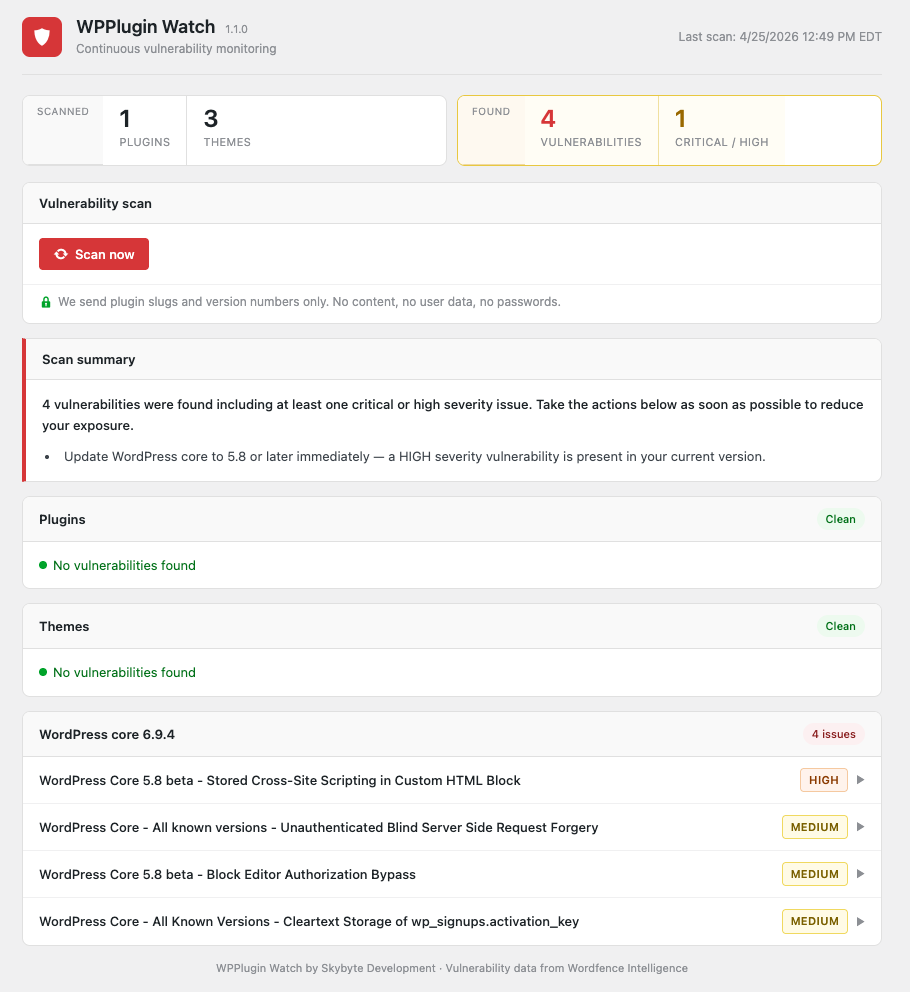
What You’ll See
- Real-time vulnerability counts
- Clear severity signals (Critical / High / Medium / Low)
- Direct identification of affected plugins, themes, or core
- Immediate guidance on what to update and why
Features
- Detects known vulnerabilities (CVEs) in plugins, themes, and WordPress core
- Clear severity classification: Critical, High, Medium, Low
- Plain-language explanations for each finding
- Identifies exactly what needs to be updated
- Daily background checks for newly disclosed vulnerabilities
- Privacy-first design — no personally identifiable information collected
Interface
Architecture
- WordPress plugin collects local inventory (plugins, themes, core version)
- A one-way SHA-256 fingerprint identifies the site
- Inventory is sent to the backend (
api.wpplugin.watch) - Backend matches against the Wordfence Intelligence vulnerability database
- Results returned with severity and explanations
Privacy
- No usernames, emails, or content are transmitted
- Site identity is represented only as a non-reversible SHA-256 fingerprint
- Data sent is limited strictly to software inventory required for vulnerability matching
Requirements
- WordPress 6.0 or higher
- PHP 8.0 or higher
Installation
Build and install locally
-
Clone the repository:
git clone https://github.com/skybytedevelopment/wpplugin-watch-client.git cd wpplugin-watch-client -
Build the plugin zip:
./build.shThe script outputs a versioned zip to the
dist/directory. -
In WordPress admin, go to Plugins → Add New → Upload Plugin
-
Upload the zip from
dist/and activate -
Enable scanning in Settings → General
-
Navigate to WPPlugin Watch and run your first scan
Note: A prebuilt release zip is not yet published. Installation currently requires building from source. This will be updated once the plugin is available in the WordPress Plugin Directory.
How It Works
- The plugin gathers installed plugin slugs, theme slugs, and WordPress core version
- This inventory is securely transmitted to the backend with a site fingerprint
- The backend checks for known vulnerabilities using the Wordfence Intelligence database
- Results are returned with severity ratings and plain-language explanations
- A daily check identifies new vulnerabilities and available updates
Building from Source
git clone https://github.com/skybytedevelopment/wpplugin-watch-client.git
cd wpplugin-watch-client
./build.sh
build.sh prompts for an optional dev API endpoint override and outputs a versioned zip to dist/. See CONTRIBUTING.md for details.
License
GPL-2.0-or-later. See LICENSE.
Releases
1 release. Each count is every asset in that release; expand a row for the breakdown.