Lightweight Integration for IndexNow
A tiny, no-bloat IndexNow integration for WordPress.
by Nicola Mustone · github.com/sirdarcanos/lightweight-integration-for-indexnow · website
Install
No release zip yet. The repository archive installs, but the folder name will carry the branch suffix and updates will not flow:
wp plugin install https://github.com/sirdarcanos/lightweight-integration-for-indexnow/archive/refs/heads/main.zipA small WordPress plugin that submits content URLs to IndexNow when posts, pages, and WooCommerce products are published, updated, or moved to the trash.
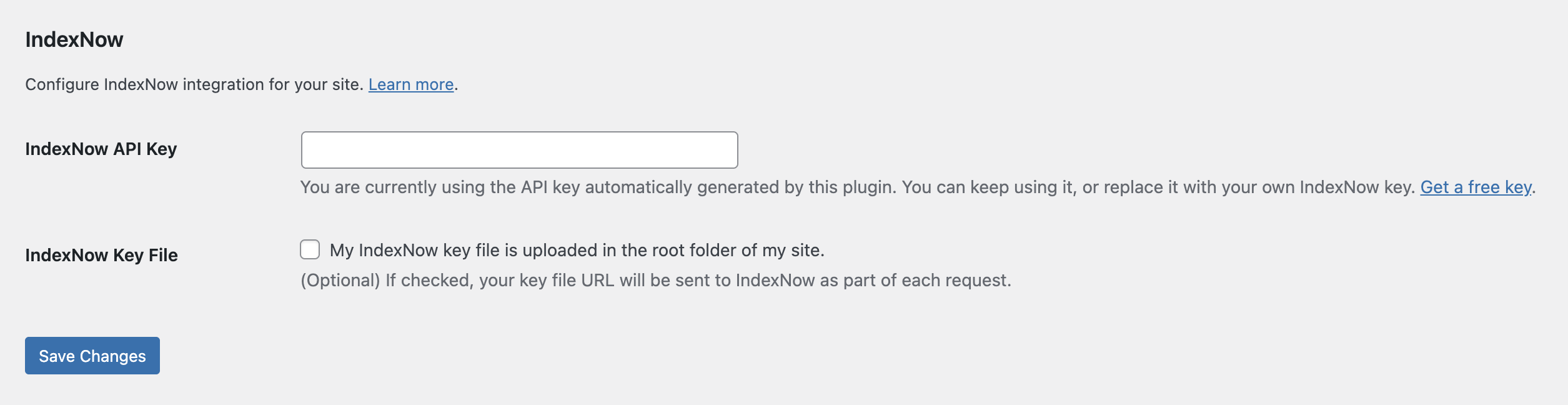
It adds two settings under Settings → General, with no JavaScript, CSS, or front-end output. This is an independent plugin by Nicola Mustone, not affiliated with or endorsed by IndexNow or its participating search engines.
Requirements
- WordPress 6.0 or newer; see
Tested up toin readme.txt for the verified release. - PHP 7.4 or newer.
- WooCommerce only if you want to submit product URLs.
Installation
Upload the lightweight-integration-for-indexnow folder to wp-content/plugins/, or install a built plugin ZIP through Plugins → Add New Plugin → Upload Plugin. Activate Lightweight Integration for IndexNow in WordPress.
For local development, clone this repository into your WordPress plugins directory:
cd /path/to/wordpress/wp-content/plugins
git clone https://github.com/SirDarcanos/lightweight-integration-for-indexnow.git
The plugin has no Composer or npm runtime dependencies. The local test tooling uses npm and Docker.
Local WordPress with wp-env
Start Docker Desktop, then run:
npm ci
npm run env:start
npm run env:status- Development: http://localhost:8888/wp-admin/
- Isolated tests with Plugin Check: http://localhost:8889/wp-admin/
- Local login for both:
admin/password(never use these credentials on a public site).
The development plugin is mounted from this checkout; the test site mounts only the four staged release files. Both are activated automatically and use the latest stable WordPress and PHP 8.3. The tests use a separate configuration and database; they do not modify the development site's content.
npm test                     # Package, functional, and Plugin Check checks
npm run test:minimum         # WordPress 6.0 / PHP 7.4 on port 8890
npm run env:cli -- plugin list
npm run env:test:cli -- plugin list
npm run env:stop
npm run env:minimum:stop     # If the minimum-version environment was started
Functional tests mock all outbound HTTP and clean up their fixtures. Plugin Check scans the staged ZIP contents with runtime checks enabled, rather than scanning development dependencies. A passing check is not a guarantee of WordPress.org approval.
Keep personal settings in the ignored .wp-env.override.json; it is excluded from release packages. Overrides replace plugin arrays rather than appending to them. See docs/testing.md for test scope and submission checks.
Settings
Activation generates a 32-character API key. Open Settings → General → IndexNow to configure:
| Setting | Purpose |
|---|---|
| IndexNow API Key | Keep the generated key or replace it with your own. An empty key disables submissions. |
| IndexNow Key File | Include https://example.com/YOUR_KEY.txt as keyLocation in each request. |
[!IMPORTANT] The plugin generates the key, not the key file. IndexNow needs a publicly accessible verification file even when the key-file checkbox is unchecked. Upload
YOUR_KEY.txt, containing only your API key, to your site's root. The checkbox explicitly sends that URL askeyLocation; the settings screen checks whether the file exists and is readable under the WordPress root (ABSPATH).
Submitted URLs
Each submission includes the content's permalink and any related taxonomy archive URLs:
| Content type | Taxonomy archives |
|---|---|
| Posts | Categories and tags |
| Pages | None by default |
| WooCommerce products | Product categories and product tags |
Submissions share your site's hostname, API key, content URLs, and optionally the verification-file URL with IndexNow. They do not contain post bodies, user accounts, or visitor analytics. Clear the key or deactivate the plugin to stop submissions. See the IndexNow service terms and the external-service disclosure in readme.txt.
Duplicate and empty URLs are removed before submission. Saves of drafts, revisions, and autosaves are skipped. Localhost detection skips submissions when the site hostname matches localhost, 127.0.0.1, or ::1.
Requests go to https://api.indexnow.org/indexnow through the WordPress HTTP API and are non-blocking by default. A dispatched request is not confirmation that a search engine accepted or indexed the URLs. Errors returned to the plugin during an admin request are stored for a one-time administrator notice.
Developer hooks
Add customizations in a site-specific plugin or your theme. For example, include a published custom post type:
add_filter( 'nm_indexnow_supported_post_types', function ( $post_types ) {
    $post_types[] = 'book';
    return $post_types;
} );| Filter | Controls |
|---|---|
nm_indexnow_should_ping_on_save |
Whether a save triggers a submission. |
nm_indexnow_should_ping_on_trashed |
Whether moving content to the trash triggers a submission. |
nm_indexnow_supported_post_types |
Tracked post types; defaults to post, page, and product. |
nm_indexnow_taxonomy_map |
Taxonomies whose archive URLs are collected for each post type. |
nm_indexnow_collect_urls |
The collected URL list. |
nm_indexnow_key_location_url |
The key-file URL. |
nm_indexnow_endpoint |
The submission endpoint. |
nm_indexnow_request_args |
WordPress HTTP request arguments. |
Actions are available before submission (nm_indexnow_before_submit), after the request returns without a detected error (nm_indexnow_after_submit), and on a detected error (nm_indexnow_submit_failed). See readme.txt for hook arguments and the plugin source for execution order.
Build and release
Both existing GitHub Actions workflows run manually; pushes, tags, and GitHub releases do not trigger deployment.
- Build release zip: Run it from the Actions tab to package the plugin with the slug
lightweight-integration-for-indexnow. - Deploy to WordPress.org SVN: Select a version tag such as
1.0.0orv1.0.0. The tag must match the plugin'sVersionand theStable taginreadme.txt, point to a commit onmain, and use a version not already published to SVN. WordPress.org must have approved the plugin's SVN repository.
SVN deployment defaults to a dry run. A live deployment uses the wordpress-org GitHub environment, an OP_SERVICE_ACCOUNT_TOKEN secret, and an OP_ENVIRONMENT_ID variable. The referenced 1Password Environment must contain SVN_USERNAME and SVN_PASSWORD. See deploy-svn.yml for validation and credential handling.
.distignore and .gitattributes define packaging exclusions. WordPress.org screenshots live in .wordpress-org/, outside the plugin package.