EZ Accessibility
EZ Accessibility is a completely free WordPress accessibility plugin built for simplicity. It works with all site builders, runs independently on the client side, stores no user data, and avoids unnecessary bloat. Just the essential accessibility features for small websites.
Install
This is the repository archive. It installs, but the folder name will carry the branch suffix and updates will not flow.
Install straight from GitHub with WP-CLI:
wp plugin install https://github.com/shauryamohan20/accessibility-plugin/archive/refs/heads/main.zip
A lightweight accessibility toolbar for WordPress.
By Greyteck Studios · Plugin page
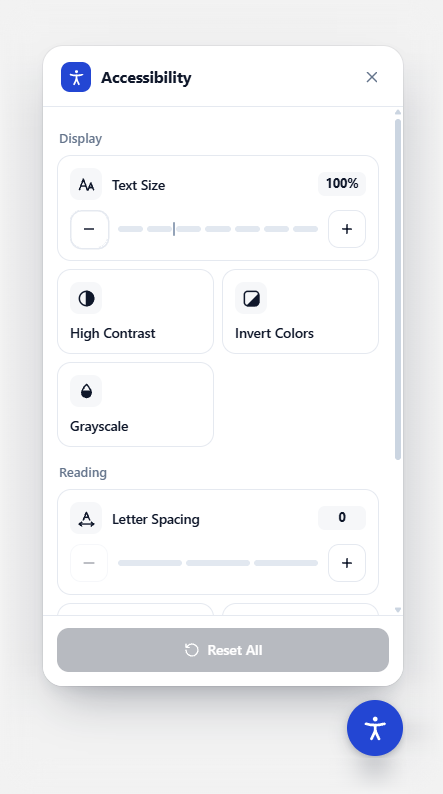
EZ Accessibility adds a small button to the corner of your site. Visitors open it to adjust the page to how they read best, and their choices are remembered on their next visit.
What visitors can change
- Text size, in steps, including text sized by page builders like Elementor
- High contrast, invert colors and grayscale (invert and grayscale can be combined)
- Highlight links and a readable font
- Letter spacing, in three levels
- Pause animations and a large cursor
- Reset all in one click; the button shows a small count of active changes
Built for everyone
- Fully keyboard accessible, with screen reader labels and announcements
- Respects "reduce motion" and Windows High Contrast settings
- 28 languages built in, left-to-right and right-to-left
- Fits any screen, from phones to wide monitors
How it works
The panel is rendered inside a Shadow DOM, so your theme's CSS can't break it and the plugin's CSS can't leak into your theme. Page adjustments are applied as classes on <html>. Everything ships with the plugin: no external requests, no tracking, no frontend libraries.
Settings
Open EZ Accessibility in the WordPress admin sidebar. Every change shows up in a live preview before you save.
| Section | What you can do |
|---|---|
| Appearance | Pick a brand color (with an automatic contrast check), one of five button icons or your own image, the button size, the corner and the distance from the edge |
| Features | Turn each visitor tool on or off |
| Visibility | Show the button on the whole site, or only on pages and posts you pick |
| Languages | Edit any built-in label, add your own languages (LTR or RTL), and choose a fallback language |
| Advanced | Change the stacking order (z-index) if a sticky header or chat widget covers the button |
Languages
The panel picks its language from the page's lang attribute and uses the closest match: pt-BR uses Portuguese, zh-TW uses Traditional Chinese. Built in: English, Spanish, French, German, Italian, Portuguese, Dutch, Polish, Swedish, Romanian, Czech, Turkish, Greek, Russian, Ukrainian, Hindi, Bengali, Thai, Vietnamese, Indonesian, Simplified and Traditional Chinese, Japanese and Korean, plus four right-to-left languages.
Using a language that isn't listed? Add it under Languages → Add language with its code (for example sw), a name and its direction, then type your labels. Right-to-left pages mirror the button and panel automatically.
Built-in labels live in assets/js/eza-i18n.js, a static file browsers cache. Only the labels you change are added to each page.
Custom button icon
Choose Your image under Appearance → Button icon to upload or pick an image from the media library. PNG, JPEG and WebP are accepted, up to 512 KB. SVG is refused, because SVG files can contain code that runs in visitors' browsers.
Privacy and security
- No data leaves the site. Visitor preferences are stored only in their own browser (
localStorage). - Settings are admin-only. Saving requires the
manage_optionscapability and a valid nonce. - All settings are validated in one place, whether they come from the form, the database or an older version.
- Uploaded icons are checked on the server. The form only sends an attachment ID. On save, the plugin reads the file itself to confirm it is a real PNG, JPEG or WebP under the size limit.
Requirements
- WordPress 6.5 or later
- PHP 8.0 or later
Installation
From WordPress.org: go to Plugins → Add New, search for "EZ Accessibility", install and activate.
From source:
git clone https://github.com/shauryamohan20/Accessibility-Plugin.git ez-accessibility
cd ez-accessibility
git archive --format=zip --prefix=ez-accessibility/ -o ../ez-accessibility.zip HEAD
Then upload the zip under Plugins → Add New → Upload Plugin. .gitattributes keeps development-only files (this README, .wordpress-org/ and so on) out of the zip.
JavaScript API
window.EZAccessibility.open()     // Open the panel
window.EZAccessibility.close()    // Close the panel
window.EZAccessibility.toggle()   // Toggle open/closed
window.EZAccessibility.reset()    // Reset every adjustment
window.EZAccessibility.refresh()  // Re-detect the language after a multilingual plugin switches it
Project layout
ez-accessibility.php                        Plugin header, bootstrap, migration
uninstall.php                               Removes settings (all sites on multisite)
includes/class-ez-accessibility-settings.php  Admin page, saving and validation
includes/class-ez-accessibility-frontend.php  Loads the widget where it should appear
assets/js/eza-frontend.js                   Visitor widget (Shadow DOM)
assets/js/eza-i18n.js                       Built-in translations
assets/js/eza-admin.js                      Settings page
assets/css/                                 Widget, page-feature and admin styles
.wordpress-org/                             Icon, banners and screenshots for the plugin directory
Publishing to WordPress.org
The WordPress.org listing is generated from readme.txt, so keep it in sync with this file. The artwork in .wordpress-org/ is not part of the plugin zip. Copy it into the top-level assets/ folder of the SVN repository, next to trunk/:
| File | Used for |
|---|---|
icon-128x128.png, icon-256x256.png |
Plugin icon in the directory and in wp-admin search results |
banner-772x250.png, banner-1544x500.png |
Header banner on the plugin page (normal and high-DPI) |
screenshot-1.png |
First screenshot on the plugin page |
Upgrading from Qudra AccessKit
Settings saved by the old plugin are carried over automatically the first time EZ Accessibility loads.
License
GPLv2 or later. See the GNU General Public License.