Install
This is the repository archive. It installs, but the folder name will carry the branch suffix and updates will not flow.
Install straight from GitHub with WP-CLI:
wp plugin install https://github.com/shandyw/hubspot-form-finder/archive/refs/heads/main.zipA developer utility plugin that scans your WordPress site for HubSpot forms — detecting ACF fields,
.form-colwrappers, and Gutenberg block embeds — and lists each form’s Form ID, Page URL, and Edit link. Includes pagination, post-status filters, CSV export, and a secure REST API.
🚀 Features
- ✅ Scans all public post types for HubSpot forms.
- ✅ Detects:
- Configurable wrapper class (default
.form-col) - Configurable ACF/meta field (default
form_id) - HubSpot embed markup (
data-form-id,/forms/{id}) - Forms nested in Gutenberg / ACF blocks
- Configurable wrapper class (default
- ✅ Displays:
- Form ID(s)
- Page URL
- Edit link
- Source type (ACF / Content / Blocks)
- ✅ Filters by post status: Published, Draft, or Both
- ✅ Paginates results (25 per page)
- ✅ Exports results to CSV (includes all results, not just visible page)
- ✅ REST API endpoint (
/wp-json/hsff/v1/results) with pagination and filters - ✅ Fully internationalized (i18n ready)
- ✅ Uninstall-safe and secure (admin-only)
🖥️ Usage
🖥️ Admin Interface Preview
Here’s what the HubSpot Form Finder tool looks like inside WordPress:
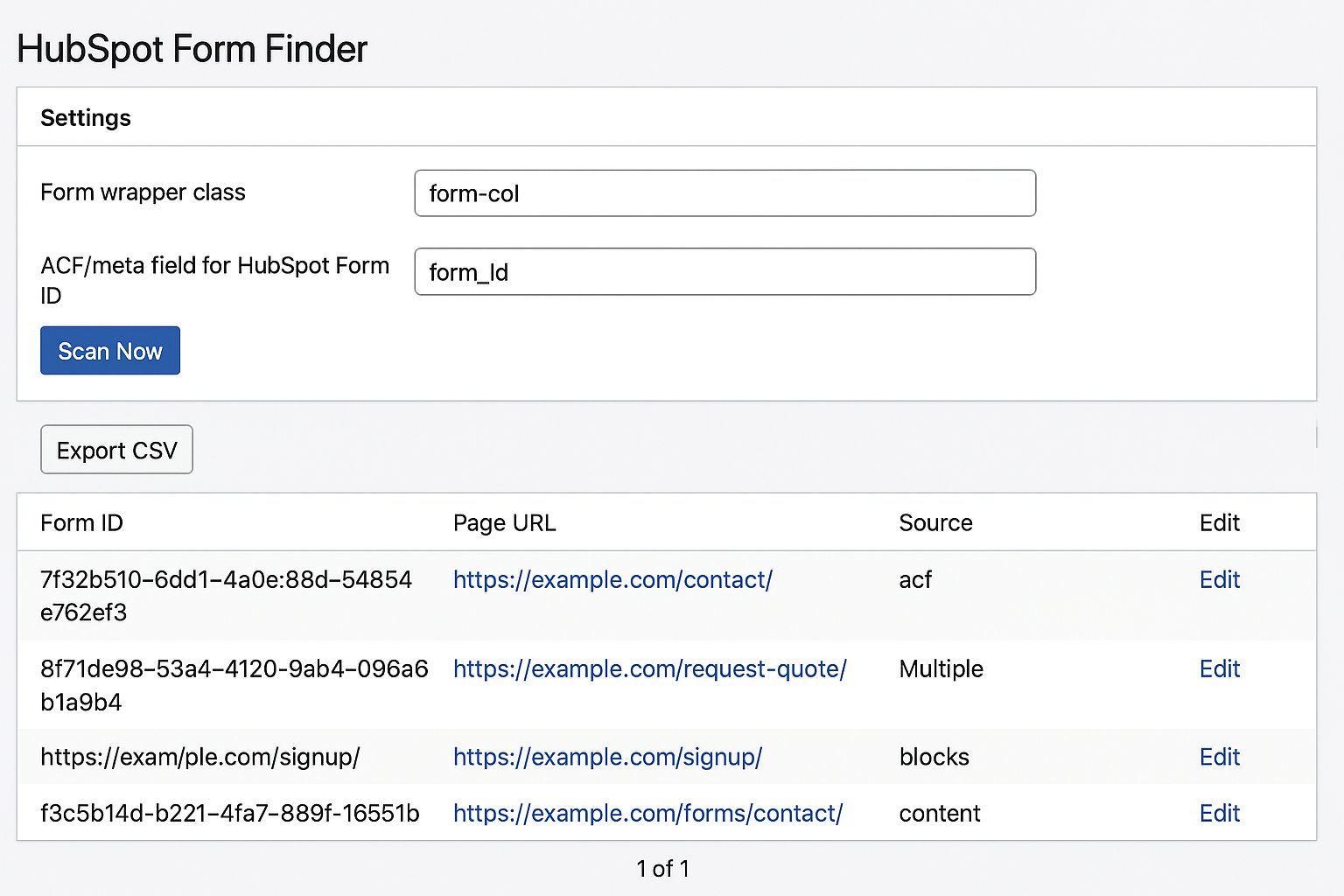
Admin Interface
- Go to Tools → HubSpot Form Finder.
- Under Settings, you can:
- Change the Form wrapper class (default:
form-col) - Change the ACF/meta field name for HubSpot Form ID (default:
form_id)
- Change the Form wrapper class (default:
- Choose a Post Status filter (Published, Draft, Both).
- Click Scan Now to detect all HubSpot forms.
- View results:
- Title & Post ID
- Form ID(s)
- URL
- Source (ACF / Content / Blocks)
- “Edit” and “View” buttons
- To export results:
- Click Export CSV — it will generate and download a
.csvfile containing all scan results.
- Click Export CSV — it will generate and download a
Export includes Post ID, Title, Status, URL, Edit URL, Form IDs, Source, and Scanned At.
📤 Export CSV Example
Filename pattern:
hubspot-form-finder-publish-20251013-142355.csv
Columns: Post ID, Title, Status, URL, Edit URL, Form IDs, Source, Scanned At
Sample Row: 145, "Contact Us", publish, "https://example.com/contact/ ", "https://example.com/wp-admin/post.php?post=145&action=edit ", "7f32e510-6dd1-4a0e-8b1d-54854e762ef3", "acf", "2025-10-13 14:23:55"
🧮 How to View the Exported CSV
After clicking Export CSV, a file (like hubspot-form-finder-publish-20251013-142355.csv) will download to your computer.
You can open it directly or import it into your favorite spreadsheet app for filtering and analysis.
💻 Option 1: Google Sheets
- Go to Google Sheets.
- Click File → Import → Upload → Browse.
- Select your exported
.csvfile (hubspot-form-finder-*.csv). - Choose:
- Import location: New spreadsheet
- Separator type: Auto-detect
- Convert text to numbers, dates, and formulas: ✅ Enabled
- Click Import data.
💻 Option 2: Apple Numbers or Microsoft Excel
Apple Numbers:
- Open Numbers.
- Drag the
.csvfile into the window, or choose File → Open → [your CSV file]. - Numbers will automatically split data into columns.
Microsoft Excel:
- Open Excel, go to Data → Get Data → From Text/CSV.
- Select your
.csvfile. - Choose UTF-8 encoding and Comma (,) as delimiter.
- Click Load.
📘 Example Files
The plugin repository includes sample exports to illustrate output:
| File | Description |
|---|---|
assets/examples/example-export.csv |
Small demo (3 rows) |
assets/examples/example-export-25rows.csv |
Full demo (25 rows, mixed statuses) |
You can import these files into Google Sheets or Excel using the steps above to preview what your own exports will look like.
📄 Sample CSV Structure
| Post ID | Title | Status | URL | Edit URL | Form IDs | Source | Scanned At |
|---|---|---|---|---|---|---|---|
| 145 | Contact Us | publish | https://example.com/contact/ | https://example.com/wp-admin/post.php?post=145&action=edit | 7f32e510-6dd1-4a0e-8b1d-54854e762ef3 | acf | 2025-10-13 14:23:55 |
🧾 Screenshots
- Quick View - Entire UI.
- Settings Panel — Configure ACF field and wrapper class.
- Results Table — Shows detected HubSpot forms with IDs, URLs, and sources.
- Export CSV Button — Quickly export all results to a CSV file.
🧾 Changelog
1.2.0
- New: Export results to CSV from the Tools page
- New: Configurable wrapper class and ACF field names in Settings
- New: Added example export CSV files for reviewers and documentation
- Updated UI to include “Export CSV” and “Settings” sections
- Improved helper logic for flexible wrapper detection
1.1.0
- Added post status filters (Published, Draft, Both)
- Added pagination (25 items per page)
- Added Gutenberg block parsing
- Added REST API endpoint
/wp-json/hsff/v1/results
1.0.0
- Initial release
- Scans ACF
form_idand.form-colwrappers - Admin results table with Edit/View links
- i18n ready and uninstall-safe
🧩 License
This plugin is open-source software licensed under the GPL-2.0-or-later.
❤️ Credits
Developed by Shandy Ward
Built following WordPress Plugin Developer Handbook.