Install
This is the repository archive. It installs, but the folder name will carry the branch suffix and updates will not flow.
Install straight from GitHub with WP-CLI:
wp plugin install https://github.com/shaik-obydullah/intelligence-for-woocommerce-wordpress-plugin/archive/refs/heads/main.zipFull business intelligence dashboard for WooCommerce — sales analytics, customer insights, inventory analysis, product performance, and smart business rules.
Overview
Intelligence for WooCommerce transforms your raw store data into actionable business intelligence — entirely within your WordPress admin. No external services, no data leaving your server, no subscriptions.
The Problem It Solves
WooCommerce ships with basic reports, but lacks:
- RFM Customer Segmentation — No way to classify customers by recency, frequency, monetary value
- Anomaly Detection — No automated detection of unusual revenue spikes or drops
- Cohort Retention — No tracking of customer retention by first-purchase month
- Cross-Sell Analysis — No "frequently bought together" computation
- ABC Classification — No product importance ranking by revenue contribution
- Business Rules Engine — No proactive identification of business risks
- Inventory Velocity — No stock-out prediction or dead stock detection
Most store owners resort to external SaaS platforms (Metorik, Google Analytics) that require sending all data to third-party servers — violating WordPress.org's plugin guidelines and raising privacy concerns.
Intelligence for WooCommerce solves this entirely in PHP.
Features
Sales Analytics
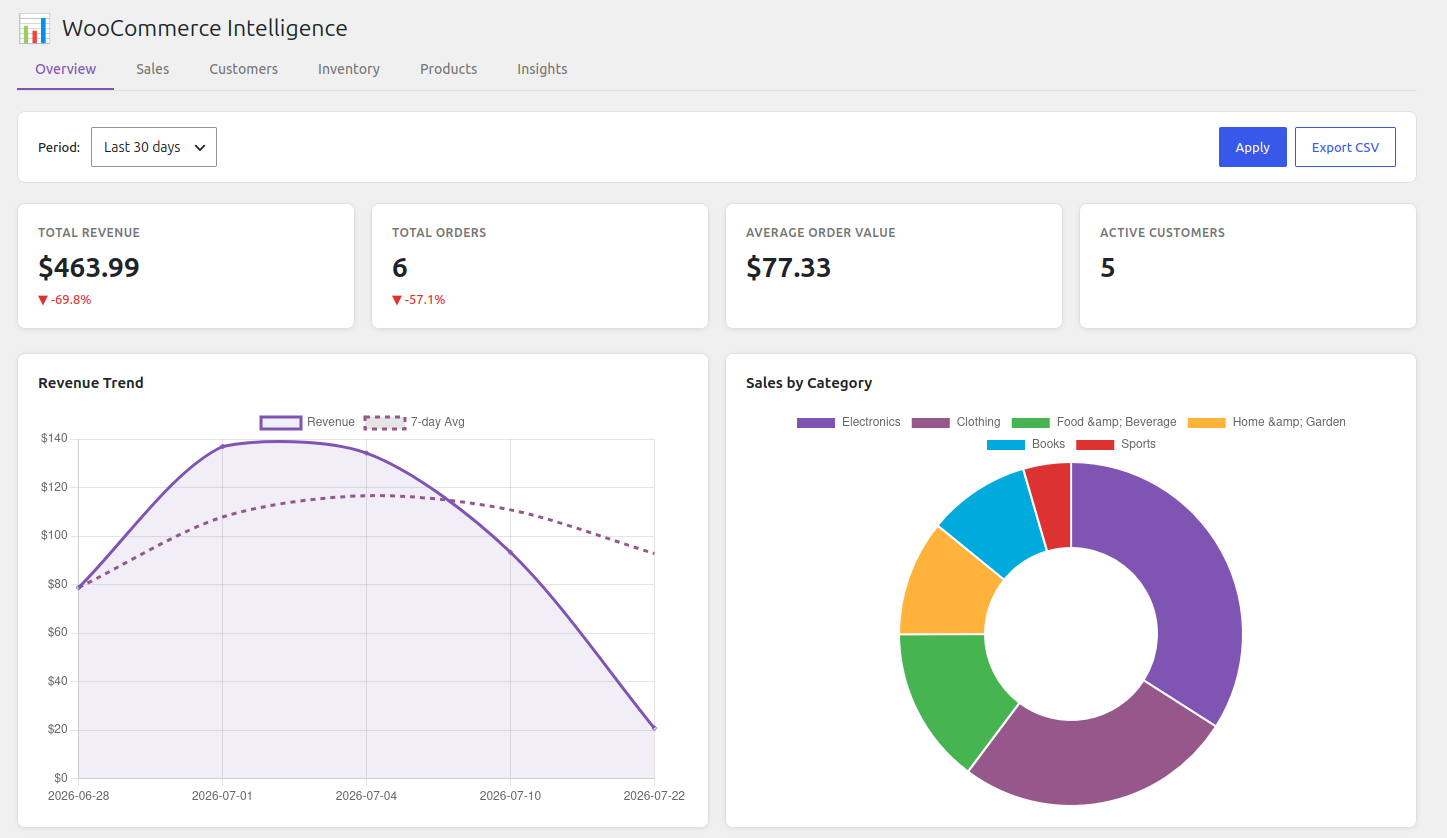
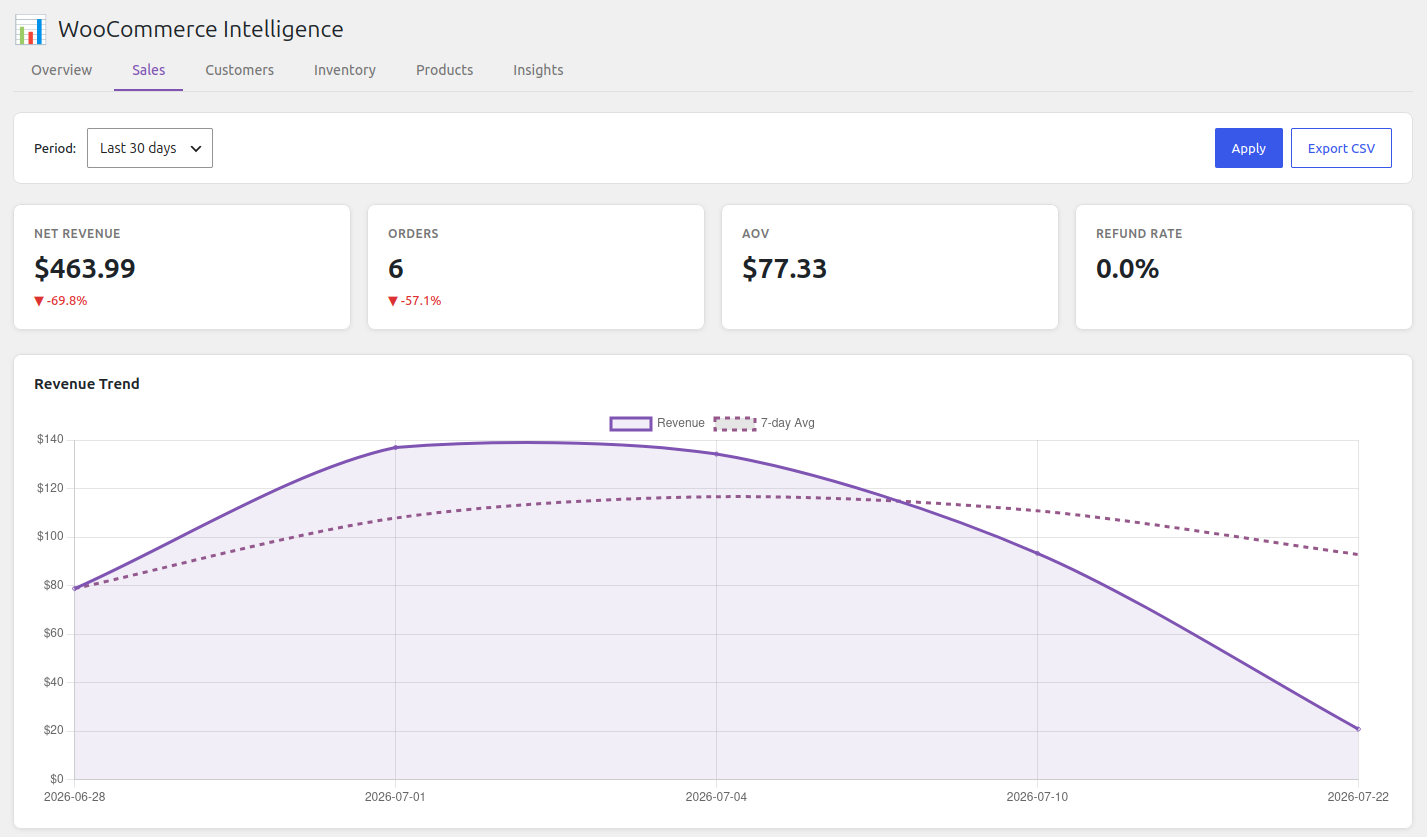
- Total/net revenue, AOV, order count, growth rates
- 7-day moving average for trend smoothing
- Statistical anomaly detection (z-score based)
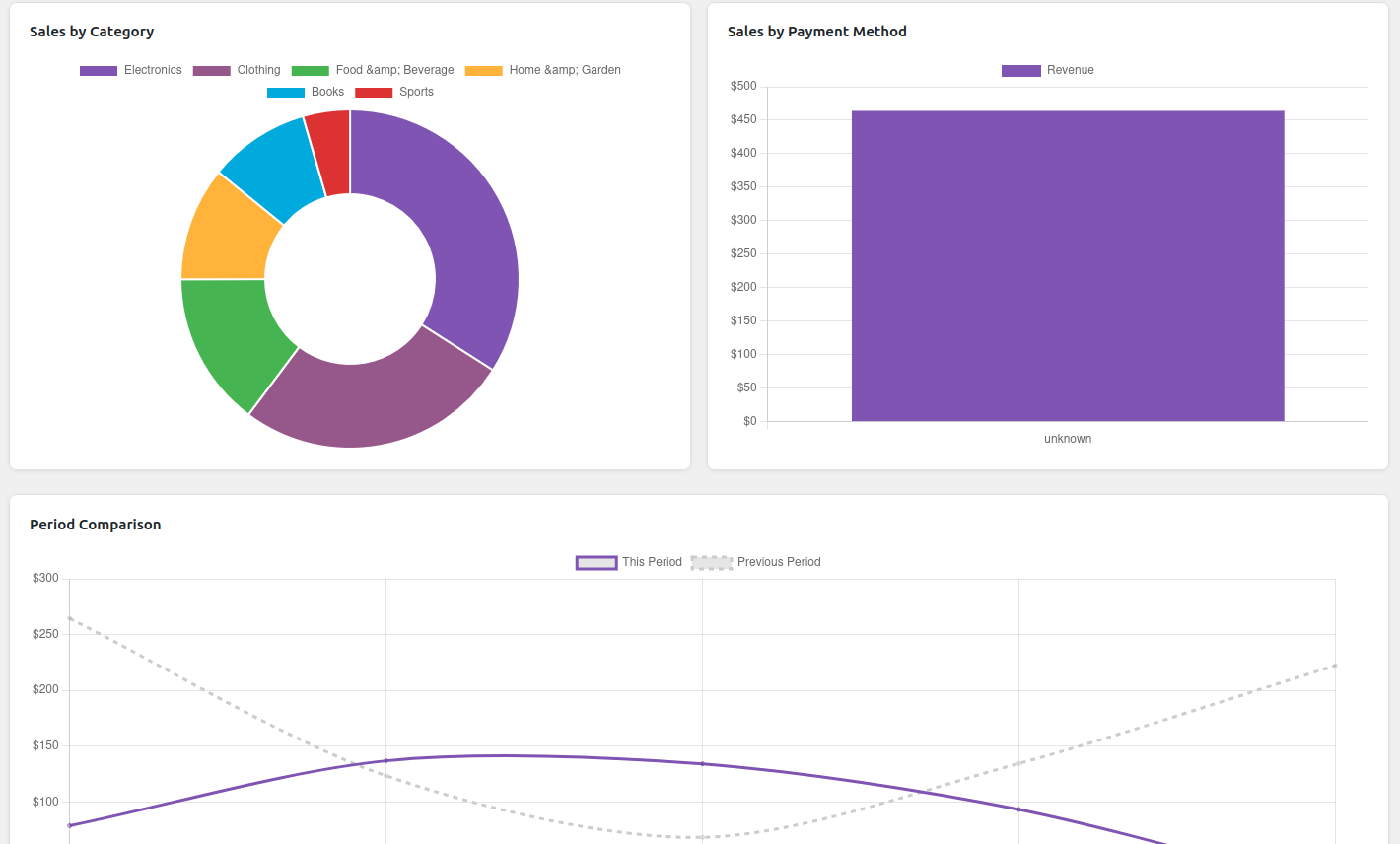
- Period-over-period comparison
- Revenue breakdown by category and payment method
Customer Intelligence
- RFM Segmentation — 8 segments: Champions, Loyal, Promising, New, At Risk, Need Attention, Hibernating, Lost
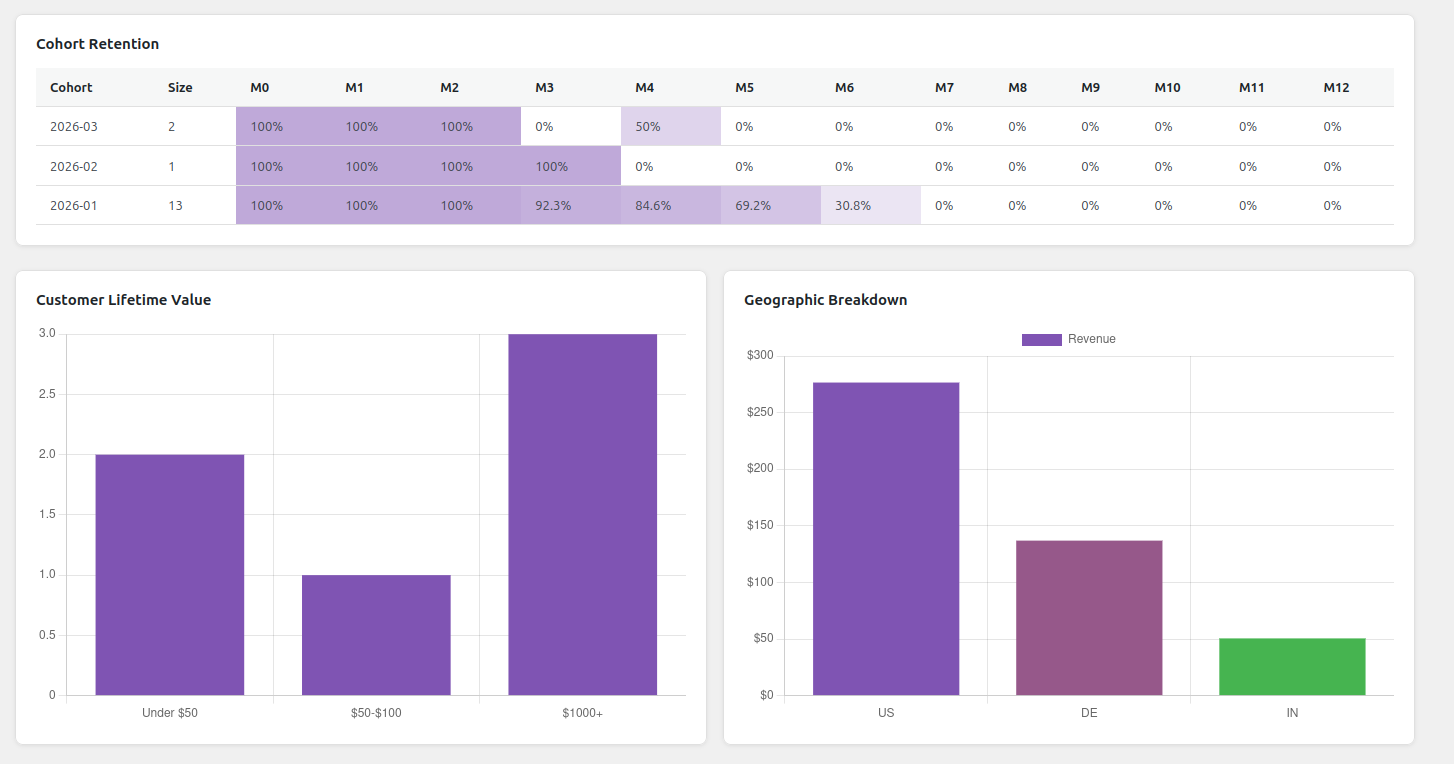
- Lifetime Value — Distribution analysis with bucketed ranges
- Cohort Retention — Month-by-month retention matrix
- Geographic Breakdown — Revenue by country
Inventory Management
- Stock status overview (in stock / low / out of stock)
- Reorder Alerts — Days of supply calculation with severity scoring
- Dead Stock Detection — Products with zero sales in 60+ days
- Sales Velocity — Trend detection (accelerating / steady / decelerating)
- ABC Classification — A (top 80%), B (next 15%), C (bottom 5%)
Product Performance
- Top/bottom products by revenue, units, or orders
- Profit Margin Analysis — Cost data from
_wii_costor_wc_cog_costmeta - Cross-Sell Analysis — Frequently bought together pairs
- Category performance breakdown
Business Rules Engine (10 Automated Insights)
| Rule | What It Detects | Severity |
|---|---|---|
| Revenue Concentration | Top 3 products >50% revenue | Warning/Critical |
| Discount Dependency | Product >40% coupon usage | Warning |
| Dead Stock | 0 sales in 60+ days | Warning/Critical |
| Low Stock | Days of supply < threshold | Critical |
| Refund Spike | Rate doubled vs previous period | Warning |
| Geographic Concentration | Single region >60% revenue | Warning |
| Growth Deceleration | 3 consecutive months declining | Warning |
| New Customer Decline | 3 months of declining acquisition | Warning |
| Payment Gap | <50% completion rate | Info |
| Seasonal Trend | High-variability demand patterns | Info |
Interactive Dashboard
- 6-tab interface: Overview, Sales, Customers, Inventory, Products, Insights
- KPI cards with trend indicators
- Chart.js 4.x visualizations (line, bar, doughnut, heatmap)
- Date range filtering (preset + custom)
- CSV export for all reports
- Responsive design
Screenshots
| Dashboard | Sales Insights |
|---|---|
 |
 |
| Sales Insights (Category) | Customer Insights |
|---|---|
 |
 |
| Customers | Products |
|---|---|
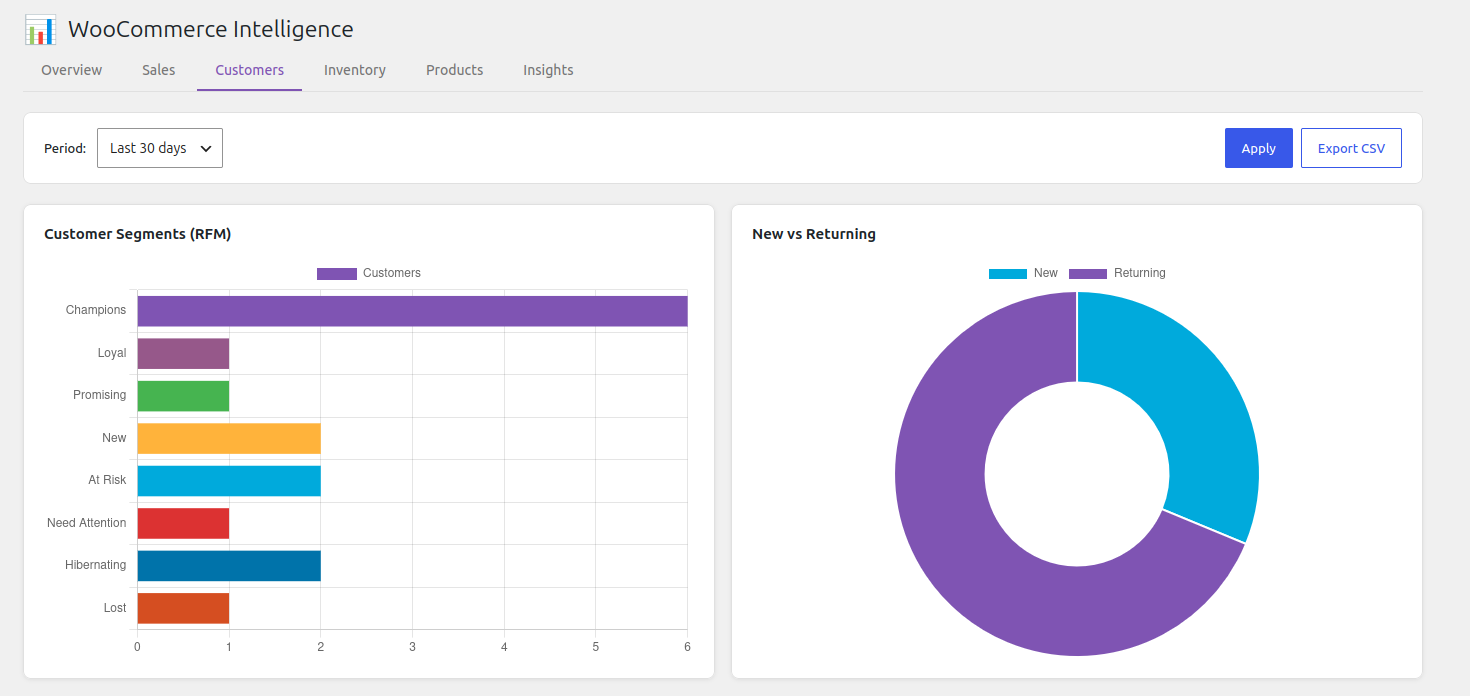 |
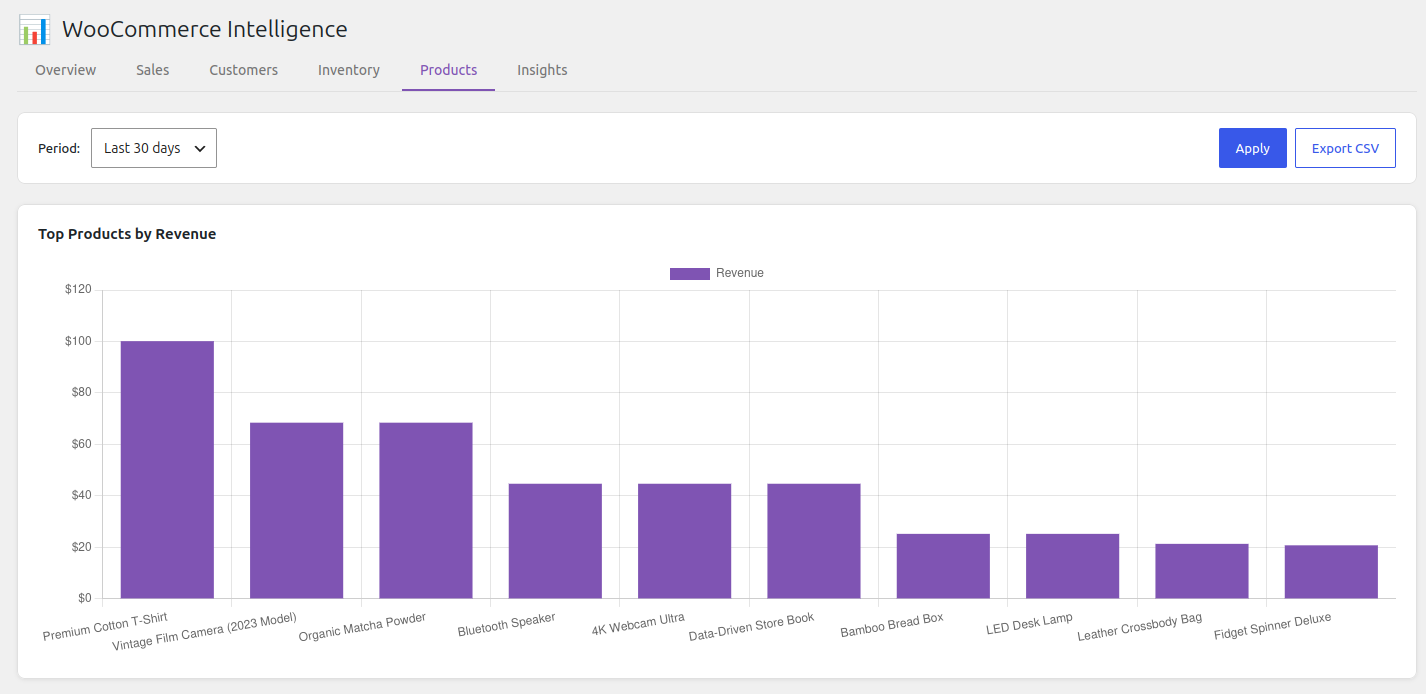 |
| Inventory Dashboard | Stock Distribution |
|---|---|
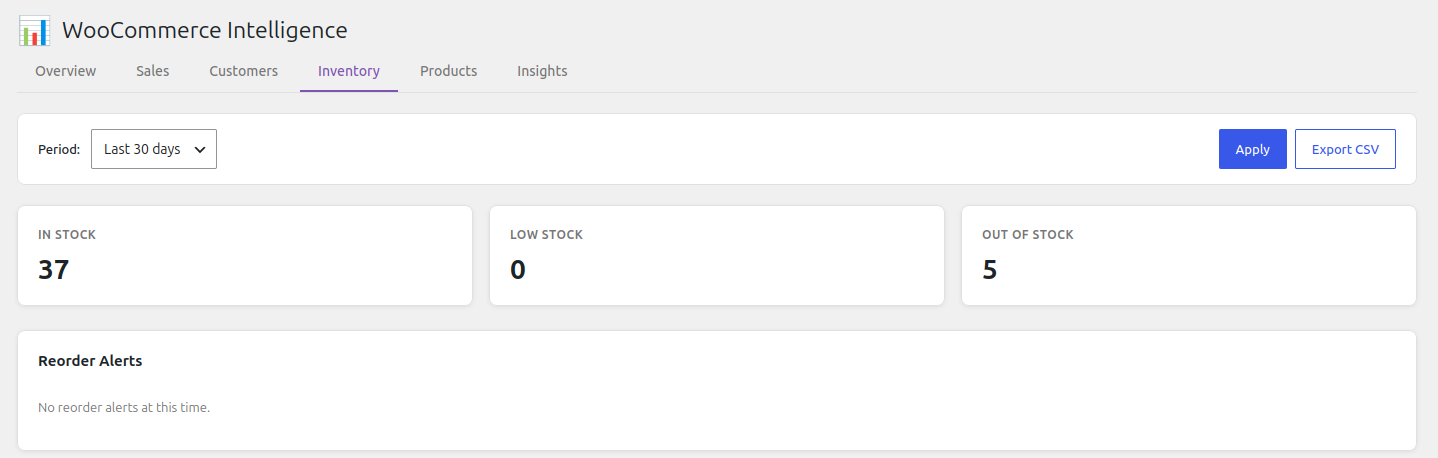 |
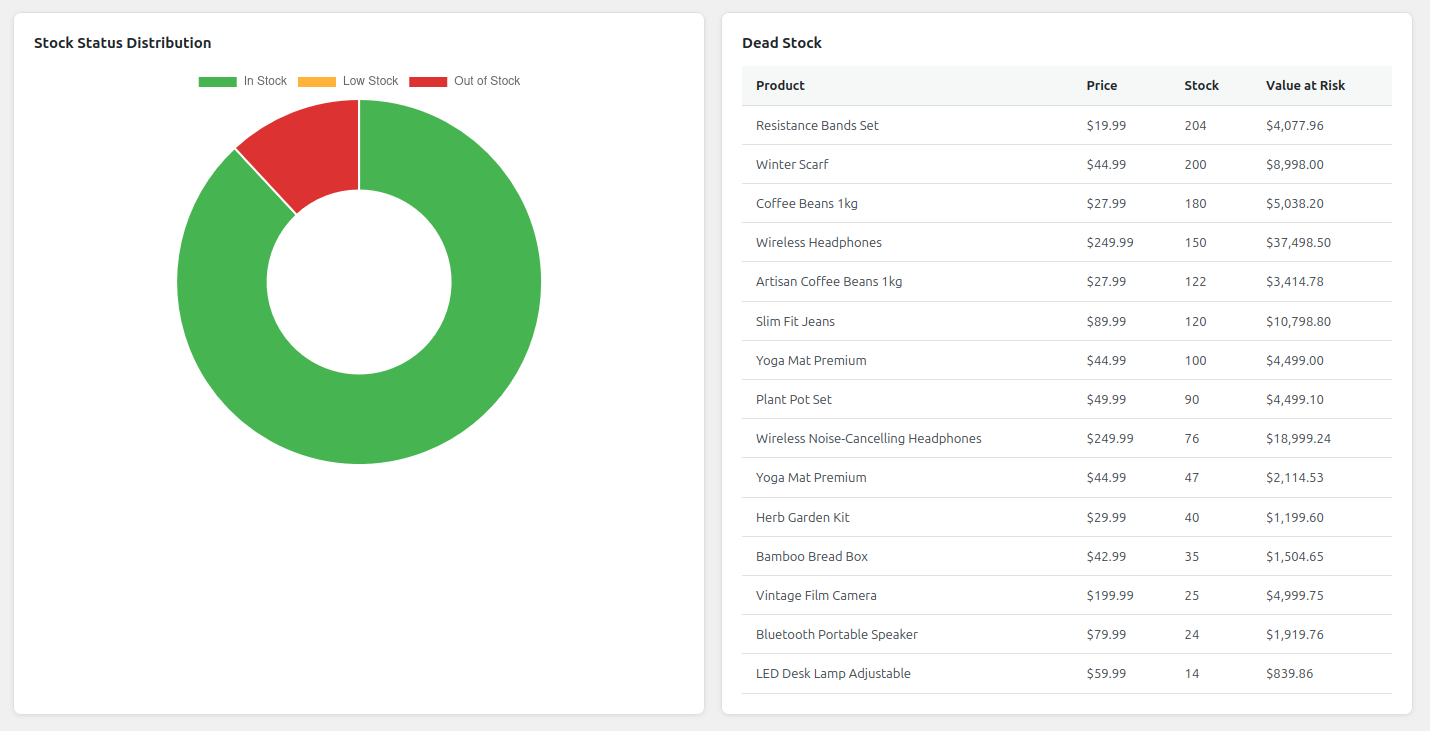 |
| Dashboard Top Product | ABC Classification |
|---|---|
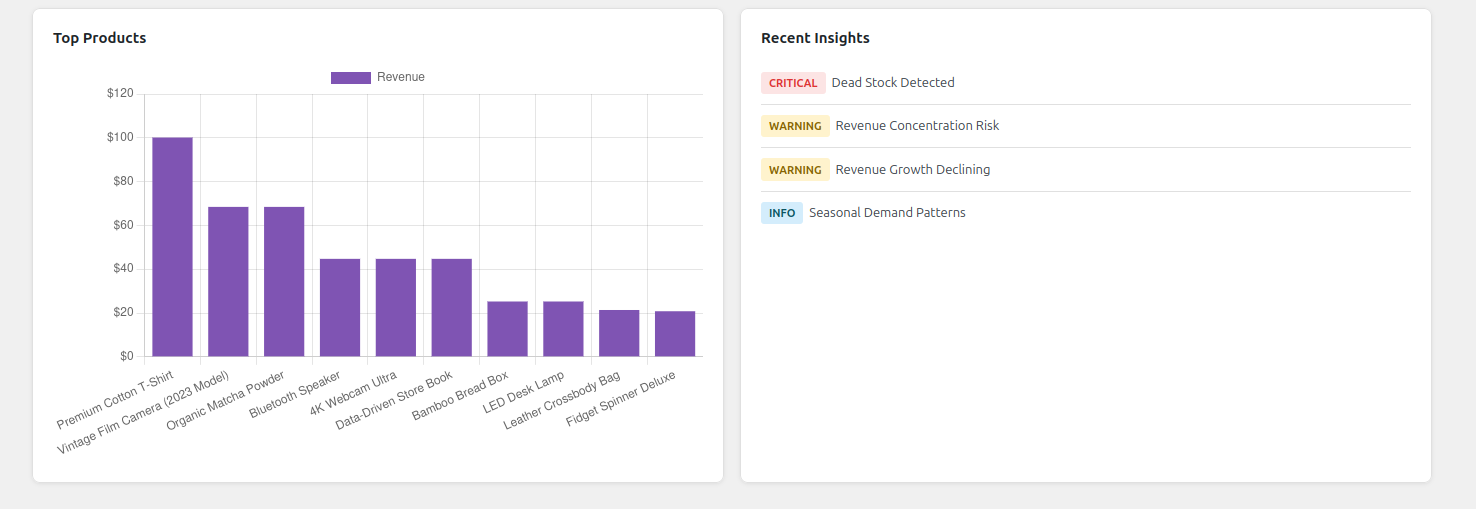 |
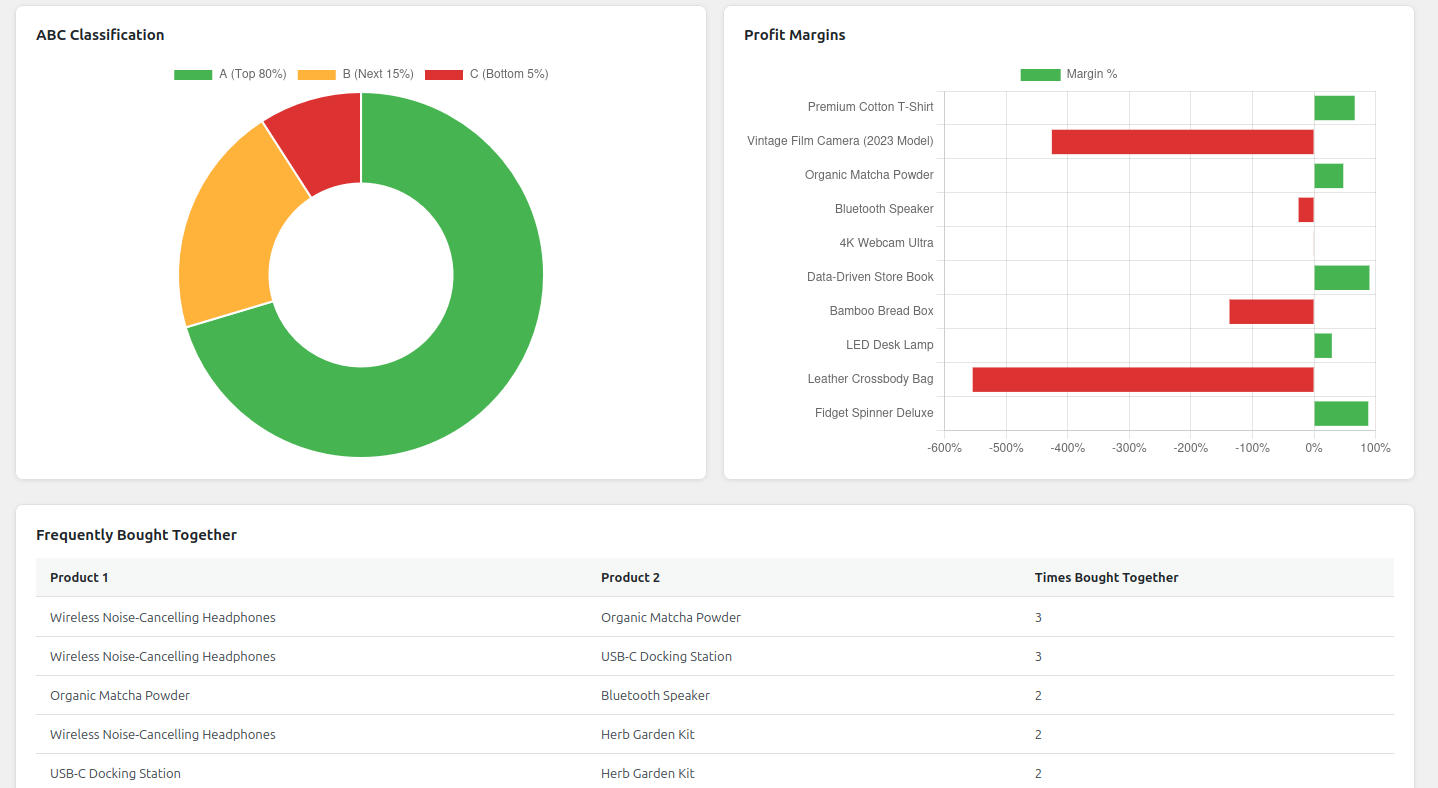 |
| Insights |
|---|
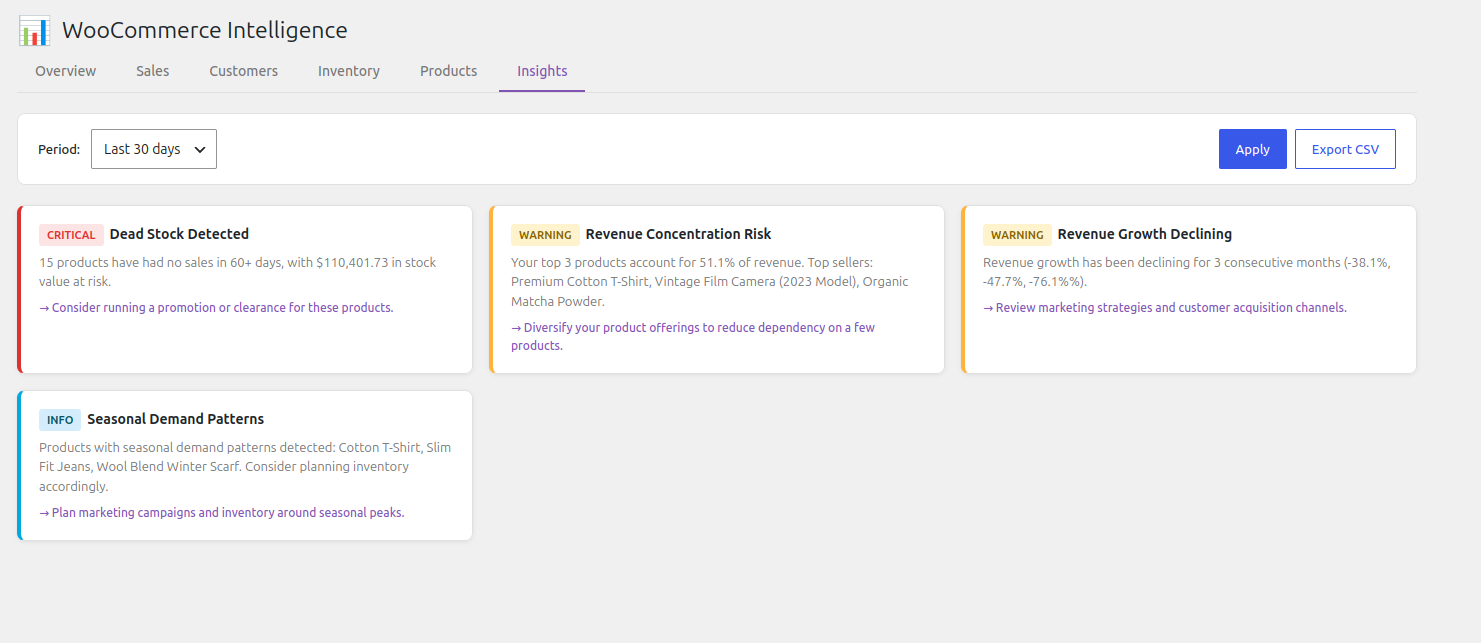 |
Architecture
┌─────────────────────────────────────────────────────────┐
│                    WordPress Admin                      │
│  ┌───────────────────────────────────────────────────┐  │
│  │           Intelligence for WooCommerce            │  │
│  │  ┌─────────────┐  ┌──────────────┐  ┌──────────┐  │  │
│  │  │   Admin UI   │ │  REST API    │  │  Cache   │  │  │
│  │  │  (PHP + JS)  │ │  (17 routes) │  │(Transient)  │  │
│  │  └──────┬──────┘  └──────┬───────┘  └────┬─────┘  │  │
│  │         │                │               │        │  │
│  │  ┌──────▼────────────────▼───────────────▼─────┐  │  │
│  │  │           Analytics Engine (PHP 8.0+)          │  │
│  │  │  Sales │ Customer │ Inventory │ Product │ Rules│  │
│  │  └──────────────────┬───────────────────────────┘ │  │
│  │                     │                             │  │
│  │  ┌──────────────────▼───────────────────────────┐ │  │
│  │  │         WooCommerce Database Tables          │ │  │
│  │  │  wc_order_stats | wc_order_product_lookup    │ │  │
│  │  │  wc_customer_lookup | wc_order_coupon_lookup │ │  │
│  │  └──────────────────────────────────────────────┘ │  │
│  └───────────────────────────────────────────────────┘  │
└─────────────────────────────────────────────────────────┘
File Structure
intelligence-for-woocommerce/
├── intelligence-for-woocommerce.php  # Bootstrap (40 lines)
├── readme.txt                        # WordPress.org readme
├── readme.md                         # This file
├── uninstall.php                     # Clean uninstall
├── LICENSE                           # GPL-2.0-or-later
├── includes/
│   ├── class-intelligence-for-woocommerce.php  # Main singleton (87 lines)
│   ├── class-loader.php              # Hook registration (54 lines)
│   ├── class-activator.php           # Activation (51 lines)
│   ├── class-deactivator.php         # Deactivation (23 lines)
│   ├── analytics/
│   │   ├── class-sales-analytics.php       # Revenue, trends (305 lines)
│   │   ├── class-customer-analytics.php    # RFM, LTV, cohorts (403 lines)
│   │   ├── class-inventory-analytics.php   # Stock, reorder (316 lines)
│   │   ├── class-product-analytics.php     # Performance, margins (272 lines)
│   │   └── class-business-rules.php        # 10 insight rules (593 lines)
│   ├── admin/
│   │   ├── class-admin-page.php      # Menu, assets (97 lines)
│   │   ├── class-dashboard.php       # Tab routing (92 lines)
│   │   ├── class-settings.php        # Options (58 lines)
│   │   └── class-reports.php         # CSV export (75 lines)
│   ├── api/
│   │   └── class-rest-api.php        # 17 endpoints (239 lines)
│   └── utils/
│       ├── class-helpers.php         # Utilities (128 lines)
│       └── class-cache.php           # Transient cache (83 lines)
├── assets/
│   ├── css/
│   │   ├── admin.css                 # Dashboard styles (378 lines)
│   │   └── chart-overrides.css       # Chart theme (19 lines)
│   └── js/
│       ├── vendor/chart.min.js       # Chart.js 4.4.7 (bundled)
│       ├── utils.js                  # Formatting, API (146 lines)
│       ├── filters.js                # Date controls (71 lines)
│       ├── dashboard.js              # Main controller (292 lines)
│       └── charts/
│           ├── sales-chart.js        # Revenue, category (209 lines)
│           ├── customer-chart.js     # Segments, LTV (191 lines)
│           ├── inventory-chart.js    # Stock status (105 lines)
│           └── product-chart.js      # Performance, ABC (180 lines)
├── templates/admin/
│   ├── dashboard.php                 # Dashboard template (260 lines)
│   └── report-single.php             # Single report (36 lines)
├── php-config/
│   └── upload-limit.ini
├── wp-content/
│   └── (mounted)
Total: ~4,500 lines PHP + ~1,500 lines JS + ~500 lines CSS = ~6,500 lines
REST API
Namespace: intelligence-for-woocommerce/v1
Authentication: WordPress cookie (admin session)
Permission: manage_woocommerce capability required
Endpoints
| Endpoint | Method | Description |
|---|---|---|
/sales-summary |
GET | Revenue, orders, AOV, growth metrics |
/sales-trend |
GET | Daily revenue/orders with moving average |
/sales-comparison |
GET | Current vs previous period |
/sales-by-category |
GET | Revenue by product category |
/sales-by-payment |
GET | Revenue by payment method |
/customer-segments |
GET | RFM segment distribution |
/customer-ltv |
GET | Lifetime value analysis |
/customer-cohort |
GET | Cohort retention matrix |
/customer-geography |
GET | Revenue by country |
/inventory-status |
GET | Stock status counts |
/inventory-reorder |
GET | Reorder alerts |
/inventory-dead-stock |
GET | Dead stock products |
/inventory-velocity |
GET | Sales velocity per product |
/product-performance |
GET | Product rankings |
/product-cross-sell |
GET | Frequently bought together |
/product-margins |
GET | Profit margins |
/business-insights |
GET | Automated insights |
/export/{report} |
GET | CSV download |
Query Parameters
All endpoints accept:
date_from— Start date (YYYY-MM-DD)date_to— End date (YYYY-MM-DD)period— Preset:today,7d,30d,90d,this_month,last_month,this_year
Example Response
{
  "total_orders": 342,
  "total_revenue": 45230.5,
  "net_revenue": 43890.25,
  "avg_order_value": 132.25,
  "total_refunds": 1340.25,
  "refund_rate": 2.96,
  "unique_customers": 89,
  "revenue_change": 12.3,
  "orders_change": 8.1
}
Installation
- Upload the
intelligence-for-woocommercefolder to/wp-content/plugins/ - Activate the plugin through the Plugins menu
- Navigate to WooCommerce > Intelligence in your admin menu
- The dashboard will display data once orders exist
Requirements
- PHP 8.0+
- WordPress 6.0+
- WooCommerce 8.0+
Configuration
Settings (via WooCommerce > Intelligence > Settings)
| Option | Default | Description |
|---|---|---|
wii_cache_ttl |
3600 | Cache lifetime in seconds |
wii_low_stock_days |
14 | Days of supply threshold for reorder alerts |
wii_dead_stock_days |
60 | Days without sales to flag as dead stock |
wii_anomaly_threshold |
2.0 | Z-score threshold for anomaly detection |
wii_show_tabs |
All 6 | Which dashboard tabs to display |
Design Principles
- Zero External HTTP Calls — No
wp_remote_get(), no cURL to external servers. Every computation happens in PHP on your server. - No Custom Database Tables — Uses WooCommerce's existing analytics tables. No migration risk, no schema maintenance.
- WordPress.org Compliant — Meets all 18 plugin guidelines. Ready for directory submission.
- No Build Step — Vanilla JavaScript + bundled Chart.js. No npm, no webpack.
- Clean Uninstall — Activating, deactivating, and uninstalling leaves no orphaned data.
Caching
- All analytics cached in WordPress transients
- Configurable TTL (default: 1 hour)
- Cache warming via Action Scheduler (hourly)
- Auto-invalidation on order status changes and product updates
- Manual refresh available via dashboard
Performance
| Operation | Without Cache | With Cache |
|---|---|---|
| Sales summary | ~200ms | <5ms |
| RFM segmentation (1000 customers) | ~800ms | <5ms |
| Cohort analysis | ~1.2s | <5ms |
| Cross-sell analysis (5000 orders) | ~3s | <5ms |
Security
- All inputs sanitized (
sanitize_text_field,absint,floatval) - All outputs escaped (
esc_html,esc_attr,esc_url) - Nonce verification on all form submissions
- Capability checks (
manage_woocommerce) on all endpoints $wpdb->prepare()on all database queries- Direct file access prevention (
ABSPATHcheck)
HPOS Compatibility
Fully compatible with WooCommerce High-Performance Order Storage. Uses the WooCommerce CRUD API and analytics lookup tables that work with both legacy and HPOS modes.
Uninstalling
Deactivating the plugin:
- Clears all scheduled Action Scheduler events
- Invalidates all transients
Uninstalling the plugin:
- Deletes all
wii_options - Deletes all
wii_transients and their timeouts - No database tables to clean (none were created)
Extensibility
Add Custom REST Endpoints
add_action('rest_api_init', function() {
    register_rest_route('intelligence-for-woocommerce/v1', '/custom-metric', [
        'methods' => 'GET',
        'callback' => 'my_custom_metric',
        'permission_callback' => function() {
            return current_user_can('manage_woocommerce');
        },
    ]);
});
Add Custom Business Rules
add_filter('wii_business_rules', function($rules) {
    $rules[] = new My_Custom_Rule();
    return $rules;
});
Invalidate Cache on External Events
add_action('my_plugin_data_change', function() {
    WII_Cache::invalidate_by_prefix('my_prefix');
});
Changelog
1.0.0
- Initial release
- Sales analytics with revenue tracking, trends, anomaly detection
- Customer analytics with RFM segmentation, LTV, cohort analysis
- Inventory analytics with reorder alerts, dead stock detection
- Product performance with margins and cross-sell analysis
- Business rules engine with 10 insight rules
- Interactive Chart.js dashboard
- CSV export
- Full WordPress.org compliance
License
GPL-2.0-or-later. See LICENSE for details.
Chart.js is MIT licensed (GPL-compatible).