Repair Tracking
Simple repair job tracker with public phone lookup and friendly admin UI.
by Shaheryar Ahmed · github.com/shaheryar-ahmed/repair-tracking-plugin
Install
No release zip yet. The repository archive installs, but the folder name will carry the branch suffix and updates will not flow:
wp plugin install https://github.com/shaheryar-ahmed/repair-tracking-plugin/archive/refs/heads/main.zip# Repair Tracking - WordPress Plugin
A lightweight WordPress plugin for mobile repair shops that lets customers check their repair status by phone number, and gives staff a simple back office to manage repair jobs.
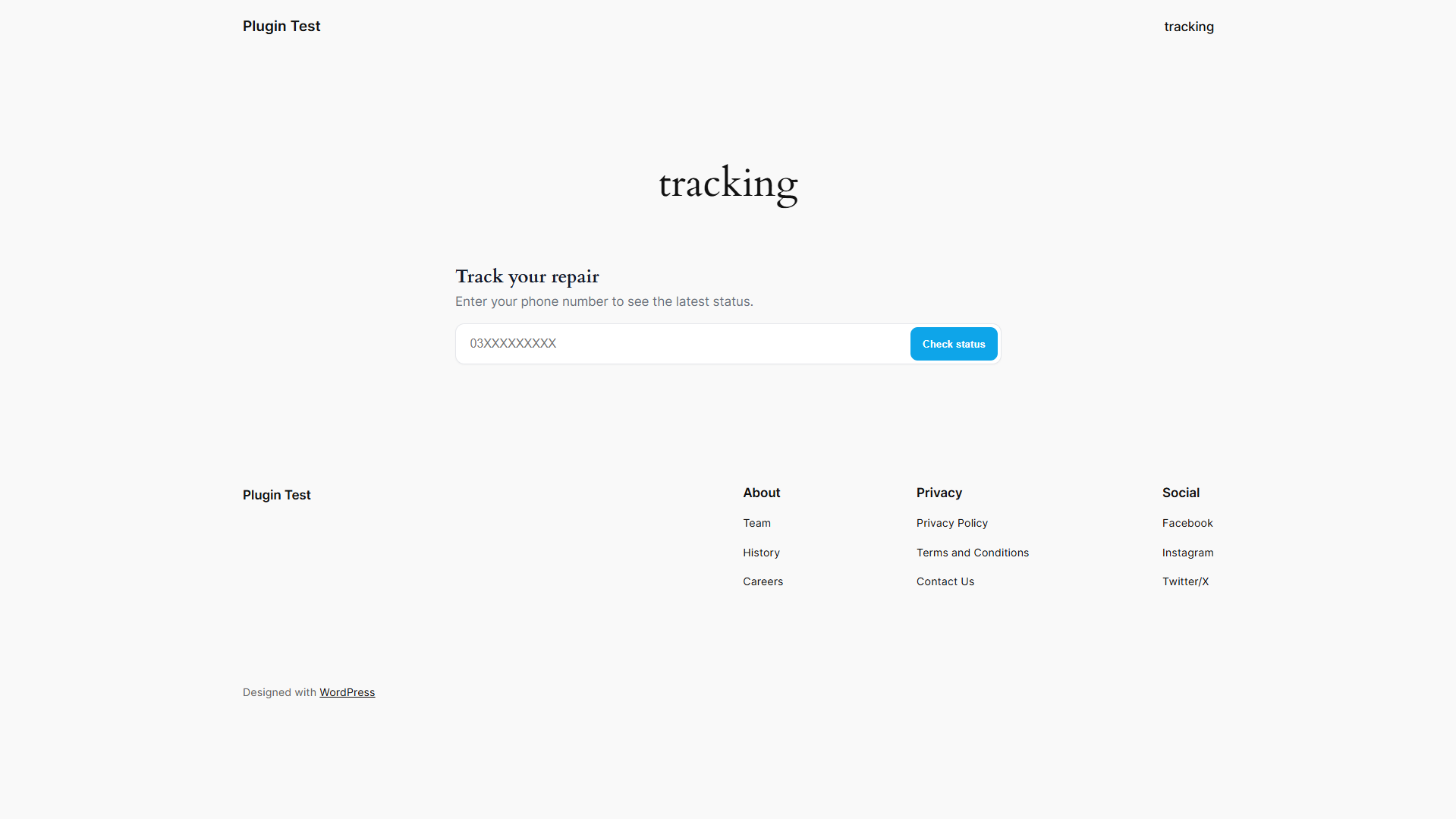
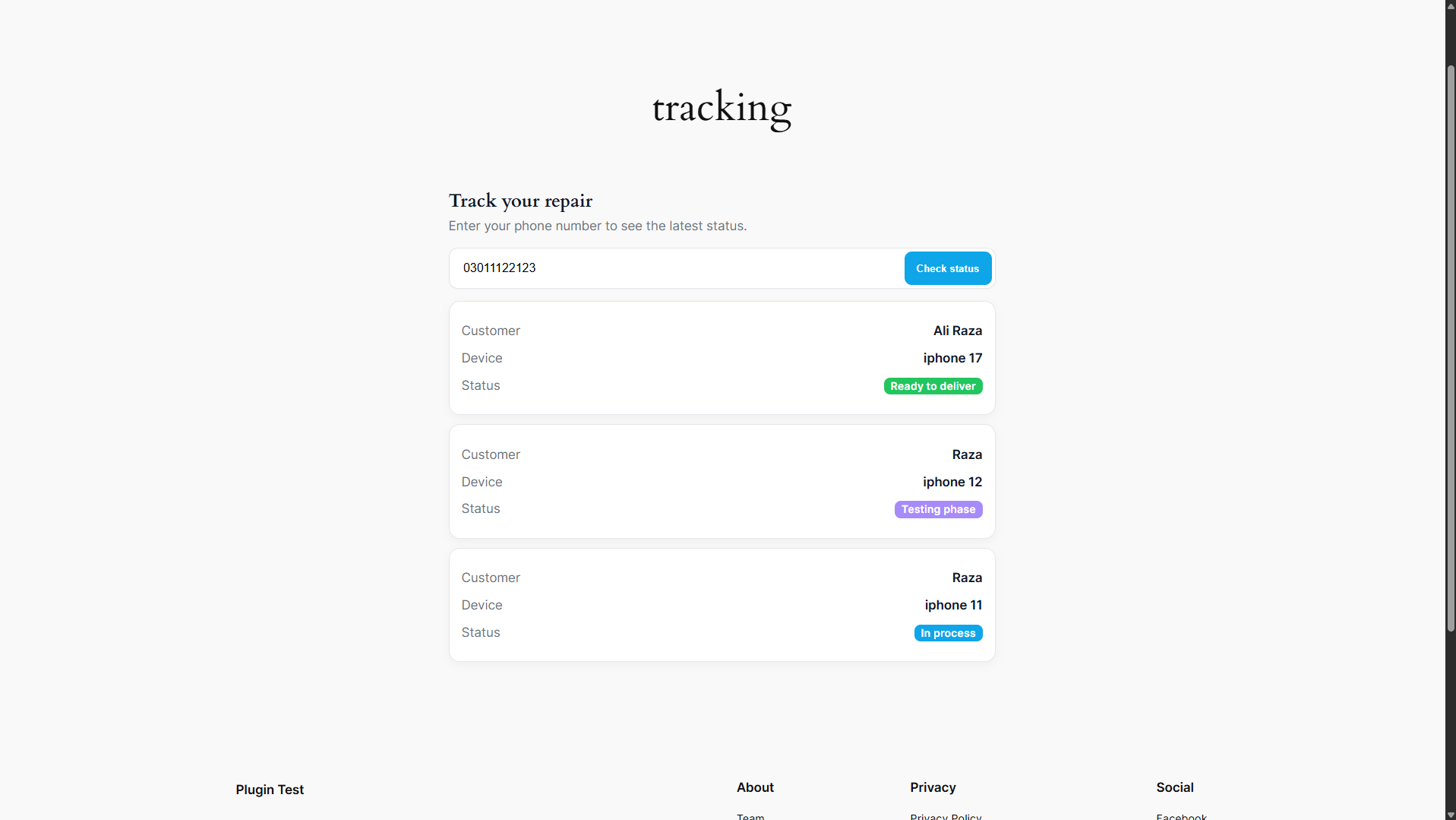
- Public tracking page with a clean form and status cards
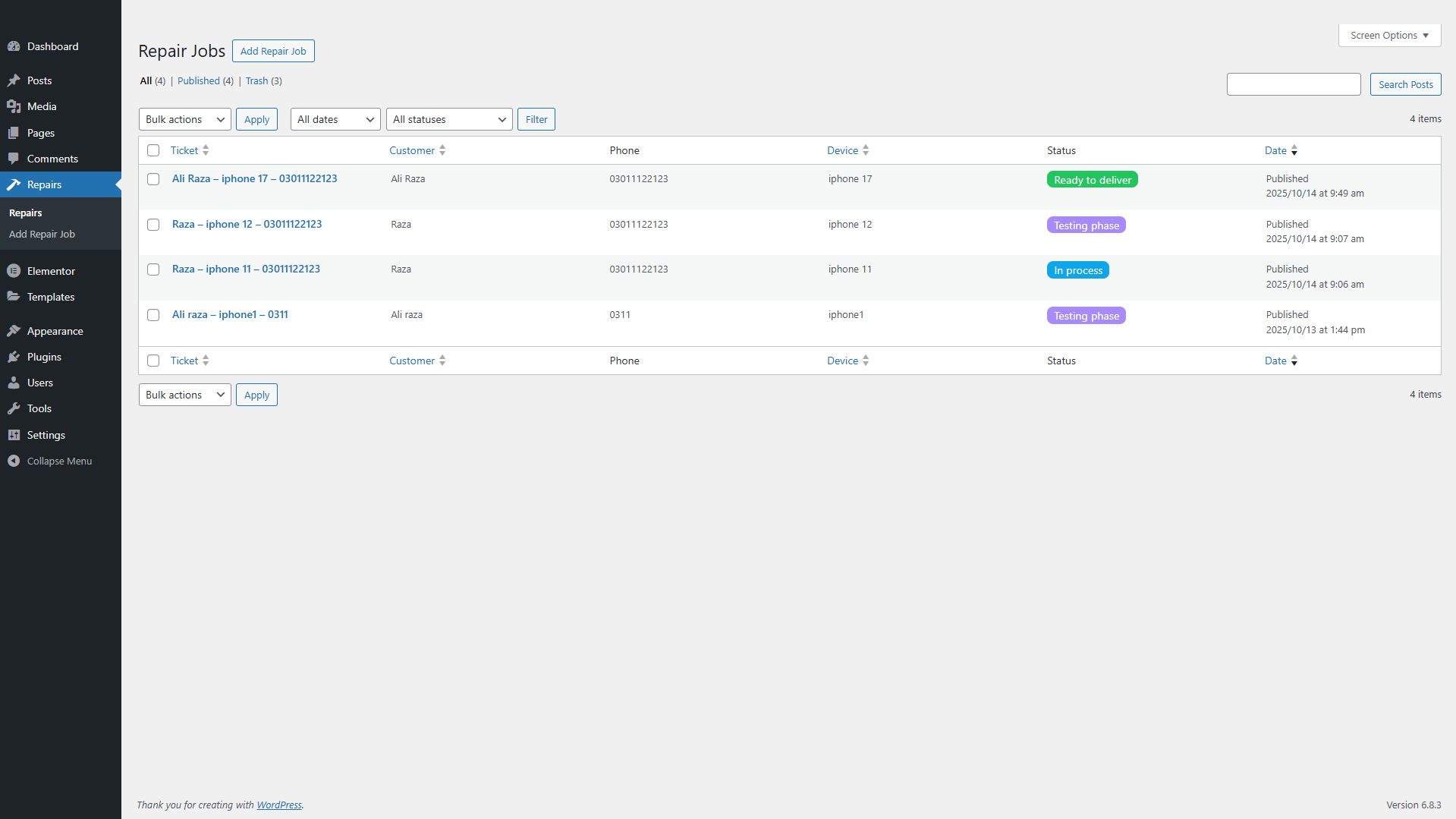
- Admin-friendly Repairs area with required fields and status badges
- Works with multiple devices per customer phone number
- Secure, minimal, and extendable
Features
- Repair jobs stored as a Custom Post Type:
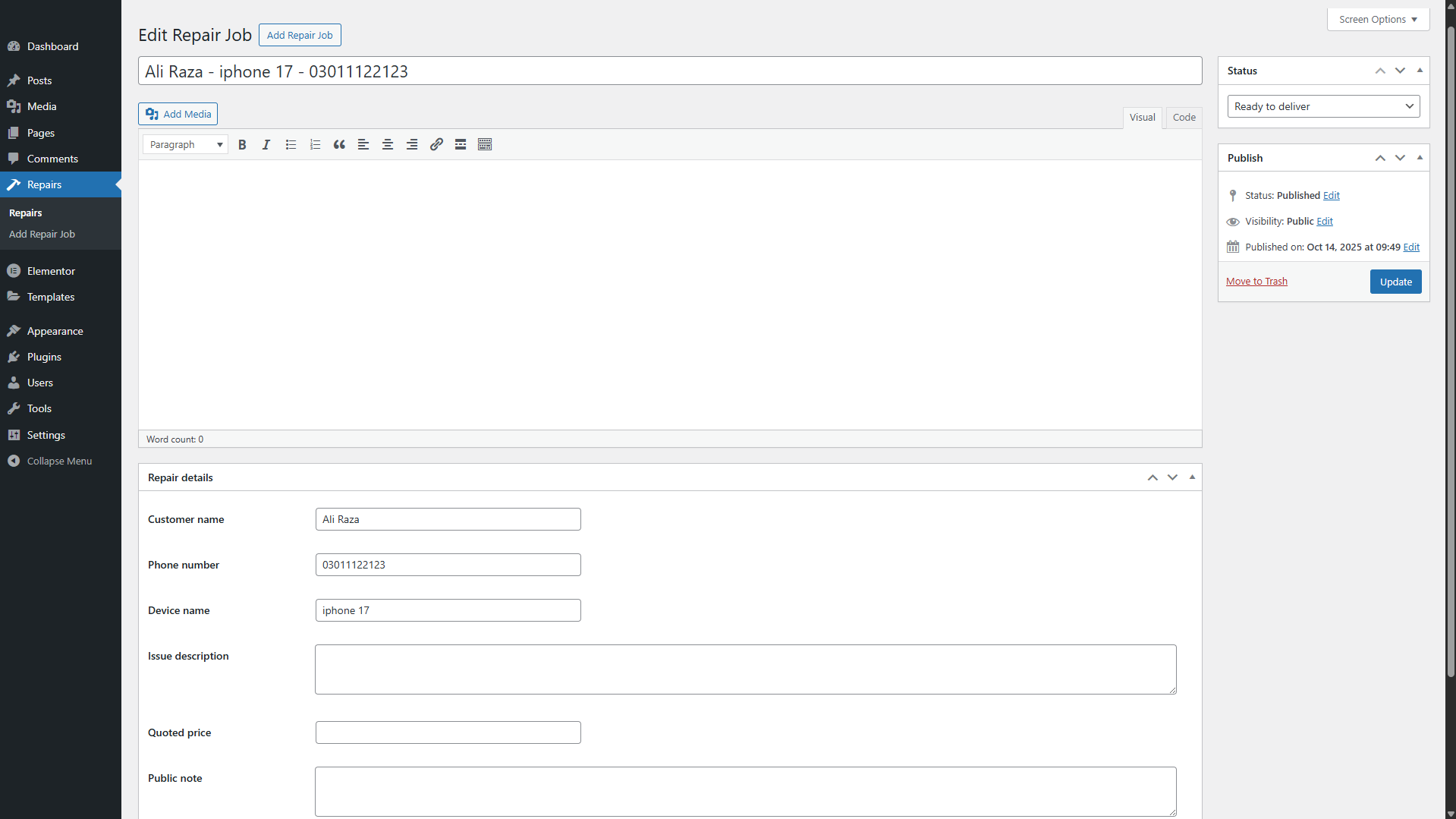
repair_job - Required fields in admin: Customer name, Phone number, Device name
- Status system with color labels:
- Received
- In process
- More details required
- Contact us
- Testing phase
- Ready to deliver
- Public shortcode
[repair_tracking]for the tracking page - REST endpoint for lookups:
GET /wp-json/rb/v1/track?phone=... - Multiple results: if a phone number has several devices, all matching repairs are shown as separate cards
- Service Agent role with limited capabilities
- Small, modern CSS and JS, easy to theme
Demo screenshots
wp-content/plugins/repair-tracking/
├─ repair-tracking.php
├─ readme.txt
├─ includes/
│  ├─ helpers.php
│  ├─ status.php
│  ├─ class-rb-cpt.php
│  ├─ class-rb-admin.php
│  ├─ class-rb-shortcode.php
│  └─ class-rb-rest.php
└─ assets/
   ├─ css/tracking.css
   └─ js/tracking.js
Installation
-
Download or clone this repository
git clone https://github.com/shaheryar-ahmed/repair-tracking-plugin -
Copy the
repair-trackingfolder into your WordPresswp-content/pluginsdirectory. -
In WordPress admin go to Plugins and activate Repair Tracking.
-
Create a page named Tracking and add the shortcode:
[repair_tracking] -
Go to Repairs in the admin menu and click Add New to create a test job.
Usage
Admin - create or update a repair
- Go to Repairs and click Add New
- Fill in:
- Customer name (required)
- Phone number (required) - use the customer’s number as provided
- Device name (required)
- Optional fields: Issue description, Quoted price, Public note, Internal note
- Pick a Status and Publish
The plugin normalizes phone numbers internally and matches the last 10 digits to handle different formats.
Frontend - customer tracking
- Place
[repair_tracking]on a page - Customers enter their phone number
- They see one card per matching device:
- Customer
- Device
- Status with colored badge
No ticket id, timestamps, or internal information are shown publicly.
Shortcode
[repair_tracking]Renders:
- Input box for phone number
- One or more result cards if matches are found
REST API
Lookup by phone:
GET /wp-json/rb/v1/track?phone=03XXXXXXXXXSuccessful response example:
{
  "ok": true,
  "count": 2,
  "results": [
    {
      "customer_name": "Raza",
      "device_name": "iPhone 12",
      "status": "testing",
      "status_label": "Testing phase",
      "status_color": "#a78bfa"
    },
    {
      "customer_name": "Raza",
      "device_name": "iPhone 11",
      "status": "testing",
      "status_label": "Testing phase",
      "status_color": "#a78bfa"
    }
  ]
}
Errors:
- 400 - invalid phone
- 404 - no repair found for this number
Settings link on Plugins page
On the Plugins screen, the Settings link opens the Repairs list:
/wp-admin/edit.php?post_type=repair_jobDevelopment
- PHP version: 7.4+
- WordPress version: 6.0+
- Enqueued assets:
- CSS:
assets/css/tracking.css - JS:
assets/js/tracking.js(uses jQuery, included by WordPress)
- CSS:
Main files:
repair-tracking.php- bootstrap and hooksincludes/class-rb-cpt.php- registers therepair_jobpost type and metaincludes/class-rb-admin.php- roles, caps, admin columns, required-field enforcementincludes/class-rb-shortcode.php- public shortcode markupincludes/class-rb-rest.php- REST endpoint for trackingincludes/status.php- status labels and colorsincludes/helpers.php- utilities like phone normalization
Customization tips
- Change status labels and colors in
includes/status.php - Adjust public card layout in
assets/css/tracking.css - Add phone input masking or brand colors in
assets/js/tracking.jsand CSS - Build notifications on status change by hooking into
save_post_repair_job
Roadmap
- Kanban board in admin for drag and drop between statuses
- Email or SMS notifications on status changes
- CSV export and simple reporting
- Optional custom database table for very large volumes
Contributing
Issues and pull requests are welcome. Please include reproduction steps and environment details.
License
GPL-2.0-or-later
Credits
Built by Shaheryar Ahmed for mobile repair workflows. Clean UI, minimal dependencies, extendable structure.