Install
This is the repository archive. It installs, but the folder name will carry the branch suffix and updates will not flow.
Install straight from GitHub with WP-CLI:
wp plugin install https://github.com/shahadul878/codereyes-imei-ledger/archive/refs/heads/master.zip
Codereyes IMEI Ledger for Mobile Shops
A buy and sell ledger for second-hand mobile phone shops. Every phone is tracked by its IMEI: who sold it to you, what you paid, who bought it and what you earned.
Install from WordPress.org · User Guide · Changelog · Report an issue
Why this plugin
Shops that trade used phones need to answer the same questions every day: Have we seen this phone before? Who brought it in? Is it still in stock? Did we make money on it? Paper registers and spreadsheets can't stop the same IMEI being entered twice or catch a mistyped digit. This plugin keeps the register inside WordPress and checks every entry.
Features
| Purchase records | IMEI 1 and 2, brand, model, storage, colour, condition and price, with the seller's name, mobile number, NID and address. |
| Sales and profit | Record the buyer and sale price; a live preview shows profit or loss as you type. |
| IMEI validation | The 15-digit Luhn check digit catches typing mistakes while you type. Bengali digits (০–৯) work everywhere. |
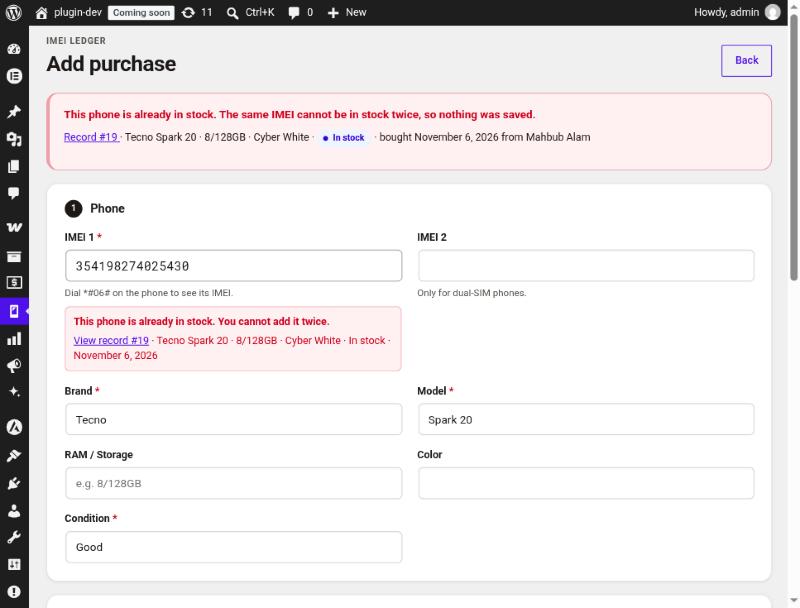
| Duplicate protection | A phone already in stock can't be added twice. A phone sold before shows the earlier record and needs confirmation before you buy it back. |
| Fast search | Find a phone by full or partial IMEI, name, mobile number, NID or model. |
| Reports | Stock, sales and profit for any date range, with quick ranges such as today, this month and last month. |
| Excel-safe CSV export | Bengali text survives, IMEIs stay as text, and spreadsheet formulas are neutralised. |
| Undo mistakes | Cancel a sale entered by mistake and the phone goes back into stock. |
| NEIR lookup | One click to check an IMEI on BTRC NEIR. |
No WooCommerce needed. The ledger is a standalone admin tool and adds nothing to the front end of your site.
Screenshots
 |
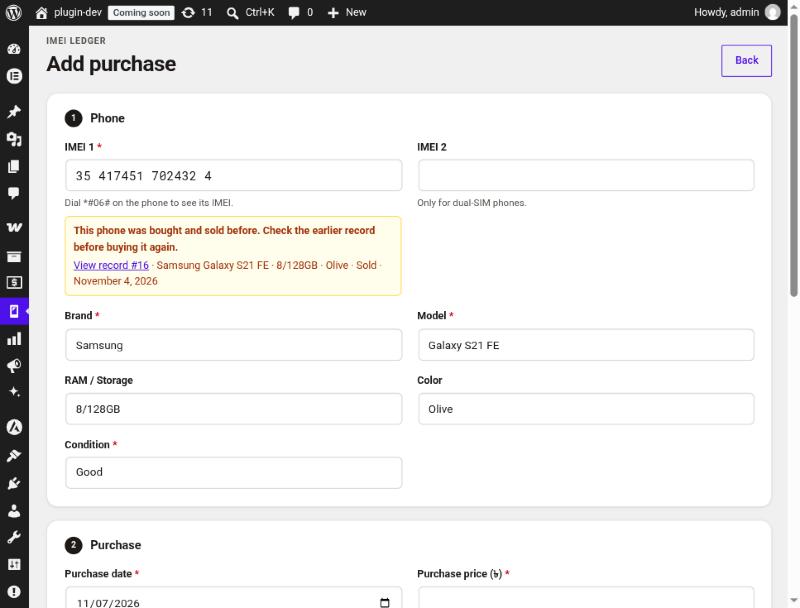 |
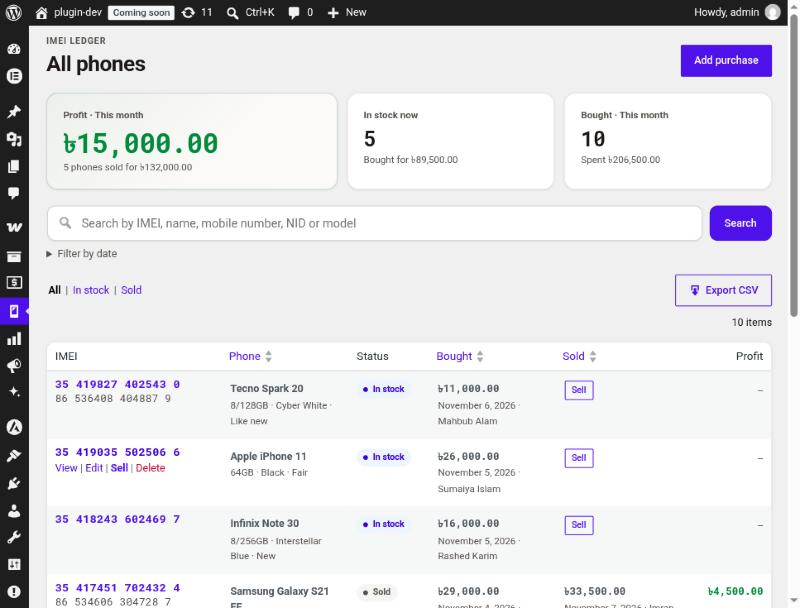
| All phones: monthly summary, search and the phone list. | Add purchase: the live IMEI check warns that this phone was traded before. |
 |
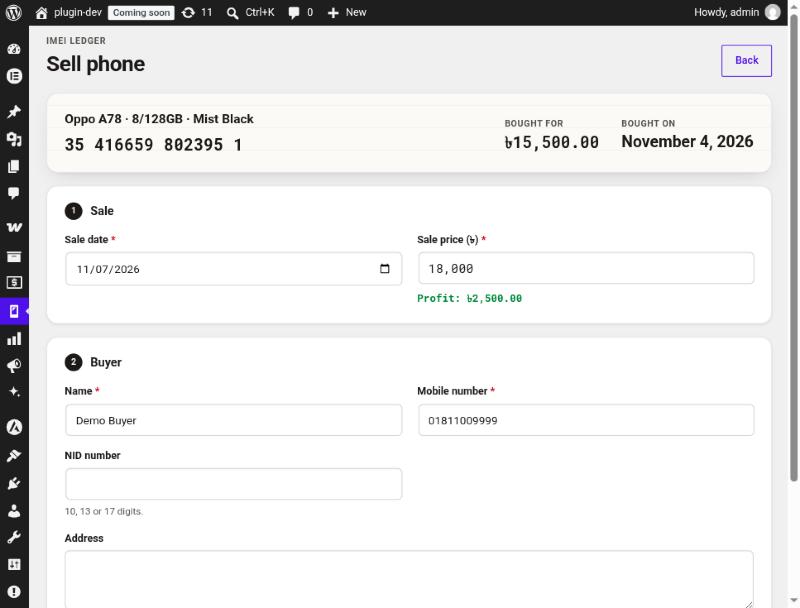 |
| Duplicate blocked: a phone in stock can't be added twice. | Sell phone: profit appears as you type the price. |
 |
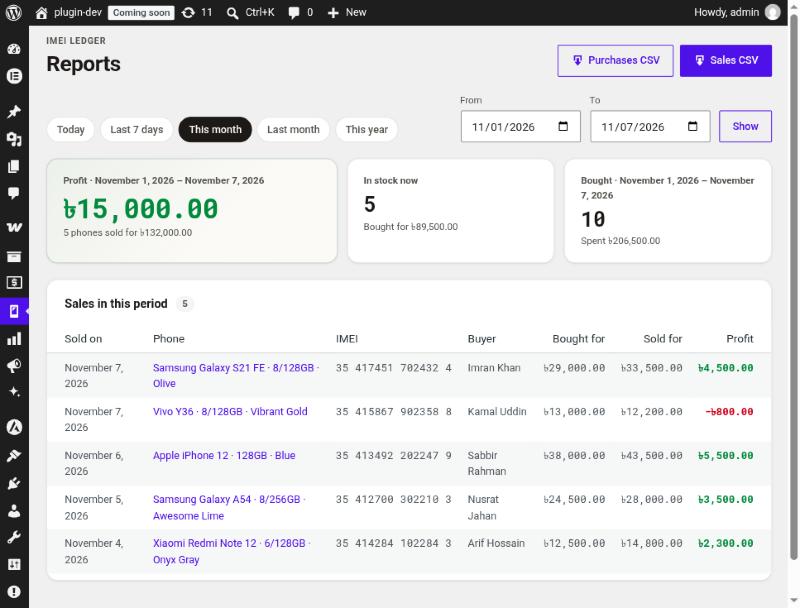 |
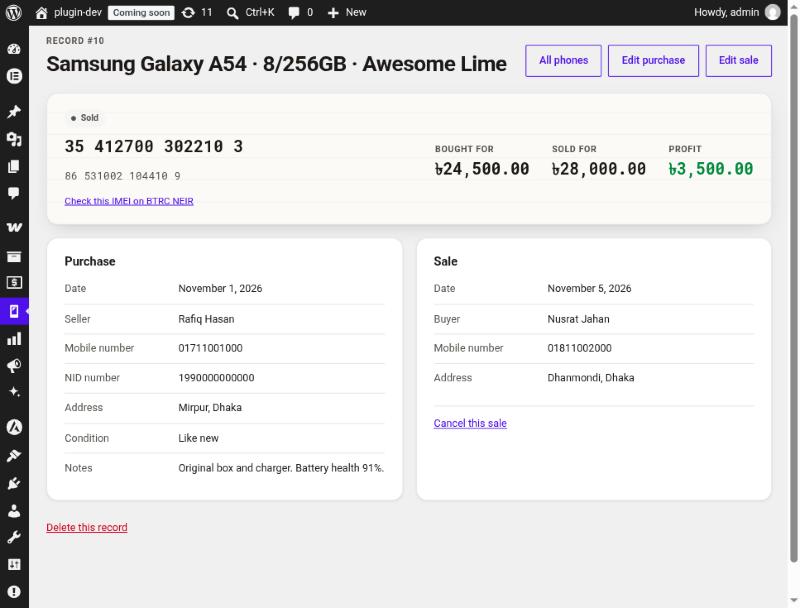
| Record: one phone's purchase, sale and profit. | Reports: any date range, with CSV downloads. |
Installation
From your dashboard (recommended): go to Plugins → Add New Plugin, search for IMEI Ledger, then install and activate Codereyes IMEI Ledger for Mobile Shops.
With WP-CLI:
wp plugin install codereyes-imei-ledger --activateManually: download the zip from WordPress.org or GitHub Releases, then upload it under Plugins → Add New Plugin → Upload Plugin.
Requirements: WordPress 6.4 or later, PHP 7.4 or later, MySQL or MariaDB.
Quick start
- Open IMEI Ledger → Add Purchase and record a phone. Dial
*#06#on the phone to see its IMEI. - When it sells, open it from IMEI Ledger → All Phones and choose Sell.
- Check IMEI Ledger → Reports for profit over any period.
The User Guide covers every screen in plain language for shop owners and staff.
Data and privacy
- All records, including seller and buyer NID numbers, stay in your own WordPress database. Nothing is sent to an outside service.
- Only users with the
manage_imei_ledgercapability can see the ledger. Administrators get it on activation, and so do Shop Managers when WooCommerce is installed. - Uninstalling keeps your records so a mistaken uninstall can't wipe your history. See Configuration to delete everything.
Configuration
| Setting | How |
|---|---|
Currency symbol (default ৳) |
add_filter( 'imei_ledger_currency_symbol', fn() => 'Tk ' ); |
| Delete all data on uninstall | define( 'IMEI_LEDGER_DELETE_DATA', true ); in wp-config.php, then uninstall |
| Give other roles access | Grant the manage_imei_ledger capability with any role editor plugin |
For developers
Architecture
Business rules live in small pure classes that run without WordPress or a database, so they are fully unit-tested. The repository is the only class that talks to $wpdb; admin classes only read requests and render views.
codereyes-imei-ledger.php           Bootstrap: constants, requires, hooks
uninstall.php                       Keeps data unless IMEI_LEDGER_DELETE_DATA is true
includes/
  class-imei-ledger-*.php           Pure rules: Digits, Imei, Money, Validator,
                                    Duplicates, Query, Csv, Status
  class-imei-ledger-installer.php   Table (dbDelta) and capability
  class-imei-ledger-repository.php  All $wpdb access
  admin/                            Menu, screens, admin-post handlers, AJAX, list table
views/                              Templates (all output escaped)
assets/                             admin.css, admin.js (no build step)
tests/unit/                         PHPUnit tests for the pure rules
docs/                               User guide, screenshots, brand sources
.github/workflows/                  WordPress.org deploy and asset sync
.wordpress-org/                     Icon, banner and screenshots (SVN assets/)
Technical notes:
- WordPress 6.4+ because the code uses
%iidentifiers in$wpdb->prepare()andwp_admin_notice(). - Duplicate checks run inside a MySQL
GET_LOCK(), so two staff saving the same IMEI at once can't both succeed. - Money is handled in integer cents and accepts lakh-style commas (
1,50,000).
Local development
composer installcomposer testCoding standards use the WordPress ruleset (PHPCS with WPCS installed globally):
phpcs --standard=WordPress --extensions=php --ignore=vendor/*,tests/* .Plugin Check, the same tool the WordPress.org review team uses:
wp plugin check codereyes-imei-ledger --exclude-directories=tests,vendor,docs --ignore-codes=hidden_files,application_detected,unexpected_markdown_fileReleasing
Releases deploy to WordPress.org automatically from GitHub Actions.
-
Bump the version in
codereyes-imei-ledger.php(theVersion:header andIMEI_LEDGER_VERSION) and inreadme.txt(Stable tag:), and add a== Changelog ==entry. -
If the table schema changed, also bump
Imei_Ledger_Installer::DB_VERSIONand update theCREATE TABLESQL.dbDeltaruns automatically when the stored version differs. -
Commit, tag and push:
git tag -a v1.0.2 -m "Codereyes IMEI Ledger 1.0.2"git push origin master v1.0.2
| Workflow | Runs when | What it does |
|---|---|---|
deploy.yml |
A v*.*.* tag is pushed, or run by hand with a version |
Checks the version matches the plugin header, IMEI_LEDGER_VERSION, Stable tag and changelog. Runs PHPUnit on PHP 7.4 and 8.3 and Plugin Check on the shipped files. Then commits to SVN trunk/ and tags/<version>/, syncs assets, and (for tags) attaches the zip to a GitHub release. |
update-assets.yml |
readme.txt or .wordpress-org/ changes on master |
Updates only the readme, icon, banner and screenshots on WordPress.org, without a release. |
The workflows need two repository secrets: SVN_USERNAME and SVN_PASSWORD. The password is the SVN password generated under Edit Profile → Account & Security on WordPress.org, not your login password.
To build a zip locally, run wp dist-archive wp-content/plugins/codereyes-imei-ledger. It honours .distignore, so tests, vendor, docs and Markdown files are left out.
Brand assets
The icon and banner are generated from sources in docs/brand/. Edit icon.svg or banner.html, then run docs/brand/render.sh. It uses headless Chrome with the Inter, JetBrains Mono and Noto Sans Bengali fonts to rewrite the PNGs and icon.svg in .wordpress-org/.
Security
- Every state-changing request checks the
manage_imei_ledgercapability and a nonce (per record for delete and cancel-sale). - All SQL goes through
$wpdb->prepare(). Column names and sort order come from whitelists inImei_Ledger_Query. - CSV cells starting with
= + - @are prefixed with'. Digit columns get a leading tab so spreadsheets keep them as text. - The list page posts its export filters, so searched names, phones and NIDs don't end up in URLs or server logs.
Found a security problem? Please don't post the details in a public issue. Open an issue asking for a private contact, and we'll follow up.
Contributing
Bug reports and pull requests are welcome. Please run composer test and PHPCS before opening a pull request, and add a unit test for any change to the rules in includes/.
License
GPL-2.0-or-later. Made by Codereyes.