WooCommerce Stock Inquiry
A lightweight WooCommerce plugin that automatically replaces the Add to Cart button with a customizable Send Inquiry button when product stock reaches a defined threshold. Supports Contact Page, WhatsApp, Elementor, and WooCommerce product layouts.
Install
This is the repository archive. It installs, but the folder name will carry the branch suffix and updates will not flow.
Install straight from GitHub with WP-CLI:
wp plugin install https://github.com/shafiq021/woocommerce-stock-inquiry/archive/refs/heads/main.zipWooCommerce Stock Inquiry
Quote requests, product inquiries and lead management for WooCommerce.
Free and open source. Version 3.0.0, "Inquiry Management System".
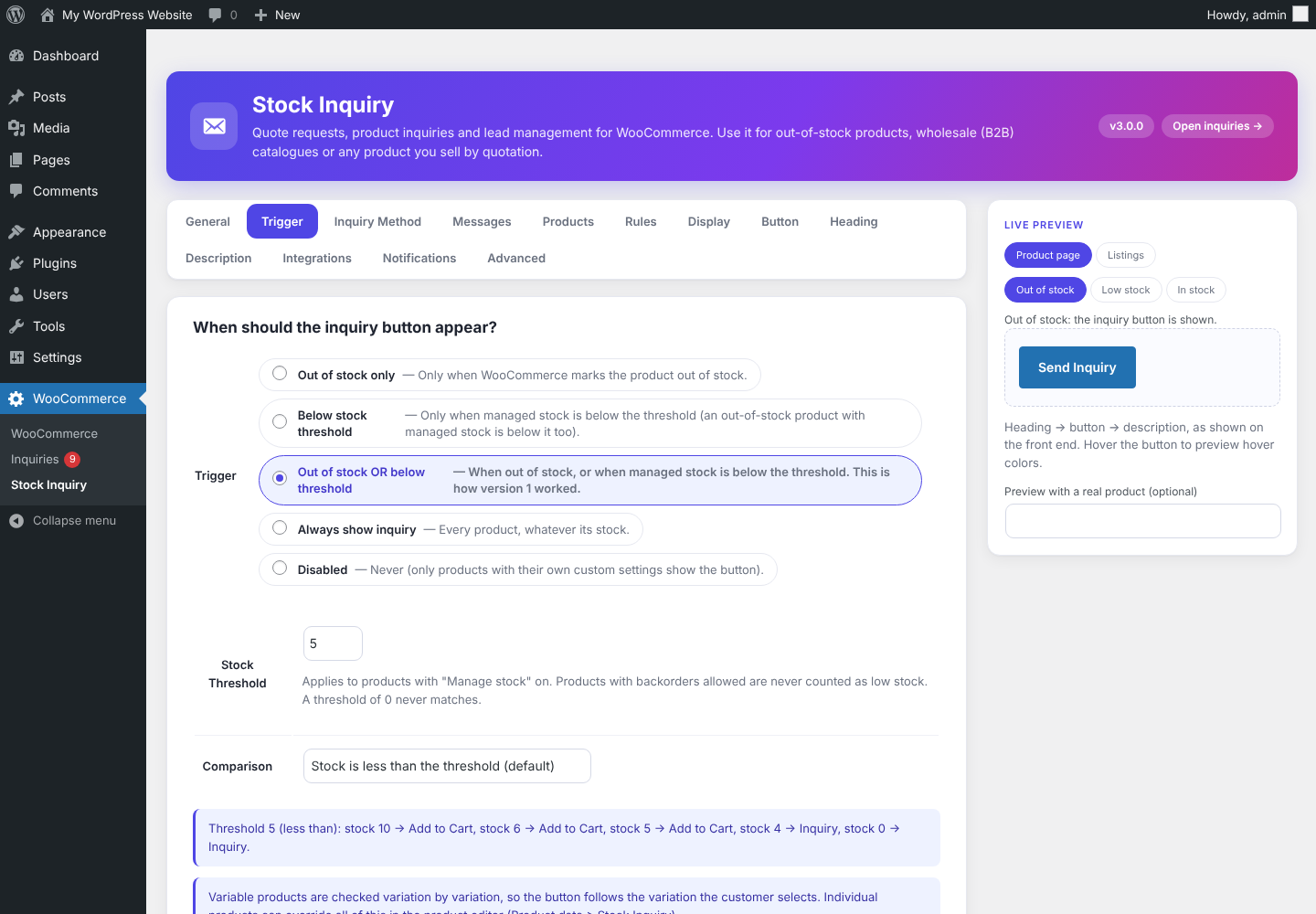
Replace Add to Cart with a customizable inquiry button, save every inquiry in a simple inbox inside WordPress, update its status and email the customer. WooCommerce stock data is never changed, and Add to Cart returns by itself when a product no longer matches your rule.
Automatic WooCommerce integration needs no shortcode. Elementor is only needed for the optional Elementor Popup method.
Contents
- What it is used for
- Screenshots
- Features
- Installation and quick start
- B2B and quotation workflow
- Stock rules
- Inquiry methods
- Inquiry management (WooCommerce > Inquiries)
- Rules by category and multiple WhatsApp numbers
- Settings reference
- Developers
- Privacy and security
- Upgrading
- FAQ and troubleshooting
- Version history and roadmap
- Support and license
What it is used for
| Use case | How |
|---|---|
| Out-of-stock or low-stock products | Keep the product visible; customers ask instead of leaving. |
| B2B and wholesale catalogues | A "Request a Quote" button on selected products or whole categories, whatever their stock. |
| Made-to-order, bulk and custom products | Collect the request, follow it up, close it. |
| Department routing | Furniture questions to one WhatsApp number, electronics to another. |
Screenshots
Settings
Settings overview with sticky live preview |
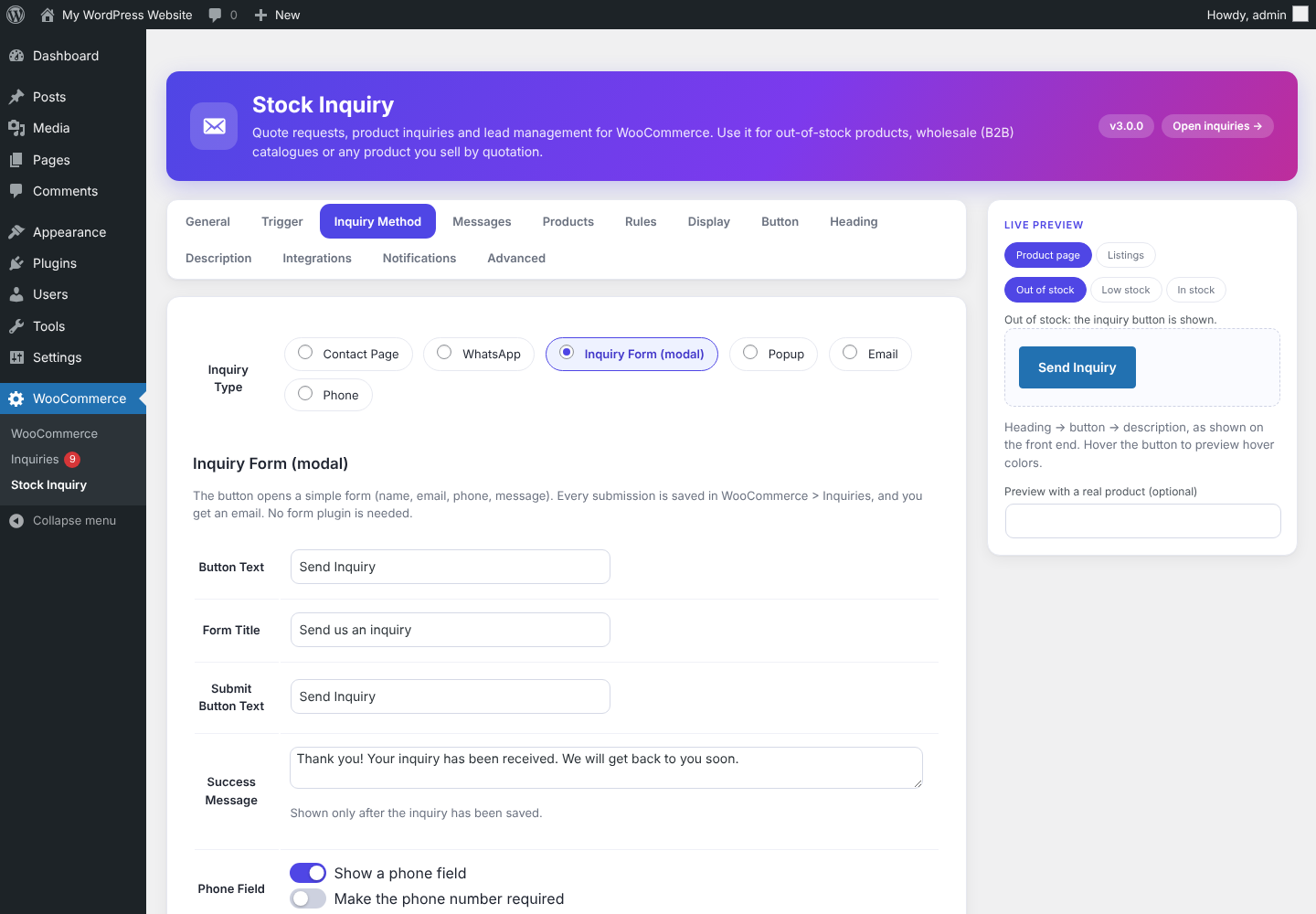 Inquiry method: Contact Page, WhatsApp, Inquiry Form, Popup, Email, Phone |
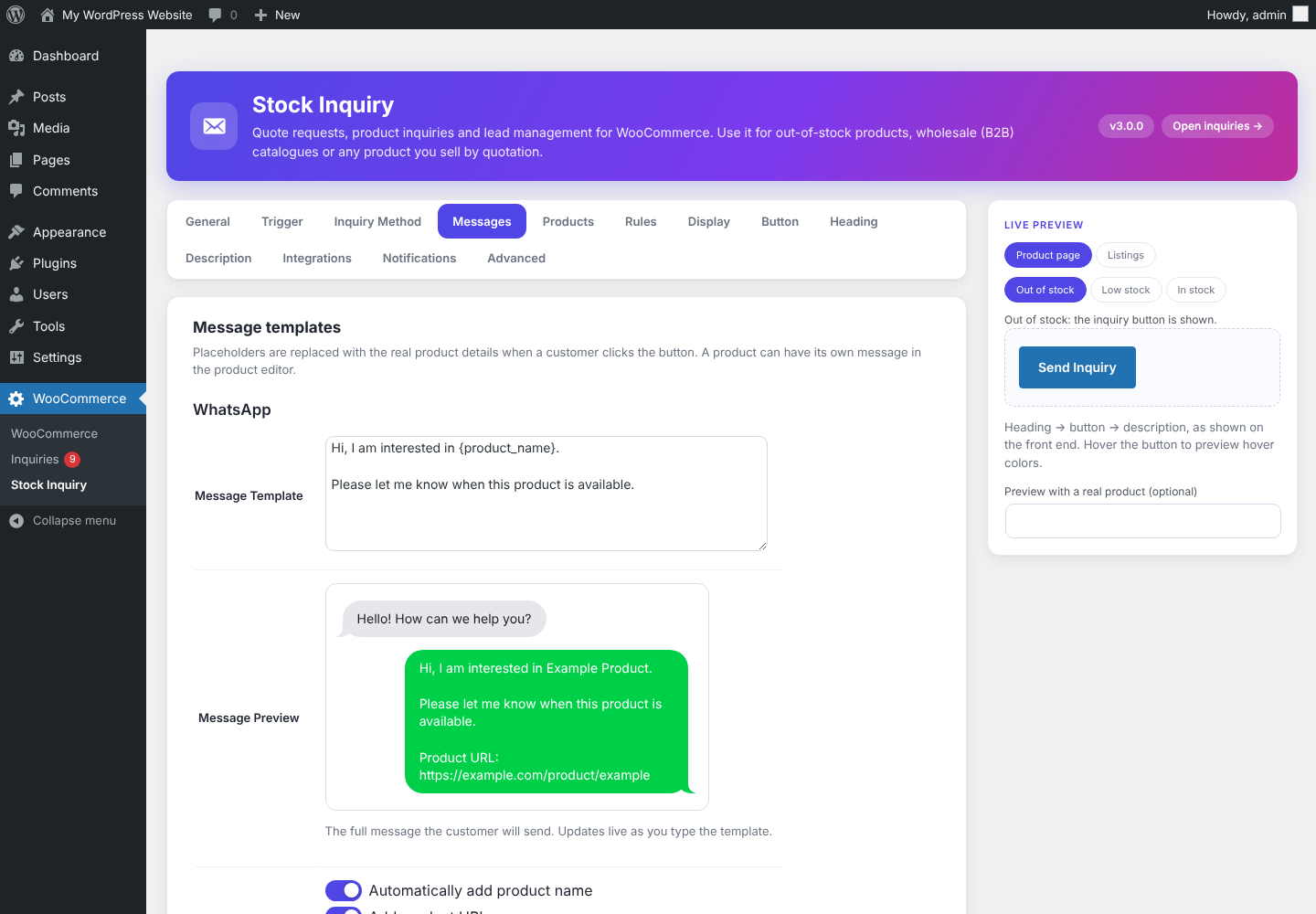 Message templates with placeholders |
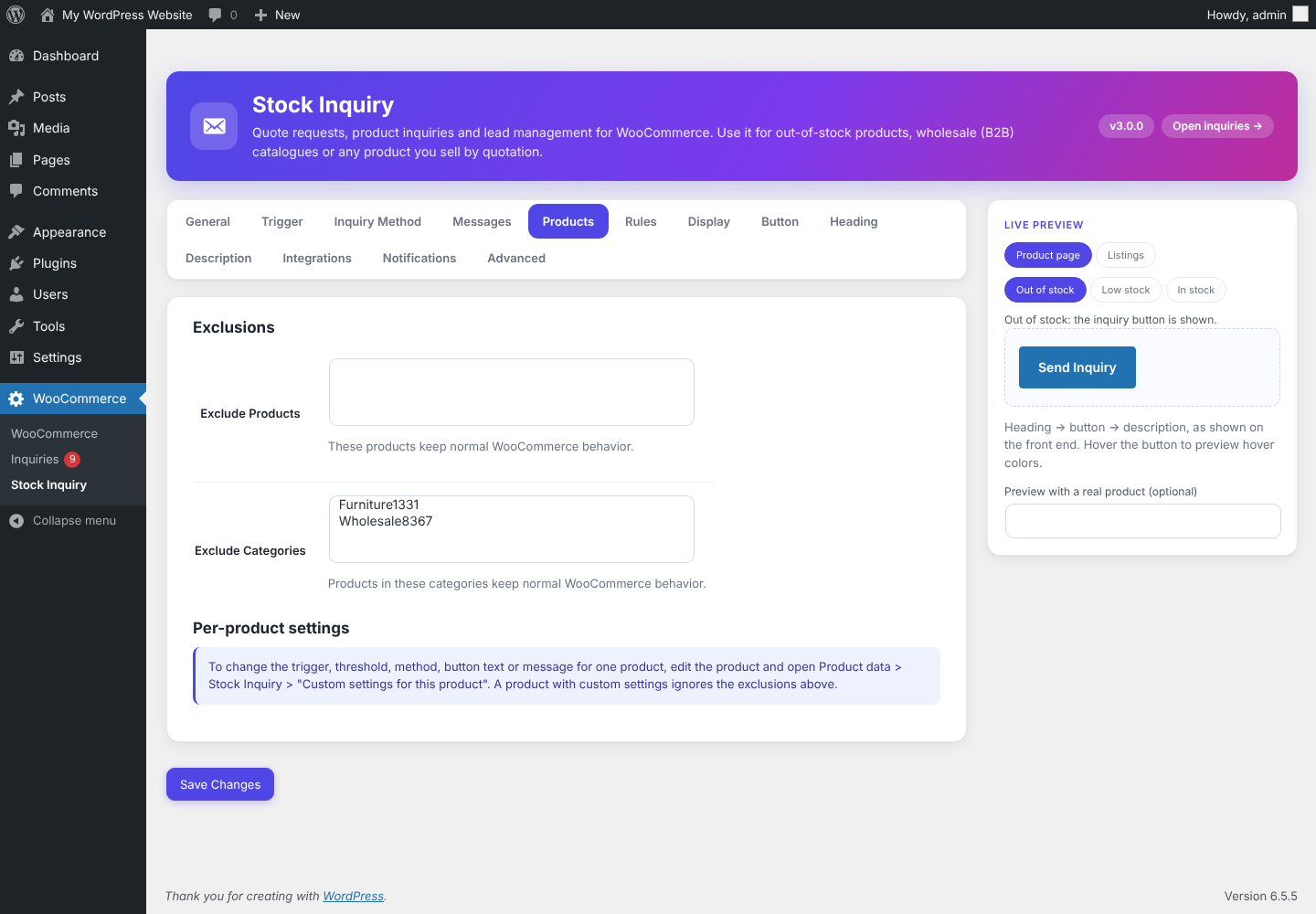 Products: exclude products and categories |
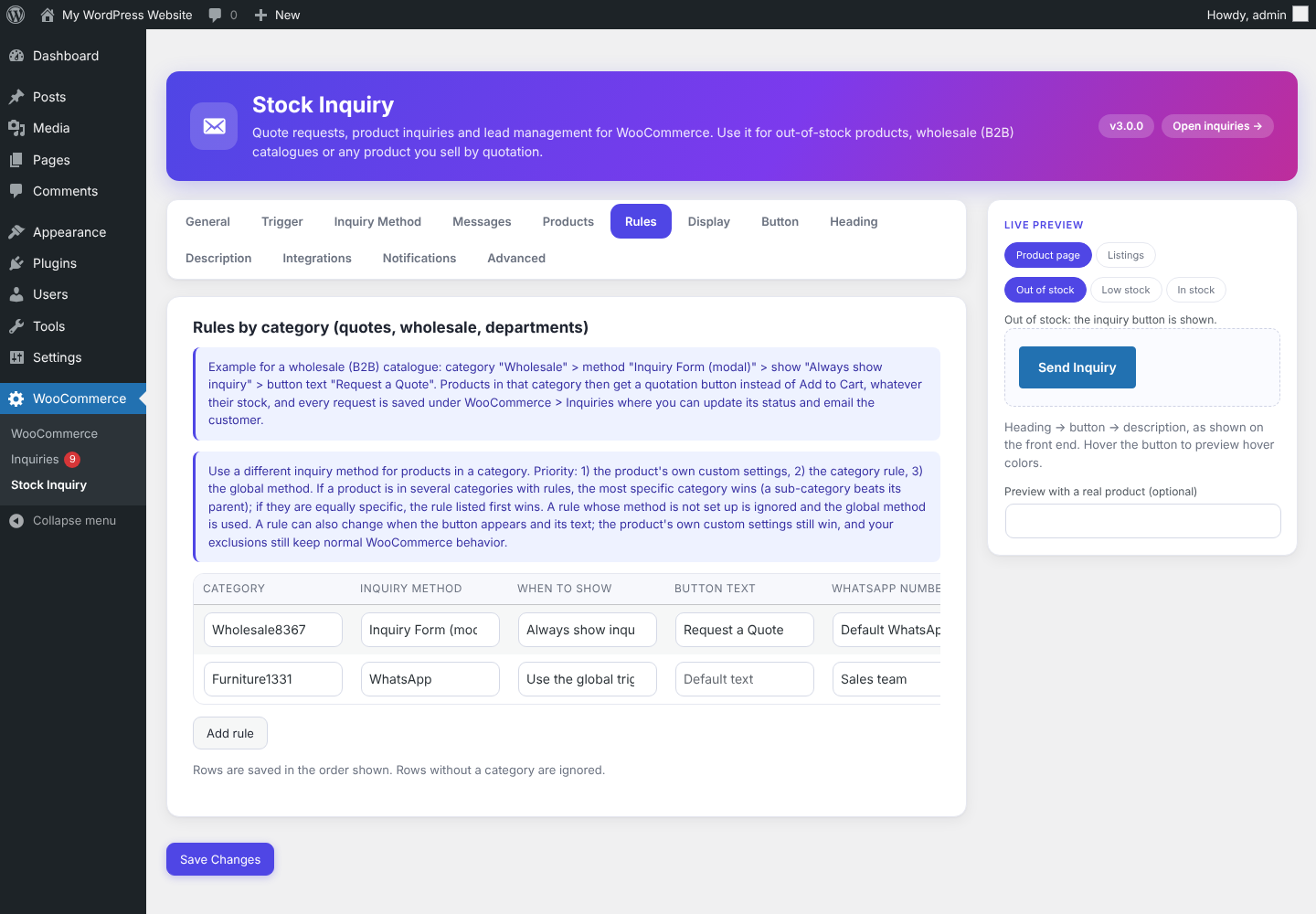 Rules by category, for example "Request a Quote" |
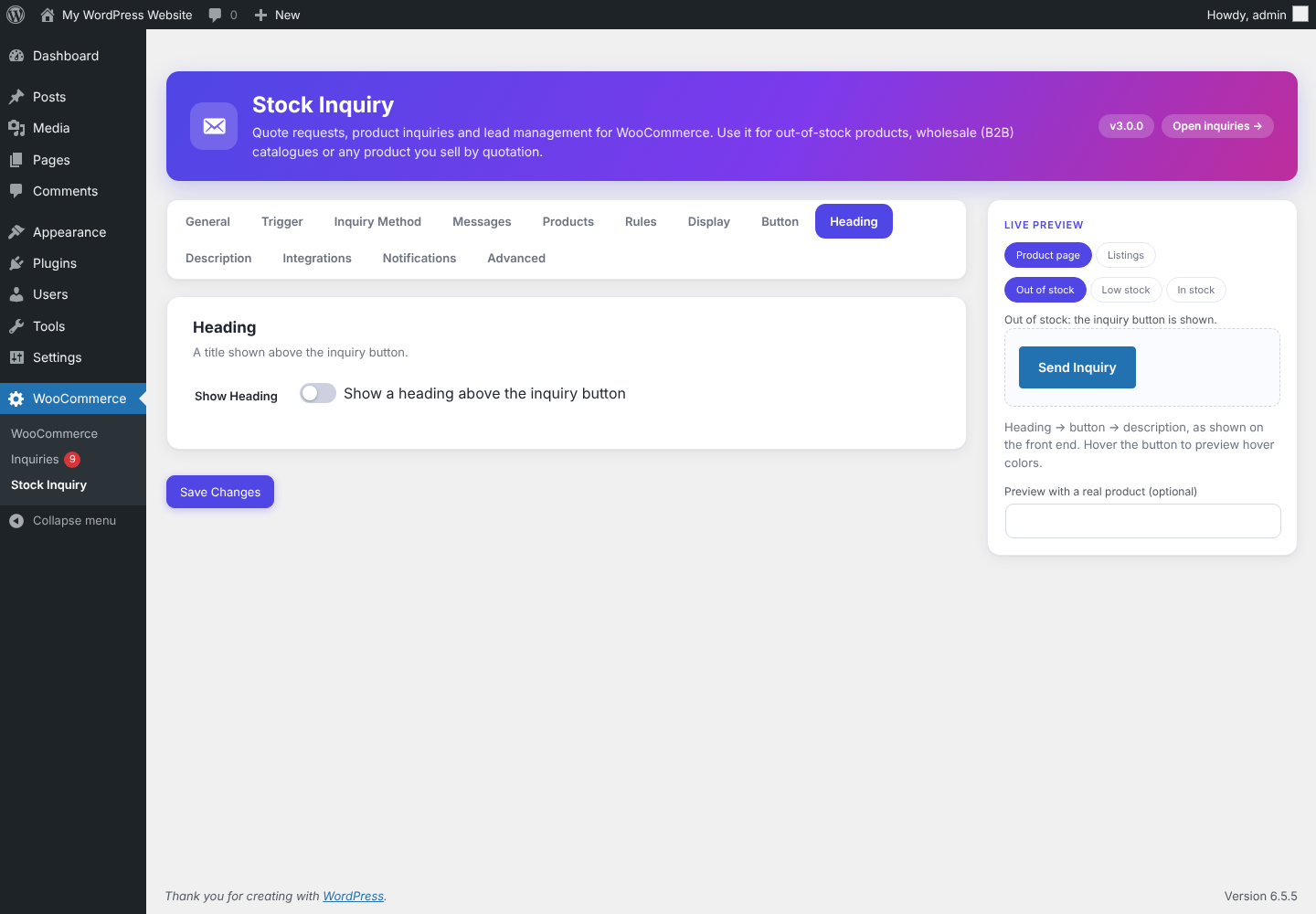 Heading, button and description styling |
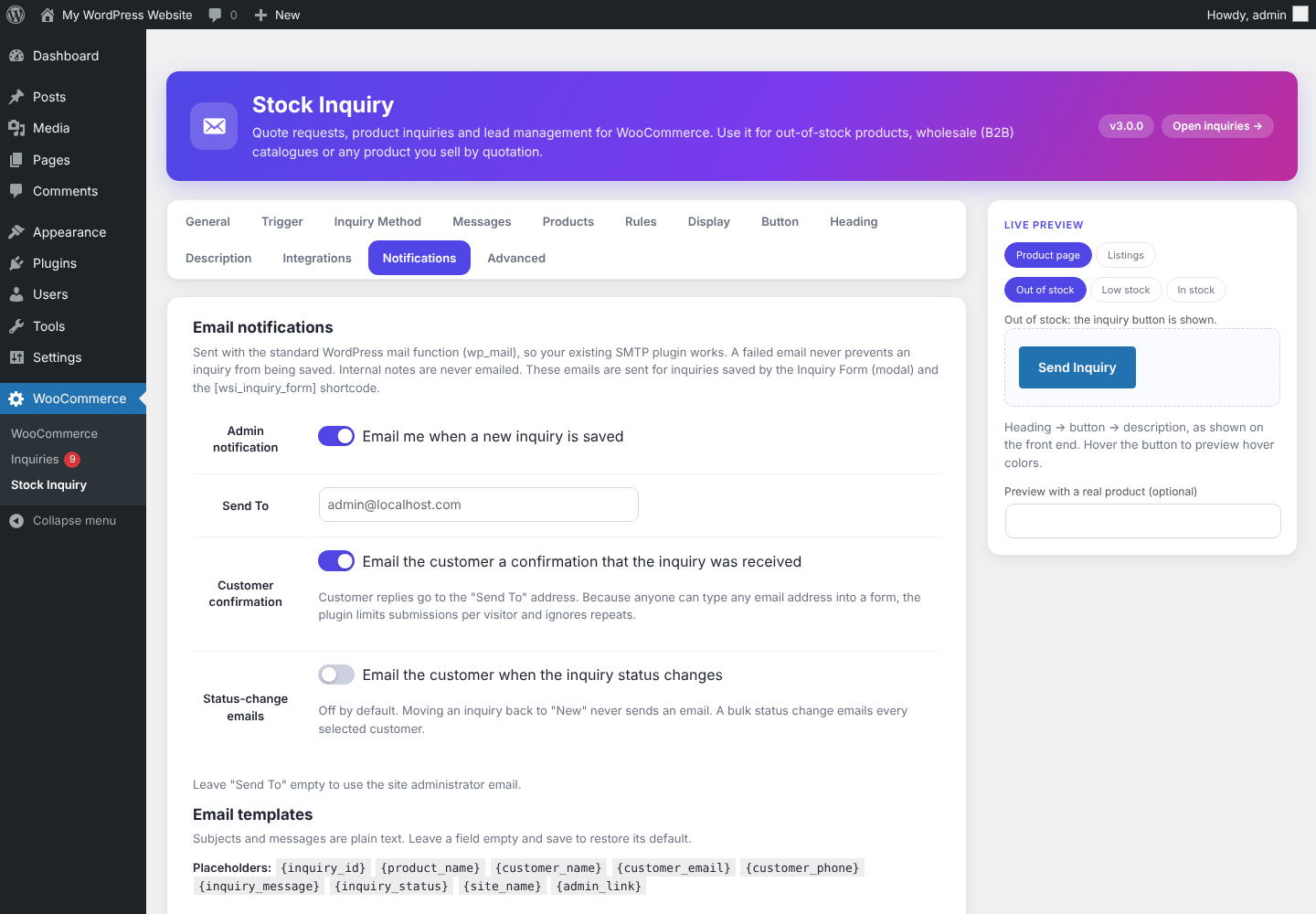 Notifications: admin, customer and status emails |
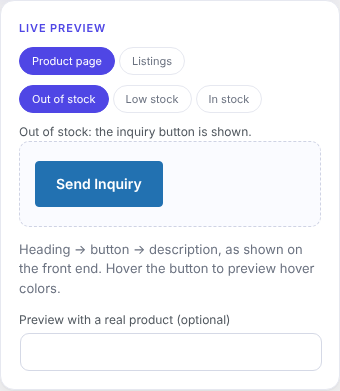 Live preview for product page and listings |
Inquiries and quotes
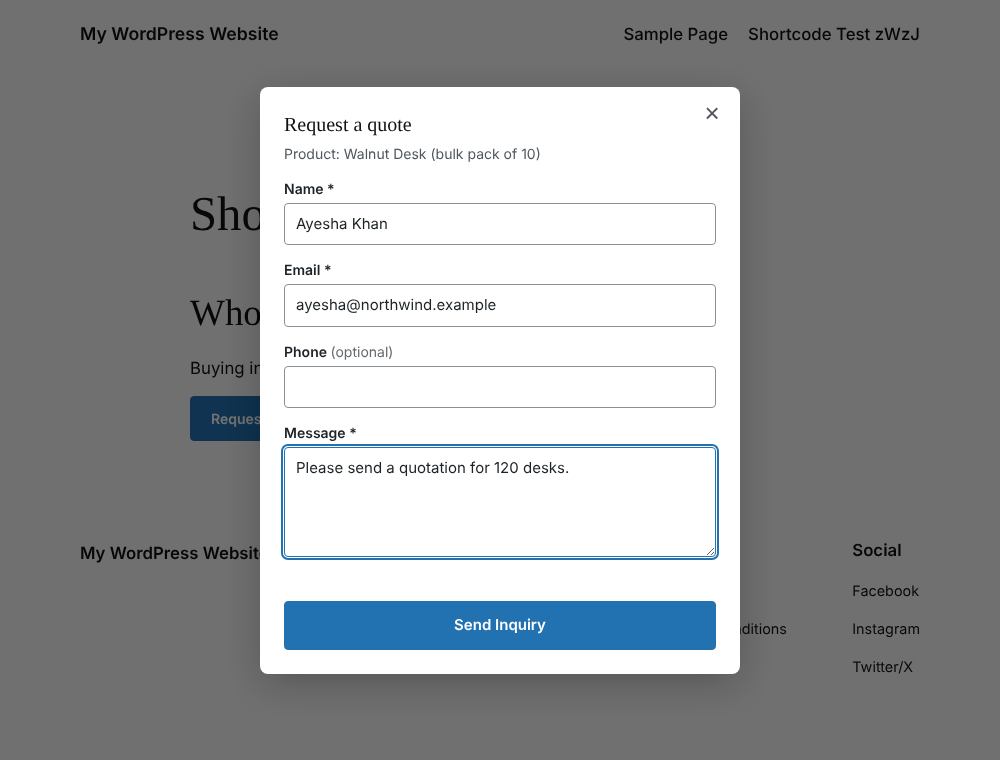 Request a Quote form on the product page |
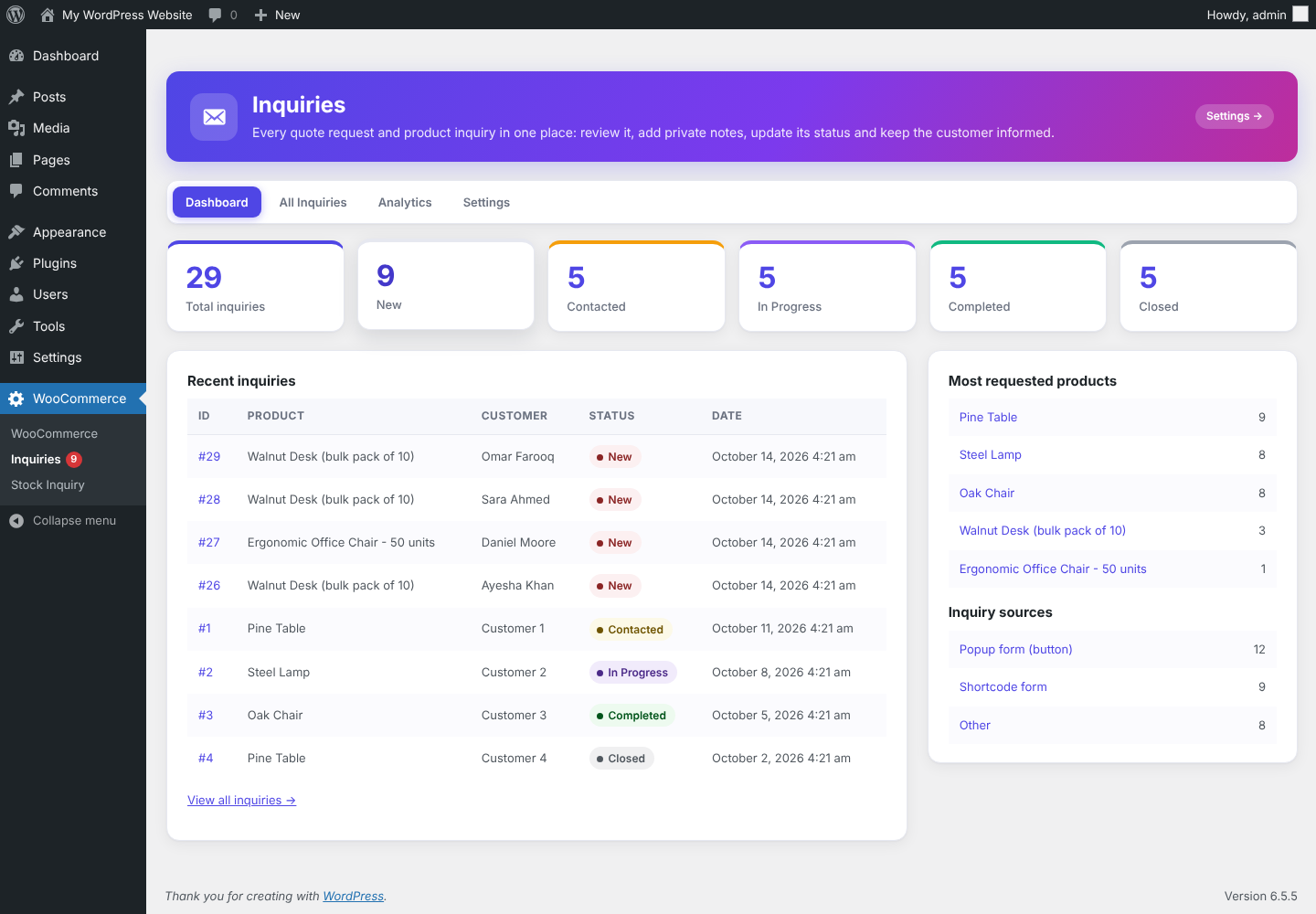 Dashboard: totals, statuses, recent inquiries |
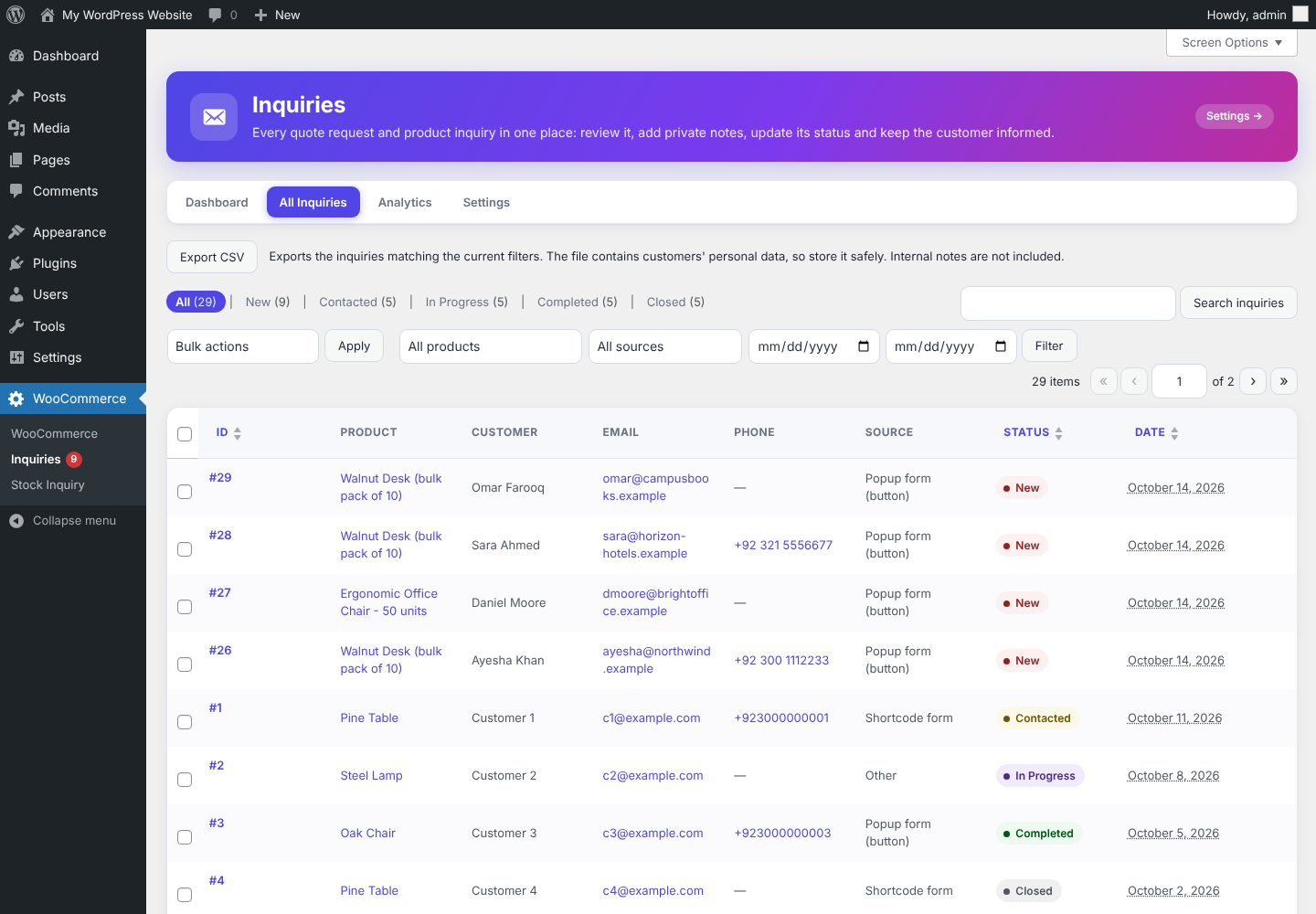 All Inquiries: search, filters, bulk actions, CSV export |
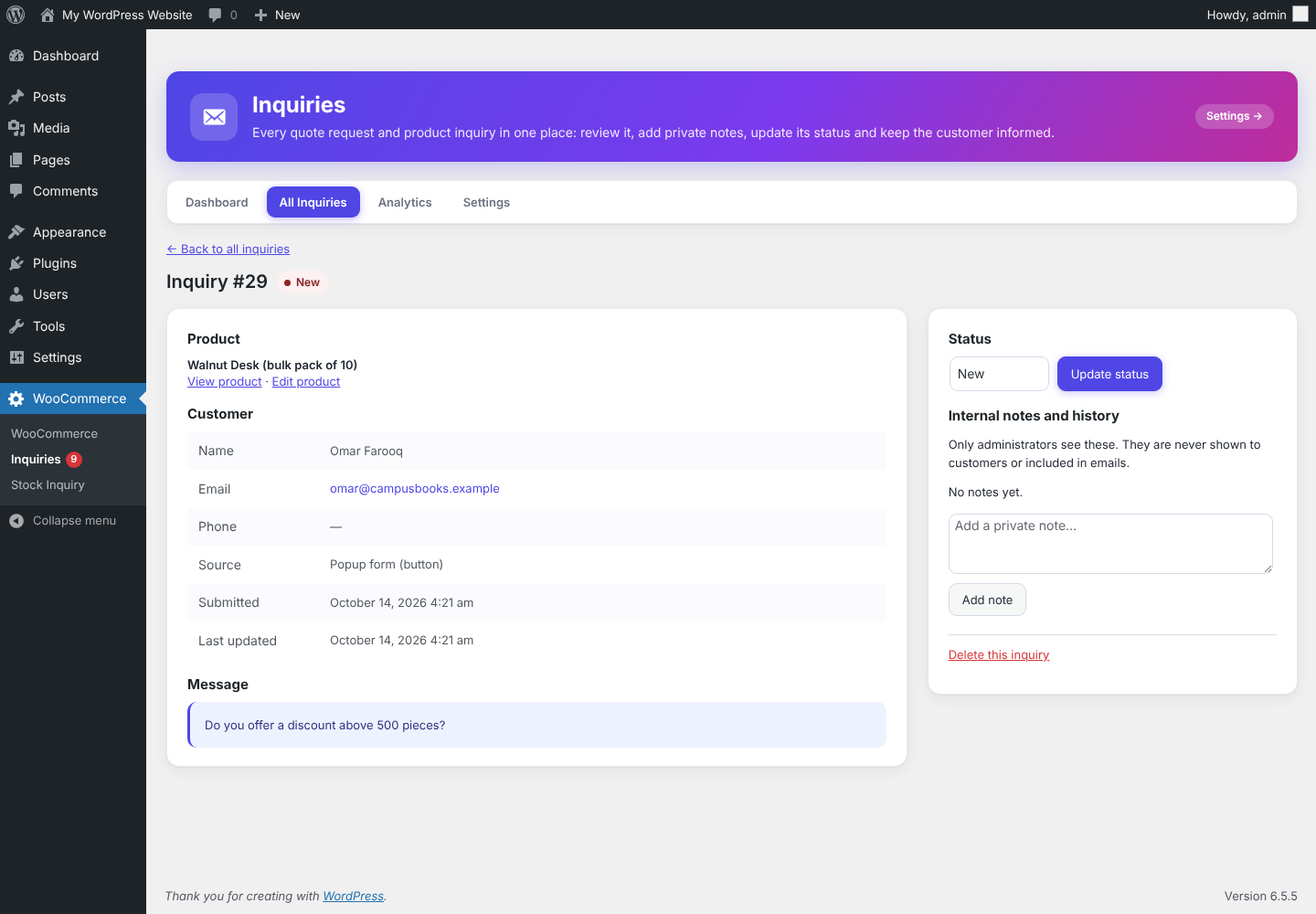 Inquiry details: status, private notes, history |
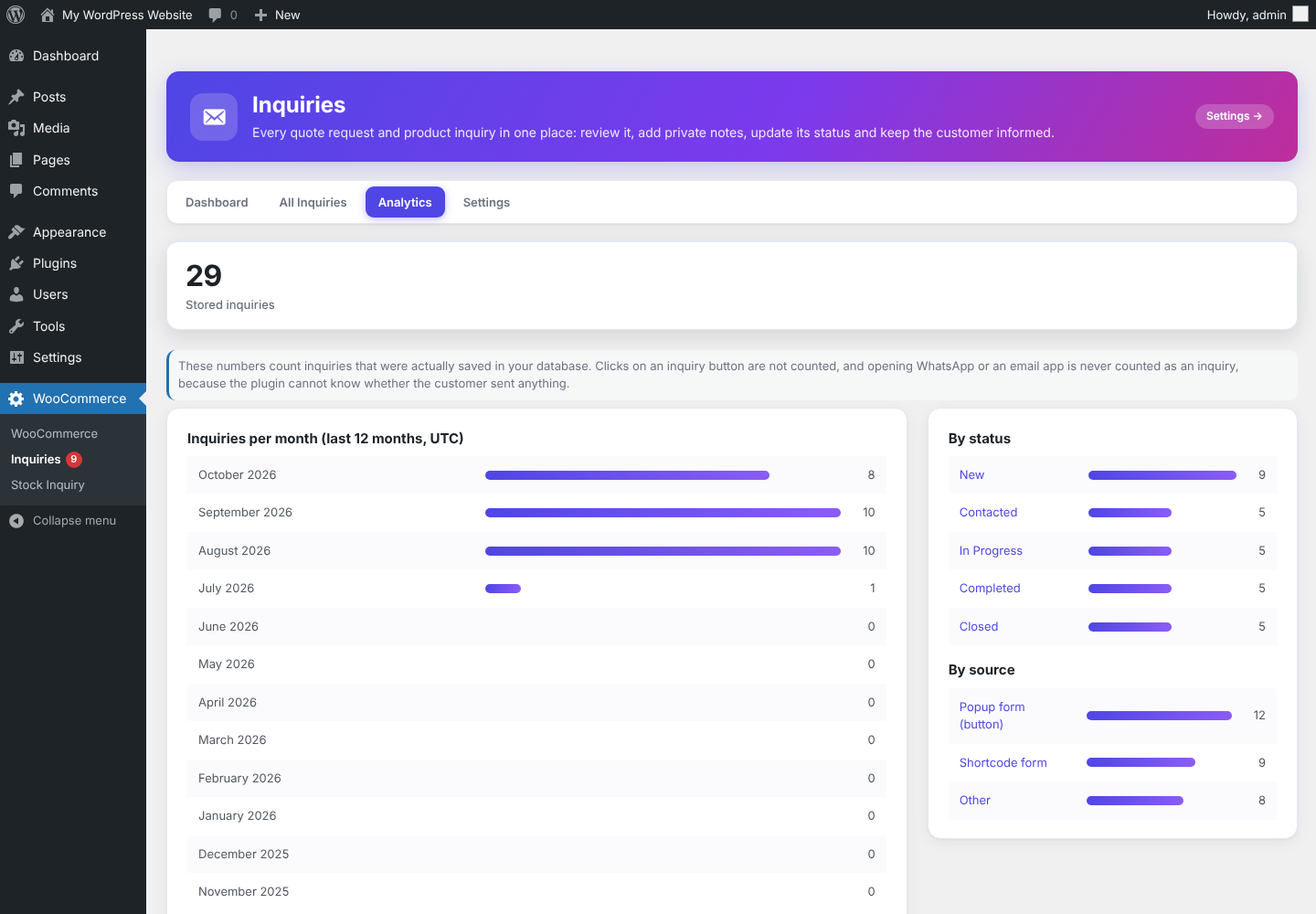 Analytics from stored inquiries |
Features
Storefront
- Stock rules: out of stock, below a threshold, either, always, or disabled. Variable products follow the selected variation.
- Six inquiry methods: Inquiry Form (modal), Contact Page, WhatsApp, Elementor Popup, Email, Phone.
- Per-product overrides and per-category rules (method, when to show, button text, WhatsApp number).
- Product and category exclusions; shared placeholders in every message; location switches (single product, shop, categories, search, related, upsells, cross-sells).
- Optional
[wsi_button]and[wsi_inquiry_form]shortcodes. Works with WooCommerce templates and Elementor product layouts.
Inquiry management
- Inquiries saved in your database, with a dashboard, search, filters, sorting, pagination and bulk actions.
- Five statuses (New, Contacted, In Progress, Completed, Closed) with history; private internal notes.
- Email notifications to you and the customer with editable templates.
- Analytics and CSV export built from stored inquiries.
Quality
- No external requests, tracking or telemetry. Capability and nonce checks, prepared SQL, escaped output. WordPress personal data export and erase.
Installation and quick start
- Upload the ZIP at Plugins > Add New Plugin > Upload Plugin and activate (WooCommerce must be active).
- Open WooCommerce > Stock Inquiry. Pick a trigger and an inquiry method, then save. Use the Test button to check the link.
- Open a product that matches your rule to see the button. Inquiries from the Inquiry Form appear under WooCommerce > Inquiries.
B2B and quotation workflow
- Rules tab: add a rule for your category, for example Wholesale > method Inquiry Form (modal) > show Always show inquiry > button text Request a Quote.
- Products in that category show a quote button instead of Add to Cart, regardless of stock. Other products behave as before.
- A customer fills in name, email, phone and message. The request is saved first; the success message appears only after it is stored.
- You get an email and a new row under WooCommerce > Inquiries (status New). The customer can get a confirmation email.
- Open the inquiry, add private notes and move it through New, Contacted, In Progress, Completed, Closed. Optionally the customer is emailed on each status change.
- Review Analytics and export the list to CSV when needed.
Stock rules
Pick one trigger under WooCommerce > Stock Inquiry > Trigger:
| Trigger | Inquiry button appears when |
|---|---|
| Out of stock only | WooCommerce marks the product out of stock |
| Below stock threshold | managed stock is below the threshold |
| Out of stock OR below threshold | either of the above (the version 1 behavior, default) |
| Always show inquiry | always |
| Disabled | never (except products with their own settings) |
Example with threshold 5 and "Out of stock OR below threshold":
| Stock | Result |
|---|---|
| 10, 6 | Add to Cart |
| 5 | Add to Cart (the comparison is "less than"; switch to "less than or equal" to include 5) |
| 4, 1 | Inquiry |
| 0 | Inquiry |
Rules that always apply: products with backorders allowed stay purchasable; products without managed stock are only affected by "out of stock"; a threshold of 0 never matches; excluded products and categories keep normal WooCommerce behavior (unless the product has its own custom settings).
Variable products
Each variation is judged on its own stock. With a T-Shirt (Small 0, Medium 10, Large 2, XL 0) and "Out of stock OR below threshold", threshold 1:
- every variation unavailable: the form is replaced by the inquiry button;
- some unavailable: the normal form stays, and the button appears when a variation that needs it is selected and disappears again when the customer picks another variation, resets the choice, or the combination is unavailable;
- none unavailable: normal WooCommerce.
This uses WooCommerce's own variation events (found_variation, reset_data, hide_variation) and the per-variation data WooCommerce already sends, including AJAX-loaded variations. Without JavaScript the normal form is shown.
Product-level overrides
Edit a product > Product data > Stock Inquiry. Choose Use global settings or Custom settings for this product, then optionally set: trigger (including Always and Disabled), threshold, inquiry method, button text and a custom message (used by WhatsApp, Email and Popup). Stored as post meta (_wsi_*); no extra tables. Switching a product back to global removes its data. Variations use their parent product's override.
Inquiry methods
- Contact Page: sends the customer to your page with
?wsi_product=ID&wsi_product_name=...&wsi_product_url=...(andwsi_variation=IDfor a variation). Use[wsi_product],[wsi_product field="url|id|sku|price"]to pre-fill a form. - WhatsApp:
https://wa.me/<number>?text=...with a message built from your template. Numbers need an international format (8 to 15 digits, no leading zero after the country code). Line breaks are normalized and the message is URL-encoded. - Elementor Popup (needs Elementor Pro): choose an existing popup under Inquiry Method > Popup. Put your own form inside the popup. When the button is clicked the plugin opens it and fills any field or element carrying these CSS classes:
wsi-product-name,wsi-product-url,wsi-product-id,wsi-product-sku,wsi-product-price,wsi-message. The product is also available aswindow.wsiProductand thewsi:productjQuery event. The plugin is not a form builder and works with any form that lives in the popup. - Email: a
mailto:link with subject and message filled in. It opens the customer's own email app. The website does not send mail, so delivery is not and cannot be confirmed. - Phone: a
tel:link. International numbers keep their+; a leading00becomes+.
New methods can be added with the wsi_inquiry_methods filter by implementing WSI_Inquiry_Method.
Placeholders
Available in the WhatsApp message, email subject and message, and a product's custom message: {product_id} {product_name} {product_url} {sku} {price} {regular_price} {sale_price} {stock_quantity} {stock_status} {category} {site_name} {site_url}. Unavailable values (no SKU, no sale, unmanaged stock) are empty. For a variation, {product_name}, {sku}, {price} and the stock values are the variation's, and {product_url} pre-selects it. Add your own with the wsi_placeholder_values filter.
Example WhatsApp template:
Hello,

I am interested in this product:

Product: {product_name}
SKU: {sku}
Price: {price}

Product link:
{product_url}

Thank you.
Display
- Single product page: Before, Replace or After Add to Cart.
- Listings, each switchable: Shop, Category/tag archives, Search, Related, Upsells, Cross-sells, Other product grids. Locations come from WooCommerce's loop context. A theme or builder that prints its own grid may be reported as "Other".
- Heading, description and credit each have their own single-page / listing switches.
Shortcodes
[wsi_button], [wsi_button product_id="123"], [wsi_button text="Ask us" method="whatsapp"]. It prints the button only when the product's stock rule says an inquiry is needed. Only published products are rendered.
[wsi_inquiry_form]                                      current product
[wsi_inquiry_form product_id="123" text="Ask about this" title="Request a quote"]
[wsi_inquiry_form send="whatsapp"]                      offer "Continue on WhatsApp" after saving
[wsi_inquiry_form only_if_needed="yes"]                 print only when the stock rule needs an inquiry
Elementor compatibility
The core plugin uses WooCommerce hooks only (woocommerce_loop_add_to_cart_link, wc_get_template, woocommerce_available_variation), so Elementor WooCommerce widgets that call those templates are covered. Widgets that print their own markup without those hooks need the [wsi_button] shortcode. Elementor-specific code is isolated in WSI_Elementor / WSI_Popup and only used by the Popup method.
Inquiry management
Choose Inquiry Form (modal) under Inquiry Method. The button opens a modal with name, email, phone (optional) and message. After the server confirms the inquiry was saved, the visitor sees the success message.
Inquiries appear in WooCommerce > Inquiries:
- Dashboard: totals, the five statuses, recent inquiries, most requested products, sources.
- All Inquiries: search, filters (status, product, source, date), sorting, pagination, bulk status change, bulk delete with confirmation, Export CSV.
- Details: product (image and link; the stored name is used if the product was deleted), customer, message, status, private notes and history.
- Analytics: totals, by status, by source, most requested products, 12-month trend. Button clicks are not tracked in 3.0.0 (planned for 3.1.0), and opening WhatsApp or an email app is never counted as an inquiry.
Emails
Settings > Notifications: an admin notification, a customer confirmation, and an optional status-change email. Each has an editable subject and plain-text message with placeholders {inquiry_id} {product_name} {customer_name} {customer_email} {customer_phone} {inquiry_message} {inquiry_status} {site_name} and {admin_link} (admin email only).
Defaults: admin on, customer confirmation on for new installs, status emails off. Sent with wp_mail(), so any SMTP plugin works. A failed email never stops an inquiry from being saved, and internal notes are never emailed. Use Send a test email to check delivery.
CSV export
Exports the current search and filters. UTF-8 with BOM for Excel, safe against spreadsheet formula injection, streamed in batches of 500, internal notes never included. Requires the manage-WooCommerce capability and a nonce.
Rules by category and multiple WhatsApp numbers
Rules tab: choose a different inquiry method per product category, and optionally when the button shows and its text. Priority: the product's own custom settings, then the category rule, then the global settings. With several matching categories the most specific one wins (a sub-category beats its parent), then the rule listed first. A rule whose method is not set up is ignored. Exclusions and WooCommerce stock behaviour are unchanged, and stores without rules do no extra work.
More WhatsApp numbers (Inquiry Method > WhatsApp): add a name, an international number and an optional message template for each department. The existing number stays the default and is the fallback. Pick a number per category rule or per product. Message order: product message, number message, global message. Nothing is sent automatically and no WhatsApp Business API is used.
Settings reference
| Tab | Controls |
|---|---|
| General | Enable the plugin |
| Trigger | Trigger mode, threshold, comparison, live example |
| Inquiry Method | Method, button text, destination (page, numbers, address, popup, form texts) and a Test button |
| Messages | WhatsApp template, email subject and message, placeholder list, previews |
| Products | Excluded products and categories, pointer to per-product settings |
| Rules | Category rules and their WhatsApp numbers |
| Display | Single page, position, listing locations |
| Button / Heading / Description | Typography, colours, padding, alignment, where to show |
| Integrations | Status of WhatsApp, Elementor and Elementor Pro; popup pre-fill classes |
| Notifications | Admin, customer and status emails, templates, test email |
| Advanced | Shortcodes, developer hooks, delete-data option, reset |
Developers
Hooks: wsi_needs_inquiry, wsi_product_config, wsi_placeholder_values, wsi_supported_product_types, wsi_inquiry_methods, wsi_loop_location, wsi_coming_soon_methods, wsi_admin_method_fields, wsi_show_stock_text, wsi_button_html, wsi_notification_email.
New methods can be added with the wsi_inquiry_methods filter by implementing WSI_Inquiry_Method. Tables: {prefix}wsi_inquiries and {prefix}wsi_inquiry_notes; options wsi_settings, wsi_db_version.
Privacy and security
- Stored per inquiry: name, email, optional phone, message and product. No IP address or browser data.
- Tools > Export / Erase Personal Data is supported; suggested privacy policy text is provided. Inquiries are kept when the plugin is deleted unless you switch on Delete all inquiries when the plugin is deleted.
- Capability checks (
manage_woocommerce) and nonces on every admin action; allow-list sanitisation; escaped output; prepared SQL; honeypot, rate limit (5 per visitor per 10 minutes) and duplicate detection on the form; no external requests, tracking or telemetry.
Upgrading
- From 1.x or 2.x: settings are kept (including your WhatsApp number and button styling). A one-time migration adds the new options and the two inquiry tables, with values that reproduce earlier behaviour.
- Stores that already had saved settings keep customer emails off until you enable them in Notifications.
- The "Powered By SK" credit and the Branding tab were removed in 3.0.0.
FAQ and troubleshooting
Do I need a shortcode? No. Do I need Elementor? No; only the Popup method needs Elementor Pro. Does Email send a message from my site? No; it opens the customer's email app. Can I use it for quotes, not only out-of-stock? Yes, see the B2B workflow.
- A product shows Add to Cart although it is low on stock: check its trigger and threshold, exclusions, backorders, and that "Manage stock" is on for threshold rules.
- The popup does not open: Elementor Pro must be active and the popup published. Its Display Conditions decide which pages print it, so include the pages where the button appears.
- A settings tab has a red marker: open it and read the message; until fixed, WooCommerce keeps its normal buttons.
- Button looks unstyled in a theme: the plugin loads inline CSS on WooCommerce pages and wherever a button is printed; a builder page that prints a button without WooCommerce hooks needs the shortcode.
- WhatsApp opens with no text: the number or message is empty, or the template has only unavailable placeholders.
Version history and roadmap
| Version | Highlights |
|---|---|
| 3.0.0 Inquiry Management System | Inquiries saved in WordPress, statuses, notes, emails, quotes and B2B rules, multiple WhatsApp numbers, analytics, CSV export, modern UI |
| 2.0.0 Core upgrade | Trigger modes, variable products, per-product overrides, Popup/Email/Phone methods, placeholders, validation, test buttons |
| 1.1.0 | Per-element settings tabs, live preview, WhatsApp chat preview |
| 1.0.0 | Initial release: inquiry button with Contact Page and WhatsApp |
Full details, with new features and fixed bugs per version, are in docs/VERSION-HISTORY.md; the developer changelog is CHANGELOG.md.
Planned for 3.1.0: click tracking kept separate from stored inquiries, company and quantity fields for quotes, reply from the inquiry screen, optional spam protection, translation file.
Support and license
Ideas and bug reports: open a GitHub issue, or email safiqkhan0102@gmail.com. Author: Shafiqur Rehman.
GPL-2.0-or-later. See LICENSE.