Install
This is the repository archive. It installs, but the folder name will carry the branch suffix and updates will not flow.
Install straight from GitHub with WP-CLI:
wp plugin install https://github.com/shafiq021/bundlekit-fixed-bundle/archive/refs/heads/main.zipBundleKit – Fixed Bundle
Sell curated product bundles with a bundle box, discounts, and one cart line at the bundle total.
Free and open source. Version 1.9.3.
Sell a fixed group of products as one kit — at a fixed total price or with a percentage discount. A bundle box with a clickable checkbox appears inside the product's own add-to-cart form (unchecked by default). Tick it and the whole bundle goes to the cart as one line at the bundle total, labelled "Bundle offer" with its "Includes" list; leave it unticked and the customer buys the single product as normal.
There is no separate BundleKit plugin to install. The BundleKit framework is bundled inside this plugin — install and activate just this one.
Contents
- What it is used for
- Screenshots
- Features
- Installation and quick start
- Setting up a bundle
- Cart behavior
- Global settings reference
- Styling
- FAQ and troubleshooting
- Version history and roadmap
- Support and license
What it is used for
| Use case | How |
|---|---|
| Gift sets and hampers | Group the items, set one bundle price, customers tick the box to add the whole set. |
| Meal and combo deals | A "breakfast combo" with a fixed total cheaper than the items bought separately. |
| Starter kits | Bundle the essentials for a new hobby or routine with a launch discount. |
| B2B kits | One order line per kit keeps invoices and packing simple. |
Screenshots
Storefront
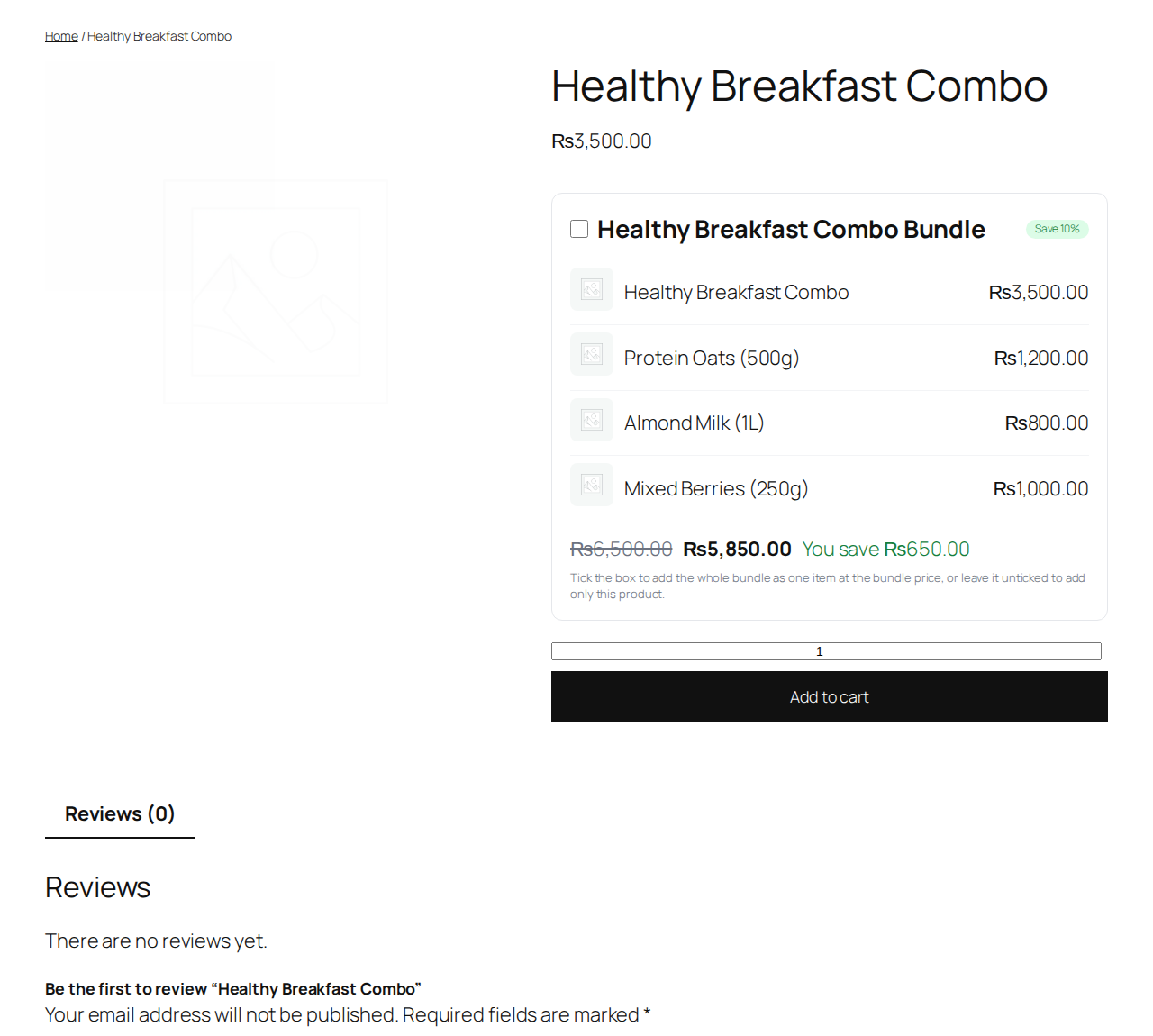
Bundle box on the product page: tick the box to add the whole bundle as one cart line at the bundle total.
Admin
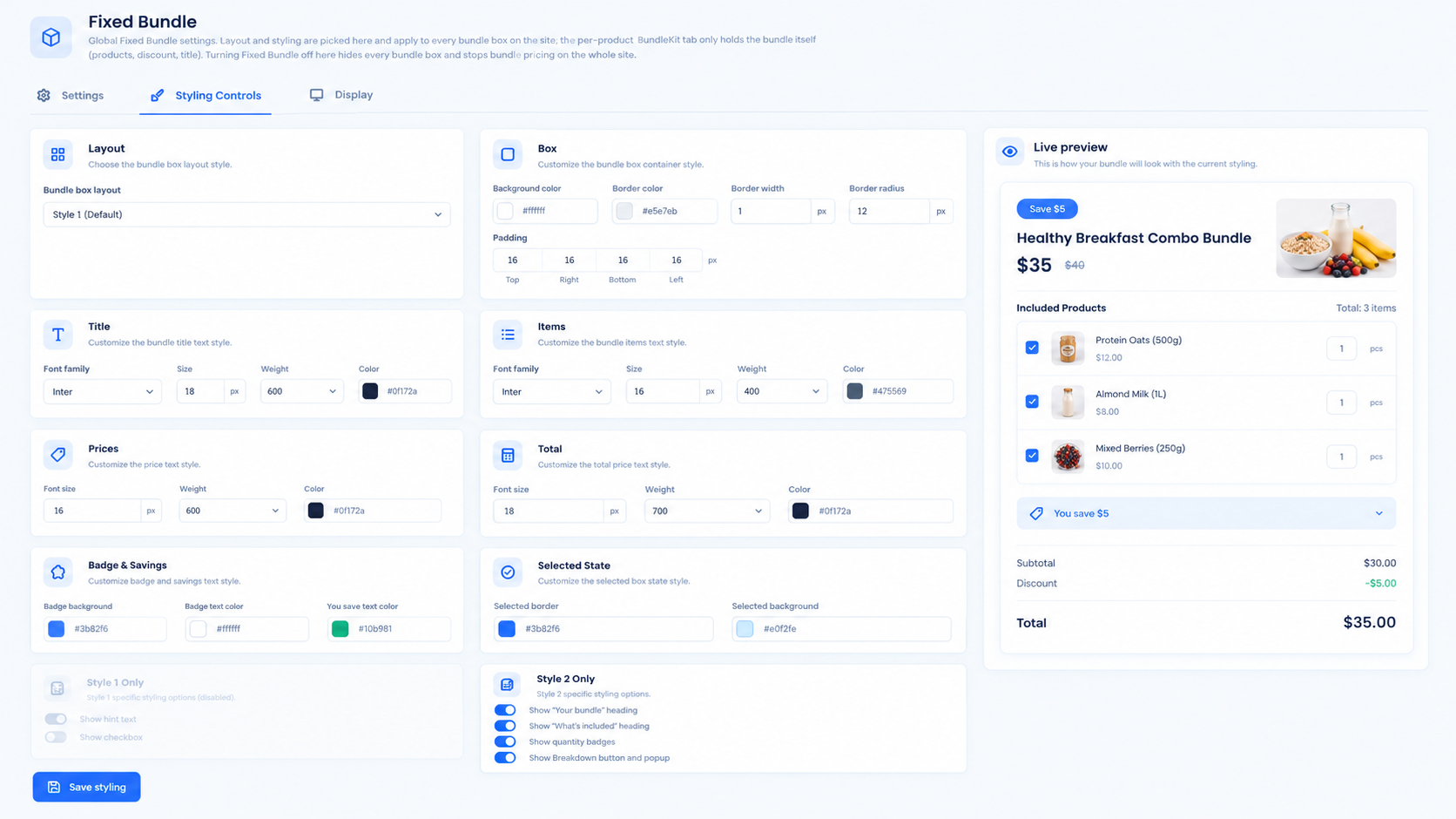
Styling Controls with live preview of the bundle box |
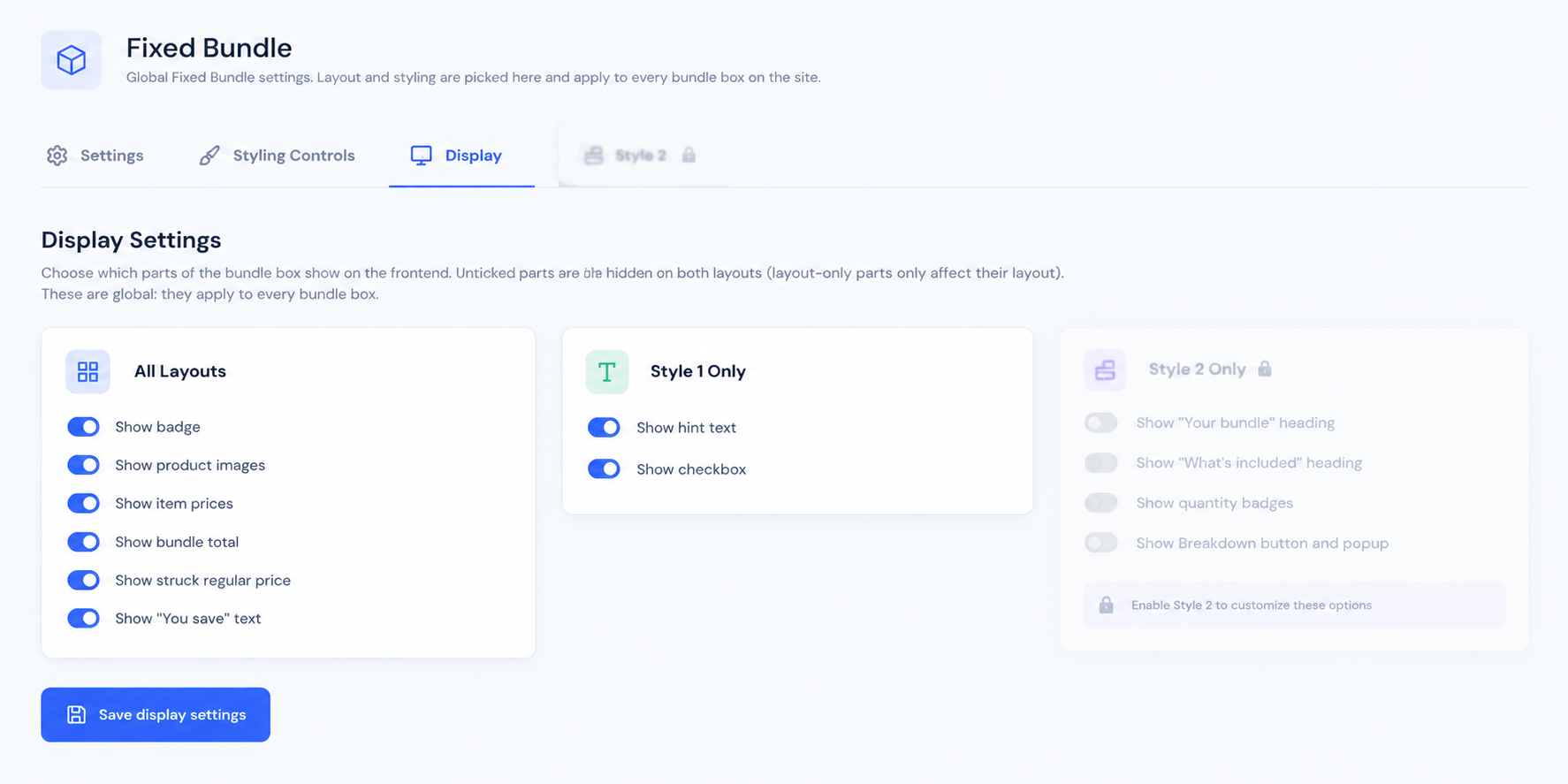 Display Settings: 12 show/hide toggles for bundle box parts |
Features
Storefront
- Bundle box with a clickable checkbox inside the product's add-to-cart form; unchecked by default.
- Ticked = the whole bundle as one cart line at the bundle total, with a "Bundle offer" label and the "Includes" product list on the line.
- Savings badge, struck regular price, "You save" text and per-item prices — each toggleable in Display settings.
Bundle setup (per product)
- Product editor > BundleKit tab: bundle on/off, title, cart name, badge text, discount, and the bundled products.
- Short per-product setup — everything else is global.
Global control
- BundleKit > Fixed Bundle > Settings: master on/off kill-switch for the whole site.
- Styling Controls: color pickers and typography with a live preview — one style for every bundle box on the site.
- Display: 12 show/hide toggles for the parts of the bundle box.
Quality
- No external requests, tracking or telemetry. Nonce checks on settings saves; escaped output.
Installation and quick start
- Upload the ZIP at Plugins > Add New Plugin > Upload Plugin and activate (WooCommerce must be active).
- Open a product, go to the BundleKit tab, switch the bundle on, add the bundled products and set the discount.
- View the product: tick the bundle box and add to cart — the cart shows one line at the bundle total.
Setting up a bundle
- Edit a product > BundleKit tab > enable the bundle.
- Set the title (shown on the box), the cart name (shown on the cart line), the badge text and the discount.
- Add the bundled products, then save.
Cart behavior
- The bundle line carries the cart name you set, a "Bundle offer" label and the "Includes" list of products.
- An unticked box — or a product with no bundle — adds the single product normally.
- Switching Fixed Bundle off in Settings hides every bundle box and stops bundle pricing site-wide.
Global settings reference
| Tab | Controls |
|---|---|
| Settings | Master on/off kill-switch |
| Styling Controls | Layout style, box, title, items, prices, total, badge & savings, selected state; live preview |
| Display | 12 show/hide toggles: badge, product images, item prices, bundle total, struck regular price, "You save" text, hint text, checkbox, and layout-specific parts |
Styling
Styling and layout are global only: what you pick under Styling Controls applies to every bundle box on the site. The product editor holds just the bundle content, so per-product setup stays short and every bundle matches your theme.
FAQ and troubleshooting
The bundle box does not appear on the product page. Check that the bundle is enabled on the product's BundleKit tab, and that Fixed Bundle is switched on under BundleKit > Fixed Bundle > Settings.
I updated the plugin but the old version still seems to run. Check the version on the Plugins screen. If the files did not actually replace, re-upload the ZIP with "Replace current with uploaded", restart Apache (to clear OPcache), and in Elementor go to Tools > Regenerate Files & Data.
Can I style each bundle differently? No — styling is global by design, so every bundle box on the site looks consistent.
Version history and roadmap
| Version | Highlights |
|---|---|
| 1.9.3 | WordPress.org submission build: brand-free code and readme |
| 1.9.2 | Readme fix: short description placement for the .org parser |
| 1.9.1 | WordPress.org review cleanup |
| 1.9.0 | Admin redesign: Settings / Styling Controls / Display with live preview |
| 1.8.1 | Fix: fatal when two BundleKit add-ons are active together |
| 1.0.0 | Initial release: bundle box, one-line cart, per-product setup |
Roadmap: more BundleKit add-ons (Mix-and-match / BYOB, Build-a-box).
Support and license
Ideas and bug reports: open a GitHub issue, or email safiqkhan0102@gmail.com. Author: Shafiqur Rehman.
MIT. See LICENSE. (The plugin header also carries GPLv2 or later for WordPress.org compatibility.)