Install
This is the repository archive. It installs, but the folder name will carry the branch suffix and updates will not flow.
Install straight from GitHub with WP-CLI:
wp plugin install https://github.com/shafiq021/bundlekit-buy-x-get-y/archive/refs/heads/main.zipBundleKit – Buy X Get Y
BOGO-style global offer rules with a gift picker, auto-added rewards, and cart limits.
Free and open source. Version 1.0.4.

Create global "buy X, get Y" offers that run across your store: buy N products, spend a minimum amount, or buy from selected categories or tags — and customers unlock a free product, a percentage or fixed discount, or the cheapest/most expensive item free. A progress banner tells shoppers how close they are ("Add Rs 5,000 more to unlock your reward").
There is no separate BundleKit plugin to install. The BundleKit framework is bundled inside this plugin — install and activate just this one.
Contents
- What it is used for
- Screenshots
- Features
- Installation and quick start
- Creating an offer
- How it works in the cart
- Global settings reference
- FAQ and troubleshooting
- Version history and roadmap
- Support and license
What it is used for
| Use case | How |
|---|---|
| Clearance | "Buy 2, cheapest item free" moves slow stock without coupons. |
| Gift with purchase | "Spend Rs 5,000, get a free cleaner" with a gift picker. |
| Category promotions | "Buy 3 from Beverages, get 10% off" during a campaign week. |
| VIP spend rewards | Minimum-spend tiers that reward bigger baskets. |
Screenshots
Offer progress banner: shows the reward and how much more is needed to unlock it.
Cart reward
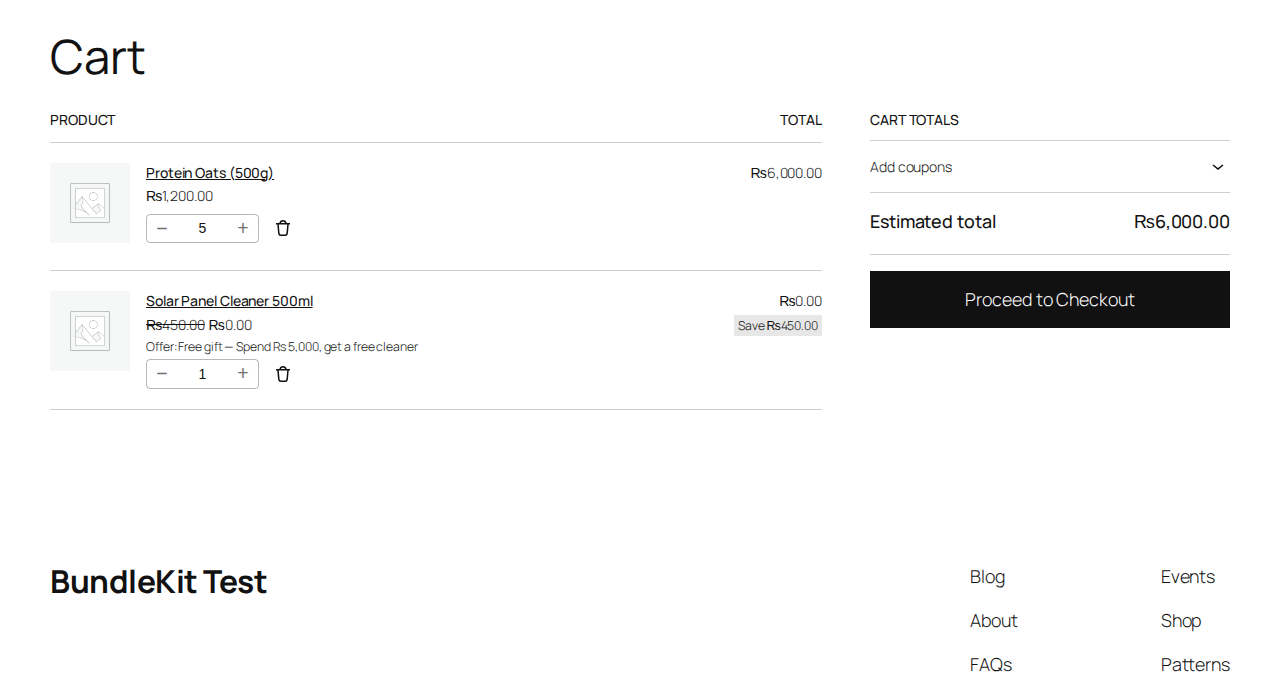
Cart: the free reward line is added automatically, with the offer name and savings.
Offers admin
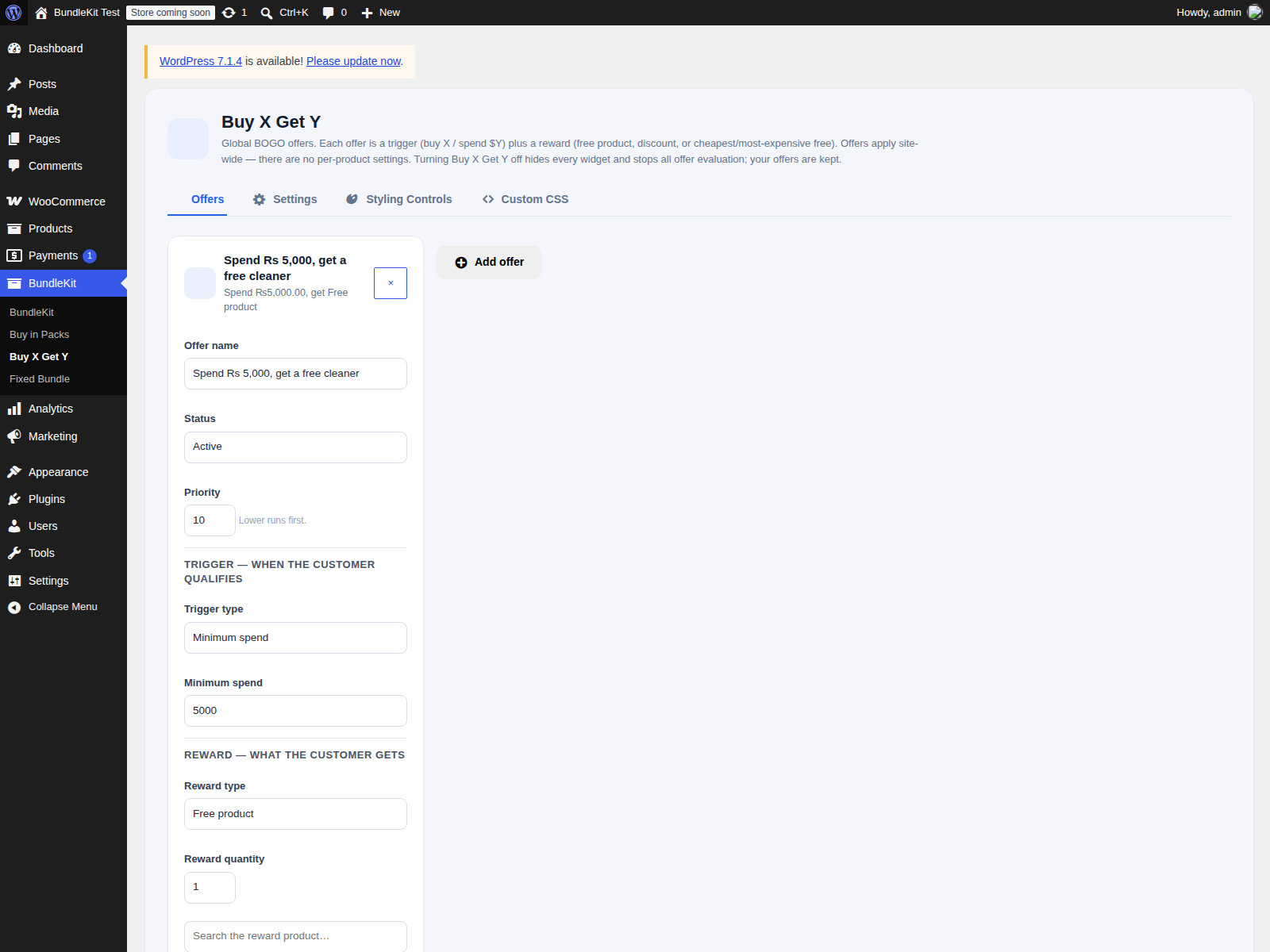
Offers: trigger, reward, status, priority and limits — all on one screen.
Features
Offers
- 4 trigger types: Specific products, Product categories, Product tags, Minimum spend.
- 5 reward types: Free product (with variation picker), Percentage discount, Fixed amount off, Cheapest item free, Most expensive item free.
- Offer states: Active, Draft, Scheduled — with priority ordering and per-cart / per-customer limits.
Cart engine
- Reward lines are added automatically and keyed to their offer; removed automatically when the cart no longer qualifies.
- Quantity lock on reward lines; no chaining — a reward never triggers another offer.
- Coupon handling is configurable (block or allow); Fixed Bundle lines are excluded; pack lines count toward triggers.
- Guest-safe gift picker — works for logged-out shoppers.
Admin
- 4 tabs: Offers, Settings, Styling Controls, Custom CSS.
Quality
- No external requests, tracking or telemetry. Nonce checks on settings saves; escaped output.
Installation and quick start
- Upload the ZIP at Plugins > Add New Plugin > Upload Plugin and activate (WooCommerce must be active).
- Open BundleKit > Buy X Get Y > Offers and add your first offer.
- Add qualifying products to the cart — the reward line appears automatically.
Creating an offer
- Offers > add an offer and pick the trigger type (Specific products, Product categories, Product tags, or Minimum spend).
- Set the trigger condition: the products/categories/tags, or the minimum spend amount.
- Pick the reward type and the reward (e.g. the free product and its variation).
- Set the status (Active, Draft, Scheduled), priority and limits, then save.
How it works in the cart
- When the cart meets an offer's trigger, its reward line is added automatically — marked so it cannot be mistaken for a normal line item.
- If the cart stops qualifying (items removed), the reward line is removed automatically.
- Shoppers cannot change the reward quantity, and rewards never trigger further offers.
- A progress banner can show the unlock message, e.g. "Spend Rs 5,000, get 1 free".
Global settings reference
| Tab | Controls |
|---|---|
| Offers | Offer list: trigger, reward, status (Active/Draft/Scheduled), priority, per-cart and per-customer limits |
| Settings | Global behavior incl. coupon handling (block/allow) |
| Styling Controls | Banner and offer styling |
| Custom CSS | Your own CSS additions |
FAQ and troubleshooting
My offer never triggers. Check that the trigger type matches the condition: for category offers the Trigger type must be "Product categories" (not "Specific products"). An offer with no products/categories/tags selected can never trigger.
The category dropdown is empty. Create categories under Products > Categories — categories under Posts don't count.
The banner text looks broken. Update to 1.0.4, which fixed the banner rendering for minimum-spend offers.
I updated the plugin but the old version still seems to run. Check the version on the Plugins screen. If the files did not actually replace, re-upload the ZIP with "Replace current with uploaded" and restart Apache (to clear OPcache).
Version history and roadmap
| Version | Highlights |
|---|---|
| 1.0.4 | Minimum-spend banner variants (percent / fixed / cheapest / most expensive) |
| 1.0.1 | Fix: offer product search |
| 1.0.0 | Initial release: global offer rules, gift picker, cart engine |
Roadmap: more BundleKit add-ons (Mix-and-match / BYOB, Build-a-box).
Support and license
Ideas and bug reports: open a GitHub issue, or email safiqkhan0102@gmail.com. Author: Shafiqur Rehman.
MIT. See LICENSE. (The plugin header also carries GPLv2 or later for WordPress.org compatibility.)