Install
This is the repository archive. It installs, but the folder name will carry the branch suffix and updates will not flow.
Install straight from GitHub with WP-CLI:
wp plugin install https://github.com/shafiq021/bundlekit-buy-in-packs/archive/refs/heads/main.zipBundleKit – Buy in Packs
Tiered quantity packs with per-pack discounts — buy more, save more.
Free and open source. Version 1.6.0.
Sell any product in quantity packs with per-pack discounts. Shoppers pick a pack — or build a custom quantity — and see exactly what they save before adding to cart. A fresh install shows a 1-pack and a 2-pack on every product with zero setup.
There is no separate BundleKit plugin to install. The BundleKit framework is bundled inside this plugin — install and activate just this one.
Contents
- What it is used for
- Screenshots
- Features
- Installation and quick start
- Pack setup
- Layouts
- Global settings reference
- FAQ and troubleshooting
- Version history and roadmap
- Support and license
What it is used for
| Use case | How |
|---|---|
| Bulk consumables | Coffee, supplements or cleaning refills in 1, 2 and 5-packs with rising discounts. |
| Wholesale tiers | Bigger packs at better unit prices without a separate wholesale plugin. |
| Family packs | One product page, several household-size options. |
| Intro offers | A discounted 1-pack next to full-price larger packs. |
Screenshots
Storefront
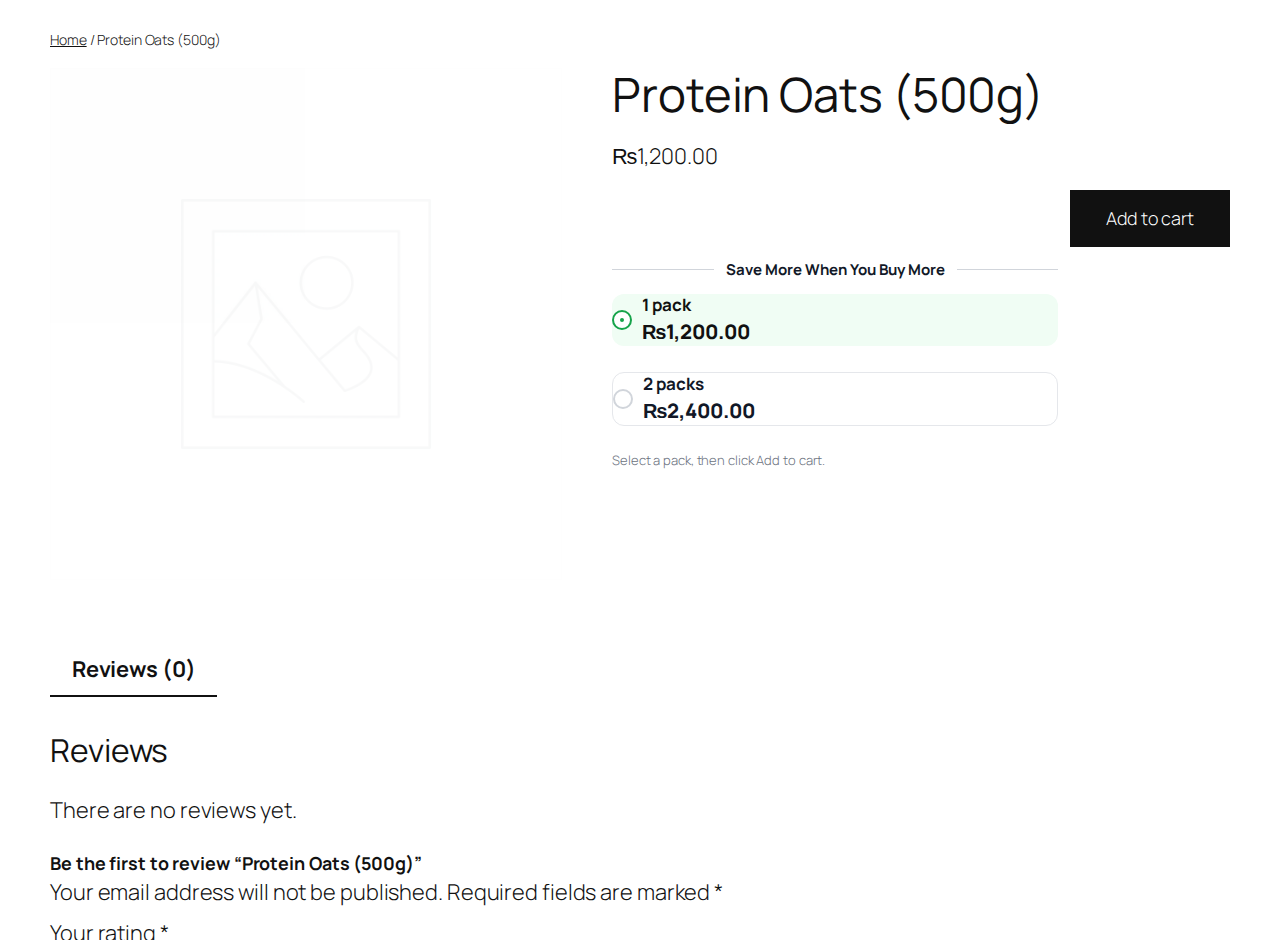
Classic cards live on a product page: pick a pack, see the savings, add to cart.
Layouts
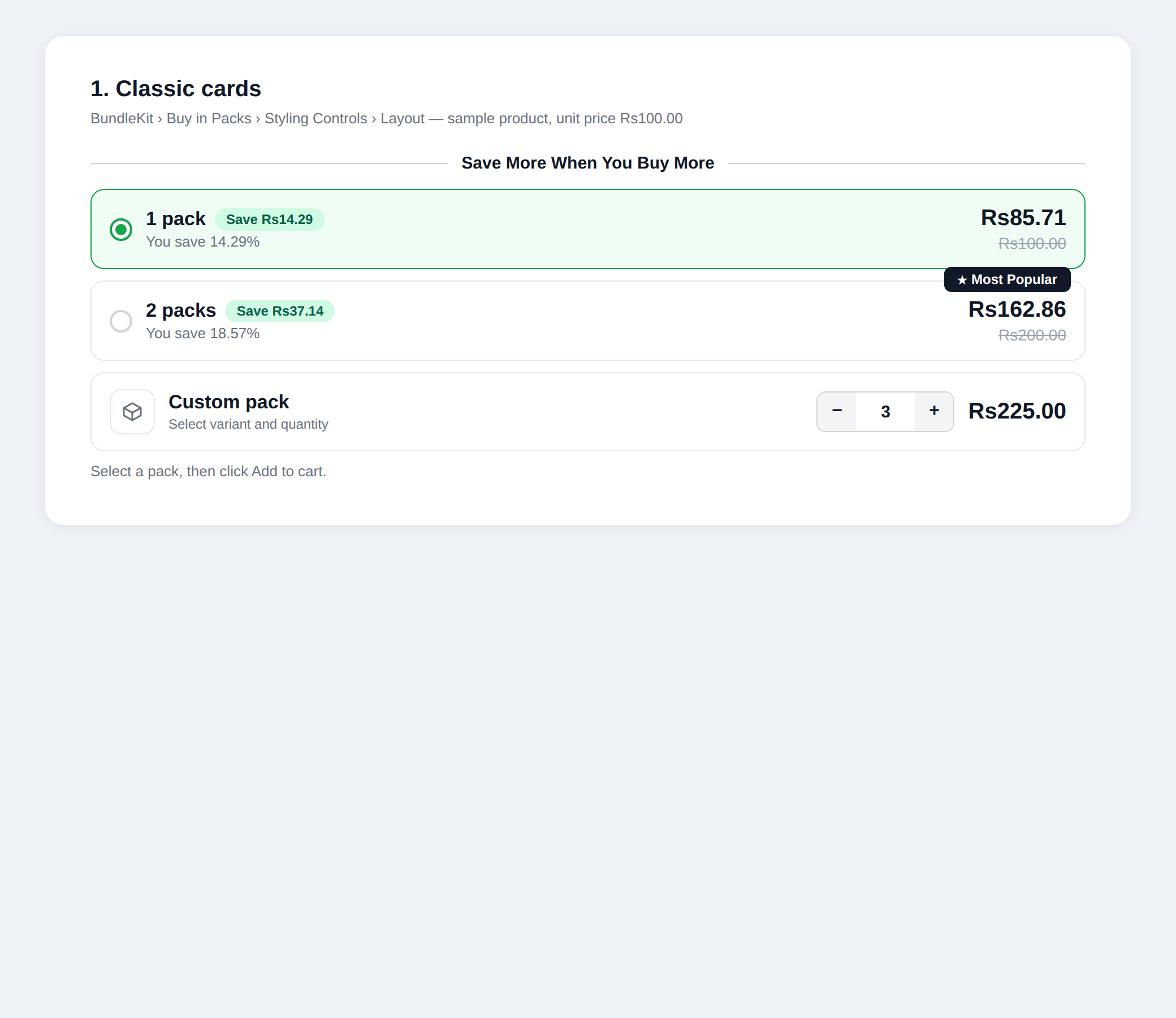
Classic cards: pack rows with savings badges |
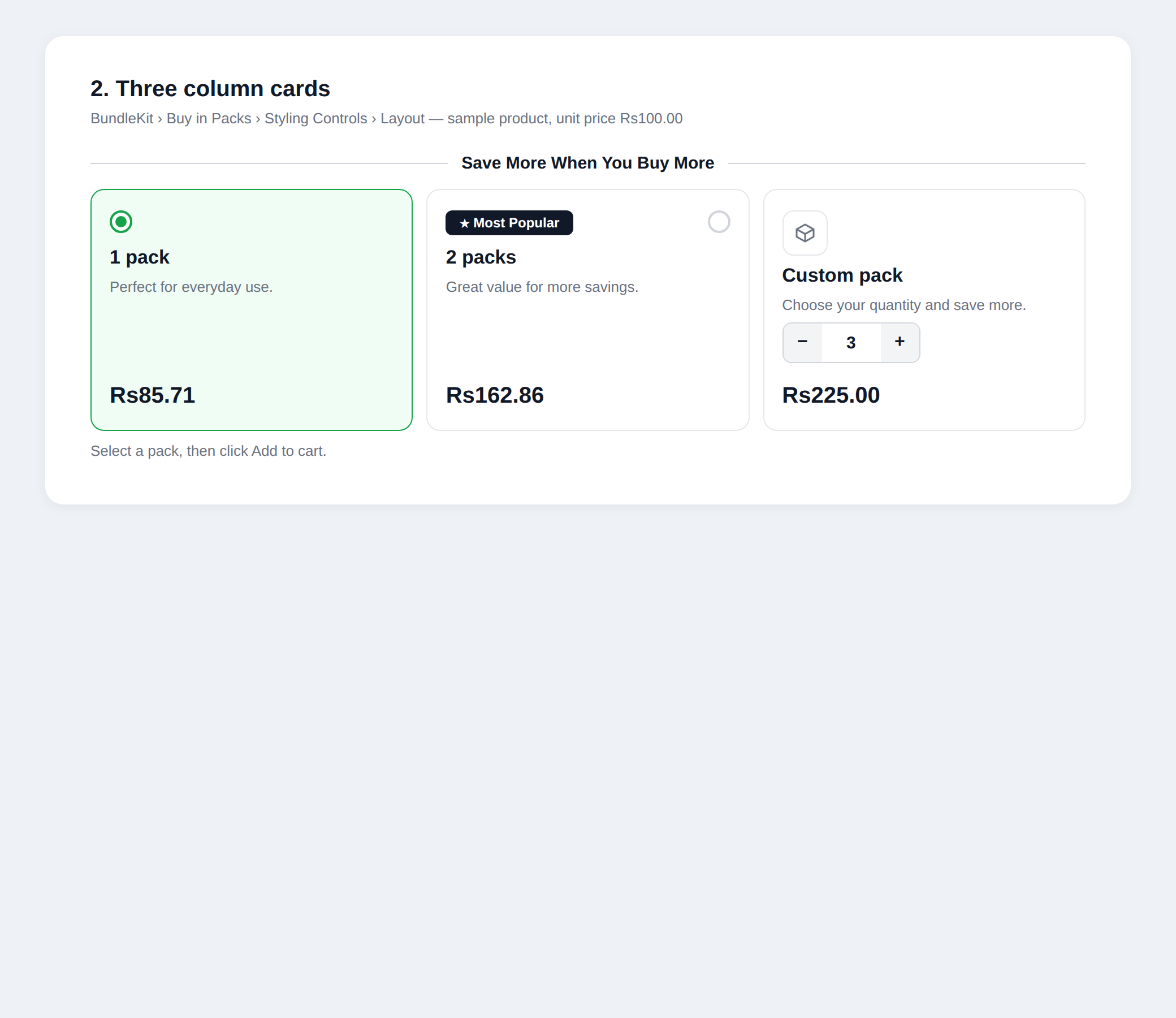 Three column cards: visual cards for easy comparison |
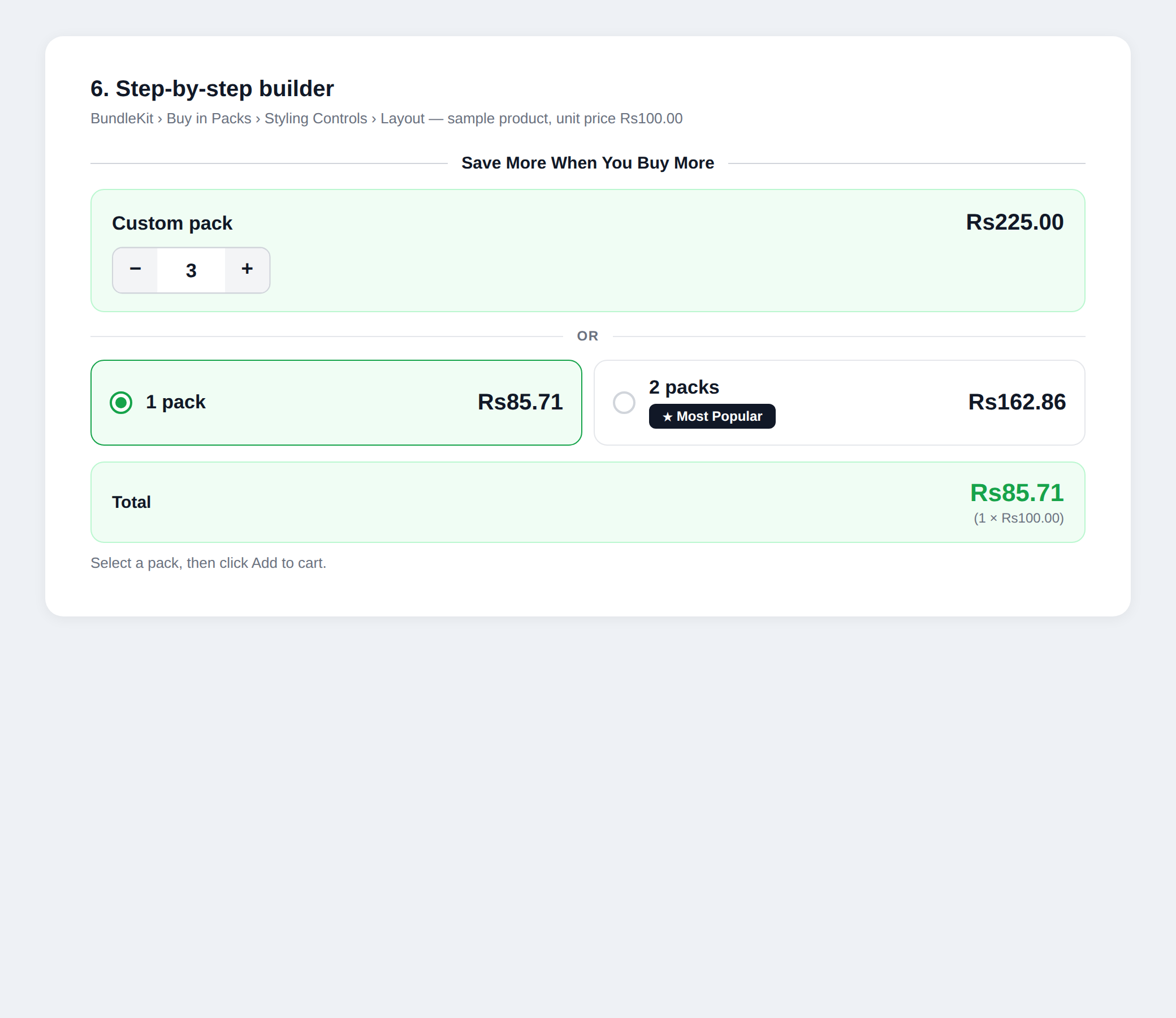 Step-by-step builder: quantity stepper with live total |
Features
Storefront
- 3 layouts: Classic cards, Three column cards, Step-by-step builder — picked globally, switchable anytime.
- Per-pack discounts with "Save Rs X" / "You save N%" badges and struck regular prices.
- "Most Popular" badge on a chosen pack.
- Optional Custom pack card: the shopper picks any quantity between your min and max.
- Live total updates as the shopper changes quantity.
Pack setup
- Global Default Packs: a 1-pack (qty 1) and a 2-pack (qty 2) appear on every product out of the box — 0% discount, fully editable.
- Settings > Default Packs repeater and Custom Pack card (on/off, label, min/max/step/discount; off by default).
- Per product, Pack source: Use global packs (default), Custom packs for this product, or No packs on this product.
- Resolution order: master kill-switch → product disabled → product custom → global.
- A Fixed Bundle offer on the same product wins over packs.
Quality
- No external requests, tracking or telemetry. Nonce checks on settings saves; escaped output.
Installation and quick start
- Upload the ZIP at Plugins > Add New Plugin > Upload Plugin and activate (WooCommerce must be active).
- Every product already shows the global 1-pack and 2-pack — open a product page to see them.
- Tune discounts under BundleKit > Buy in Packs > Settings, or set per-product packs in the product editor.
Pack setup
- BundleKit > Buy in Packs > Settings: edit the Default Packs (quantities, discounts, badges) and optionally enable the Custom Pack card.
- For a product with its own packs: edit the product, set Pack source to "Custom packs for this product" and define them.
- To hide packs on a product: set Pack source to "No packs on this product".
Layouts
- Classic cards: one row per pack with the savings badge and struck price — the default.
- Three column cards: visual cards side by side for easy comparison.
- Step-by-step builder: a quantity stepper on top with a live total below.
Pick the layout under Styling Controls; the preview updates live before you save.
Global settings reference
| Area | Controls |
|---|---|
| Settings | Master on/off kill-switch, Default Packs repeater, Custom Pack card |
| Styling Controls | Layout picker with live preview, colors and typography |
| Product editor | Pack source: Use global packs / Custom packs for this product / No packs on this product |
FAQ and troubleshooting
Packs appear on a product I never set up. That is the global Default Packs — they show on every product by design. Set that product's Pack source to "No packs on this product" to hide them.
I changed the layout but the product page still shows the old one. Save the settings, clear any page cache, and in Elementor go to Tools > Regenerate Files & Data.
A product has both a Fixed Bundle and packs. The Fixed Bundle wins; packs are hidden on that product.
I updated the plugin but the old version still seems to run. Check the version on the Plugins screen. If the files did not actually replace, re-upload the ZIP with "Replace current with uploaded" and restart Apache (to clear OPcache).
Version history and roadmap
| Version | Highlights |
|---|---|
| 1.6.0 | Trimmed to 3 layouts (Classic cards, Three column cards, Step-by-step builder) |
| 1.4.1 | Fix: fatal on the Styling Controls preview |
| 1.3.0 | Global Default Packs: 1-pack and 2-pack on every product with zero setup |
| 1.0.0 | Initial release: tiered packs, per-pack discounts, layouts |
Roadmap: more BundleKit add-ons (Mix-and-match / BYOB, Build-a-box).
Support and license
Ideas and bug reports: open a GitHub issue, or email safiqkhan0102@gmail.com. Author: Shafiqur Rehman.
MIT. See LICENSE. (The plugin header also carries GPLv2 or later for WordPress.org compatibility.)