Install
This is the repository archive. It installs, but the folder name will carry the branch suffix and updates will not flow.
Install straight from GitHub with WP-CLI:
wp plugin install https://github.com/serkanalgur/advanced-content-restrictor/archive/refs/heads/main.zipControl content access with precision. Restrict posts, archives, and pages. Custom login redirects. Modern dashboard interface. Must-use plugin.
Description
Advanced Content Restrictor
Safeguard your WordPress content with surgical precision. This must-use plugin empowers administrators to protect sensitive material while maintaining a seamless user experience.
Key Features: 🔒 Granular Content Control
- Restrict individual posts/pages
- Protect entire post type archives
- Block custom post type singular entries
- Select multiple targets with smart filters
🔄 Flexible Redirect Options
- Choose any page as login redirect
- Default WordPress login fallback
- Maintains referral data for post-login returns
🎛 Modern Administration
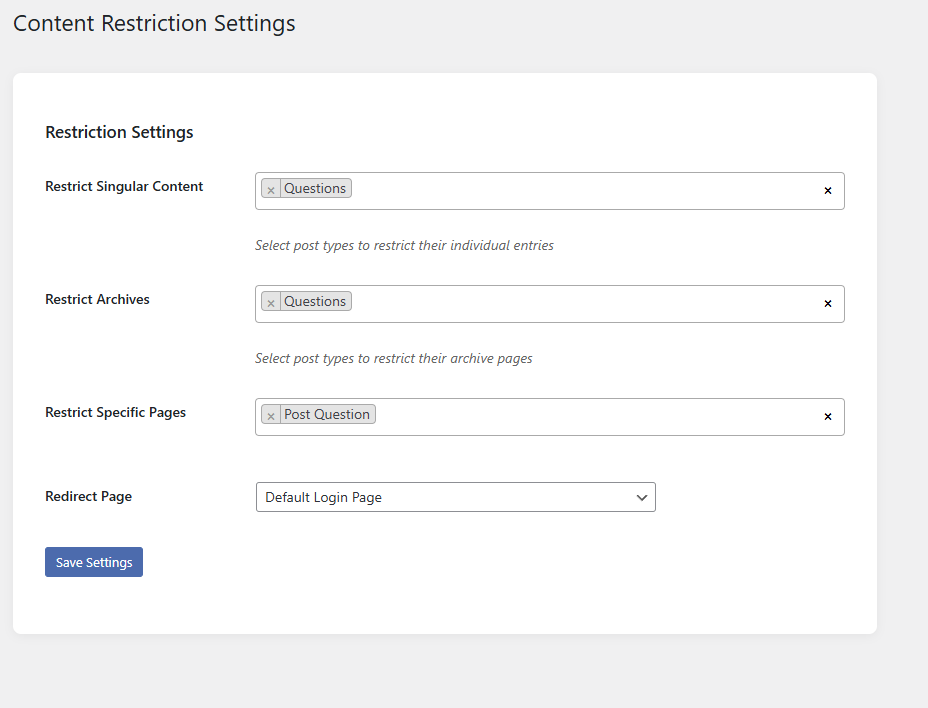
- Intuitive Select2 multi-select interface
- Card-based settings layout
- Real-time selection previews
- Responsive dashboard design
⚡ Optimized Performance
- Must-use plugin architecture
- Zero database bloat
- Cached settings retrieval
- Lightweight (under 50KB)
Use Cases:
- Member-only content areas
- Premium resource protection
- Client portal restrictions
- Archive page paywalls
- Temporary content lockdown
Technical Specifications:
- Requires PHP 7.4+
- Compatible with WordPress 5.6+
- Follows WP coding standards
- Non-intrusive template redirects
- Full settings sanitization
Why Choose This Plugin?
- Unlike basic restriction plugins, our solution offers:
- Dual protection (singular + archives)
- Visual page selection interface
- No shortcode dependencies
- MU plugin reliability
- Future-proof settings architecture
Setup in Minutes:
- Install as must-use plugin
- Visit Settings → Content Restrictor
- Select protected content
- Choose redirect page
- Save and enjoy peace of mind
Maintain complete content control without compromising site performance or user experience. Ideal for agencies, membership sites, and enterprise implementations.
Installation
- Upload
advanced-content-restrictorfolder to the/wp-content/plugins/directory - Activate the plugin through the
Pluginsmenu in WordPress
Screenshots
1. Plugin Page
Changelog
First Release