Install
This is the repository archive. It installs, but the folder name will carry the branch suffix and updates will not flow.
Install straight from GitHub with WP-CLI:
wp plugin install https://github.com/satwinderrathore/cmb2-radio-image/archive/refs/heads/master.zipNo built-in updater. New versions won't appear under Dashboard → Updates. Install new releases yourself, or let Git Updater track the repository.
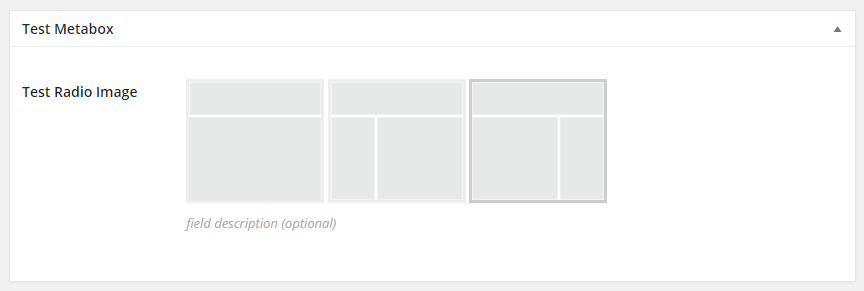
Image as radio buttons
add_action( 'cmb2_admin_init', 'cmb2_radio_image_metabox' );
function cmb2_radio_image_metabox() {

    $prefix = 'yourprefix_demo_';

    $cmb_demo = new_cmb2_box( array(
        'id'            => $prefix . 'metabox',
        'title'         => __( 'Test Metabox', 'cmb2' ),
        'object_types'  => array( 'page', 'post' ), // Post type
        // 'show_on_cb' => 'yourprefix_show_if_front_page', // function should return a bool value
        // 'context'    => 'normal',
        // 'priority'   => 'high',
        // 'show_names' => true, // Show field names on the left
        // 'cmb_styles' => false, // false to disable the CMB stylesheet
        // 'closed'     => true, // true to keep the metabox closed by default
    ) );

    $cmb_demo->add_field( array(
        'name'             => __( 'Test Radio Image', 'cmb2' ),
        'desc'             => __( 'field description (optional)', 'cmb2' ),
        'id'               => $prefix . 'radioimg',
        'type'             => 'radio_image',
        'options'          => array(
            'full-width'    => __('Full Width', 'cmb2'),
            'sidebar-left'  => __('Left Sidebar', 'cmb2'),
            'sidebar-right' => __('Right Sidebar', 'cmb2'),
        ),
        'images_path'      => get_template_directory_uri(),
        'images'           => array(
            'full-width'    => 'images/full-width.png',
            'sidebar-left'  => 'images/sidebar-left.png',
            'sidebar-right' => 'images/sidebar-right.png',
        )
    ) );

}
Screenshots