Tasty Custom Fonts releases
Tasty Fonts gives designers, agencies, and WordPress professionals one place to upload, import, preview, and publish the fonts that power a site. Manage local fonts, Google Fonts, Bunny Fonts, and Adobe Fonts from a single dashboard, then push the right typography across the frontend, Gutenberg, and Etch without juggling disconnected tools.
by Tasty WP · github.com/sathyvelukunashegaran/tasty-custom-fonts · website
Install
The author publishes release zips, so WP-CLI can install straight from GitHub:
wp plugin install https://github.com/sathyvelukunashegaran/tasty-custom-fonts/releases/download/1.16.0-beta.3/tasty-fonts-1.16.0-beta.3.zipReadme
One Plugin to Manage Every Font on Your WordPress Site
Tasty Custom Fonts is the free WordPress font manager from Tasty WP that unifies local fonts, custom CSS URL imports, Google Fonts, Bunny Fonts, and Adobe Fonts in a single dashboard — with a draft-first publishing workflow, GDPR-friendly self-hosting, and deep integrations for Gutenberg and your favourite page builders.
Stop juggling four workflows. Stop breaking Gutenberg presets. Stop rebuilding typography from scratch on every project.
Works with EtchWP · Automatic CSS · Bricks · Oxygen — and on any standard WordPress site without them.
The Problem With WordPress Fonts Today
Every WordPress project means the same painful loop: uploading fonts in one plugin, configuring a CDN in another, fixing broken Gutenberg presets in a third, worrying about GDPR violations from remote Google Fonts calls, and rebuilding the whole system when a client changes their typeface. There is no single place to see, control, and safely publish the fonts that shape your site.
Tasty Custom Fonts fixes that — one plugin, every font source, zero build tools.
Why Tasty Custom Fonts
- Stop rebuilding your font setup from scratch. One library, one workflow, reusable across every project.
- See exactly how typography looks before it goes live. Draft roles let you compare heading, body, and monospace output against the live site before a single visitor sees a change.
- Stay GDPR-friendly with one-click self-hosting. Import Google Fonts and Bunny Fonts into your own server — no third-party CDN requests at runtime, no compliance headaches.
- Switch delivery modes without rebuilding anything. Each font family stores multiple delivery profiles. Toggle between self-hosted and CDN without touching your CSS or role assignments.
- Keep every layer of WordPress in sync. Runtime CSS, Gutenberg font presets, preloads, preconnect hints, and builder outputs all generate from the same settings surface.
Everything You Need, Nothing You Don't
Add Any Font Source
Pull in fonts from wherever your project needs them — all managed from the same dashboard.
- Upload
WOFF2,WOFF,TTF, andOTFfiles directly from the WordPress admin - Import fonts from one public HTTPS CSS stylesheet URL containing
@font-facerules (WOFF2/WOFF in Phase 1) - Import Google Fonts as self-hosted files or serve from Google CDN
- Import Bunny Fonts as self-hosted files or serve from Bunny CDN
- Connect an Adobe Fonts web project and use Adobe-hosted families alongside local and imported fonts
- Rescan
wp-content/uploads/fonts/to pick up files added outside the plugin UI
Preview & Publish Safely
Your live site stays unchanged until you say so.
- Build draft heading, body, and optional monospace roles before applying them sitewide
- Preview typography across editorial, interface, reading, card, and code scenes
- Compare draft versus live output side by side
- Publish the full typography system in one action
Control How Fonts Are Delivered
Precise runtime control — no manual CSS required.
- Store multiple delivery profiles per family and choose which is active at runtime
- Enable variable font support for axis-aware controls and flexible weight behavior per role
- Generate CSS custom properties, optional utility classes, and
@font-facerules automatically - Configure
font-display, fallback stacks, and unicode-range handling per family - Emit WOFF2 preloads for self-hosted families and preconnect hints for CDN deliveries
Sync With Your Whole Stack
Published fonts reach every layer of your WordPress site automatically.
- Register runtime families as Gutenberg font presets
- Optionally sync published families into the core Block Editor Font Library
- Push typography to Etch, Bricks, Oxygen, and Automatic.css through dedicated integrations
- Inspect generated CSS, download the runtime stylesheet, and trace changes through the activity log
- Run Advanced Tools workflows from WP-CLI for scripted diagnostics, CSS regeneration, transfer bundles, snapshots, and support exports
See It in Action
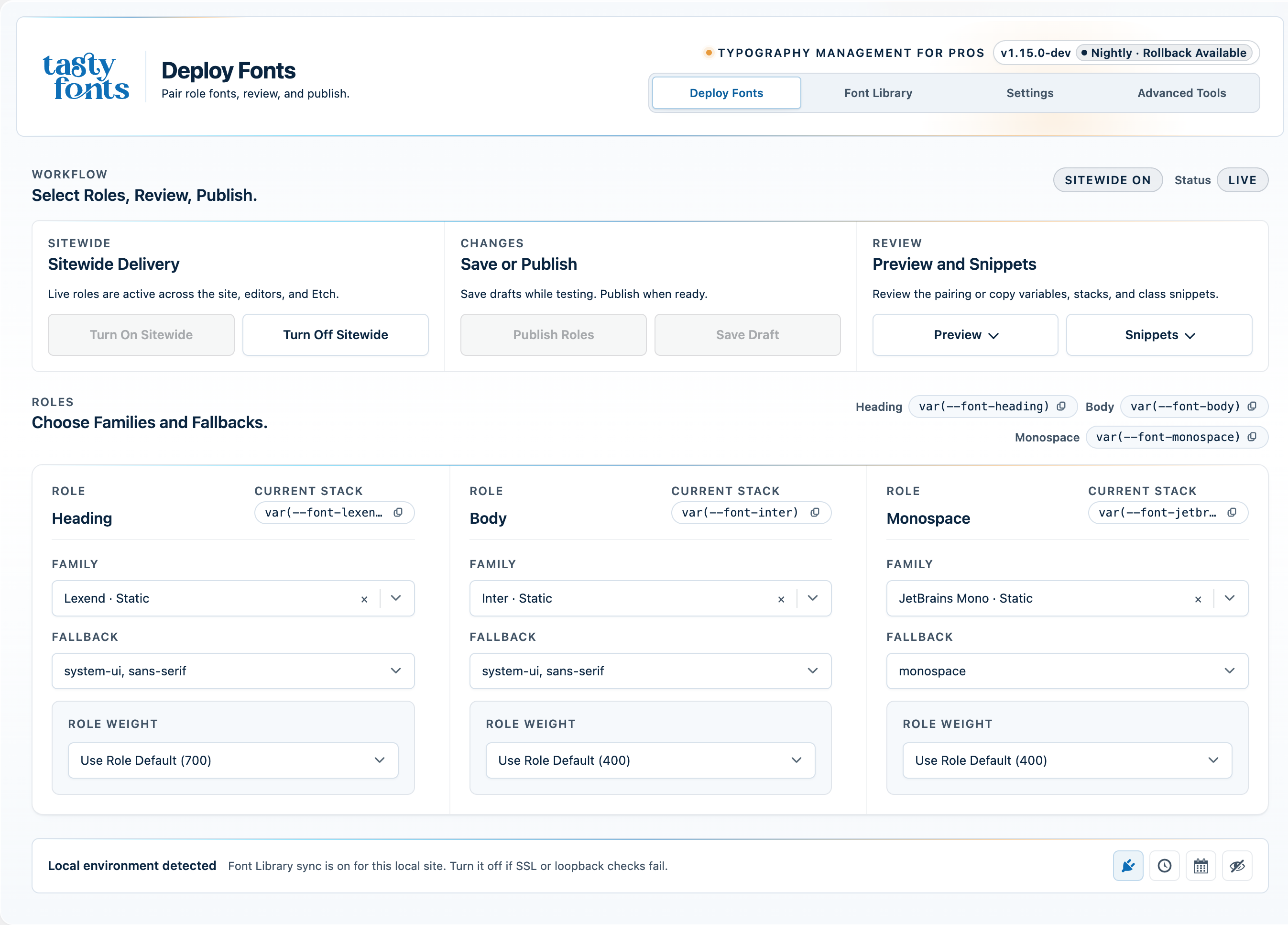 Deploy Fonts — compare draft vs. live before publishing |
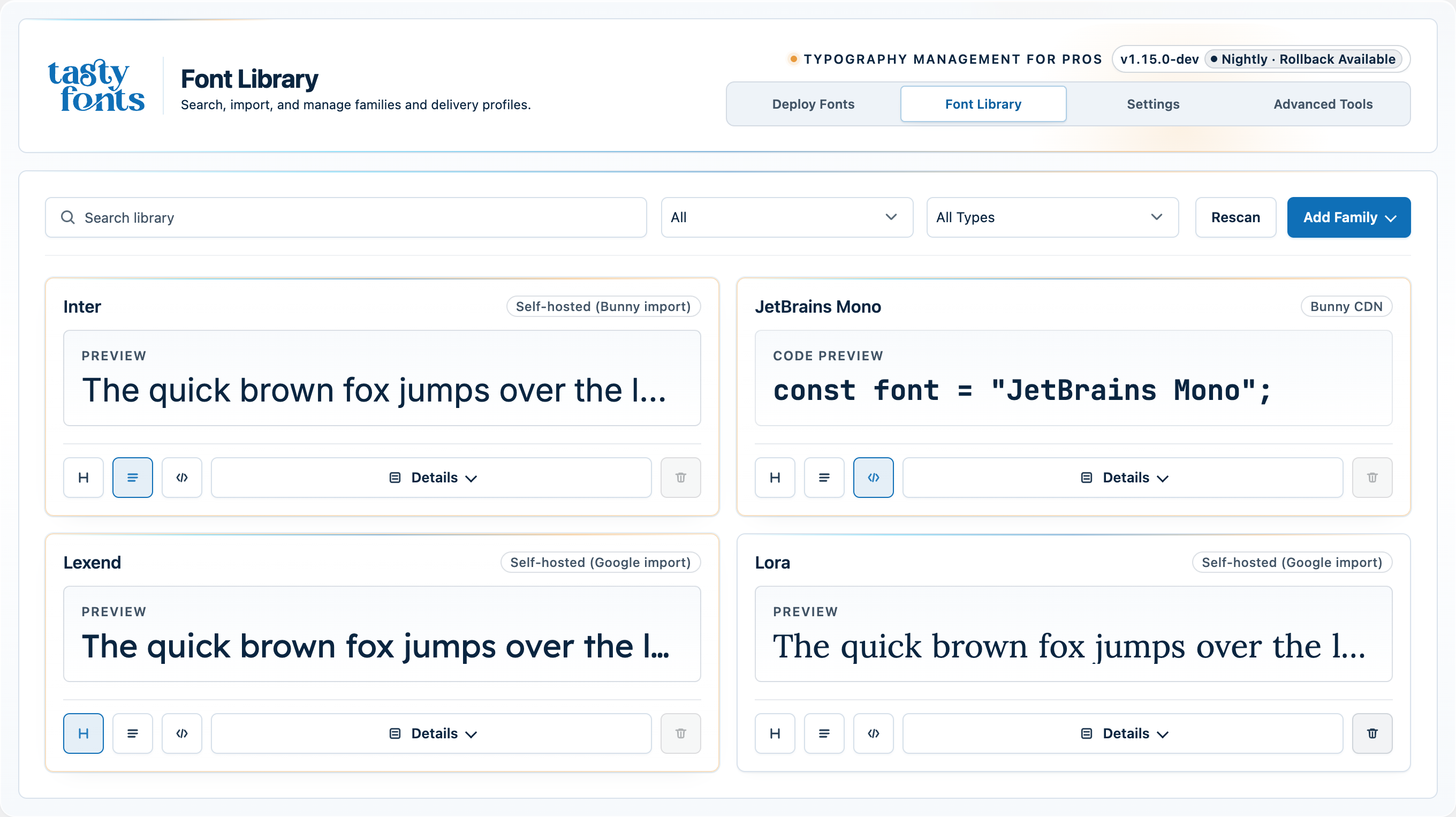 Font Library — all families, delivery profiles, and publish states |
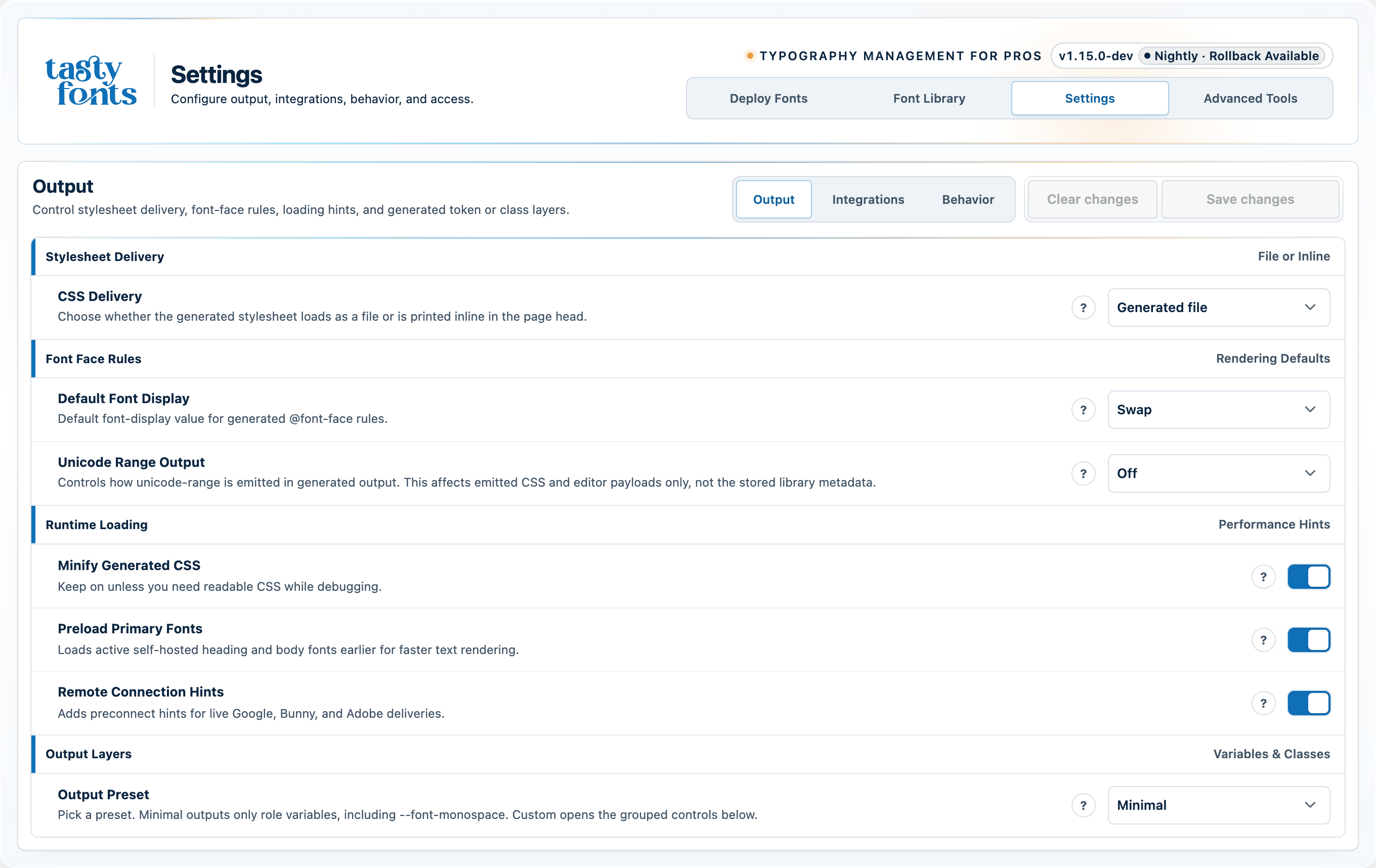 Settings — output controls, integrations, and runtime behavior |
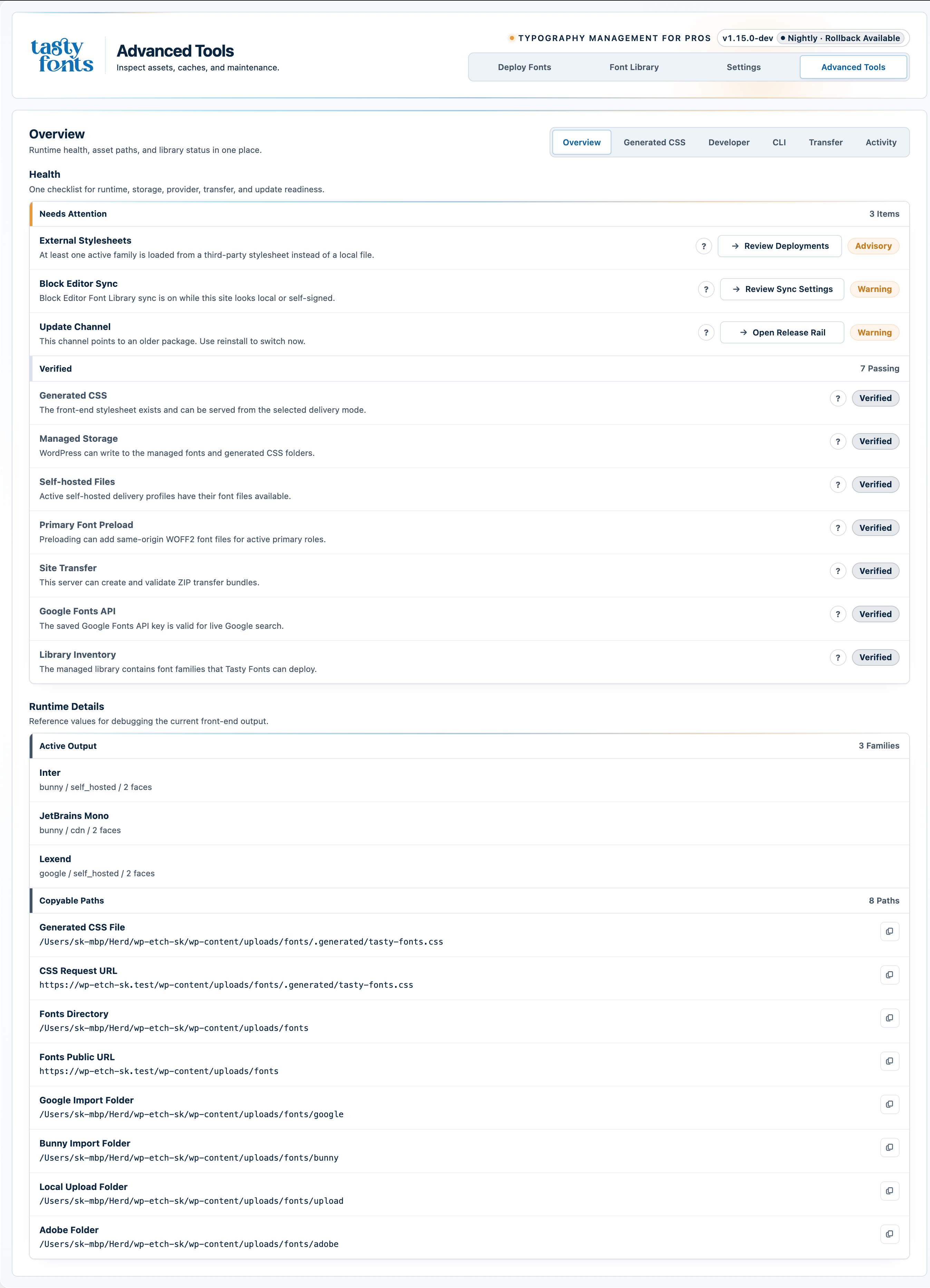 Advanced Tools — generated CSS, diagnostics, and activity log |
Supported Font Sources
| Source | Delivery options | Self-hostable | GDPR-friendly |
|---|---|---|---|
| Local files | Self-hosted | ✅ Yes | ✅ Yes |
| Custom CSS URL | Self-hosted or remote URL | ✅ Yes | ✅ Yes (when self-hosted) |
| Google Fonts | Self-hosted or Google CDN | ✅ Yes | ✅ Yes (when self-hosted) |
| Bunny Fonts | Self-hosted or Bunny CDN | ✅ Yes | ✅ Yes (when self-hosted) |
| Adobe Fonts | Adobe-hosted | — | ❌ No (Adobe-hosted) |
Each family stores one or more delivery profiles. The active profile controls what the plugin serves at runtime — switch it any time without rebuilding your typography system.
Self-hosted provider files are stored under your uploads directory:
- Custom CSS URL imports:
wp-content/uploads/fonts/custom/<family-slug>/ - Google Fonts:
wp-content/uploads/fonts/google/<family-slug>/ - Bunny Fonts:
wp-content/uploads/fonts/bunny/<family-slug>/
How It Works — 5 Steps
- Add fonts to your library — local files, custom CSS URLs, Google Fonts, Bunny Fonts, or Adobe Fonts, all from the same screen.
- Choose a delivery profile for each family — self-hosted for full GDPR control, CDN for convenience.
- Assign draft roles for heading, body, and optional monospace output — nothing goes live yet.
- Preview the full typography system and compare it against what is currently live on the site.
- Publish sitewide — the frontend, Gutenberg, and your page builder all update in one step.
No build tools. No CDN accounts. No custom code.
Built for the Tools You Already Use
All integrations are opt-in and activate automatically when the companion tool is present. Tasty Custom Fonts works on any standard WordPress install without requiring any of them.
- Gutenberg — published families register as editor font presets and optionally sync into the core Block Editor Font Library
- Etch — runtime stylesheet URLs and bridge CSS pass through the canvas bridge so preview typography stays aligned with the live site
- Automatic.css — heading and body font-family and font-weight settings sync automatically with your managed role variables
- Bricks — published families appear in Bricks builder selectors; matching Bricks typography choices mirror into Gutenberg editor styles
- Oxygen — published families surface through the compatibility shim; matching Oxygen choices mirror into Gutenberg editor styles
No Lock-In. No Bloat.
Tasty Custom Fonts has zero runtime PHP dependencies. There is no build step for plugin use. composer install and npm install/npm ci are only used for repository dev tooling like PHPStan, Stylelint, and CI.
Output is plain CSS and standard WordPress enqueues. Nothing proprietary, nothing that breaks if you deactivate the plugin.
Developers can filter the generated CSS, modify the font catalog, and hook into delivery behavior using standard WordPress filters. The generated CSS filter is a CSS contract: callbacks should return valid CSS, and Tasty Custom Fonts preserves it as CSS rather than passing it through broad HTML sanitization.
// Modify the generated runtime CSS
add_filter( 'tasty_fonts_generated_css', function( $css, $catalog, $roles, $settings ) {
    return $css;
}, 10, 4 );
The catalog filter receives the structured unified family catalog and should return the same catalog shape. Runtime output boundaries such as preload links, preconnect hints, and provider stylesheet tags use context-specific URL or attribute escaping when rendered. See wiki/Architecture.md for the current filter contract table, including which hooks are intended extension points and which are internal escape hatches.
The plugin is translation-ready and uses the tasty-fonts text domain. Translation template at languages/tasty-fonts.pot.
Requirements
| Component | Minimum |
|---|---|
| WordPress | 6.5 |
| PHP | 8.1 |
| Etch / Bricks / Oxygen / Automatic.css | Optional |
Install
Fastest Path — Download Free From GitHub Releases
- Download the latest ZIP from GitHub Releases.
- In WordPress, go to
Plugins → Add New Plugin → Upload Plugin. - Upload the ZIP and activate Tasty Custom Fonts.
- Open Tasty Fonts in the WordPress admin menu.
No npm install. No Composer. No build step.
The packaged plugin directory is tasty-fonts/. Once installed from a release ZIP, you can follow the Stable, Beta, or Nightly update channel from Settings → Behavior → Update Channel — updates deliver automatically through the WordPress admin.
Manual / Git Install
- Clone or download this repository.
- Copy the
tasty-fontsfolder intowp-content/plugins/. - Activate the plugin from the WordPress Plugins screen.
- Open Tasty Fonts in the WordPress admin menu.
Read the full README on GitHub →
Releases
| Tag | Published | Asset | Downloads |
|---|---|---|---|
| 1.16.0-beta.3 | May 4, 2026 | tasty-fonts-1.16.0-beta.3.zip | 0 |
| 1.16.0-beta.3 | May 4, 2026 | tasty-fonts-1.16.0-beta.3.zip.sha256 | 0 |
| 1.16.0-dev.202605031448 | May 3, 2026 | tasty-fonts-1.16.0-dev.202605031448.zip | 0 |
| 1.16.0-dev.202605031448 | May 3, 2026 | tasty-fonts-1.16.0-dev.202605031448.zip.sha256 | 0 |
| 1.16.0-beta.2 | May 2, 2026 | tasty-fonts-1.16.0-beta.2.zip | 0 |
| 1.16.0-beta.2 | May 2, 2026 | tasty-fonts-1.16.0-beta.2.zip.sha256 | 0 |
| 1.16.0-beta.1 | May 1, 2026 | tasty-fonts-1.16.0-beta.1.zip.sha256 | 0 |
| 1.16.0-beta.1 | May 1, 2026 | tasty-fonts-1.16.0-beta.1.zip | 0 |
| 1.16.0-dev.202604300814 | Apr 30, 2026 | tasty-fonts-1.16.0-dev.202604300814.zip | 0 |
| 1.16.0-dev.202604300814 | Apr 30, 2026 | tasty-fonts-1.16.0-dev.202604300814.zip.sha256 | 0 |
| 1.16.0-dev.202604300808 | Apr 30, 2026 | tasty-fonts-1.16.0-dev.202604300808.zip | 0 |
| 1.16.0-dev.202604300808 | Apr 30, 2026 | tasty-fonts-1.16.0-dev.202604300808.zip.sha256 | 0 |
| 1.15.0 | Apr 30, 2026 | tasty-fonts-1.15.0.zip | 1 |
| 1.15.0 | Apr 30, 2026 | tasty-fonts-1.15.0.zip.sha256 | 0 |
| 1.15.0-dev.202604291546 | Apr 29, 2026 | tasty-fonts-1.15.0-dev.202604291546.zip.sha256 | 0 |
| 1.15.0-dev.202604291546 | Apr 29, 2026 | tasty-fonts-1.15.0-dev.202604291546.zip | 0 |
| 1.15.0-dev.202604282004 | Apr 28, 2026 | tasty-fonts-1.15.0-dev.202604282004.zip | 0 |
| 1.15.0-dev.202604282004 | Apr 28, 2026 | tasty-fonts-1.15.0-dev.202604282004.zip.sha256 | 0 |
| 1.15.0-beta.2 | Apr 26, 2026 | tasty-fonts-1.15.0-beta.2.zip.sha256 | 0 |
| 1.15.0-beta.2 | Apr 26, 2026 | tasty-fonts-1.15.0-beta.2.zip | 4 |
| 1.15.0-dev.202604261502 | Apr 26, 2026 | tasty-fonts-1.15.0-dev.202604261502.zip | 0 |
| 1.15.0-dev.202604261502 | Apr 26, 2026 | tasty-fonts-1.15.0-dev.202604261502.zip.sha256 | 0 |
| 1.15.0-dev.202604260549 | Apr 26, 2026 | tasty-fonts-1.15.0-dev.202604260549.zip.sha256 | 0 |
| 1.15.0-dev.202604260549 | Apr 26, 2026 | tasty-fonts-1.15.0-dev.202604260549.zip | 0 |
| 1.15.0-dev.202604260529 | Apr 26, 2026 | tasty-fonts-1.15.0-dev.202604260529.zip | 0 |