Install
This is the repository archive. It installs, but the folder name will carry the branch suffix and updates will not flow.
Install straight from GitHub with WP-CLI:
wp plugin install https://github.com/sasanzare/biologiism-courses-carousel-plugin/archive/refs/heads/main.zipAn RTL WordPress plugin for displaying WooCommerce courses/products in a modern category-tabbed carousel. It is built for Persian course websites and works well inside Elementor through a simple shortcode.
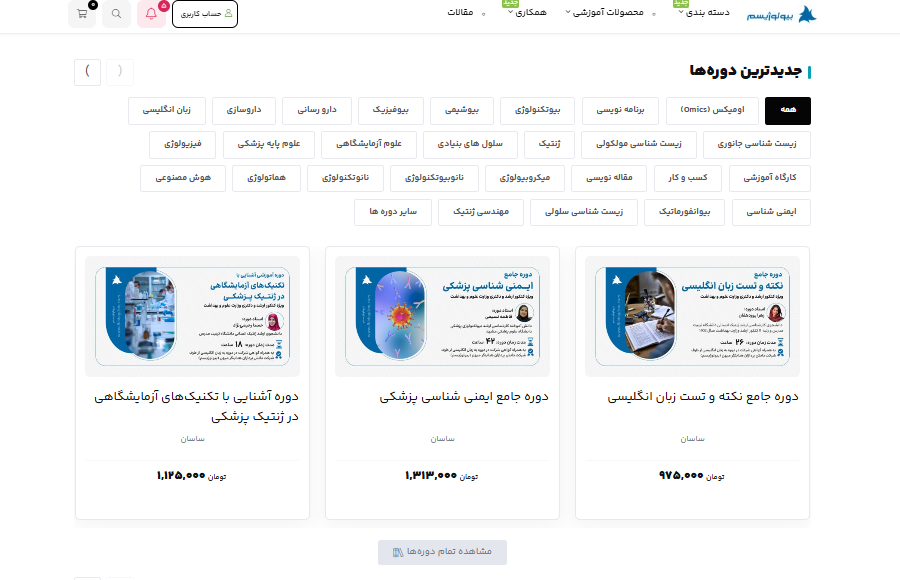
Overview
Biologiism Courses Carousel adds the following shortcode:
[biologiism_courses_carousel]The shortcode renders a WooCommerce product carousel with:
- A section title
- WooCommerce product category tabs
- An optional "All" tab
- Product cards
- Featured image
- Product title and link
- Course instructor
- Student count
- Rating and review count
- Price and sale price
- Discount badge
- Course badges such as "Popular Users" and "Certificate"
- Previous/next carousel buttons
The plugin is designed for RTL layouts and uses scoped bcc- CSS classes to reduce theme conflicts.
Features
- Elementor-friendly shortcode
- WooCommerce product source
- Category tabs from the
product_cattaxonomy - Pre-rendered tab panels for fast switching
- Vanilla JavaScript carousel controls
- CSS scroll-snap carousel behavior
- No CDN dependency
- Fully RTL-ready
- Uses the active site/theme font
- Desktop layout with 3 cards per carousel view
- Tablet layout with 2 cards per carousel view
- Mobile-friendly horizontal scroll
- Clean handling of missing course metadata
- Inline CSS/JS loading to avoid MIME and missing asset issues on some hosts
- CSS classes prefixed with
bcc-
Requirements
- WordPress 5.8 or newer
- PHP 7.4 or newer
- WooCommerce enabled
- Published WooCommerce products
- Elementor, Gutenberg, Classic Editor, or any area that supports WordPress shortcodes
File Structure
biologiism-courses-carousel/
├── README.md
├── biologiism-courses-carousel.php
└── assets/
    ├── css/
    │   └── bcc-style.css
    ├── js/
    │   └── bcc-script.js
    └── screenshots/
        └── biologiism-carousel-demo.png
Installation
Option 1: Install from the WordPress Dashboard
- Download or create a ZIP file of the
biologiism-courses-carouselfolder. - Open your WordPress dashboard.
- Go to
Plugins > Add New > Upload Plugin. - Upload the ZIP file.
- Click
Install Now. - Activate the plugin.
- Add the shortcode to an Elementor Shortcode widget or any shortcode-enabled area.
Option 2: Manual Installation
- Upload the plugin folder to:
wp-content/plugins/- The final plugin path should be:
wp-content/plugins/biologiism-courses-carousel/biologiism-courses-carousel.php- Open the WordPress dashboard.
- Go to
Plugins. - Activate
Biologiism Courses Carousel.
Basic Usage
Default carousel:
[biologiism_courses_carousel]Latest courses:
[biologiism_courses_carousel title="Latest Courses" per_page="8" orderby="date" order="DESC"]Most popular courses:
[biologiism_courses_carousel title="Popular Courses" per_page="8" orderby="popularity" order="DESC"]Specific categories by slug:
[biologiism_courses_carousel category_slugs="programming,ai,marketing" per_page="6"]Specific categories by ID:
[biologiism_courses_carousel category_ids="12,18,25" orderby="rating" order="DESC"]Elementor Usage
- Edit a page with Elementor.
- Add the
Shortcodewidget. - Paste the shortcode into the widget.
- Save or update the page.
- View the page on the frontend.
Example:
[biologiism_courses_carousel title="جدیدترین دورهها" per_page="6" orderby="date" order="DESC"]The plugin output is RTL-ready, so Persian titles and category names can be used directly in shortcode attributes.
Shortcode Attributes
| Attribute | Default | Description |
|---|---|---|
title |
محبوبترین دورهها |
Section title |
per_page |
8 |
Number of products loaded per tab |
category_ids |
empty | Comma-separated WooCommerce product category IDs |
category_slugs |
empty | Comma-separated WooCommerce product category slugs |
show_all |
yes |
Shows the "All" tab when set to yes |
orderby |
popularity |
Product sorting mode |
order |
DESC |
Sort direction |
Supported orderby Values
| Value | Description |
|---|---|
popularity |
Sort by WooCommerce total sales |
date |
Sort by publish date |
price |
Sort by product price |
rating |
Sort by WooCommerce average rating |
title |
Sort by product title |
rand |
Random order |
Supported order Values
ASC
DESC
Recommended examples:
orderby="date" order="DESC"orderby="price" order="ASC"orderby="rating" order="DESC"WooCommerce Data Sources
The plugin reads standard WooCommerce product data:
- Product featured image
- Product title
- Product permalink
- Regular price
- Sale price
- Sale status
- Average rating
- Review count
- Featured product status
- Total sales
- Product category terms from
product_cat
Only published, visible, purchasable, and in-stock products are displayed.
Supported Course Metadata
The plugin also supports optional custom fields for course-specific information.
| Meta Key | Purpose |
|---|---|
_students_count |
Course student count |
_course_instructor |
Course instructor name |
_course_duration |
Course duration |
_course_certificate |
Shows the certificate badge when set to yes, 1, true, or on |
Instructor Fallback Order
The instructor name is resolved in this order:
- Product meta
_course_instructor - Product attribute
pa_instructor - WordPress product author display name
Student Count Fallback Order
The student count is resolved in this order:
- Product meta
_students_count - WooCommerce
total_sales - Hidden if no valid value exists
Badges
Popular Users
The محبوب کاربران badge is shown when:
- The product is marked as featured, or
- The product total sales are equal to or greater than the configured threshold
The default threshold is 50. Developers can change it with this filter:
add_filter( 'bcc_popular_sales_threshold', function ( $threshold, $product ) {
    return 100;
}, 10, 2 );
Certificate
The گواهینامه badge is shown when _course_certificate is set to:
yes
1
true
on
Handling Empty Values
The plugin keeps product cards clean by hiding empty values:
- Student count is hidden when empty or zero.
- Rating is hidden when zero.
- Review count is hidden when zero.
- Discount badge is hidden when the product is not on sale.
- Regular crossed-out price is hidden when there is no sale price.
- Single-price products show the price centered in the card.
Styling Notes
The design is scoped with bcc- prefixed classes.
Default visual choices:
- RTL layout
- Active tab: black background with white text
- Inactive tab text:
#565656 - Card background: white
- Card border: light gray
- Discount badge: purple/magenta
- Rating star: yellow
- No external font loading
Main stylesheet:
assets/css/bcc-style.cssResponsive Behavior
| Viewport | Layout |
|---|---|
| Desktop | 3 cards per carousel view |
| Tablet | 2 cards per carousel view |
| Mobile | Horizontal scroll carousel |
Category tabs wrap on desktop to prevent the last category from being clipped. On mobile, tabs remain horizontally scrollable.
Category Behavior
- Categories are read from the WooCommerce
product_cattaxonomy. - Empty categories are hidden.
- If
category_idsis provided, only those category IDs are used. - If
category_slugsis provided, only those category slugs are used. - If neither is provided, the plugin loads parent product categories that contain products.
- The "All" tab can be disabled with
show_all="no".
Practical Examples
Latest Courses
[biologiism_courses_carousel title="جدیدترین دورهها" per_page="6" orderby="date" order="DESC"]Popular Courses
[biologiism_courses_carousel title="محبوبترین دورهها" per_page="8" orderby="popularity" order="DESC"]Programming Courses
[biologiism_courses_carousel title="Programming Courses" category_slugs="programming" per_page="6"]Selected Categories
[biologiism_courses_carousel title="Selected Courses" category_slugs="programming,ai,biology" per_page="9"]Hide the All Tab
[biologiism_courses_carousel title="Specialized Courses" show_all="no" category_slugs="biology,genetics"]Random Courses
[biologiism_courses_carousel title="Today’s Suggestions" orderby="rand" per_page="6"]Troubleshooting
The carousel does not appear
Check the following:
- WooCommerce is active.
- Products are published.
- Products are visible in the catalog.
- Products are purchasable.
- Products are in stock.
- The category IDs or slugs in the shortcode are correct.
Tabs appear, but products do not
The selected category may not contain published, visible, purchasable, and in-stock products.
Product images are missing
Set a featured image for each WooCommerce product. If the browser console shows a 404 image error, the media file or generated thumbnail is missing on the server.
Styles are not applied
The plugin inlines CSS and JavaScript through WordPress to avoid common MIME and 404 asset issues. If styles still do not appear:
- Clear the browser cache.
- Clear WordPress cache plugins.
- Clear server/CDN cache.
- Regenerate Elementor CSS from
Elementor > Tools > Regenerate CSS & Data. - Make sure the latest plugin version is active.
Changes do not appear after updating
Clear:
- Browser cache
- WordPress cache
- Optimization plugin cache
- Server cache
- CDN or Cloudflare cache
- Elementor generated CSS/data cache
Development
Main plugin file:
biologiism-courses-carousel.phpStyles:
assets/css/bcc-style.cssJavaScript:
assets/js/bcc-script.jsScreenshot assets:
assets/screenshots/Publishing to GitHub
Recommended repository structure:
biologiism-courses-carousel/
├── README.md
├── biologiism-courses-carousel.php
└── assets/
    ├── css/
    │   └── bcc-style.css
    ├── js/
    │   └── bcc-script.js
    └── screenshots/
        └── biologiism-carousel-demo.png
Example Git commands:
git init
git add .
git commit -m "Initial release"
git branch -M main
git remote add origin https://github.com/sasanzare/biologiism-courses-carousel-plugin.git
git push -u origin main
Before publishing:
- Do not commit private credentials.
- Keep the plugin version in
biologiism-courses-carousel.phpaligned with GitHub releases. - Put release ZIP files in GitHub Releases rather than committing multiple generated ZIP files to the repository.
- Add a clear repository description and topics such as
wordpress,woocommerce,elementor,rtl, andcarousel.
Current Version
1.0.5Changelog
1.0.5
- Centered single-price products.
- Fixed clipped category tabs on desktop.
1.0.4
- Set inactive button/tab text color to
#565656. - Centered the carousel wrapper.
- Centered cards in tabs with few products.
1.0.3
- Reduced empty whitespace in product cards.
- Changed desktop carousel view to 3 cards.
1.0.2
- Improved product metadata display handling.
1.0.1
- Inlined CSS and JavaScript to avoid host-side asset MIME and 404 issues.
1.0.0
- Initial release.