Install
This is the repository archive. It installs, but the folder name will carry the branch suffix and updates will not flow.
Install straight from GitHub with WP-CLI:
wp plugin install https://github.com/sanjuacodez/likenook/archive/refs/heads/main.zipLike and dislike buttons for WordPress posts, pages, WooCommerce products, custom post types and comments. Nine icon sets, six styles, a block that works inside Query Loop, a Most Liked Posts list, vote analytics, one-click import from other like plugins, and like counts in your schema.org markup. Works with page caching.
Use cases
- Blogs and magazines: readers like posts; a Most Liked Posts list in the sidebar sends them to more of your best writing.
- Documentation and help centres: "Was this article helpful?" with Yes / No and a thank-you message; the Most disliked list shows which articles need work.
- WooCommerce stores: likes on products, and a most liked products list.
- Recipe, travel and review sites: heart or thumbs-up buttons show what other readers enjoyed.
- Communities: like and dislike buttons on comments, or Reddit-style upvote / downvote scores.
- Courses, changelogs and feature ideas: one-click feedback on lessons, release notes or requests.
Works with
| Block editor | Likenook Buttons and Most Liked Posts blocks: posts, Query Loop, block theme templates and template parts, widget areas |
| Elementor | Likenook Buttons and Most Liked Posts widgets with style, text and colour controls; editor clicks are preview-only |
| Widget areas | both blocks, plus classic widgets for classic themes (also used by SiteOrigin, Elementor's WordPress panel and Beaver Builder's widget module) |
| Other builders | Divi, Bricks, Beaver Builder, WPBakery, Oxygen, Breakdance: [likenook] in a shortcode or text module |
| Theme templates | likenook_buttons() anywhere, or do_shortcode() |
| Themes | classic and block themes; button rules carry :not(#likenook-x) so theme-wide button styles don't override them |
Buttons placed without an ID belong to the current post. In a widget area that means the post being viewed, and nothing on blog and archive pages, where the "current" post would only be the last one in the list.
The concept
Most like plugins break in one of three places.
- Page caching. The buttons are rendered with the page, so a cached page shows yesterday's counts, and the visitor's own vote is forgotten. Here the page can be cached as usual: counts and the visitor's vote load through one small REST request after the page loads, for every widget on the page at once.
- Counting. A cookie or an IP list in post meta is easy to inflate and impossible to analyse. Here every vote is one row (who, what, when), so a vote can be switched or removed, logged-in users keep their vote across devices, and the dashboard can show any period. Totals are cached in meta, so lists and sorting never touch the votes table.
- Switching plugins. Your existing votes are stuck in the old plugin. Here they can be imported in one click, with dates, and the old shortcodes keep working.
How it works
Page (cacheable)                       REST API (never cached)
  .likenook[data-likenook-type][data-likenook-id]  ─→  GET  /likenook/v1/state?items=post:12,comment:5
                                     ←─  totals + this visitor's vote for each item
  click                             ─→  POST /likenook/v1/vote {type, id, reaction}
                                         └─ checks: item public, reaction on,
                                            login/role rules, 30 votes/min per network
                                         └─ insert / switch / remove one row
                                         └─ recount that item → meta
Who is a voter. Logged-in users are keyed by account (u:42). Visitors are
keyed by a random ID in a cookie set on their first vote, or by IP, as chosen in
settings. Cookie IDs and IPs are only ever stored as a keyed HMAC, never as-is.
One row per voter per item is enforced by a unique key, and a short MySQL lock
stops double clicks from counting twice.
Storage. {prefix}likenook_votes holds one row per current vote. Totals live in
_likenook_likes, _likenook_dislikes and _likenook_score (post or comment meta). Imports
from plugins that only kept totals sit in _likenook_imported, so a recount never
loses them.
Structured data. Totals are added to the page's existing Article or WebPage
entity as interactionStatistic (LikeAction and DislikeAction). Yoast SEO,
Rank Math and All in One SEO are extended through their schema filters. Any other
theme or plugin that prints JSON-LD in the head has its matching entity extended
in place. A page with no JSON-LD gets a small WebPage entity. Nothing is added
when counts are hidden.
Front end. About 9 KB of plain, unminified JavaScript and no jQuery. Buttons are real
<button> elements with aria-pressed, announcements go to a live region, and
animations are skipped for visitors who prefer reduced motion. Colours are CSS
custom properties that mix from currentColor, so the default look works on
light and dark themes.
Features
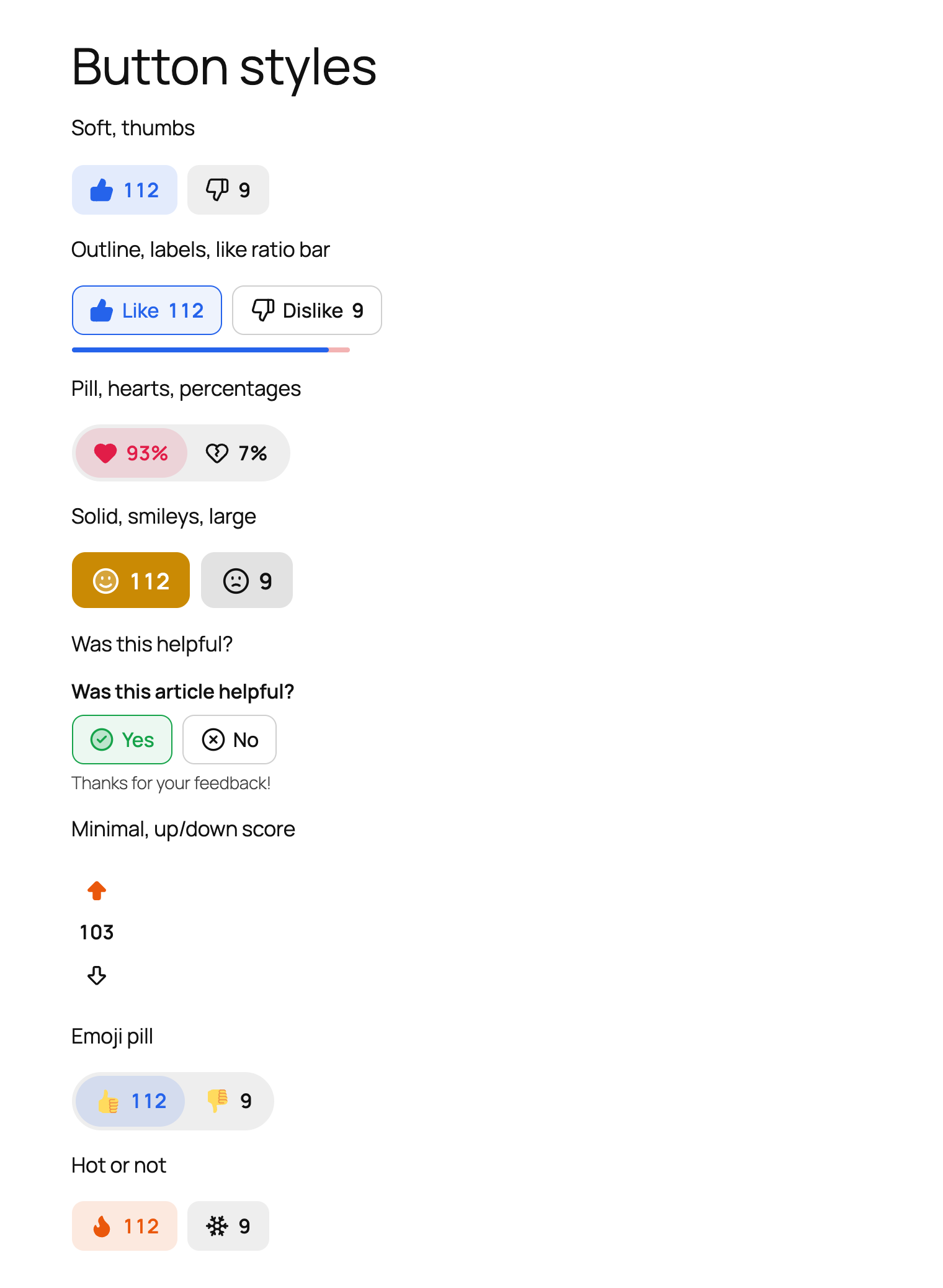
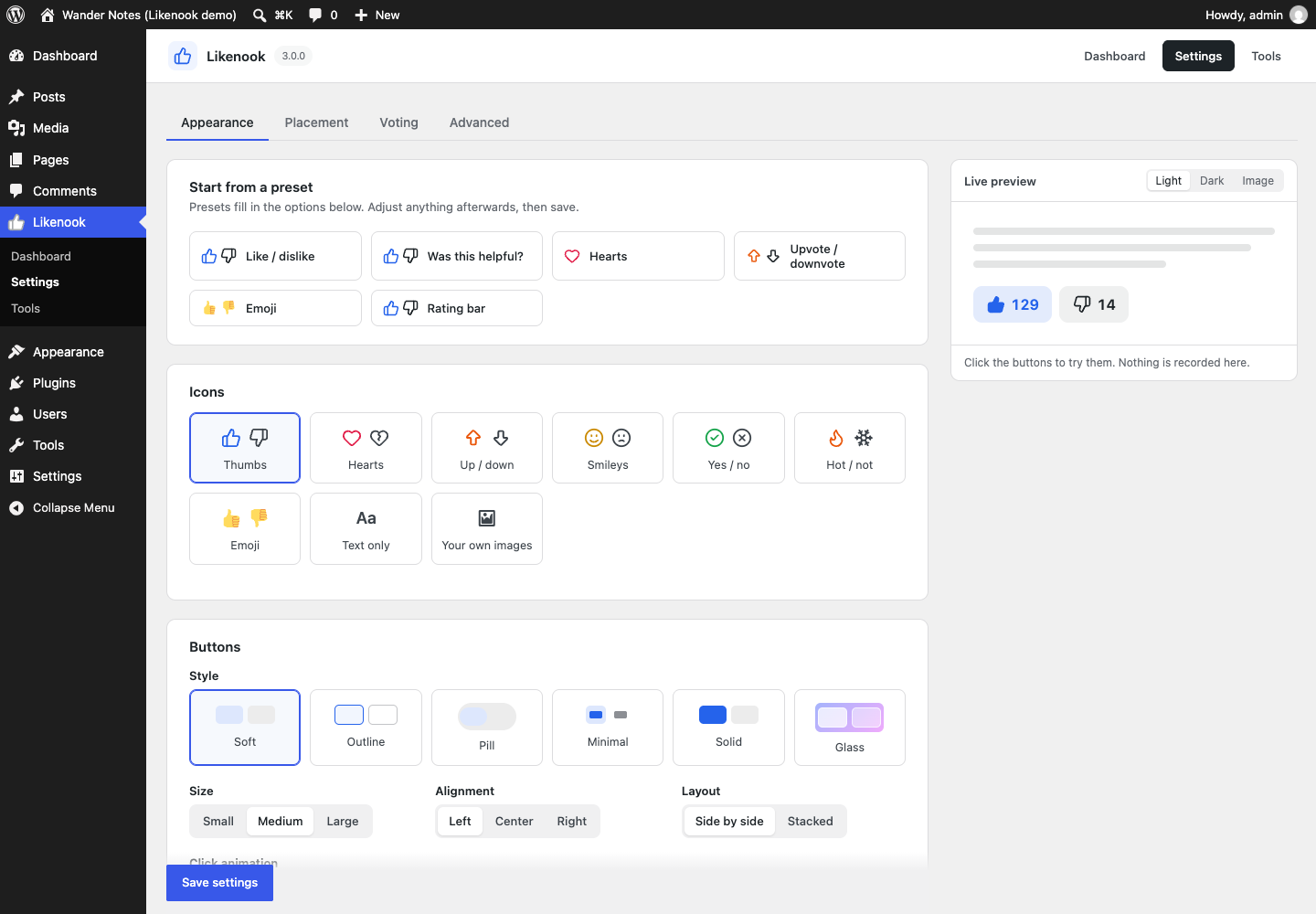
| Look | 9 icon sets (thumbs, hearts, up/down, smileys, yes/no, hot/not, emoji, text, your own images), 6 styles (soft, outline, pill, minimal, solid, glass), 3 sizes, alignment, side-by-side or stacked, colours, pop/bounce/burst animations |
| Counts | shown, hidden, after voting, percentages or a single score; 1.2K short numbers; like ratio bar |
| Presets | Like / dislike, Was this helpful?, Hearts, Upvote / downvote, Emoji, Rating bar, all with a live preview |
| Placement | any post type, comments, WooCommerce products, before/after content, block (Query Loop and site editor), shortcode, template tag, Elementor widget |
| Voting | change or remove a vote, like-only mode, logged-in only, role limits, per-browser or per-IP visitors, proxy and Cloudflare IP headers, rate limit |
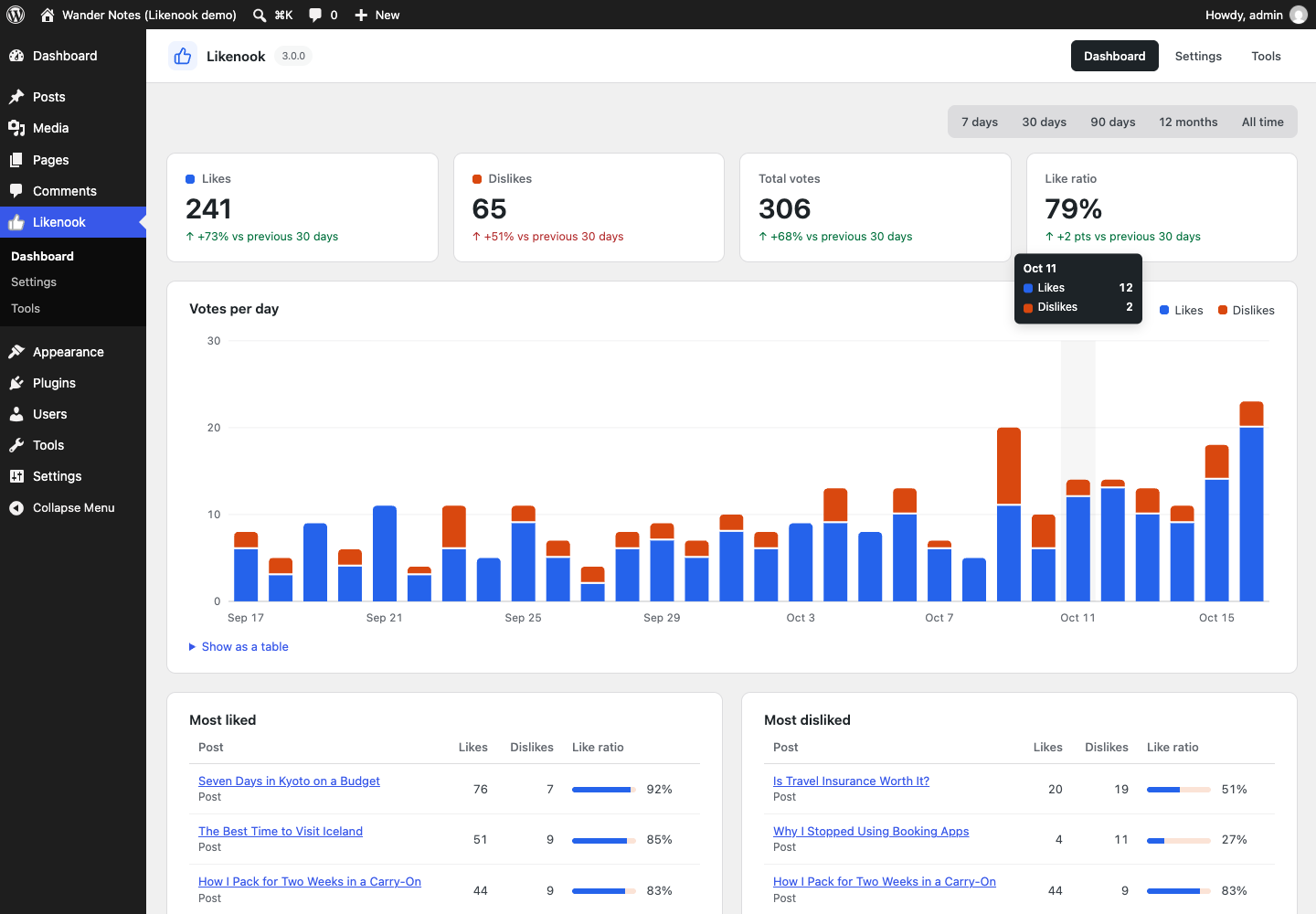
| Analytics | 7/30/90 days, 12 months or all time, change vs previous period, votes per day, most liked and disliked, sortable posts column, dashboard widget, CSV export |
| Import | WP ULike (vote by vote), Like Dislike for WP (vote by vote), Posts Like Dislike (totals), Like / Dislike Button 2.x |
| Privacy | hashed IPs only, cookie set only on voting, WordPress export and erase tools, privacy policy text, no external requests |
| Developers | REST API, likenook_votes REST field, hooks, WP-CLI, template tags, CSS custom properties |
Shortcodes and template tags
[likenook]
[likenook id="42" icons="hearts" style="pill" counts="percent"]
[likenook style="outline" labels="yes" like_label="Yes" dislike_label="No" question="Was this helpful?"]
[likenook_most_liked number="5" period="month" show_thumbnail="yes"]
<?php if ( function_exists( 'likenook_buttons' ) ) { likenook_buttons(); } ?>
<?php $counts = likenook_get_counts( get_the_ID() ); // ['likes' => 12, 'dislikes' => 3] ?>Hooks
| Hook | Type | Use |
|---|---|---|
likenook_vote_recorded |
action | ( $type, $id, $vote, $previous, $user_id, $counts ) after any vote change |
likenook_can_vote |
filter | return a WP_Error to block a vote |
likenook_buttons_html |
filter | change the buttons markup |
likenook_icon_sets |
filter | add an icon set (24×24 stroked SVG paths) |
likenook_visitor_ip |
filter | supply the real visitor IP behind a proxy |
likenook_rate_limit |
filter | votes per minute per network, 0 to turn off |
likenook_schema_statistics |
filter | change or remove the interactionStatistic entries |
likenook_current_post_id |
filter | which post buttons without an ID belong to |
WP-CLI
wp likenook stats --days=30         # totals and top posts
wp likenook sources                 # other like plugins found on this site
wp likenook import wp-ulike         # import votes
wp likenook recount                 # rebuild every total
wp likenook reset --post=42         # delete one post's votes
Development
No build step. The blocks are plain JavaScript (blocks/*/index.js) using the
wp.* globals, with dependencies listed in index.asset.php.
likenook.php      bootstrap
includes/
  class-likenook-votes.php        casting, counting, recounting, voter identity
  class-likenook-render.php       button markup, automatic placement, shortcodes
  class-likenook-rest.php         likenook/v1/state, likenook/v1/vote, likenook_votes field
  class-likenook-schema.php       interactionStatistic in schema.org markup
  class-likenook-blocks.php       Buttons and Most Liked blocks
  class-likenook-widgets.php      classic widgets
  class-likenook-elementor*.php   Elementor widgets
  class-likenook-stats.php        dashboard queries
  class-likenook-importer.php     imports from other plugins
  admin/                     dashboard, settings, tools, meta box, list column
assets/                      front-end and admin CSS/JS
blocks/                      block.json + editor scripts
bin/
  build-zip                  builds the WordPress.org package
  build-blueprint            builds the Playground Live Preview
  blueprint-demo.php         demo content for the Live Preview
.wordpress-org/              banner, icons, screenshots, blueprint (SVN assets/)
./bin/build-zip is the single source of truth for what ships. It leaves out
bin/, README.md, .wordpress-org/ and every hidden file, and writes the zip
next to the plugin folder rather than inside it.
To try the Live Preview locally with your working copy mounted:
./bin/build-blueprint --local /tmp/likenook-blueprint.json
npx @wp-playground/cli@latest server --blueprint=/tmp/likenook-blueprint.json \
  --mount="$PWD:/wordpress/wp-content/plugins/likenook"
Release
- Bump
Versioninlikenook.php,LIKENOOK_VERSION, andStable taginreadme.txt. - Commit and push to
main. - Tag it:
git tag v3.0.0 && git push origin v3.0.0.
The tag runs .github/workflows/deploy.yml. It checks that the tag, Stable tag
and plugin Version match, builds with bin/build-zip, and deploys to SVN
trunk and tags/X.Y.Z. It also syncs .wordpress-org/ to SVN assets/. It
needs the repository secrets SVN_USERNAME (the exact WordPress.org login,
Sanju Shankar) and SVN_PASSWORD (the SVN password from your WordPress.org
profile).
Credits
Icons are adapted from Lucide (ISC licence).
License
GPLv2 or later. See LICENSE.