SEO Assistant by Nazari Technologies
In the Elementor editor, right-click on any section and select "Inspect Structure." You will receive an organized list of suggested improvements—covering appropriate HTML tags, image size and resolution, mobile responsiveness, and loading speed—along with a score.
Install
This is the repository archive. It installs, but the folder name will carry the branch suffix and updates will not flow.
Install straight from GitHub with WP-CLI:
wp plugin install https://github.com/sajjadnazari1995/nazari-seo-assistant/archive/refs/heads/main.zip

SEO Assistant by Nazari Technologies
دستیار سئو · an Elementor add-on that reviews your page structure while you build it.
Right-click any section, container or widget in the Elementor editor, choose Review structure (بررسی ساختار), and a floating window lists every element in order with exactly what to change: the HTML tag to use, image size and resolution, mobile fit and loading speed. The last item is a scored summary with a Check again button.
Why this plugin
Most SEO tools audit a page after it is published. By then, an oversized hero image, a second H1 or a fixed-width row that overflows on phones is already live, and fixing it means going back through the whole design.
SEO Assistant moves the review into the editor. You get the advice at the moment you are building the element, next to the setting you need to change, so the page is built to standard the first time.
- No separate SEO pass. The review lives inside Elementor.
- Nothing leaves your site. No external service, no account, no tracking.
- Read-only. It never changes your page; it only gives advice.
- Persian and English. The interface follows the site language, with full RTL support.
Screenshots
| Dashboard | Settings |
|---|---|
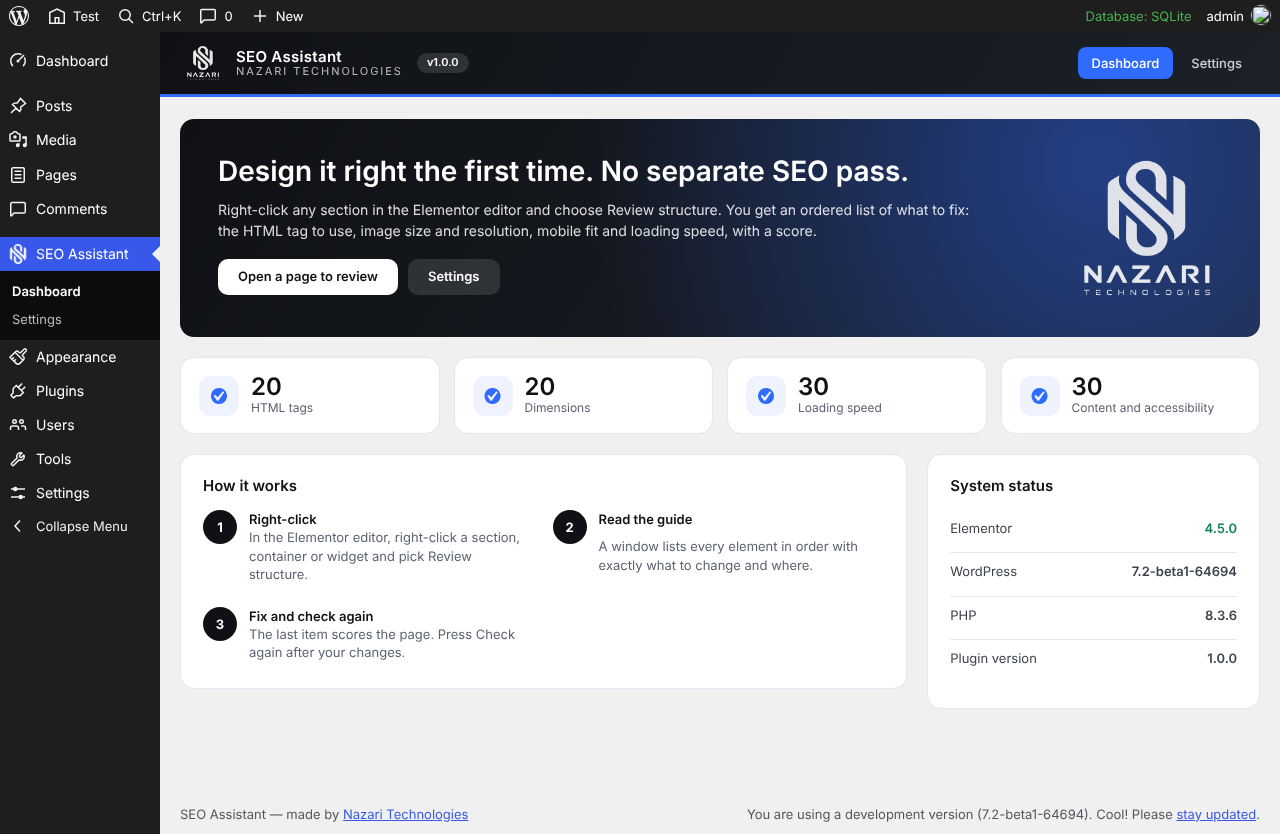 |
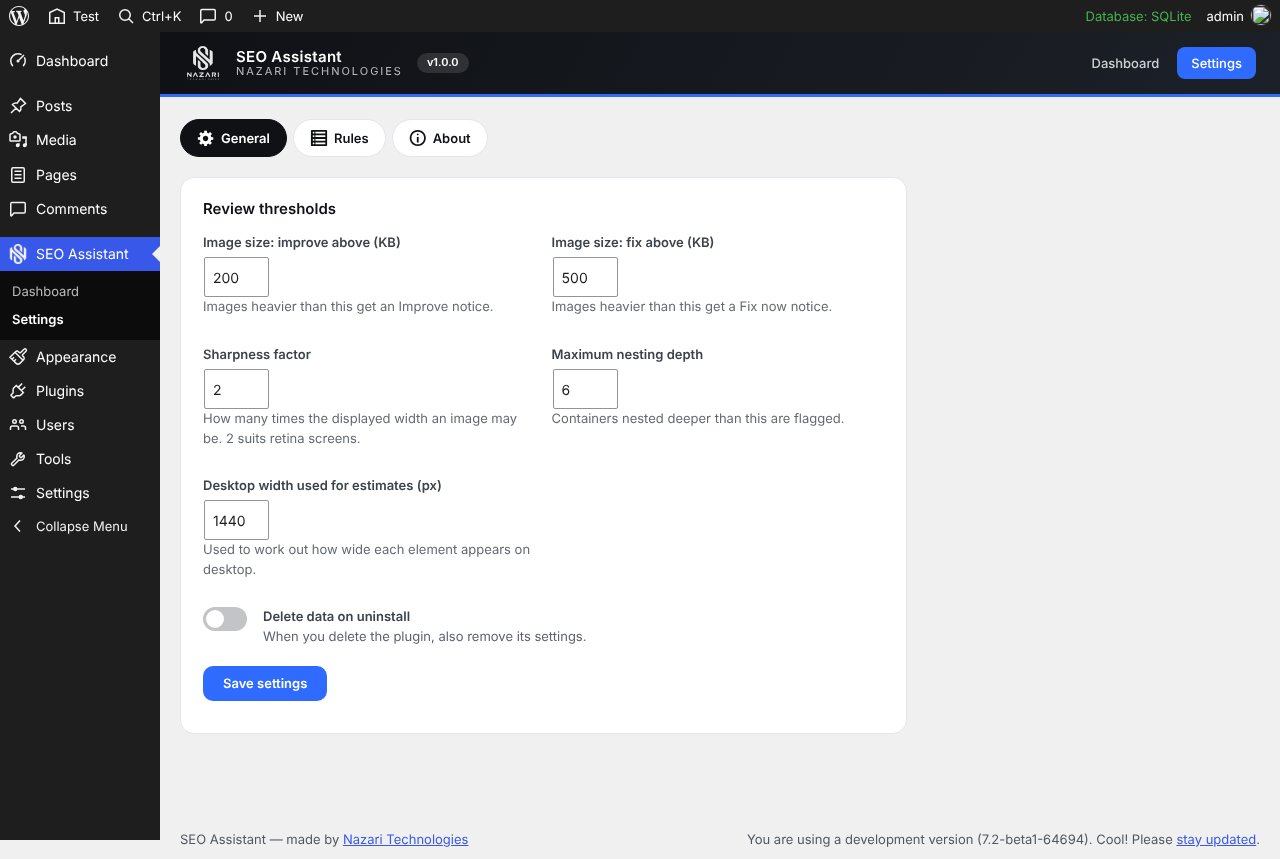 |
How it works
- Right-click. In the Elementor editor, right-click a section, container or widget and pick Review structure.
- Read the guide. A draggable window, laid out like Elementor's Navigator, lists each element in document order. Click an element's name to select it and scroll to it in the editor. Under each element you see what is wrong and what to do about it.
- Fix and check again. The final item is a summary with the score and a Fix these first list. After your changes, press Check again.
You can review just the element you clicked or switch to the whole page from the window's toolbar. A checkbox shows or hides elements that have no problems.
What it checks
| Area | Examples |
|---|---|
| HTML tags | Landmarks (header, footer, main, section); one H1 per page; heading order; empty or overly long headings |
| Image dimensions | File size; pixel size compared with the size shown on screen; blurry or oversized images; WebP/AVIF; alt text |
| Mobile fit | Fixed widths wider than a phone; huge minimum heights; large padding; rows that do not wrap |
| Loading speed | Heavy sliders, videos, maps, iframes and animations; deep nesting; total image weight |
| Links and buttons | Empty, vague or missing links |
Every finding has a severity, a short message and a "What to do" line that names the setting to change.
| Severity | Label in the window | Penalty |
|---|---|---|
| Error | Fix | 3 |
| Warning | Improve | 1.5 |
| Info | Tip | 0.5 |
Scoring
The summary gives a score out of 100, split into four categories:
| Category | Points |
|---|---|
| HTML tags | 20 |
| Dimensions | 20 |
| Loading speed | 30 |
| Content and accessibility | 30 |
Each category has a penalty budget. Findings add penalty by severity, and the category's points are round(max × max(0, 1 − penalty / budget)). The window then grades the total as Excellent, Good, Needs work or Poor.
Requirements
- WordPress 6.5 or newer
- PHP 8.2 or newer
- Elementor (free is enough; Elementor Pro is not required)
Installation
From a zip
- Install and activate Elementor.
- In WordPress go to Plugins → Add New → Upload Plugin and upload the zip.
- Activate SEO Assistant by Nazari Technologies.
- Open any page in Elementor, right-click a section and choose Review structure.
From source
cd wp-content/plugins
git clone https://github.com/SajjadNazari1995/nazari-seo-assistant.git
Then activate it from the Plugins screen. There is no build step.
Settings
Open SEO Assistant → Settings.
| Setting | Default | What it does |
|---|---|---|
| Image size: improve above (KB) | 200 | Heavier images get an Improve notice |
| Image size: fix above (KB) | 500 | Heavier images get a Fix notice |
| Sharpness factor | 2 | How many times the displayed width an image may be (2 suits retina screens; allowed 1 to 3) |
| Maximum nesting depth | 6 | Containers nested deeper than this are flagged (allowed 3 to 15) |
| Desktop width used for estimates (px) | 1440 | Used to work out how wide each element appears on desktop (allowed 1024 to 2560) |
| Delete data on uninstall | Off | Also removes the plugin's settings when you delete it |
The Rules tab lists the built-in checks, and About shows the changelog.
Security
- The review runs on your own site through
POST /wp-json/nazari-seo/v1/analyze. - Every request needs a valid REST nonce and a user who is allowed to edit the page.
- Requests larger than 1 MB are rejected.
- All text in the editor window is written with
textContent, never as HTML. - No data is sent to an outside server.
For developers
Add your own check
Extend NZSA_Rule and register it with the nzsa_rules filter.
<?php
defined( 'ABSPATH' ) || exit;

add_action( 'plugins_loaded', function () {
    if ( ! class_exists( 'NZSA_Rule' ) ) {
        return;
    }

    final class My_Button_Rule extends NZSA_Rule {

        public function id(): string {
            return 'my-button';
        }

        /** Called once for every element, in document order. */
        public function check( NZSA_Context $ctx, NZSA_Node $node ): array {
            if ( 'button' !== $node->widget || '' !== (string) $node->get( 'text' ) ) {
                return array();
            }

            return array(
                $this->issue(
                    $node,
                    NZSA_Category::Access,
                    NZSA_Severity::Warning,
                    'empty-text',
                    __( 'This button has no text.', 'my-plugin' ),
                    __( 'Add a short label in Content > Text.', 'my-plugin' )
                ),
            );
        }
    }

    add_filter( 'nzsa_rules', fn( array $rules ): array => array_merge( $rules, array( new My_Button_Rule() ) ) );
} );| Method | When it runs |
|---|---|
id() |
Required. A unique id used in reports |
check( $ctx, $node ) |
Once per element, in document order |
check_page( $ctx ) |
Once per review, for checks that need the whole tree (for example "one H1 per page") |
NZSA_Node exposes id, type, widget, settings, parent, depth and index, plus helpers such as get(), size(), unit(), has_device() and descendants(). NZSA_Context gives access to plugin settings and page-wide data such as the heading list.
Project structure
nazari-seo-assistant/
├── nazari-seo-assistant.php     Plugin header and PHP version guard
├── uninstall.php
├── includes/
│   ├── class-nzsa-plugin.php    Bootstrap and loading
│   ├── class-nzsa-types.php     Enums (severity, category), Issue, Node
│   ├── class-nzsa-settings.php  Settings and sanitising
│   ├── class-nzsa-rule.php      Abstract base class for checks
│   ├── class-nzsa-tree.php      Builds the node tree from Elementor data
│   ├── class-nzsa-context.php   Shared data for rules
│   ├── class-nzsa-analyzer.php  Runs the rules and calculates the score
│   ├── class-nzsa-rest.php      REST endpoint
│   ├── class-nzsa-editor.php    Loads the window into the Elementor editor
│   ├── class-nzsa-admin.php     Dashboard and settings pages
│   └── rules/                   tags, images, weight, responsive, links
├── assets/                      editor.js, editor.css, admin.css, images
├── languages/                   fa_IR translation
└── .wordpress-org/              Icons, banners, screenshots
Editor hook
The right-click item is added through Elementor's elements/base/behaviors filter. The window can also be opened from code:
window.NZSA_EDITOR_API.review( elementor.getContainer( 'element-id' ) );
window.NZSA_EDITOR_API.close();
Known limits
- Element widths are estimated from Elementor settings and the desktop width in the plugin settings. They are not measured in the browser, so treat them as a guide.
- Tested on Elementor 4.5. Elementor Pro and the atomic editor variants, and very large pages, have not been tested yet.
- The official WordPress.org Plugin Check has not been run yet.
Roadmap
- Measure real rendered widths from the editor preview
- Core Web Vitals hints
- A score history per page
- More built-in rules
Ideas and bug reports are welcome.
Translations
English and Persian (fa_IR) are included, with RTL support. The language follows your WordPress site language.
Changelog
1.0.1
- Fix: the Review structure right-click item now appears on elements that are already on the page when the editor opens.
1.0.0
- First release: right-click Review structure in the Elementor editor, ordered guidance per element, a scored summary and a Check again button.
- English and Persian, with RTL support.
Support
Questions, bugs and feature requests: sajjadnazari.ir@gmail.com, or open an issue on GitHub.
WordPress.org profile: sajjadnazari
دستیار سئو (فارسی)
دستیار سئو افزونهای برای المنتور است که ساختار صفحه را همان لحظهای که میسازید بررسی میکند، نه بعد از انتشار.
چطور کار میکند
- در ویرایشگر المنتور روی هر سکشن، کانتینر یا ویجت راستکلیک کنید و بررسی ساختار را بزنید.
- پنجرهای شناور، شبیه ناویگیتور المنتور، همه المانها را به ترتیب نشان میدهد. زیر هر المان دقیقاً نوشته شده چه چیزی را کجا تغییر دهید. با کلیک روی نام المان، همان المان در ویرایشگر انتخاب میشود.
- آخرین بخش، خلاصه و نمره است. بعد از اصلاحات دکمه بررسی دوباره را بزنید.
چه چیزهایی بررسی میشود
- تگهای HTML: header، footer، main و section؛ فقط یک H1 در صفحه؛ ترتیب تیترها؛ تیترهای خالی یا خیلی طولانی.
- ابعاد تصویر: حجم فایل، اندازه پیکسلی در برابر اندازه نمایش، تصاویر محو یا بزرگتر از نیاز، فرمت WebP/AVIF و متن جایگزین (alt).
- تناسب با موبایل: عرض ثابت بزرگتر از گوشی، ارتفاع حداقل خیلی زیاد، پدینگ زیاد و ردیفهایی که در موبایل شکسته نمیشوند.
- سرعت: اسلایدر، ویدیو، نقشه، iframe و انیمیشن سنگین، تودرتویی زیاد و مجموع حجم تصاویر.
- لینکها و دکمهها: لینک خالی، مبهم یا فراموششده.
نمرهدهی
نمره از ۱۰۰: تگهای HTML ۲۰، ابعاد ۲۰، سرعت بارگذاری ۳۰، محتوا و دسترسپذیری ۳۰.
ویژگیها
- رابط کاملاً فارسی و راستچین
- هیچ دادهای به سرور بیرونی ارسال نمیشود و بررسی روی خود سایت انجام میشود
- فقط راهنمایی میدهد و هیچ تغییری در صفحه شما نمیدهد
- با المنتور رایگان کار میکند
- قابل توسعه با فیلتر
nzsa_rules(بخش «For developers» بالا)
نیازمندیها
وردپرس ۶.۵+، PHP ۸.۲+ و افزونه المنتور.
نکته
عرض المانها از روی تنظیمات المنتور تخمین زده میشود و در مرورگر اندازهگیری نمیشود، پس آن را راهنما بدانید.
License
GPL-2.0-or-later. See LICENSE.
Made by Nazari Technologies.