Install
This is the repository archive. It installs, but the folder name will carry the branch suffix and updates will not flow.
Install straight from GitHub with WP-CLI:
wp plugin install https://github.com/sajjadnazari1995/nazari-metafield-for-elementor/archive/refs/heads/main.zip

Nazari Metafield For Elementor
A lightweight, JetEngine-style meta box builder for WordPress, with first-class Elementor support.




Create custom field groups for posts, pages and custom post types from a visual builder, then show the values anywhere in Elementor with a dedicated Meta Field widget, dynamic tags (Elementor Pro) or a shortcode.
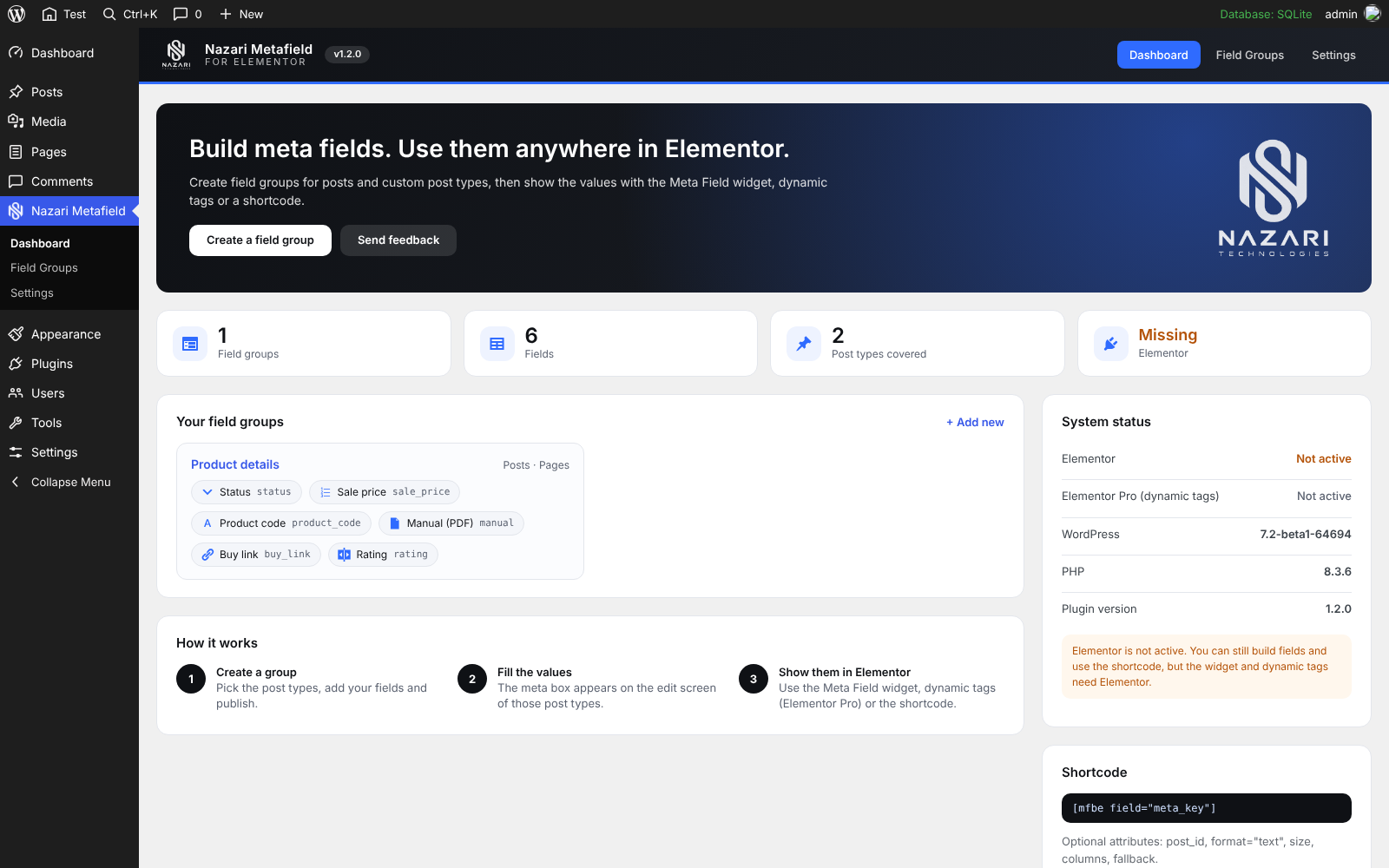
Features
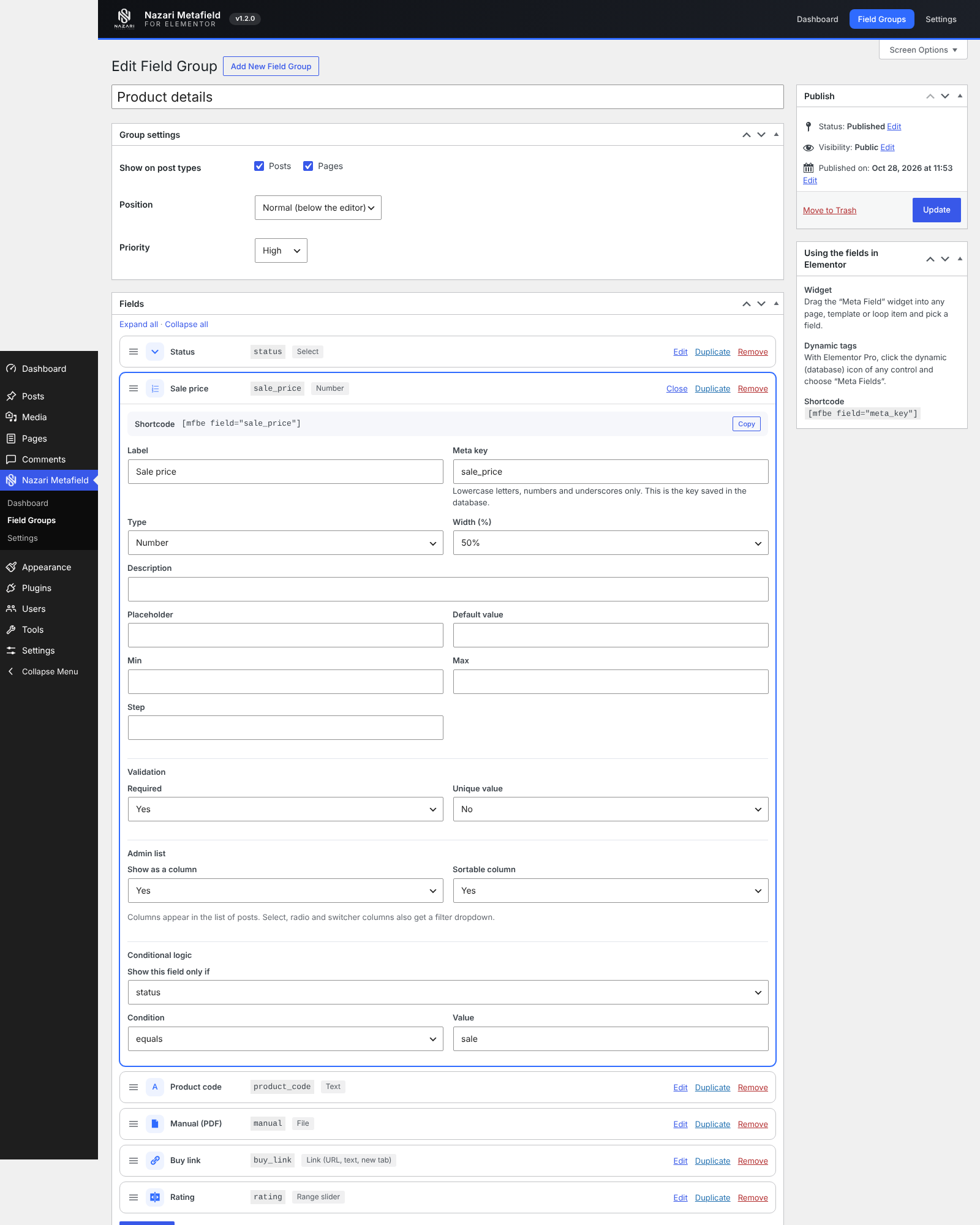
- Visual field group builder: drag to reorder, duplicate fields, collapse/expand, copy each field's shortcode.
- 20 field types: text, textarea, number, email, URL, select, radio, checkbox (multiple), switcher, date, time, date and time, color, range, WYSIWYG, image, gallery, file, link and embed (oEmbed).
- Validation: required, minimum/maximum length and unique values, with clear messages on save.
- Conditional logic: show a field only when another field has a given value.
- Admin list columns: show fields as columns in the post list, sortable, with filters for select / radio / switcher fields.
- Import / Export / Duplicate: move field groups between sites as JSON, or copy a group in one click.
- Dynamic Visibility: show or hide any Elementor section, column, container or widget by a meta field.
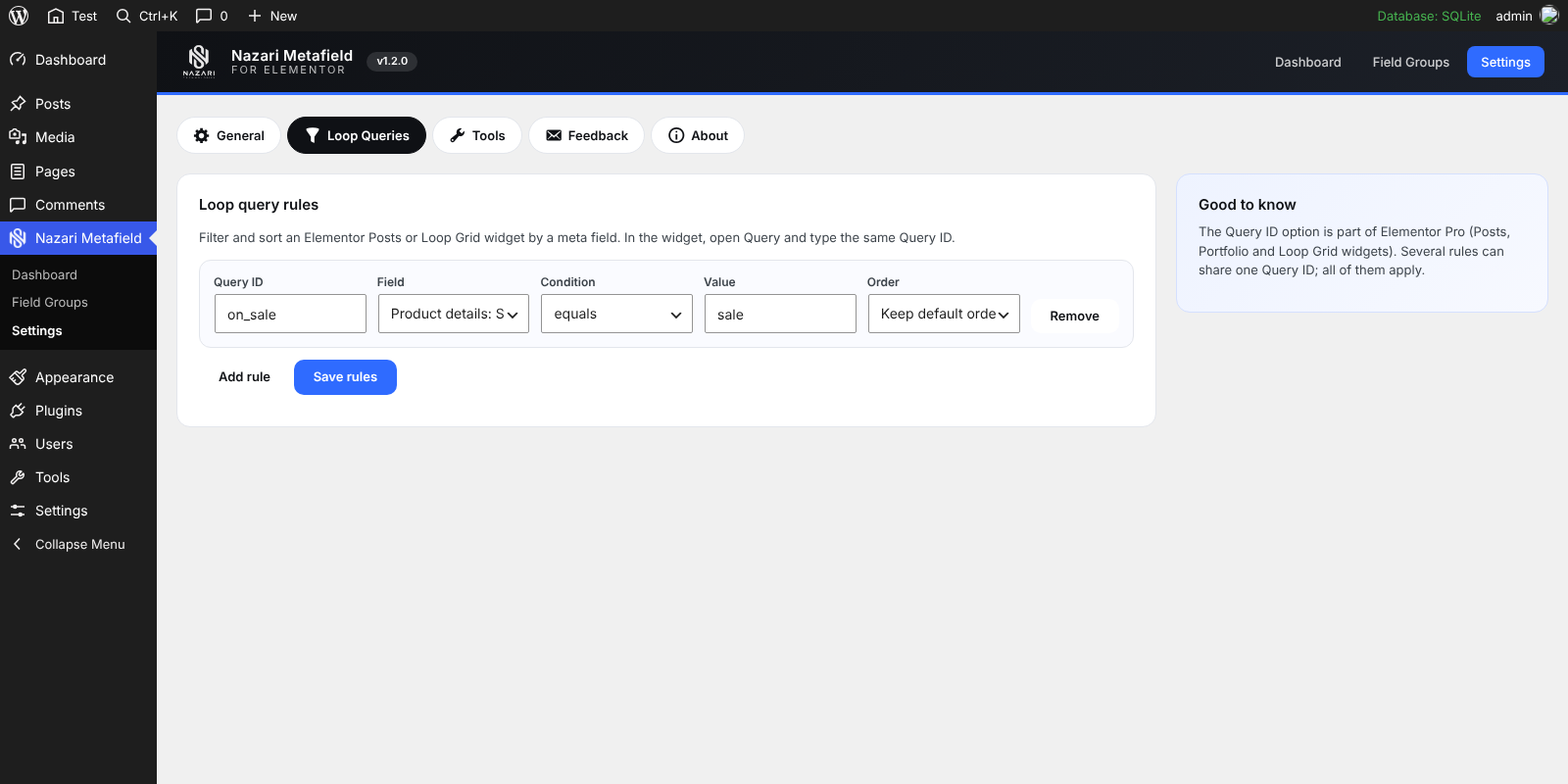
- Loop query rules: filter and sort Posts / Loop Grid widgets (by Query ID) with a meta field, no code.
- Meta Field Link widget: a button or link from a link, URL, email or file field.
- Meta boxes anywhere: choose the post types, position (normal / side / advanced) and priority per group.
- Elementor widget: the Meta Field widget works with free Elementor and has controls for text before/after, fallback, "hide when empty", HTML tag, image size, gallery columns/gap, alignment, color and typography.
- Dynamic tags (Elementor Pro): Text, Number, URL, Color, Image and Gallery tags, grouped under "Meta Fields".
- Shortcode:
[mfbe field="meta_key"]for everything else. - Plain post meta: values are stored under the meta key you choose, so any other tool or theme can read them.
- Branded admin area: dashboard with stats and system status, settings, and a built-in feedback form.
- Secure by default: nonces and capability checks on every save, per-field sanitizing, and values of drafts, private and password-protected posts are never shown to visitors.
- RTL ready with a Persian (
fa_IR) translation included.
Screenshots
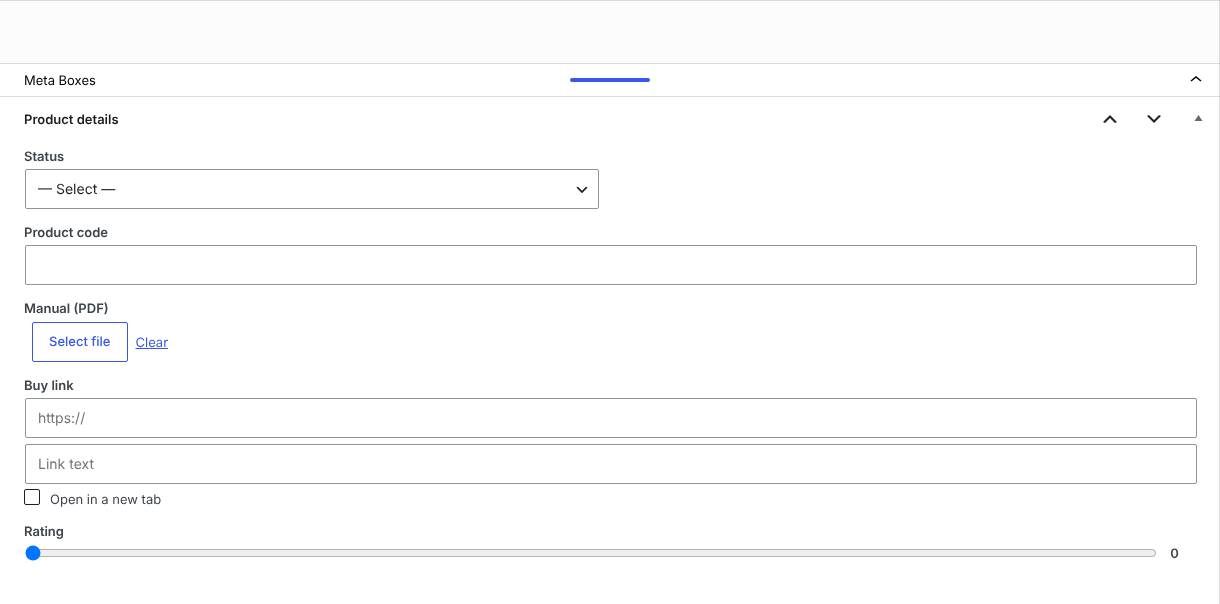
| Field group builder | Meta box in the editor |
|---|---|
 |
 |
| Loop query rules |
|---|
 |
Requirements
- WordPress 5.8 or newer
- PHP 7.4 or newer
- Elementor 3.6 or newer (optional for building fields and using the shortcode; required for the widget)
- Elementor Pro (optional; only needed for dynamic tags)
Installation
- Download the latest
nazari-metafield-for-elementor-x.y.z.zipfrom the Releases page. - In WordPress go to Plugins > Add New > Upload Plugin, choose the zip and activate it.
- Open Nazari Metafield in the admin menu.
Do not use GitHub's "Download ZIP" button for installing: it names the folder
…-main. Use the zip attached to a release (see Building a release).
Upgrading from "Meta Fields for Elementor" 1.0.0
Just activate this plugin. The old one is deactivated automatically, and your field groups and saved values are kept.
Usage
1. Create a field group
Nazari Metafield > Field Groups > Add New: pick the post types, add your fields and publish. Each field has a label, a meta key (lowercase letters, numbers, underscores), a width, an optional description, placeholder and default value, and options for select / radio / checkbox fields (one value : label per line).
2. Fill in the values
Edit any post of the chosen types. The meta box appears with your fields.
3. Show them in Elementor
Widget: drag Meta Field (category Meta Fields) onto the page, template or loop item, pick a field and style it.
Dynamic tags (Elementor Pro): click the dynamic (database) icon of any control and choose Meta Fields.
| Tag | Use it in |
|---|---|
| Meta Field (Text) | any text control (select/radio show the label, dates are formatted) |
| Meta Field (Number) | number controls |
| Meta Field (URL) | link controls (URL, email as mailto:, image file URL) |
| Meta Field (Color) | color controls |
| Meta Field (Image) | image controls, backgrounds |
| Meta Field (Gallery) | gallery, image carousel |
Shortcode
[mfbe field="price"]
[mfbe field="price" post_id="42" fallback="On request"]
[mfbe field="photos" size="medium" columns="4"]
[mfbe field="level" format="text"]| Attribute | Default | Description |
|---|---|---|
field |
(required) | The meta key of the field |
post_id |
current post | Read the value from another post |
format |
html |
html or text |
size |
full |
Image size for image and gallery fields |
columns |
3 |
Gallery columns |
fallback |
empty | Text shown when the field is empty |
Reading the values from PHP
The values are normal post meta:
$price = get_post_meta( get_the_ID(), 'price', true );Settings
Nazari Metafield > Settings
- Loop Queries: rules for the Query ID option of Elementor Pro loops.
- Tools: import / export field groups as JSON.
- General: optionally delete field groups and settings when the plugin is deleted (values saved on posts are always kept).
- Feedback: send criticism, ideas or bug reports to the author by email.
- About: version, changelog and author information.
Project structure
nazari-metafield-for-elementor/
├── nazari-metafield-for-elementor.php   # plugin header, bootstrap
├── uninstall.php
├── assets/                              # admin CSS/JS, logo
├── includes/
│   ├── class-mfbe-plugin.php            # loader
│   ├── class-mfbe-registry.php          # reads the saved field groups
│   ├── class-mfbe-fields.php            # field types: render / sanitize / output
│   ├── class-mfbe-groups.php            # field group post type + builder UI
│   ├── class-mfbe-metaboxes.php         # meta boxes on the edit screens
│   ├── class-mfbe-shortcode.php
│   ├── class-mfbe-columns.php           # admin list columns, sorting, filters
│   ├── class-mfbe-tools.php             # import / export / duplicate
│   ├── class-mfbe-queries.php           # loop query rules
│   ├── class-mfbe-conditions.php        # shared condition logic
│   ├── class-mfbe-admin.php             # menu, dashboard, settings, feedback
│   └── elementor/                       # widgets, dynamic tags, visibility
└── languages/                           # fa_IR translation
Building a release
The repository root is the plugin folder. To produce an installable zip whose top-level folder has the right name:
git tag v1.2.0
git archive --prefix=nazari-metafield-for-elementor/ \
  -o nazari-metafield-for-elementor-1.2.0.zip v1.2.0
Attach the zip to a GitHub Release. Files marked export-ignore in .gitattributes (screenshots, README, …) are left out of the zip.
Roadmap
Ideas, not promises: repeater fields, relations between posts, a global options page. Open an issue if one of these matters to you.
Feedback
Found a bug or have an idea? Open an issue, or use Nazari Metafield > Settings > Feedback inside WordPress.
Changelog
1.2.0
- Elementor: Meta Field Visibility on every section, column, container and widget (Advanced tab).
- Elementor: loop query rules (Settings > Loop Queries) for the Query ID option of Posts / Loop Grid widgets.
- Elementor: new Meta Field Link widget; Text, Number and URL dynamic tags understand the new field types.
1.1.0
- New field types: file, link, time, date and time, embed (oEmbed) and range.
- Validation: required, min/max length, unique.
- Conditional logic between fields.
- Admin list columns (sortable) and filters.
- JSON import / export and duplicate group (Settings > Tools).
1.0.2
- New name and branding (logo, top-level menu, branded admin screens).
- Dashboard with stats, field group overview and system status.
- Settings page: General, Feedback (emails the author), About.
- Field builder: type icons, duplicate field, expand/collapse all, copy shortcode.
- Optional "delete data on uninstall".
- Old "Meta Fields for Elementor" 1.0.0 is deactivated automatically.
- Persian (fa_IR) translation updated.
1.0.0
- First release: field groups, 14 field types, Elementor widget, dynamic tags and shortcode.
Author
Sajjad Nazari, sajjadnazari.com, Nazari Technologies
License
The code is released under the GPL-2.0-or-later.
The image files in assets/images/ are distributed with the plugin under the same GPL-2.0-or-later license. The "Nazari Technologies" name and logo remain the author's trademarks: you may redistribute the plugin, but please do not use them to promote derived products.