Littlefoot for Footnotes WP Registry grade A. No security issues foundWP RegistryNo security issues foundOpen the reportA
Elegant, interactive popups for the Footnotes block.
Install
Upload it under Plugins → Add New Plugin → Upload Plugin, then activate.
Install straight from GitHub with WP-CLI:
wp plugin install https://github.com/s3rgiosan/littlefoot/releases/download/1.8.1/littlefoot-1.8.1.zipOn Packagist as s3rgiosan/littlefoot:
composer require s3rgiosan/littlefootElegant, interactive popups for the Footnotes block.
Description
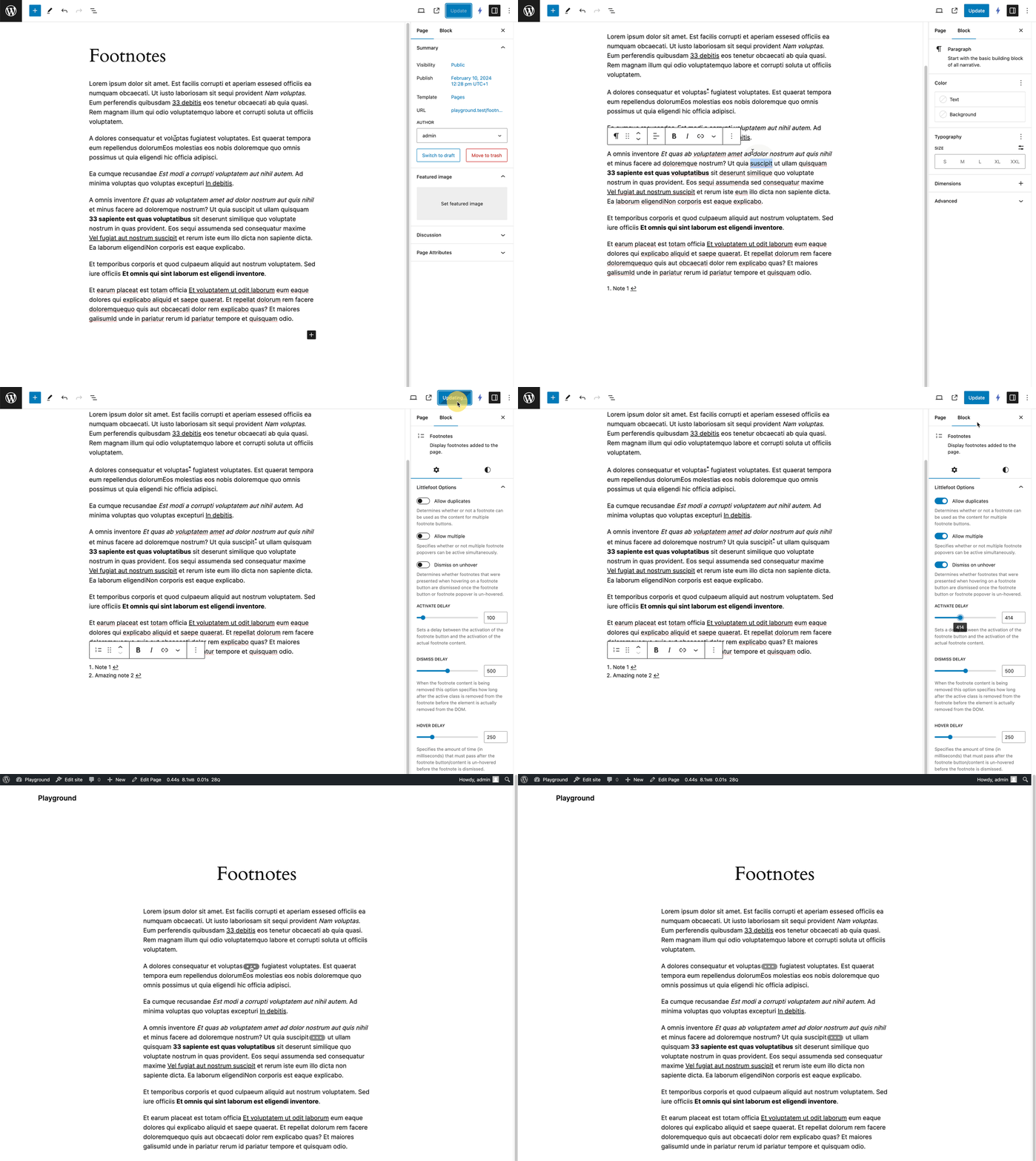
Elevate your website's user experience by incorporating lightweight and visually appealing footnotes using littlefoot. This WordPress plugin extends the functionality of the Footnotes block, seamlessly integrating the littlefoot JavaScript library to transform static footnotes into interactive popups.
Requirements
- WordPress 6.7 or later
- PHP 7.4 or later
Installation
Manual Installation
- Download the latest release ZIP from the Releases page.
- Go to Plugins > Add New > Upload Plugin in your WordPress admin area.
- Upload the ZIP file and click Install Now.
- Activate the plugin.
Install with Composer
To include this plugin as a dependency in your Composer-managed WordPress project:
- Add the plugin to your project using the following command:
composer require s3rgiosan/littlefoot- Run
composer install. - Activate the plugin from your WordPress admin area or using WP-CLI.
Usage
- Add a Footnotes block to your post or page.
- Select the Footnotes block and open the block settings in the sidebar.
- Configure the littlefoot options under the Littlefoot panel.
- Publish or update your post — footnotes will automatically appear as interactive popups on the frontend.
Options
activateDelay
Sets a delay between the activation of the footnote button and the activation of the actual footnote content.
Default: 100
allowDuplicates
Determines whether or not a footnote can be used as the content for multiple footnote buttons.
Default: false
allowMultiple
Specifies whether or not multiple footnote popovers can be active simultaneously.
Default: false
dismissDelay
When the footnote content is being removed this option specifies how long after the active class is removed from the footnote before the element is actually removed from the DOM.
Default: 500
dismissOnUnhover
Determines whether footnotes that were presented when hovering on a footnote button are dismissed once the footnote button or footnote popover is un-hovered.
Default: false
hoverDelay
Specifies the amount of time (in milliseconds) that must pass after the footnote button/content is un-hovered before the footnote is dismissed.
Default: 250
Styling
See littlefoot.js theming section.
Changelog
A complete listing of all notable changes to this project are documented in CHANGELOG.md.
License and Attribution
This plugin is licensed under MIT.
This project incorporates littlefoot.js, which is licensed under the MIT License.
Releases
13 releases. Each count is every asset in that release; expand a row for the breakdown.