Install
This is the repository archive. It installs, but the folder name will carry the branch suffix and updates will not flow.
Install straight from GitHub with WP-CLI:
wp plugin install https://github.com/rubengc/cmb2-field-js-controls/archive/refs/heads/master.zipNo built-in updater. New versions won't appear under Dashboard → Updates. Install new releases yourself, or let Git Updater track the repository.
Plugin for CMB2 to show any field similar to Wordpress publishing actions (Post/Page post_status, visibility and post_date submit box field).
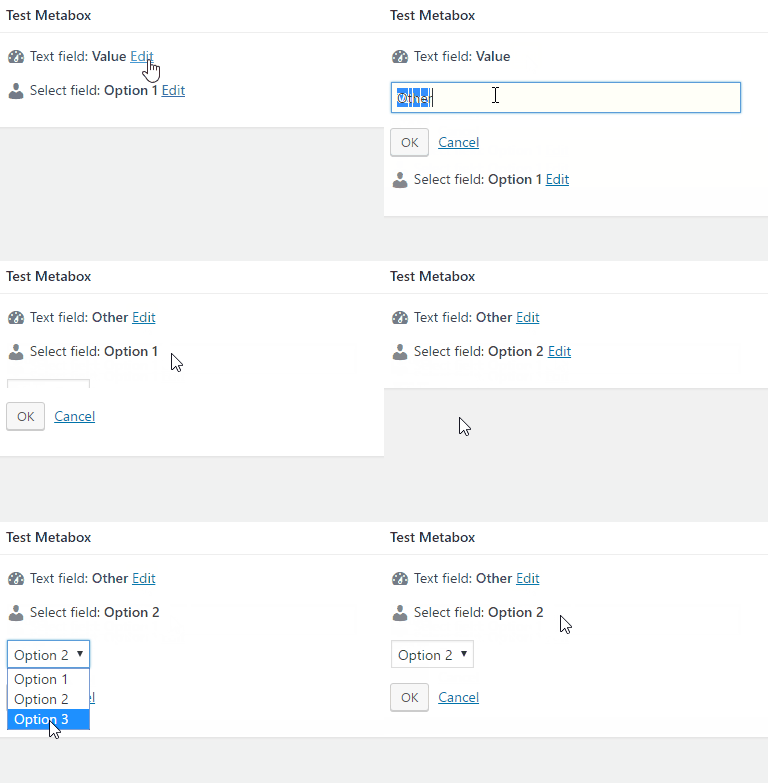
Installation
You can install this field type as you would a WordPress plugin:
- Download the plugin
- Place the plugin folder in your /wp-content/plugins/ directory
- Activate the plugin in the Plugin dashboard
Parameters
Options :
- icon (string, default = '') : Icon to show. Dashicons supported by default so you only need to define
dashicons-editinstead ofdashicons dashicons-edit. Empty means no icon. - js_controls (array) : Array of setting for the javascript controls to edit, save and cancel
- edit_button (string, default = 'Edit') : Text of edit button
- save_button (string, default = 'OK') : Text of save button
- cancel_button (string, default = 'Cancel') : Text of cancel button
Important note
Currently there is no way to output content before/after a field based on custom parameter value so to use this plugin you need setup your field like in examples section.
Examples
add_action( 'cmb2_admin_init', 'cmb2_js_controls_metabox' );
function cmb2_js_controls_metabox() {

    $prefix = 'your_prefix_demo_';

    $cmb = new_cmb2_box( array(
        'id'            => $prefix . 'metabox',
        'title'         => __( 'Test Metabox', 'cmb2' ),
        'object_types'  => array( 'page', 'post' ), // Post type
    ) );

    $cmb->add_field( array(
        'name' => __( 'Text field', 'cmb2' ),
        'desc' => '',
        'id'   => 'js_field',
        'type' => 'text',
        // CMB2 Field JS Controls parameters
        'js_controls' => array(
            'icon' => 'dashicons-dashboard',
        ),

        // Temporal solution to output html content
        'before_row' => 'js_controls_before',
        'after_row' => 'js_controls_after',
    ) );

    $cmb->add_field( array(
        'name' => __( 'Select field', 'cmb2' ),
        'desc' => '',
        'id'   => 'js_field_2',
        'type' => 'select',
        'options' => array(
            'option_1' => __( 'Option 1', 'cmb2' ),
            'option_2' => __( 'Option 2', 'cmb2' ),
            'option_3' => __( 'Option 3', 'cmb2' ),
        ),
        // CMB2 Field JS Controls parameters
        'js_controls' => array(
            'icon' => 'dashicons-admin-users',
            'edit_button' => __( 'Modify', 'cmb2' ),
            'save_button' => __( 'Save', 'cmb2' ),
            'cancel_button' => __( 'Revert', 'cmb2' ),
        ),

        // Temporal solution to output html content
        'before_row' => 'js_controls_before',
        'after_row' => 'js_controls_after',
    ) );

}
Customize how CMB2 Field JS Controls output the field value
CMB2 Field JS Controls includes WP JS Hooks library where you can filter the output when field value changes using filters cmb_js_controls_display_{field_id} and cmb_js_controls_display_{field_type}.
wp.hooks.addFilter( 'cmb_js_controls_display_js_field', custom_field_output_by_field_id );
function custom_field_output_by_field_id( output, field, field_type ) {
if( field.val().includes( '.' ) ) {
output = '<span class="my-custom-class">' + field.val().replace( '.', ',' ) + ' €</span>';
}
return output;
}
wp.hooks.addFilter( 'cmb_js_controls_display_select', custom_field_output_by_field_type );
function custom_field_output_by_field_type( output, field ) {
if( field.val() == '' ) {
output = '<span class="my-custom-class">None</span>';
}
return output;
}Changelog
1.0.0
- Initial commit