Install
This is the repository archive. It installs, but the folder name will carry the branch suffix and updates will not flow.
Install straight from GitHub with WP-CLI:
wp plugin install https://github.com/rshalihin/sapphireit-editorial-workflow/archive/refs/heads/main.zipSapphireIT Editorial Workflow is a WordPress editorial workflow plugin for content review and approval. It adds a separate workflow status, reviewer assignment, due dates, editorial comments and activity history to posts, pages and supported custom post types. Manage reviews in the Gutenberg block editor sidebar, classic editor meta box or admin dashboard, with workflow transitions and permissions enforced server-side.
An optional publish gate stops unapproved content from going live, and every publication is on the record. AI can draft it. A human approves it. You can prove who approved what, and when.
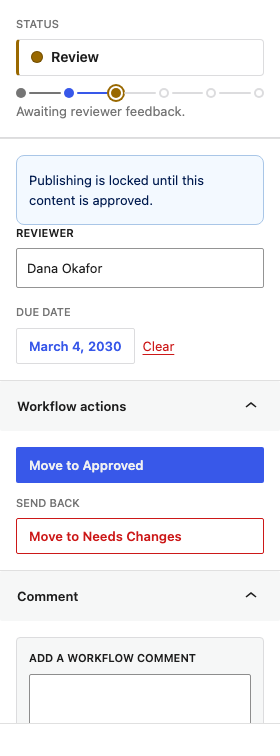
Most sites keep an article's progress in the WordPress post status and in people's heads: who has looked at it, what still needs doing, which revision is signed off. SapphireIT Editorial Workflow makes that process explicit. It adds a separate editorial state to each managed post, restricts which moves are allowed, records who changed what and when, and keeps it all visible in the editor where the work happens.
It is built for the two audiences that share a WordPress editorial process:
- Editorial teams who track a piece across writers, reviewers and approvers, assign a reviewer, set a due date, request revisions and review what happened.
- Developers who need the rules enforced server-side, a documented REST API, a predictable data model and extension hooks.
React Gutenberg UI  ──►  REST API  ──►  PHP Workflow Engine
                         sit-cwm/v1     │
                                        ├─► Permissions  (PermissionManager)
                                        ├─► Transition rules (TransitionManager)
                                        ├─► WordPress data (post meta)
                                        └─► Activity log  (wp_sit_cwm_activity)
The arrows only point one way. The React UI never decides whether a transition is allowed; it renders what the server told it is possible and sends the move back for the server to re-derive from scratch. See ARCHITECTURE.md.
At a glance
| What it does | Adds a structured editorial approval workflow to existing WordPress content: status, reviewer, due date, comments and activity history. |
| Supported content types | Posts, pages, and any custom post type with an admin UI, REST support and the editor feature that you enable in the settings. |
| Editor interfaces | Block (Gutenberg) editor sidebar, classic editor meta box, and an admin dashboard. |
| Workflow statuses | Draft, Writing, Review, Needs Changes, Approved, Published. |
| Minimum WordPress | 6.8 |
| Minimum PHP | 7.4 |
| Tested up to | WordPress 7.1 |
| License | GPL-2.0-or-later — see LICENSE |
| Technical docs | ARCHITECTURE.md · WORKFLOW.md · REST-API.md · DEVELOPMENT.md · CONTRIBUTING.md |
Screenshots
|
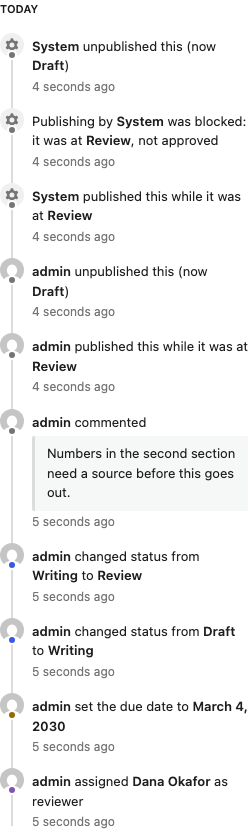 |
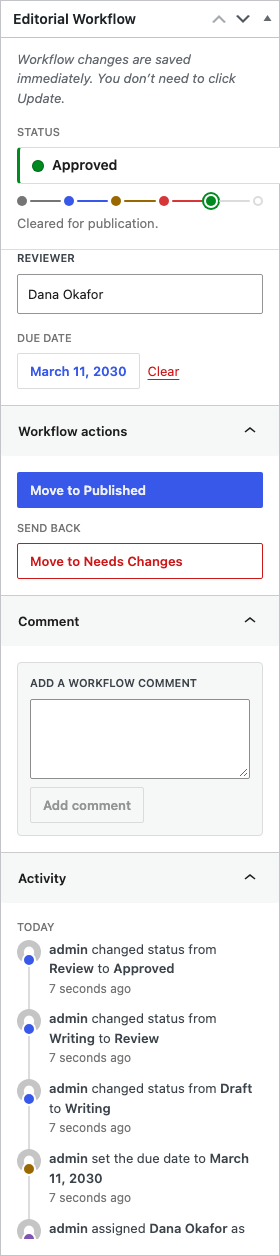
| Editor sidebar — the content is not approved, so the publish gate locks publishing. | Activity timeline — content published while it was at Review, and a publish the gate blocked. |
 |
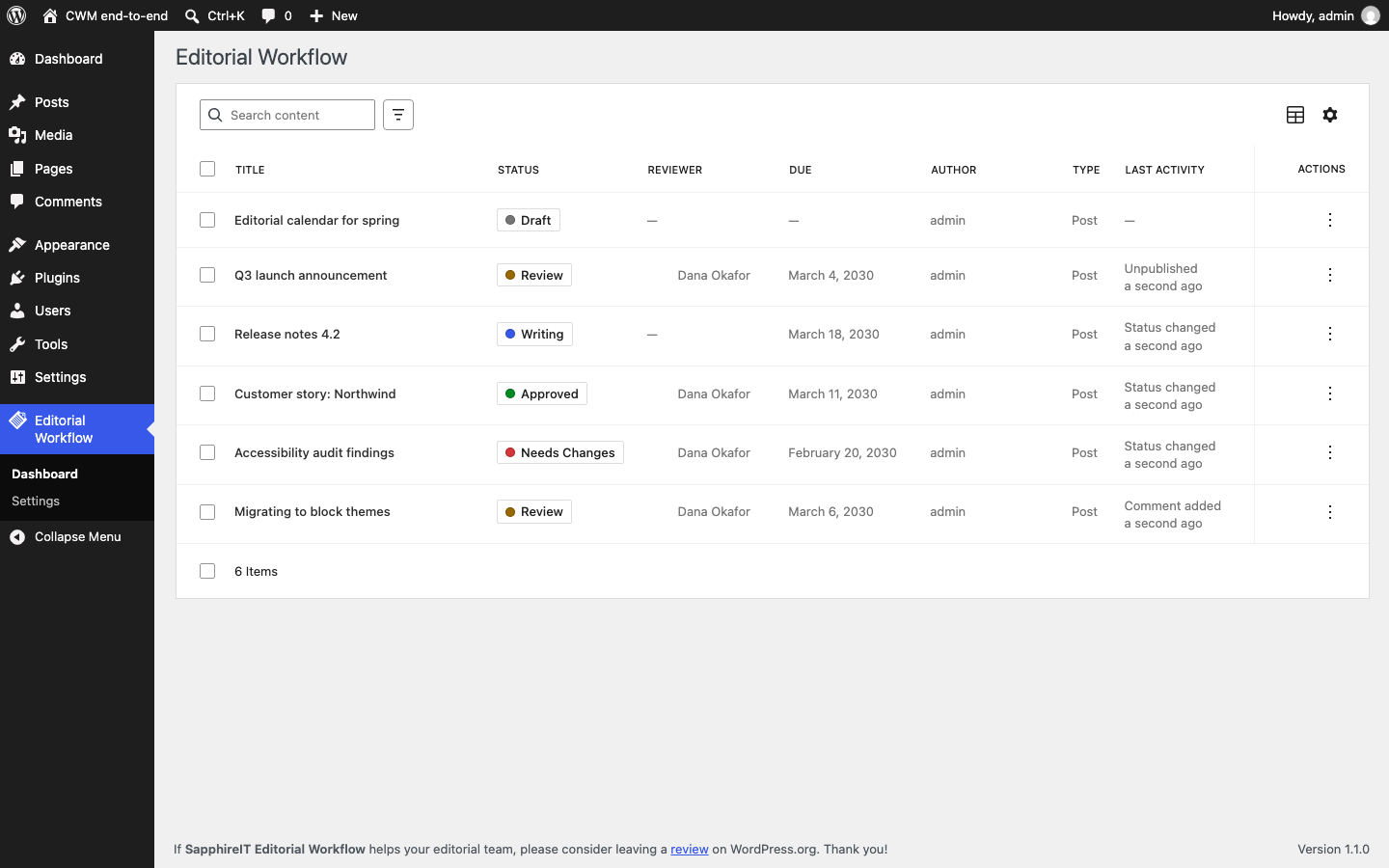 |
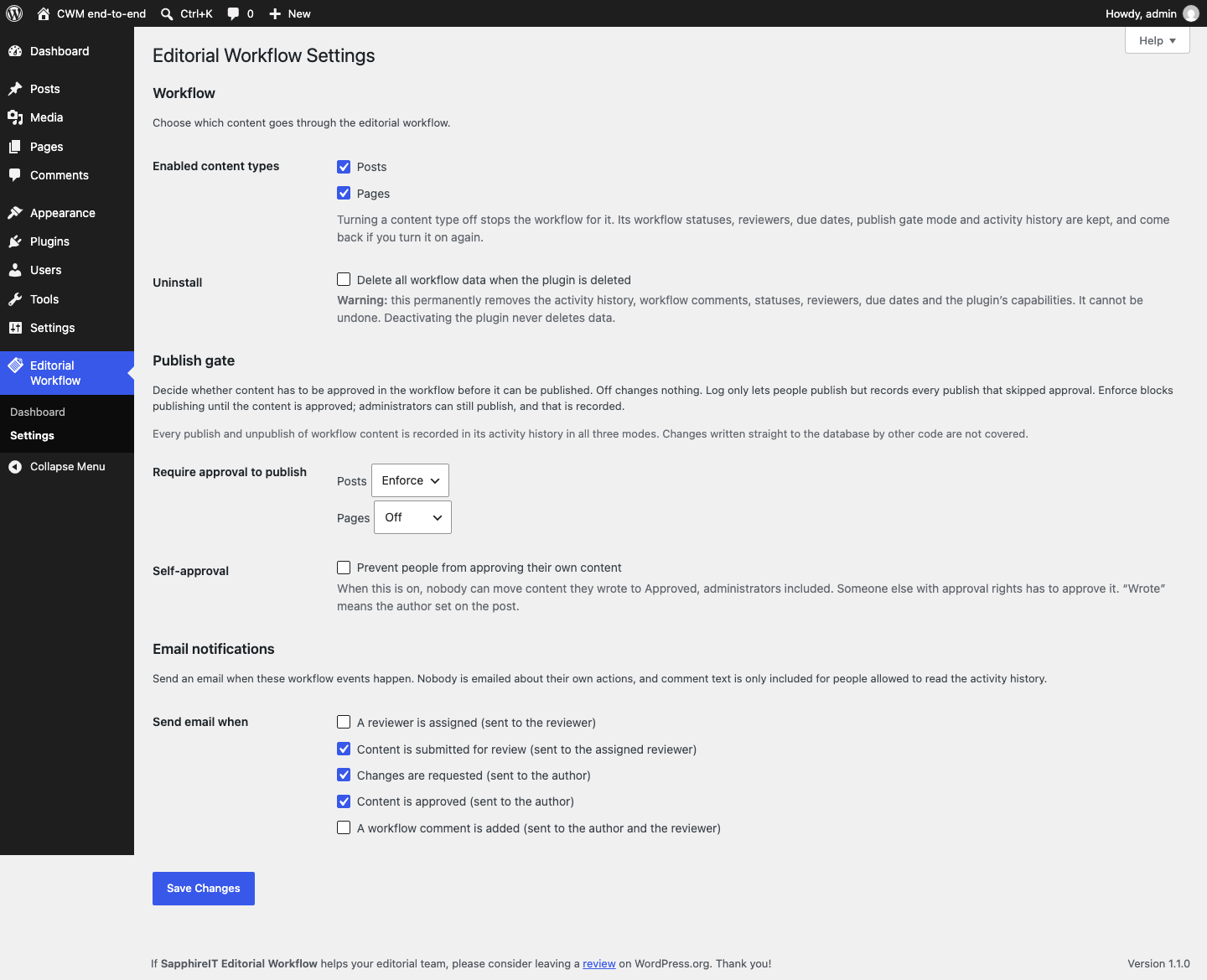
| Settings — the Publish gate and Email notifications sections. | Dashboard — every managed post, filtered and sorted server-side. |
 |
|
| Classic editor — the same workflow box in the classic editor. |
See docs/screenshots/README.md for how these are captured.
Features
- Publish gate, per content type. Off, Log only or Enforce. In
Enforce, content cannot be published or scheduled until its workflow status
is Approved, across the block editor, the classic editor, Quick Edit, Bulk
Edit,
wp/v2REST, WP-CLI and scheduled publishing. Administrators can still publish, and that is recorded. Every type starts at Off. See WORKFLOW.md, including what the gate does not cover. - Publication audit trail. Every publish and unpublish of managed content is logged with the actor, the time and the workflow status at that moment, in every gate mode including Off.
- Opt-in email notifications for five events: reviewer assigned, submitted for review, changes requested, approved, workflow comment added. Off until a site owner turns them on; never sent to the actor or to anyone who cannot read the post.
- Six-status editorial workflow — Draft, Writing, Review, Needs Changes, Approved and Published, with a fixed transition graph and explicit rollback paths. The statuses are not a single line: Review can approve or send back, an approval can be withdrawn, and Published content can start a new cycle. See Workflow overview and WORKFLOW.md.
- Server-side transition validation. Every move is re-checked against the
transition map, the capability map and the post's current stored status. A
client that posts
{"status": "approved"}gets the same answer as one that clicks the button. - Optimistic concurrency. A status change must state the status the client
believed was current; if someone else moved the post meanwhile the request
fails with
409instead of silently overwriting. - Seven dedicated capabilities (
sit_cwm_*), granted to roles at activation. No role names are hard-coded anywhere else in the plugin. - Reviewer assignment and due dates, with an Overdue only filter computed in the site timezone.
- Workflow comments stored alongside the audit trail, not in
wp_comments. - Activity history in a dedicated indexed table, never a growing serialized meta array.
- Gutenberg editor sidebar — status, reviewer, due date, transition buttons and the timeline, without leaving the editor.
- Classic editor meta box — the same panel in an Editorial Workflow box for sites and post types (e.g. WooCommerce products) that use the classic editor. Changes save immediately through REST, independently of Update.
- Admin dashboard built on
@wordpress/dataviews: server-side search, filtering, sorting and pagination, row actions and bulk actions over up to 100 posts per request. - A real REST API. Everything the UI does is a documented, authenticated
endpoint — see REST API and REST-API.md for
curlexamples.
Workflow overview
Every managed post starts at Draft. The workflow status is stored in post
meta (_sit_cwm_status) and is separate from the WordPress post status.
What each status means
| Status | Meaning |
|---|---|
| Draft | Not yet started in the workflow. The default for every managed post. |
| Writing | The author is working on the content. |
| Review | Awaiting reviewer feedback. |
| Needs Changes | Sent back to the author for changes. |
| Approved | Cleared for publication. |
| Published | Published; the workflow cycle is complete. |
The transition graph
Not every move is legal. The graph is fixed in the core plugin and filterable
through sit_cwm_transition_map.
stateDiagram-v2
    [*] --> Draft
    state "Needs Changes" as NeedsChanges
    Draft --> Writing : Start writing
    Writing --> Review : Send for review
    Review --> Approved : Approve
    Review --> NeedsChanges : Request changes (rollback)
    Approved --> Published : Mark published
    Approved --> NeedsChanges : Withdraw approval (rollback)
    NeedsChanges --> Writing : Resume writing
    Published --> Writing : Start new cycle (rollback)
Read as a table:
| From | May move to |
|---|---|
draft |
writing |
writing |
review |
review |
approved, needs_changes |
needs_changes |
writing |
approved |
published, needs_changes |
published |
writing |
Rules that hold for every edge:
- No self-transitions.
writing → writingis invalid, not a no-op. - Any pair not in the table is invalid, whatever capabilities the user
holds. An administrator cannot jump
draft → approved. - The graph is data, not code.
sit_cwm_transition_mapcan replace it; the result is validated against the status registry, so a filter cannot introduce an unknown status or a self-transition.
The normal path and the loops
- Normal editorial path:
draft → writing → review → approved → published. - Revision loop: from
review, a reviewer either approves or sends the post back toneeds_changes; the author then resumeswritingand resubmits forreview. - Approval withdrawn:
approved → needs_changesexists so withdrawing an approval does not require a trip back throughreview. - Re-review of live content:
published → writingstarts a fresh cycle while the WordPress post stays published.
Three edges send content backwards — review → needs_changes,
approved → needs_changes and published → writing. They are flagged
separately (sit_cwm_rollback_transitions) so the UI styles them as destructive
and asks for confirmation.
Workflow status is not WordPress post status
These are two independent fields that are allowed to disagree. The workflow
status lives in _sit_cwm_status; the WordPress post status lives in
wp_posts.post_status, and the workflow never writes to it. (The optional
publish gate can only stop a publish; it never publishes.)
As a consequence, reaching the published workflow status does not publish
the post. A human still clicks Publish. Keeping the fields apart is what
lets a scheduled post keep its schedule while it is being approved, and lets an
already-live article go back through a round of edits without being unpublished.
The full rationale is in
ARCHITECTURE.md.
Moving a post to the published workflow status therefore requires both
sit_cwm_approve_content — the capability mapped to the target status — and
WordPress' own publish_post on that specific post, so the workflow step does
not grant a publishing ability the user would not otherwise have.
What it deliberately does not do
Being honest about this is part of the design:
- No automatic publishing. Reaching the
publishedworkflow status does not publish the post — that stays a deliberate editor action. Workflow status and WordPress post status are separate fields on purpose (why). The publish gate only ever prevents publishing; it never publishes. - No AI detection. It records who approved content, not who or what wrote it.
- No guard against direct database writes. Code that updates
wp_posts.post_statusthrough$wpdbis not seen by the publish gate (uncovered paths). - No Slack, no calendar, no rules engine, no multiple workflows. Those are named in the roadmap, not shipped.
None of these are hidden behind an upsell in this plugin.
Requirements
| WordPress | 6.8 or newer |
| PHP | 7.4 or newer |
| Tested up to | WordPress 7.1 |
The plugin loads no PHP 7.4+ syntax before checking PHP_VERSION, so on an
older PHP it shows an admin notice instead of fataling.
There are no runtime PHP dependencies and no external services. The plugin makes no remote requests, loads nothing from a CDN, sets no cookies of its own and collects no usage data.
Installation
From a release zip
- Download the
sapphireit-editorial-workflow.ziprelease package. - Plugins → Add New → Upload Plugin, choose the zip, install, activate.
Activation creates the wp_sit_cwm_activity table and grants the workflow
capabilities to the administrator, editor, author and contributor roles.
From a clone
assets/build/ is committed, so a clone runs as-is — no build step needed:
git clone <repository-url> sapphireit-editorial-workflow
# into wp-content/plugins/, then activate in wp-admin
Composer and npm are only needed for development. The plugin ships a fallback
autoloader for when vendor/ is absent, and the compiled JavaScript in
assets/build/ means you do not need to run a build to use it. Do not activate
an unbuilt development checkout whose src/ changes have not been compiled.
Quick start
- Activate the plugin.
- Editorial Workflow → Settings — choose which post types the workflow applies to (default: posts and pages).
- Open a post in the block editor and click the Editorial Workflow icon in the top-right toolbar. Every managed post starts at Draft. In the classic editor, the same controls appear in the Editorial Workflow box in the sidebar column.
- Move it along: Draft → Writing when you start, Writing → Review when it is ready, and assign a reviewer plus a due date if you are allowed to.
- The reviewer either Approves it or sends it back with Needs Changes, leaving a workflow comment explaining why.
- Editorial Workflow → Dashboard shows everything in flight, with search, filtering, sorting, row actions and bulk actions.
- Optional: under Settings → Publish gate, set a content type to Enforce so it cannot be published until it is Approved, and tick the events you want under Email notifications.
Status and permission reference
The six capabilities
| Capability | Grants |
|---|---|
sit_cwm_change_workflow |
Move content through the author-side statuses (Draft, Writing, Review). |
sit_cwm_review_content |
Send content back to Needs Changes; also the capability a user must hold to be assignable as a reviewer. |
sit_cwm_approve_content |
Reach Approved and Published. |
sit_cwm_assign_reviewer |
Set or clear the reviewer and the due date. |
sit_cwm_view_activity |
Read the activity timeline and workflow comments. |
sit_cwm_manage_workflows |
The settings page, and attempting bulk actions. |
Reaching each status
| Status | Meaning | Required capability |
|---|---|---|
| Draft | Not yet started in the workflow. The default. | sit_cwm_change_workflow |
| Writing | The author is working on it. | sit_cwm_change_workflow |
| Review | Awaiting reviewer feedback. | sit_cwm_change_workflow |
| Needs Changes | Sent back to the author. | sit_cwm_review_content |
| Approved | Cleared for publication. | sit_cwm_approve_content |
| Published | The cycle is complete. | sit_cwm_approve_content + WordPress publish_post |
The capability is keyed to the target status, not to the edge. Moving
approved → needs_changes needs sit_cwm_review_content, the same as
review → needs_changes, because both land on needs_changes.
On top of the capability, every move also requires WordPress' own edit_post on
that specific post, and a post type the workflow is enabled for. The last word
on a permission decision is the sit_cwm_can_transition filter, which runs
after the capability checks.
Workflow capabilities vs. WordPress post permissions
The workflow capabilities and WordPress' own post permissions are different things, and both apply:
- Workflow capabilities (
sit_cwm_*) decide which statuses a user may reach. - WordPress' post-specific permissions (
edit_post,publish_post,read_post) decide what a user may do to that particular post. They are checked with the post's ID, so a contributor who holdssit_cwm_change_workflowstill only reaches their own unpublished posts, and an author cannotpublish_poston someone else's post whateversit_cwm_approve_contentsays.
Default role grants
Grants are applied at activation and are ordinary role capabilities — any capability-management plugin can change them. Roles not listed (for example subscriber) receive nothing.
| Role | Capabilities granted at activation |
|---|---|
| Administrator | all seven |
| Editor | change_workflow, assign_reviewer, review_content, approve_content, view_activity |
| Author | change_workflow, view_activity |
| Contributor | change_workflow, view_activity |
| Subscriber | none |
The other three capabilities are sit_cwm_assign_reviewer (set or clear the
reviewer and due date), sit_cwm_manage_workflows (settings page, bulk
actions) and sit_cwm_bypass_publish_gate (publish unapproved content while the
gate is set to Enforce; administrators only, and every use is recorded).
Grants are ordinary role capabilities — any capability-management plugin can
change them.
Grants are made on the current site at activation. A network-wide activation
sets up every site, and a site created afterwards is set up on
wp_initialize_site. Permissions themselves are checked dynamically on every
request; the grants only seed the default roles.
Who can be a reviewer
Only a user who holds sit_cwm_review_content. Assigning anyone else fails with
sit_cwm_invalid_user (400), single or bulk. With the default grants that means
editors and administrators.
Architecture summary
includes/
  Core/       Plugin, Container, Activator/Deactivator, Database, Settings, Assets
  Workflow/   WorkflowManager, StatusManager, TransitionManager,
              PermissionManager, Capabilities, BulkProcessor
  Content/    PostMeta, PostRepository
  Activity/   ActivityLogger, ActivityEntry
  Publishing/ PublishGate, the three gate layers, PublicationLogger
  Notifications/ Notifier, RecipientResolver, MessageBuilder
  REST/       Workflow / Activity / Posts / Batch / User controllers
  Editor/     SidebarAssets, ClassicMetaBox
admin/        Dashboard, Settings
src/          React source (sidebar, classic meta box, dashboard)
assets/build/ compiled output (committed)
Three rules hold the design together:
WorkflowManageris the only way to change workflow state. REST controllers, bulk actions and the React app are thin clients over it.TransitionManageranswers "is this edge in the graph?";PermissionManageranswers "may this user do it?". Neither knows about the other.WorkflowManageris the only place they meet, so neither can be bypassed through the other.- Workflow status is not WordPress post status. They are separate fields that never write to each other.
The UI never decides whether a transition is allowed: the sidebar renders the
available_transitions the server computed for that user and post, and every
mutating request re-derives the same answer before writing. A hostile client
with a valid cookie and nonce can do exactly what the UI lets an honest one do,
and nothing more.
Full detail — the transition() pipeline, the data model, the concurrency guard
and the known trade-offs — is in ARCHITECTURE.md.
REST API
Everything the Gutenberg sidebar and the admin dashboard do goes through the
plugin's own REST API under the sit-cwm/v1 namespace. There is no private
AJAX action and no hidden path: the React app is a client of this API, and so
can you be. The eight endpoints are documented with curl examples in
REST-API.md.
| Method | Route | Purpose |
|---|---|---|
GET |
/posts/{post_id}/workflow |
One post's workflow state and what this user may do next |
POST |
/posts/{post_id}/workflow |
Change status, reviewer and/or due date |
GET |
/posts/{post_id}/activity |
Paginated activity history |
POST |
/posts/{post_id}/comments |
Add a workflow comment |
GET |
/statuses |
Status registry and transition map |
GET |
/posts |
Dashboard collection |
POST |
/posts/batch |
Bulk status / reviewer / due date |
GET |
/users |
Assignable reviewers |
Authentication and authorization are separate. The plugin's own UI
authenticates with the logged-in session cookie and the wp_rest nonce, sent by
@wordpress/api-fetch. External clients (curl, scripts, CI) use a WordPress
application password
over HTTP Basic auth. Authentication only identifies the user; every route then
has a real permission_callback that re-derives authorization server-side —
there is no __return_true anywhere in the plugin. The capabilities and
available_transitions a response returns are display hints, never a grant.
One deliberate detail: a post that is missing, has no workflow, or is not
readable by the caller returns the identical sit_cwm_not_managed (404), so a
403 is only ever returned for a post the caller can already see. This prevents
the error codes from enumerating private post IDs.
Extensibility
Free core fires these so add-ons (and your own code) can extend it without
touching a core file. Every one is prefixed sit_cwm_.
Actions
| Hook | Signature | Fires |
|---|---|---|
sit_cwm_status_changed |
( int $post_id, string $from, string $to, int $user_id ) |
After a status change is persisted and logged. |
sit_cwm_reviewer_assigned |
( int $post_id, int $reviewer_id, int $previous_id, int $user_id ) |
After the reviewer changes. $reviewer_id === 0 means cleared; $user_id === 0 means the system did it, which is how a deleted user's assignments are cleaned up. |
sit_cwm_due_date_changed |
( int $post_id, string $date, string $previous, int $user_id ) |
After the due date changes. '' means cleared. |
sit_cwm_comment_added |
( int $post_id, int $activity_id, string $message, int $user_id ) |
After a workflow comment is stored. |
sit_cwm_activity_logged |
( int $activity_id, ActivityEntry $entry ) |
After any activity row is written. |
sit_cwm_db_upgraded |
( string $from_version, string $to_version ) |
After the schema is migrated. |
sit_cwm_publish_gate_refused |
( int $post_id, GateDecision $decision, int $user_id, string $layer ) |
After the publish gate refuses a publish and the refusal is recorded. |
sit_cwm_publish_gate_bypassed |
( int $post_id, GateDecision $decision, int $user_id, string $layer ) |
After unapproved content goes live in Log only, or under the bypass capability in Enforce. |
sit_cwm_publish_gate_failed |
( string $layer, Throwable $error, int $post_id ) |
A gate layer threw; the publish went ahead (the gate fails open). |
sit_cwm_notification_sent |
( string $event, int $post_id, int $recipient_id, bool $sent ) |
After each wp_mail() call; $sent is its return value. |
Filters
| Hook | Signature | Controls |
|---|---|---|
sit_cwm_statuses |
( array $statuses ) |
The status registry. Entries need slug + label; invalid ones are dropped and the draft default must survive. |
sit_cwm_transition_map |
( array $map ) |
The transition graph, as from => [ to, … ]. Unknown statuses and self-transitions are stripped. |
sit_cwm_rollback_transitions |
( array $rollbacks ) |
Which of those edges count as "sending content back", for UI styling. |
sit_cwm_status_capability_map |
( array $map ) |
Target status → required capability. |
sit_cwm_can_transition |
( bool $allowed, int $post_id, string $from, string $to, int $user_id ) |
The last word on a permission decision. Runs after the capability checks; only boolean true allows. |
sit_cwm_available_transitions |
( array $transitions, int $post_id, string $from, int $user_id ) |
The UI's button list. May remove, reorder or relabel — never add a move the user was not already allowed. |
sit_cwm_enabled_post_types |
( string[] $post_types ) |
Which post types have a workflow. |
sit_cwm_available_post_types |
( array $post_types ) |
Which post types the settings screen offers (slug => slug). Defaults to types with an admin UI, REST support and the editor feature; internal types are always removed. |
sit_cwm_activity_actions |
( string[] $actions ) |
Loggable action slugs. |
sit_cwm_activity_action_labels |
( array $labels ) |
Human-readable labels for those slugs. |
sit_cwm_assignable_reviewers |
( array $query, int $post_id, int $user_id ) |
get_users() arguments behind GET /users. fields and count_total are re-forced afterwards. |
sit_cwm_publish_gate_mode |
( string $mode, string $post_type, int $post_id ) |
A post type's gate mode. $post_id is 0 when the question is not about one post. A value outside off/log_only/enforce means off. |
sit_cwm_publish_gate_passes |
( bool $passes, int $post_id, string $workflow_status, string $mode ) |
Whether a publish attempt passes the gate. Only boolean true passes; false and a WP_Error both refuse. |
sit_cwm_notification_recipients |
( int[] $user_ids, string $event, int $post_id, int $actor_id ) |
Who gets mail for an event. The actor, users without a valid email and users who cannot read the post are removed after this filter. |
sit_cwm_notification_message |
( array $message, string $event, int $post_id, int $recipient_id ) |
The subject and plain-text body of one mail, already in the recipient's language. |
sit_cwm_can_transition cannot grant a logged-out user, a missing post or a
post whose type has no workflow — those are hard gates checked before it runs.
It also cannot widen the transition graph; that is sit_cwm_transition_map.
// Only let the assigned reviewer approve.
add_filter(
    'sit_cwm_can_transition',
    function ( $allowed, $post_id, $from, $to, $user_id ) {
        if ( 'approved' !== $to ) {
            return $allowed;
        }

        return $allowed && (int) get_post_meta( $post_id, '_sit_cwm_reviewer_id', true ) === $user_id;
    },
    10,
    5
);
// Notify Slack when something is approved.
add_action(
'sit_cwm_status_changed',
function ( $post_id, $from, $to, $user_id ) {
if ( 'approved' === $to ) {
my_slack_notify( $post_id, $user_id );
}
},
10,
4
);Development
composer install
npm ci
npm run build
npm run env:start        # wp-env (Docker)
Then run the suites:
composer lint            # phpcs, WordPress-Extra, zero errors required
composer test            # PHP unit (no WordPress)
composer test:setup && composer test:integration
npm run test:unit        # Jest
npm run test:e2e         # Playwright
assets/build/ is committed, so run npm run build and commit the output
alongside any src/ change.
DEVELOPMENT.md covers the Docker-free setup, the build pipeline, the performance budgets and the release process. CONTRIBUTING.md covers the coding standards and what a PR needs to be mergeable.
Roadmap
Named because they are planned, not because they exist. These are deliberately not in Free core — but the hooks above are the surface they attach to.
- Multiple workflows, and per-role workflow configuration
- Slack integration
- Editorial calendar
- Checklist gating before approval
- A workflow rules engine (if/then automation)
- Scheduled publishing driven by the
approvedstatus - Advanced audit logs and exports
License
GPL-2.0-or-later. See LICENSE.
Copyright © 2026 SapphireIT.