UVic Captions Player
Embeds a video player from UVic's Video Player Setup Wizard and extracts the captions for annotation with Hypothesis.
by Digital Scholarship - University of Rochester · github.com/rochester-rcl/uvic-captions-player-wp
Install
No release zip yet. The repository archive installs, but the folder name will carry the branch suffix and updates will not flow:
wp plugin install https://github.com/rochester-rcl/uvic-captions-player-wp/archive/refs/heads/master.zipWordPress Block plugin to embed a JWPlayer instance from UVic's Video Player Setup Wizard and extract its captions for annotation with Hypothesis
Installation
Download one of the releases and install it as you would any other WordPress plugin, either through the WordPress interface or by unzipping it into the wp-content/plugins directory.
This will create a new UVic Captions Player block under blocks/embeds
Usage
To add a new UVic Captions Player block to your post or page, select the UVic Captions Player block from the EMBEDS section in the Blocks menu.Paste the output from the UVic Video Player Wizard into the Embed UVic Player textarea and optionally set the width, height, font family, and responsive options.
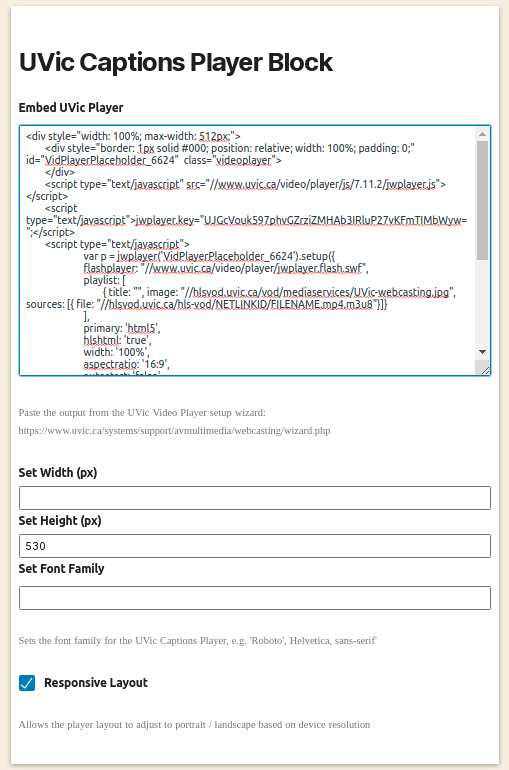
Options
| Option | Description |
|---|---|
| Embed UVic Player | (Required) - The HTML snippet generated from the UVic Video Player Wizard: https://www.uvic.ca/systems/support/avmultimedia/webcasting/wizard.php |
| Set Width | (Optional) - The width in pixels of the UVic Captions Player container. If no value is entered, the width is set to auto and is proportional to the height. |
| Set Height | (Optional) - The height in pixels of the UVic Captions Player container. Default is 500. |
| Set Font Family | (Optional) - Use this field to override the UVic Captions Player font with a different font family (i.e. "Roboto", Helvetica, sans-serif). Note - the fonts must be loaded on the site. |
| Responsive Layout | (Optional) - Allows the UVic Captions Player to swap from landscape to portrait layout based on device resolution. Default is true. |
Local Development
Note: Local development requires both Docker and Node 12.0.0 or later and requires an npm version greater than 6.9.0.
Clone the repository:
git clone git@github.com:rochester-rcl/uvic-captions-player-wp.gitCreate a new folder anywhere on your machine in order to persist the MySQL database used by the Docker service.
Create a .env file in the uvic-captions-player-wp folder with the following environment variables:
WP_PLUGIN_SRC [absolute path to the uvic-captions-player-wp folder]
WP_MYSQL_DIR [absolute path to the mysql data folder created above]
Install all node modules:
With npm > 7
cd uvic-captions-player-block &&
npm install --legacy-peer-deps
With npm 6.9.*
cd uvic-captions-player-block &&
npm install --legacy-peer-deps
Start the Docker service
To start the Docker service, run
docker-compose up wordpressThis will spin up a local version of WordPress available at localhost:8080. You should see the UVic Captions Player Plugin in the Plugins list. If not, check the WP_PLUGIN_SRC environment variable set in the .env file.
Build the block
To build the block code with hot module reloading, cd into the uvic-captions-player-block folder and run:
npm run buildTo run with hot module reloading, run:
npm run start