User Login Status WP Registry grade A. No security issues foundWP RegistryNo security issues foundOpen the reportA
A plugin to quickly see which users are online or offline, and log them out en masse.
Install
This is the repository archive. It installs, but the folder name will carry the branch suffix and updates will not flow.
Install straight from GitHub with WP-CLI:
wp plugin install https://github.com/robertdevore/user-login-status/archive/refs/heads/main.zipA WordPress plugin to easily view which users are online/offline and log them out en-masse directly from the Users admin table.
Description
The User Login Status plugin enables administrators to view and manage user login statuses directly from the WordPress admin dashboard. With this plugin, you can easily see which users are logged in or out and, if necessary, log out multiple users at once using the bulk action feature.
Key Features
- 🟢 Monitor Login Status: Quickly see whether a user is logged in or out via color-coded icons (green = online, red = offline) in the Users table.
- 🚪 Bulk Log Out Users: Select multiple users and log them out simultaneously using the bulk action dropdown in the Users table.
- 🔄 Real-Time Updates: User statuses are updated via AJAX every 30 seconds to reflect real-time login activity.
- 🔒 Secure AJAX Requests: The plugin uses nonces to ensure that AJAX requests are secure and valid.
Installation
From Your WordPress Dashboard
- Navigate to Plugins > Add New.
- Search for User Login Status.
- Click Install Now and then Activate.
Manual Installation
- Download the plugin ZIP file from this repository.
- Upload the ZIP file via the Plugins > Add New > Upload Plugin section of your WordPress dashboard.
- Activate the plugin from the Plugins menu.
Installation via FTP
- Download the plugin ZIP file and unzip it.
- Upload the
user-login-statusfolder to the/wp-content/plugins/directory on your server. - Activate the plugin from the Plugins menu in WordPress.
Usage
Once the plugin is activated:
- Navigate to the Users section in your WordPress admin dashboard.
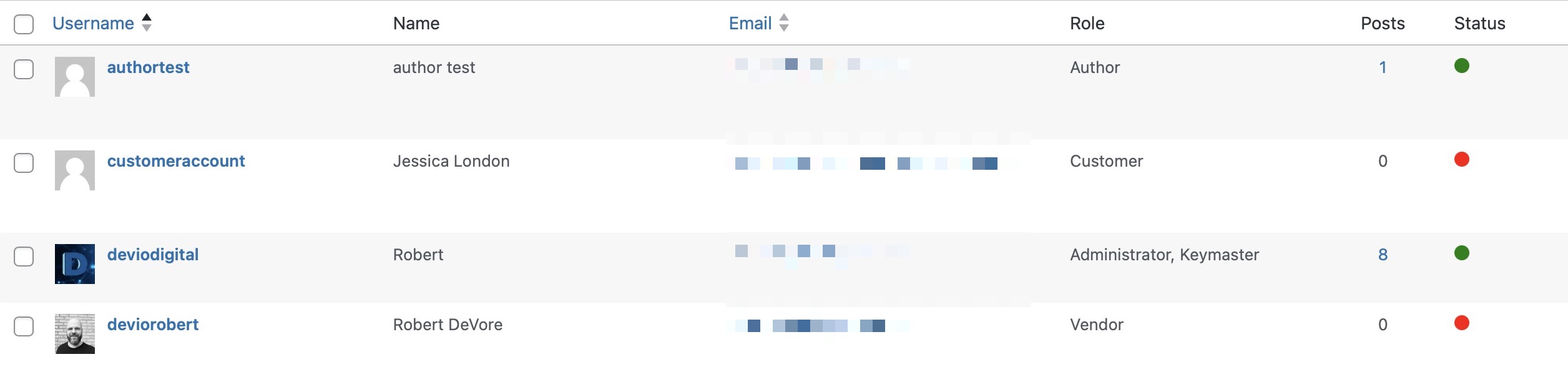
- You will see a new Status column in the Users table:
- 🟢 Green Circle: User is logged in.
- 🔴 Red Circle: User is logged out.
- To log out multiple users:
- Check the boxes next to the users you want to log out.
- Select Log Out Users from the bulk actions dropdown.
- Click Apply.
Technical Details
- Session Management: The plugin relies on WordPress’s built-in session tokens to determine whether a user is logged in or out.
- AJAX Polling: User statuses are refreshed every 30 seconds via AJAX to provide real-time updates.
- Security: All AJAX requests are secured with nonces to prevent unauthorized access.
Screenshots
-
User status column: Shows a green circle for logged-in users and a red circle for logged-out users.
-
Bulk log out action: Select multiple users and log them out from the Users table.

Frequently Asked Questions
How does the plugin determine whether a user is logged in?
The plugin checks the session tokens stored in the user’s metadata. If session tokens exist and are active, the user is considered logged in.
Can I adjust how often the user status is refreshed?
Yes, the status is refreshed every 30 seconds by default. If you wish to change the interval, you can modify the polling interval in the JavaScript code.
Will this plugin work on large websites with many users?
For websites with large numbers of users, the plugin batches AJAX requests to improve performance. This ensures that the plugin remains efficient even when dealing with many users.
Changelog
1.0.1
- Updated the ajax calls to include all users in a single call for peformance improvements in
user-login-status.php - Updated the JS for ajax calls to include all users in a single call for performance improvements in
user-login-status.js - Updated status check to also look for unexpired
session_tokensinuser-login-status.php
1.0.0
- Initial release.
License
This plugin is licensed under the GPLv3 or later. For more information, visit http://www.gnu.org/licenses/gpl-3.0.html.
Releases
3 releases.
These releases are tags only. The author does not attach a packaged zip, so there are no download counts to report.