Install
This is the repository archive. It installs, but the folder name will carry the branch suffix and updates will not flow.
Install straight from GitHub with WP-CLI:
wp plugin install https://github.com/robertandrews/cwp-column-post-featimg-path/archive/refs/heads/master.zipNo built-in updater. New versions won't appear under Dashboard → Updates. Install new releases yourself, or let Git Updater track the repository.
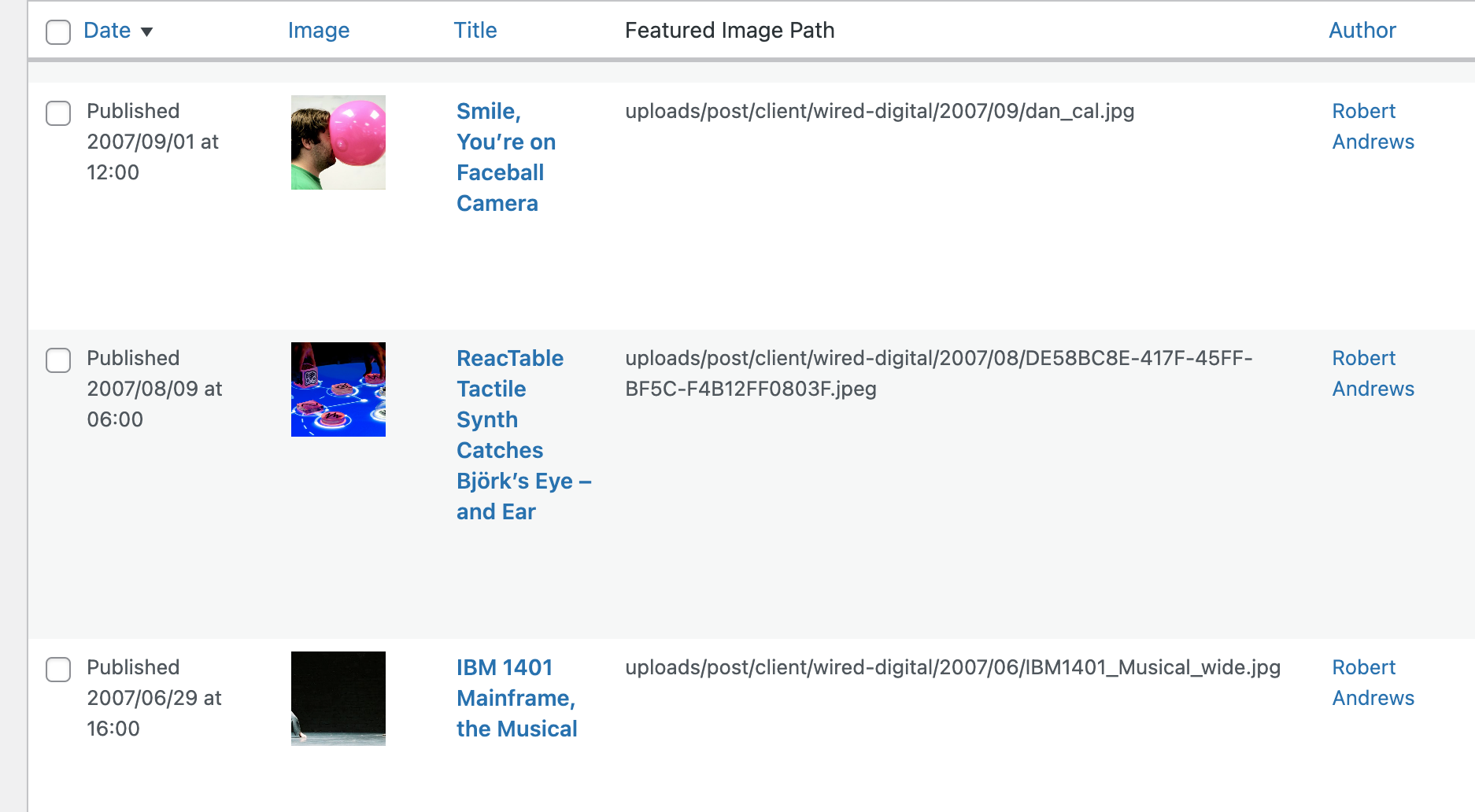
This WordPress plugin adds a custom column to the Posts list in the WordPress admin area. The column displays the path of any attached Featured Image for each post.
Installation
- Upload the
column-featured-img-pathfolder to the/wp-content/plugins/directory. - Activate the plugin through the 'Plugins' menu in WordPress.
- Go to the 'Posts' screen in the WordPress admin area to see the new custom column.
Usage
After activating the plugin, a new custom column named 'Featured Image Path' will appear in the Posts list in the WordPress admin area. The column displays the path of any attached Featured Image for each post. The path shown in the column is relative to the 'wp-content' directory.
Changelog
1.0.0
- Initial release
License
This plugin is licensed under the MIT License - see the LICENSE file for details.