Install
This is the repository archive. It installs, but the folder name will carry the branch suffix and updates will not flow.
Install straight from GitHub with WP-CLI:
wp plugin install https://github.com/ripon4/cloudflare-web-analytics/archive/refs/heads/main.zip

Cloudflare Web Analytics for WordPress




The privacy-first, zero-database-bloat analytics solution for WordPress.
Stream Cloudflare's enterprise-grade Real User Monitoring (RUM) and global edge intelligence directly into your WordPress dashboard — 100% free forever, no cookies, no tracking scripts, and zero database bloat.
Created with passion by RipoN Sahaji
GitHub: github.com/RipoN4/Cloudflare-Web-Analytics
📸 Visual Showcase & Previews
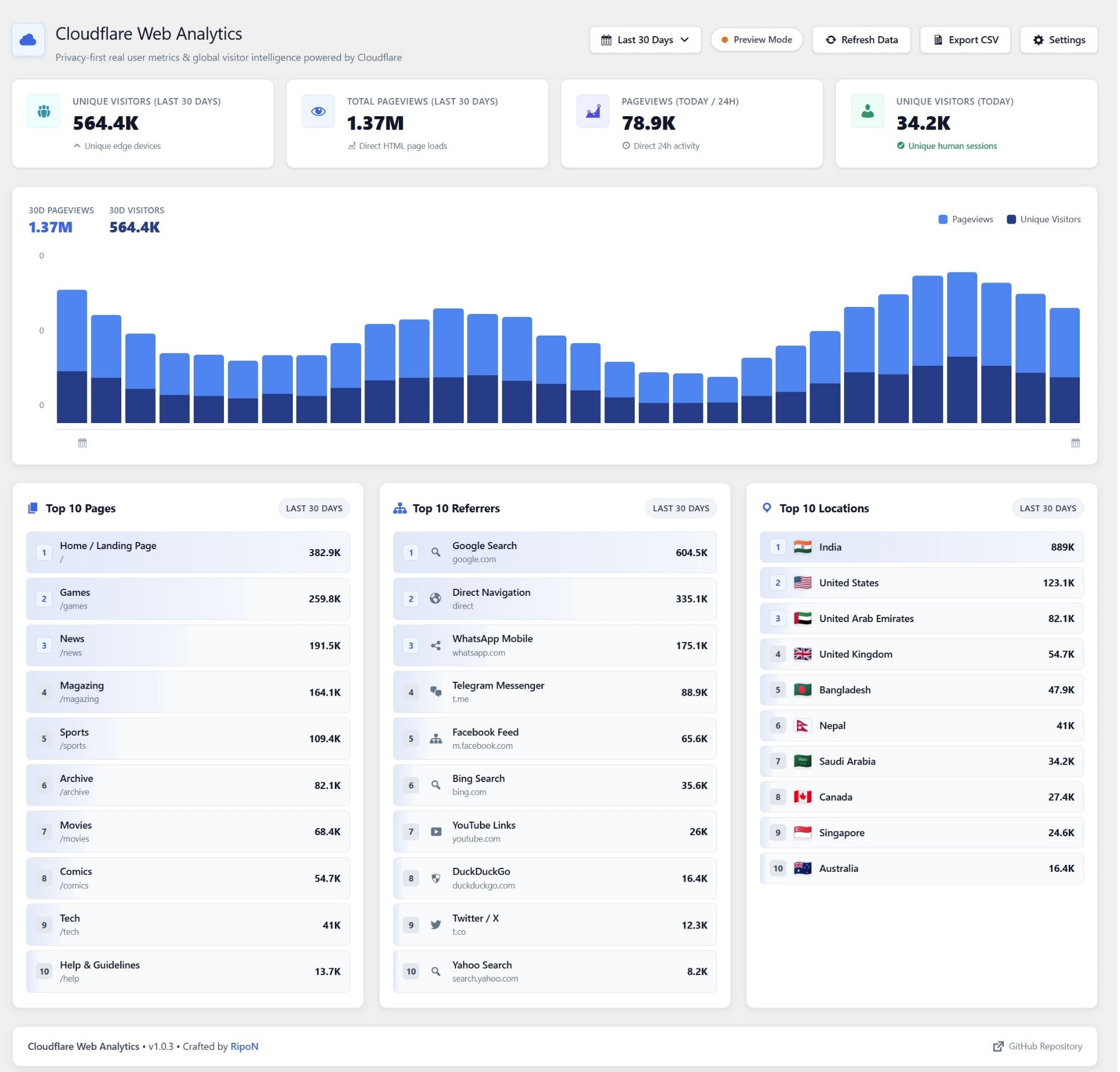
1. Dedicated Analytics Dashboard (/wp-admin/index.php?page=cf-edge-analytics)
Full real-time visibility with interactive multi-period filters (24 Hours, 7 Days, 14 Days, 30 Days), dual-tone daily activity graphs, and Top 10 breakdown columns for Pages, Referrers, and Locations.
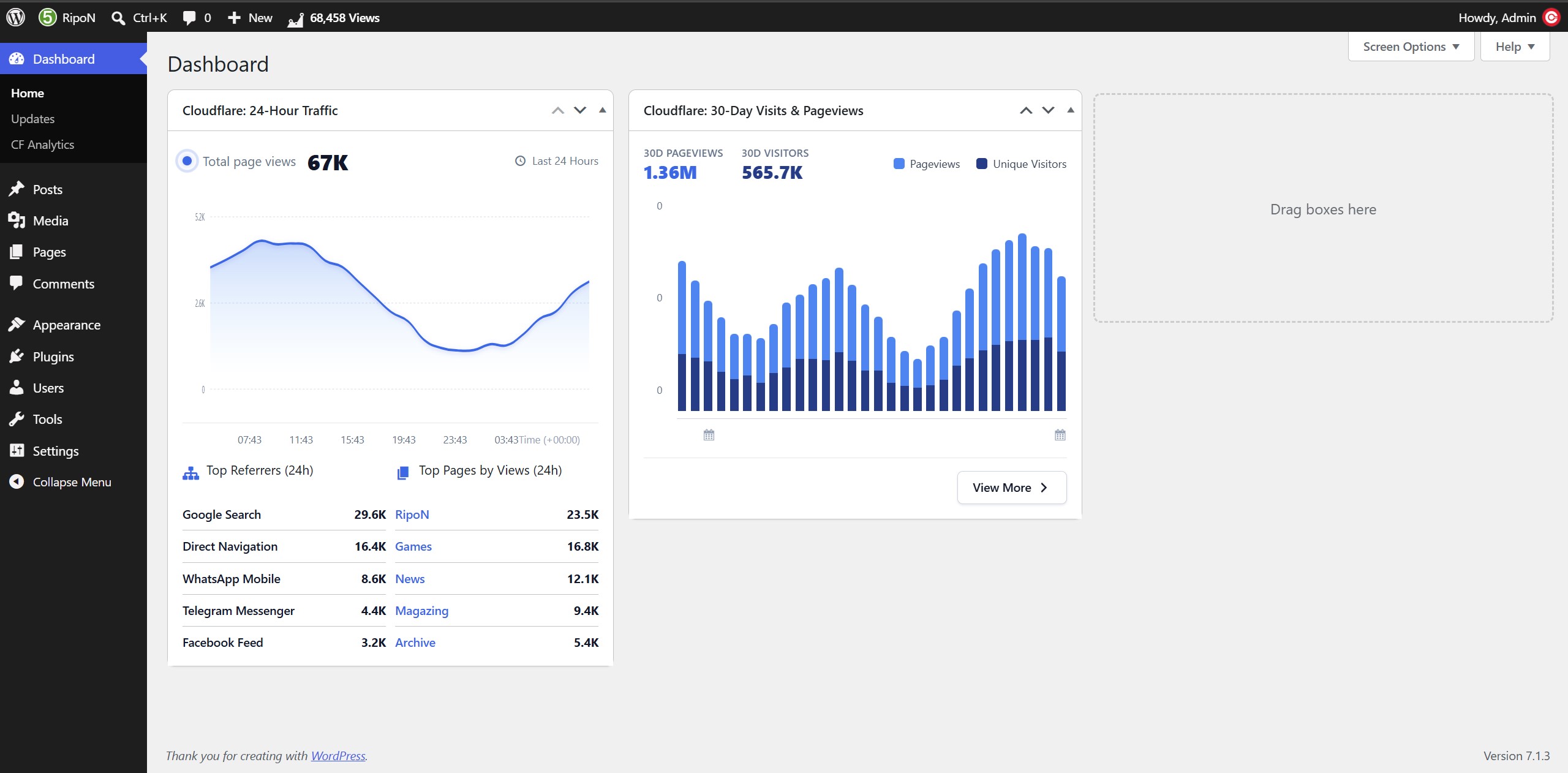
2. Native WordPress Dashboard Widgets (/wp-admin/index.php)
Get instant traffic health updates the moment you log in to WordPress. Includes an hourly 24-hour cubic Bézier area spline, a 30-day dual-tone bar chart, and a live top Admin Bar traffic counter.
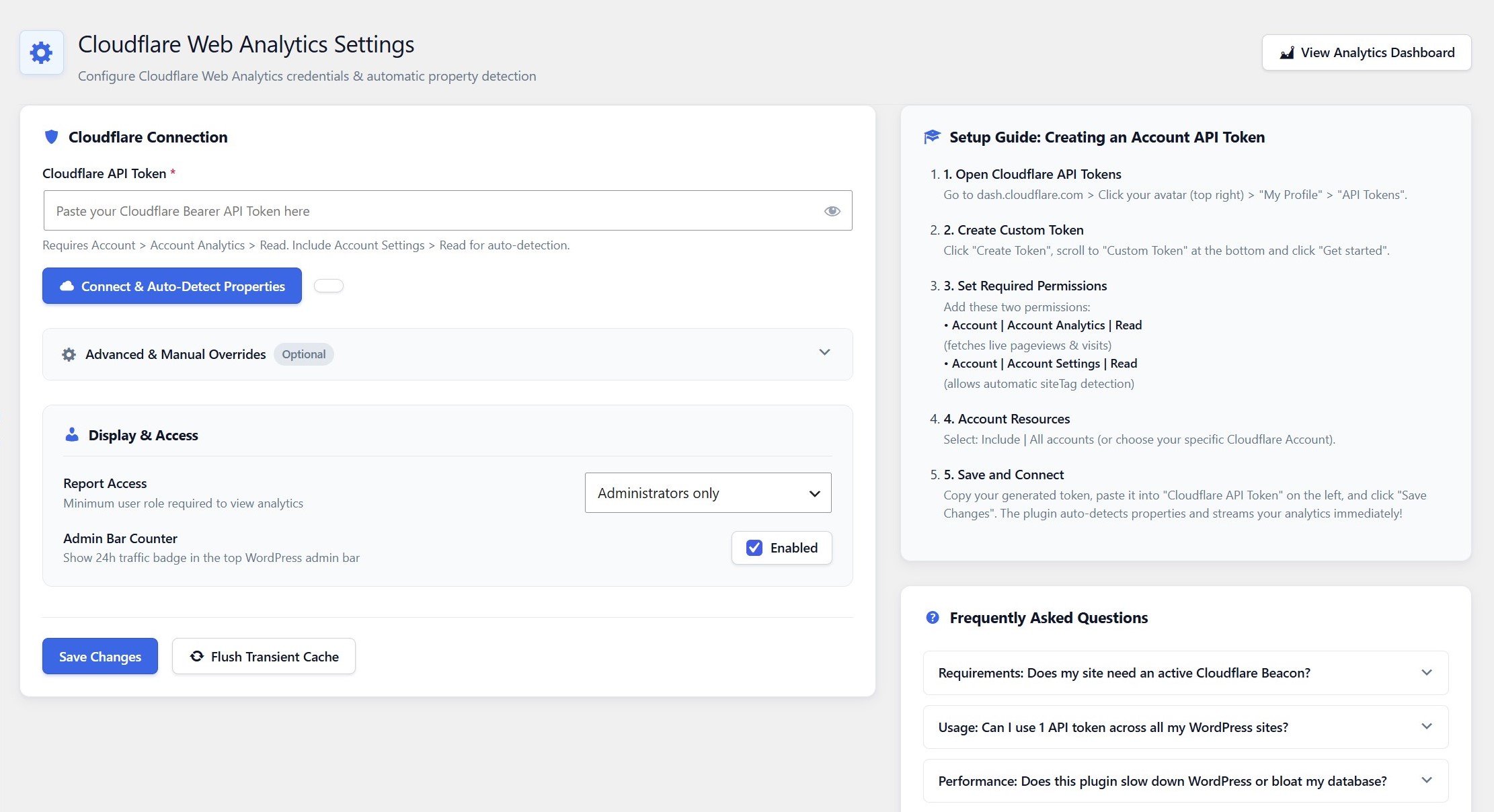
3. Clean Settings with 1-Click Auto-Detection
Connect in seconds. Paste your Cloudflare API Token and let the plugin automatically detect your Account ID, Site Tag, and Zone ID. Includes granular report access permissions and a built-in setup guide.
💡 Why This Plugin Was Created
For over a decade, WordPress site owners have been stuck in a frustrating dilemma when trying to view simple, reliable website traffic:
- The Jetpack Trap: Jetpack Stats used to be the default choice. Today, it has become bloated, slow, heavy on server memory, and packed with intrusive upsell nag banners. Worst of all, it requires connecting your site to a third-party WordPress.com account.
- The Database Bloat of Self-Hosted Analytics: Independent plugins like Koko Analytics or WP Statistics are great in theory, but storing every single visitor request locally in MySQL quickly inflates your database by hundreds of thousands or millions of rows. This causes sluggish database queries, gigantic backup files, and high CPU usage on shared and VPS hosting.
- The Google Analytics 4 (GA4) Nightmare: GA4 is complex, sluggish, and privacy-invasive. Loading Google's heavy
gtag.jstracking bundle penalizes your Google PageSpeed and Core Web Vitals score, while legally forcing you to display annoying GDPR/CCPA cookie consent banners to visitors.
The Cloudflare Solution
Cloudflare operates the world's most advanced edge network and provides a 100% free Web Analytics (RUM) engine. It offers:
- Pure human traffic metrics with automatic bot and crawler filtering.
- Zero cookies, zero personal data collection, and zero IP address logging.
- Global edge computing that handles millions of pageviews effortlessly without consuming a single byte of your WordPress server's database.
The only missing piece? Webmasters had to log in to the Cloudflare website dashboard every day just to see their numbers.
Cloudflare Web Analytics for WordPress bridges this gap permanently. It queries Cloudflare's official GraphQL API behind the scenes and renders clean, interactive analytics right inside your WordPress admin.
✨ Key Features & Highlights
- ⚡ Zero Database Bloat: Does not create a single database table or log visitor hits in MySQL. Your database remains 100% clean and fast.
- 🔒 100% Privacy-First & GDPR Compliant: No cookies are set on visitor browsers, no IP addresses are recorded, and no personal data is collected. No cookie consent popups required!
- 🤖 Real Human Traffic Only: Excludes search engine bots, scraper crawlers, automated spam scripts, and uptime monitors (
excludeBots: Yes), giving you true visitor intelligence. - 🚀 Zero Frontend Scripts: Unlike other analytics plugins, this plugin injects zero JavaScript or CSS files on your public frontend if you use Cloudflare proxy or the Cloudflare beacon.
- 📅 Dynamic Multi-Period Filtering: Seamlessly toggle between Last 24 Hours, Last 7 Days, Last 14 Days, and Last 30 Days directly from the header dropdown.
- 📈 Zero External Library Bloat: Engineered using pure PHP and responsive inline vector SVG splines. No heavy Chart.js, D3.js, or external JavaScript libraries loaded in your admin.
- 🪄 Smart 1-Click Auto-Detection: Enter your API token once — the plugin automatically resolves your domain's Account ID, Site Tag, and Zone ID.
- 🧩 2 Core Dashboard Widgets:
- 24-Hour Traffic Area Graph: Smooth cubic Bézier spline with hover tooltips and Top 5 Referrers & Top 5 Pages.
- 30-Day Activity Bar Chart: Dual-colored candle bars for Unique Visitors and Pageviews with total counts and a 1-click "View More" link.
- 🔔 WordPress Admin Bar Quick Counter: Displays real-time 24h pageviews and unique visitors right in the top WordPress admin bar for instant status checks.
- 👥 Role-Based Report Access: Let your Editors or Authors view analytics reports while keeping API credentials strictly restricted to Administrators.
- 📝 1-Click "Edit Post" Shortcuts: Jump directly into the WordPress Gutenberg or Classic post editor straight from the Top 10 Pages list.
- 📥 1-Click CSV Report Export: Export complete analytics reports (summary, timeline, top pages, referrers, and countries) formatted with Excel-friendly UTF-8 BOM encoding.
- 🎨 WordPress UI Conflict-Proof: Built with a sleek, modern white aesthetic (
#ffffff, subtle slate borders, native Dashicons) designed to never conflict with WordPress core styling.
🛠️ Step-by-Step Setup Guide
Getting started takes less than 2 minutes.
Step 1: Create a Custom Cloudflare API Token
- Log in to your Cloudflare Dashboard.
- In the top-right corner, click your User Avatar > My Profile.
- Select API Tokens from the left navigation menu.
- Click Create Token, scroll to the bottom, and click Get started next to Custom Token.
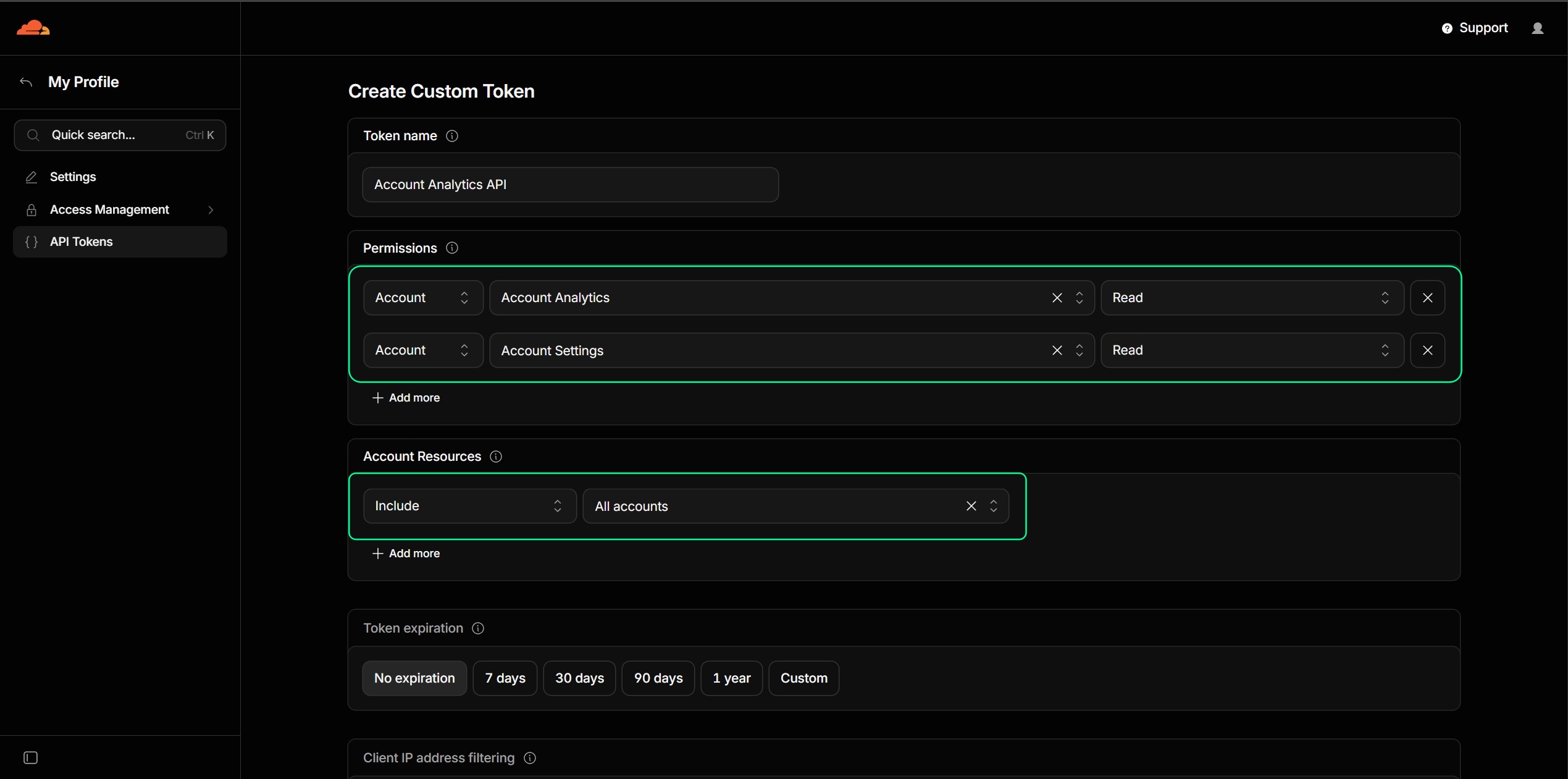
- Configure the token settings:
- Token name:
Account Analytics API(or any name you prefer) - Permissions:
Account|Account Analytics|Read(Fetches pageviews & visitors)Account|Account Settings|Read(Enables automatic domain discovery)
- Account Resources:
Include|All accounts(or choose your specific account)
- Token name:
- Click Continue to summary, then click Create Token.
- Copy your generated API Token.
Step 2: Connect in WordPress
- In your WordPress admin, navigate to Settings > Cloudflare Analytics (
/wp-admin/options-general.php?page=cf-edge-analytics-settings). - Paste your token into the Cloudflare API Token field.
- Click Connect & Auto-Detect Properties.
- The plugin will instantly discover your Account ID, Site Tag, and Zone ID.
- Click Save Changes. Your live analytics will start streaming immediately!
📊 Feature Comparison
| Feature | Cloudflare Web Analytics | Jetpack Stats | Google Analytics 4 | Koko Analytics | Plausible (Self-Hosted) |
|---|---|---|---|---|---|
| Price | 100% Free Forever | Paid plans / Upsells | Free / Complex | Free | Paid / Complex Setup |
| Database Bloat | 0 Rows (Clean DB) | Stored Remotely | Stored Remotely | Heavy MySQL Bloat | Requires Docker/PostgreSQL |
| Cookie Free | Yes | No | No | Yes | Yes |
| GDPR Banner Needed | No | Yes | Yes | No | No |
| Frontend Script Size | 0 KB | Heavy bundle | ~45 KB (gtag.js) |
~1.5 KB | ~1 KB |
| Bot Traffic Filtered | Yes (Automatic) | Partial | Basic | Basic | Basic |
| Live in WP-Admin | Yes | Yes | Via 3rd-party plugin | Yes | Via 3rd-party plugin |
| Server Resource Usage | Zero | High | Low | High (on viral spikes) | High |
🏗️ Architecture & How It Works
┌─────────────────────────────────────────────────────────────┐
│                    WordPress Admin Area                     │
│  (/wp-admin/index.php  &  ?page=cf-edge-analytics)          │
└──────────────────────────────┬──────────────────────────────┘
                               │
                Check Transient Cache (5 min TTL)
                               │
               ┌───────────────┴───────────────┐
               │                               │
         [Cache Hit]                     [Cache Miss]
               │                               │
      Instant UI Render               Cloudflare GraphQL API
       (0ms DB impact)                (api.cloudflare.com/v4)
                                               │
                                 ┌─────────────┴─────────────┐
                                 │                           │
                            Primary Mode                Fallback Mode
                        Web Analytics (RUM)            Zone Analytics
                       (rumPageloadEvents)         (httpRequests1dGroups)
                                 │                           │
                                 └─────────────┬─────────────┘
                                               │
                                       Format & Cache
                                               │
                                               ▼
Pure Vector SVG Splines & HTML- Two Intelligent Fetch Engines:
- Primary (Web Analytics RUM): Uses Cloudflare's
rumPageloadEventsAdaptiveGroupsdataset withbot: 0for direct Real User Monitoring parity withdash.cloudflare.com. - Fallback (Zone-Level Edge Analytics): If a standalone RUM beacon is not active, the plugin automatically falls back to DNS Zone-level proxy analytics (
httpRequests1dGroupsandhttpRequests1hGroups), ensuring your charts always show live data.
- Primary (Web Analytics RUM): Uses Cloudflare's
- Smart Transient Caching: Responses are cached using the WordPress Transients API (default 300s) to keep admin page loads instantaneous and protect your Cloudflare API limits.
- Pure Math SVG Spline Generator: Hourly traffic graphs are generated via pure cubic Bézier mathematics (
M x y C x1 y1 x2 y2 x y), producing lightweight, ultra-crisp vector graphics on all Retina displays.
❓ Frequently Asked Questions (FAQ)
Does my website need an active Cloudflare JS Beacon?
No! If your domain routes its traffic through Cloudflare (DNS orange-cloud proxy active), this plugin automatically queries Cloudflare's Zone Analytics without needing any tracking script. If you also enable Cloudflare Web Analytics RUM, it will automatically stream the Real User Monitoring dataset. Both methods work seamlessly.
Can I use 1 Cloudflare API Token for all my WordPress websites?
Yes! A single Cloudflare API Token with Account Analytics: Read and Account Settings: Read permissions can be reused across all your WordPress installations. The plugin automatically detects the correct domain on each site.
Does this plugin slow down my website or increase database size?
Never. The plugin stores zero hit logs in your WordPress database. All visitor traffic is recorded at Cloudflare's global edge network. Your admin dashboard queries the aggregated data via Cloudflare's GraphQL API and caches the summary in lightweight WordPress Transients.
How does Cloudflare filter bots and scrapers?
Cloudflare analyzes incoming traffic at its global edge network, identifying search crawlers, scraping bots, and malicious automated scripts. When our plugin queries the analytics engine, it includes the filter bot: 0 (excludeBots: Yes), ensuring you only see authentic human visitors.
What happens if Cloudflare's API is temporarily unreachable?
If Cloudflare's API experiences downtime or your token expires, the plugin gracefully falls back to your last cached data or displays a non-intrusive preview notification without crashing your WordPress site.
🔒 Privacy & Compliance
This plugin is designed strictly following GDPR, CCPA, and PECR privacy standards:
- No Personal Identifiable Information (PII): Does not record or transmit visitor IP addresses, browser fingerprints, email addresses, or usernames.
- No Cookies: Does not write or read cookies on visitor browsers.
- Clean Frontend: Loads zero scripts or tracking pixels on your public website.
👨💻 Author & Community
- Crafted by: RipoN Sahaji
- GitHub Profile: @RipoN4
- Feedback & Issues: Submit an Issue
If you find this plugin helpful for your WordPress workflow, please consider starring the repository ⭐ on GitHub!
📄 License
This project is open-source software licensed under the GNU General Public License v2.0 or later.