Install
Upload it under Plugins → Add New Plugin → Upload Plugin, then activate.
Install straight from GitHub with WP-CLI:
wp plugin install https://github.com/ripon4/clickadu/releases/download/v1.1.0/clickadu.zipA simple WordPress plugin that connects to ClickAdu.com's API to display your earnings, impressions, and CPM directly on your WordPress admin dashboard and top toolbar.
Features
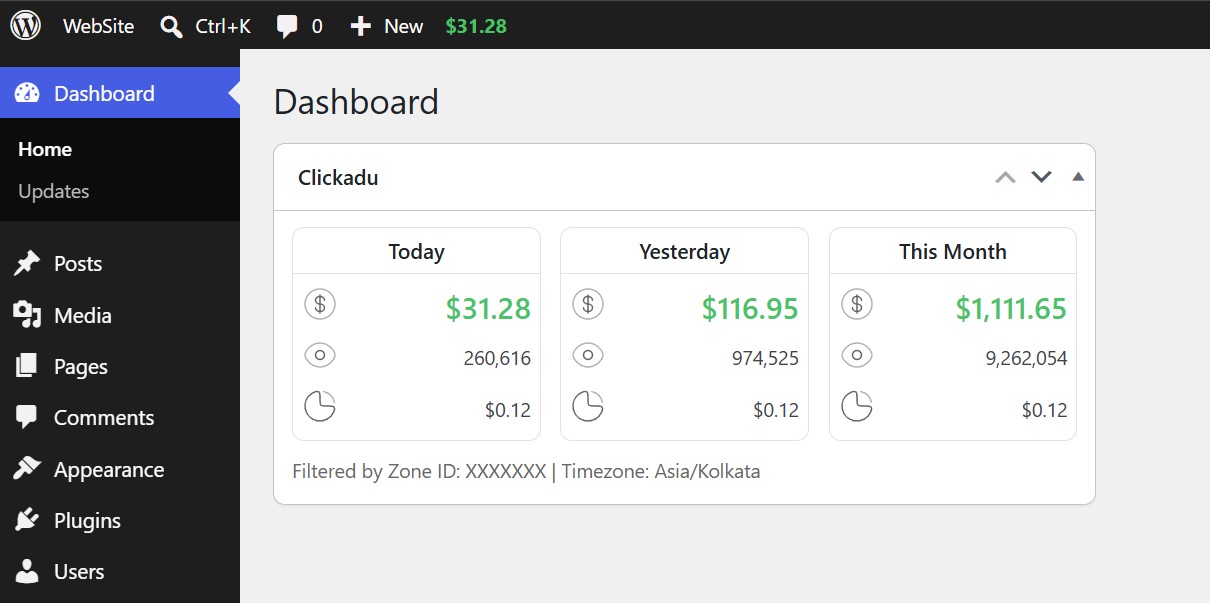
- Dashboard Widget: Shows Today's, Yesterday's, and This Month's performance (Earnings, Impressions, and CPM) side by side.
- Top Toolbar Badge: Live earnings badge in the WordPress admin bar for quick monitoring from any admin page or front-end view.
- Zone Filtering: View data for a specific ad zone using its Zone ID, or leave blank to see total account stats across all zones.
- Custom Timezone: Match your ClickAdu reporting timezone (e.g. EST, UTC, Asia/Kolkata).
- Fast and Cached: Results are cached server-side using WordPress transients (5-minute cache) to prevent API rate limits and keep your dashboard fast.
- Secure: All requests are performed server-side over HTTPS. Only users with administrator capabilities (
manage_options) can view stats and settings.
Screenshots
WordPress Dashboard Widget & Admin Bar
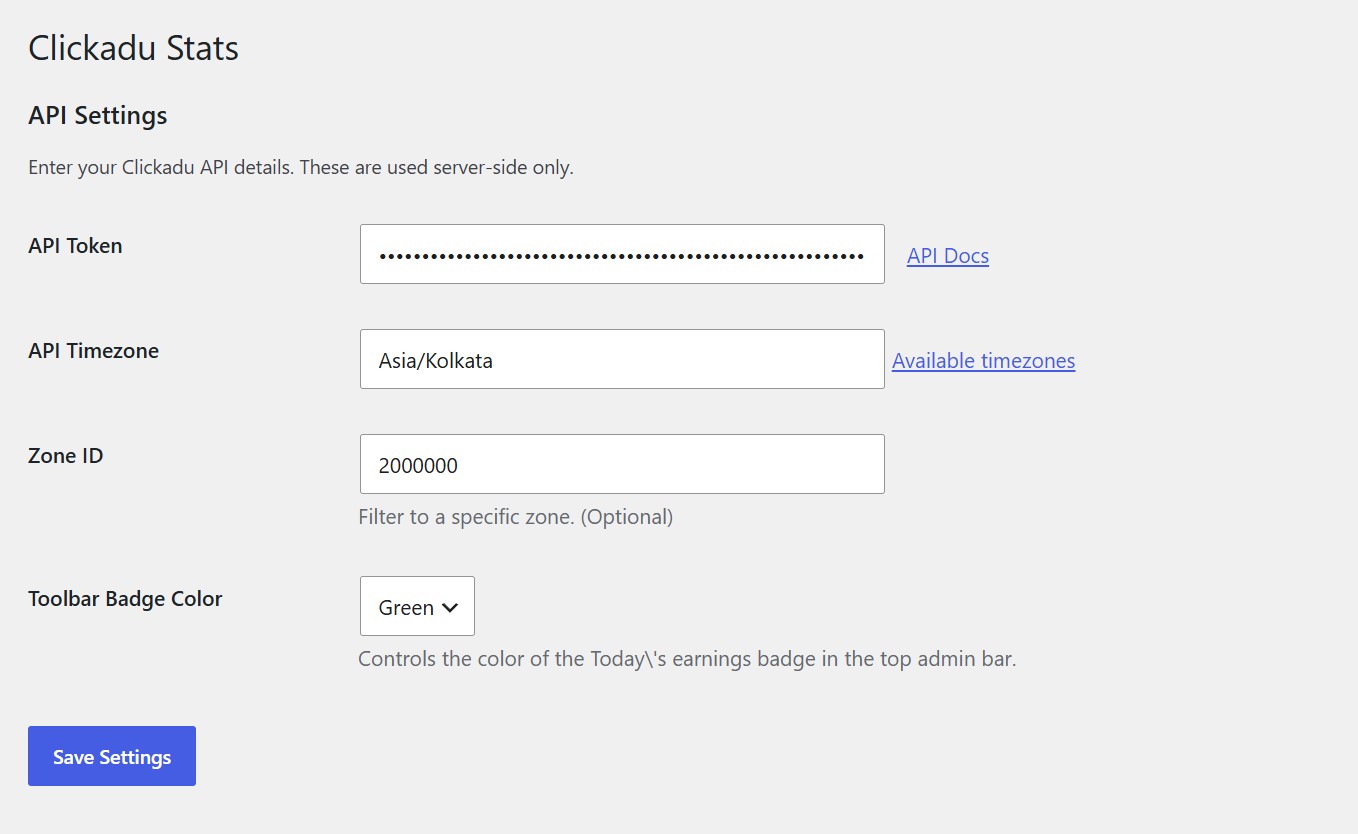
API Settings Page
Requirements
- WordPress 5.6 or higher
- PHP 7.4 or higher
- Active ClickAdu Publisher account
Installation
Method 1: Upload via WordPress Admin
- Download this repository as a
.zipfile. - In your WordPress admin area, go to Plugins > Add New > Upload Plugin.
- Select the
.zipfile and click Install Now. - Click Activate Plugin. You will be redirected directly to the ClickAdu settings page.
Method 2: Manual Installation via FTP / SSH
- Clone or upload the
clickadufolder into your WordPress plugins directory:wp-content/plugins/clickadu/ - In your WordPress admin area, go to Plugins > Installed Plugins.
- Find ClickAdu in the list and click Activate.
Configuration and Usage Guide
Once activated, follow these steps to connect your ClickAdu account:
-
Open Settings: Go to Settings > ClickAdu in your WordPress admin menu.
-
Enter your API Token:
- Log into your ClickAdu publisher dashboard.
- Go to ClickAdu API Integration.
- Generate or copy your API Token and paste it into the API Token field.
-
Set API Timezone:
- Enter your account reporting timezone (for example:
ESTorAsia/Kolkata). - Default is
EST. Check the ClickAdu Timezones Guide if you are unsure.
- Enter your account reporting timezone (for example:
-
Set Zone ID (Optional):
- Enter the Zone ID of the specific ad you want to monitor.
- If you leave this field blank, the plugin will display aggregate totals for all your zones.
-
Choose Toolbar Badge Color:
- Select either Green or Yellow for the earnings badge displayed on the top WordPress toolbar.
-
Save Settings:
- Click the blue Save Settings button.
-
View Your Stats:
- Go to Dashboard > Home to see the ClickAdu statistics widget.
- Look at the top admin bar to check Today's earnings at a glance.
Frequently Asked Questions
Why does the toolbar or dashboard show an error? Make sure your API Token is correct and that your server can make outbound HTTPS requests. Failed requests are temporarily cached for 2 minutes before retrying.
Why are my daily numbers slightly different from ClickAdu dashboard? Ensure that the timezone entered in Settings > ClickAdu matches the timezone configured in your ClickAdu publisher account.
Who can see these statistics?
Only users with administrator privileges (manage_options capability) can view the settings page, the dashboard widget, and the admin toolbar badge.
License
This plugin is open-source software licensed under the GNU General Public License v2.0 or later.
Releases
1 release. Each count is every asset in that release; expand a row for the breakdown.