Install
This is the repository archive. It installs, but the folder name will carry the branch suffix and updates will not flow.
Install straight from GitHub with WP-CLI:
wp plugin install https://github.com/riotrequest/wpmalwarescanner/archive/refs/heads/main.zipWordPress Malware Scanner
Look first. Trust nothing.
DO NOT USE ON A SITE YOU CARE ABOUT.
This is experimental software. It will miss malware. It will flag legitimate code. Cleaning, quarantine, and restore can break your site or put malicious code back. Use an offline copy or disposable staging install. Keep an independent, tested backup. Use entirely at your own risk. No warranty.
An experimental WordPress admin tool for inspecting suspicious files, reviewing findings, and attempting a few deliberately narrow repairs. Version 4.0.0 replaces the old blanket string replacement with a scan → review → back up → change workflow.
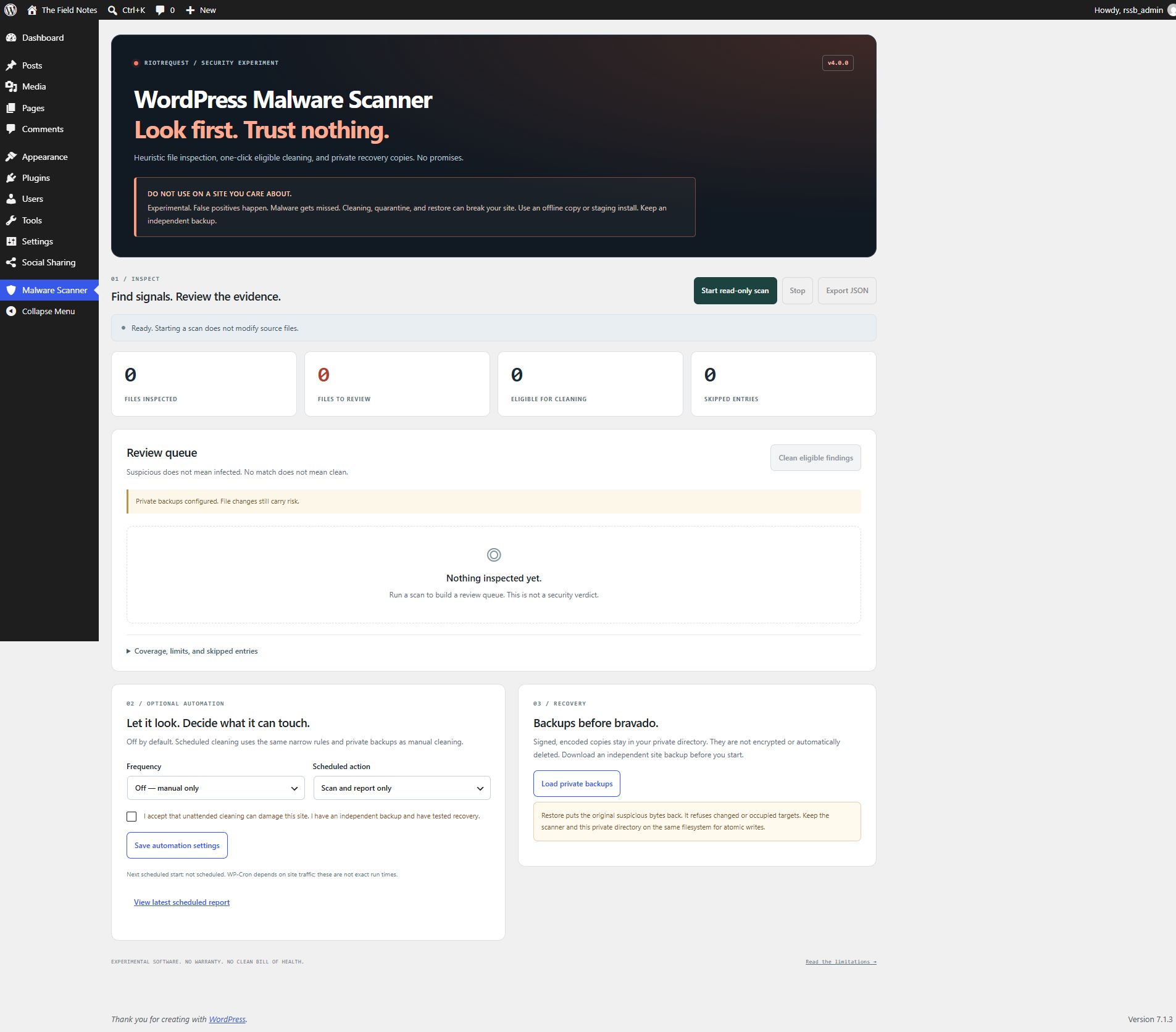
What it does
| Action | Behavior |
|---|---|
| Read-only scan | Inspects local files in resumable batches, including uploads. Reports suspicious patterns, line numbers, file hashes, and skipped entries. |
| One-click eligible cleaning | Backs up each eligible file, then removes supported standalone encoded PHP eval statements. Everything else stays in the review queue. |
| Quarantine a finding | Saves and verifies a private recovery copy, then removes the selected file from wp-content. WordPress core files and wp-config.php cannot be quarantined. |
| Restore original | Authenticates a recovery copy and restores it only if the cleaned file is unchanged, or the quarantined path is still vacant. |
| Optional automation | Daily or weekly scans, either report-only or followed by eligible cleaning. Off by default. Unattended cleaning requires a separate risk acknowledgement and a private backup directory. |
| Export JSON | Downloads the current report for review. Reports contain metadata and paths, not copies of scanned source. |
No accounts, API keys, remote scanning service, external fonts, or JavaScript dependencies. The plugin makes no external scan requests. Its assets load only on its admin page.
Screenshots
Findings and one-click cleaning
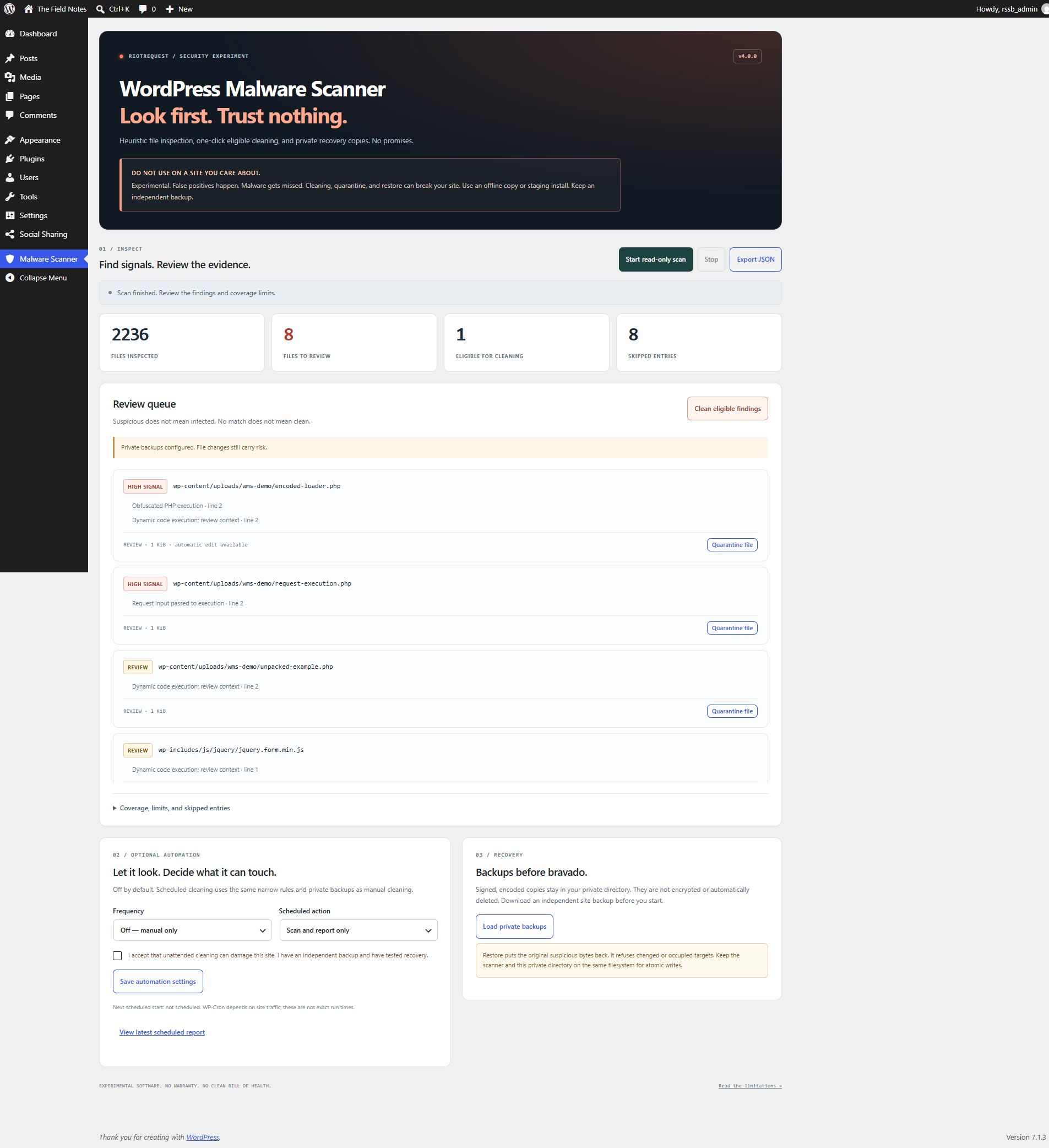
These are actual captures from a disposable WordPress installation. The demonstration files are inert test fixtures. The review queue also includes legitimate WordPress code: a finding is a signal, not a malware verdict.
Automation and recovery
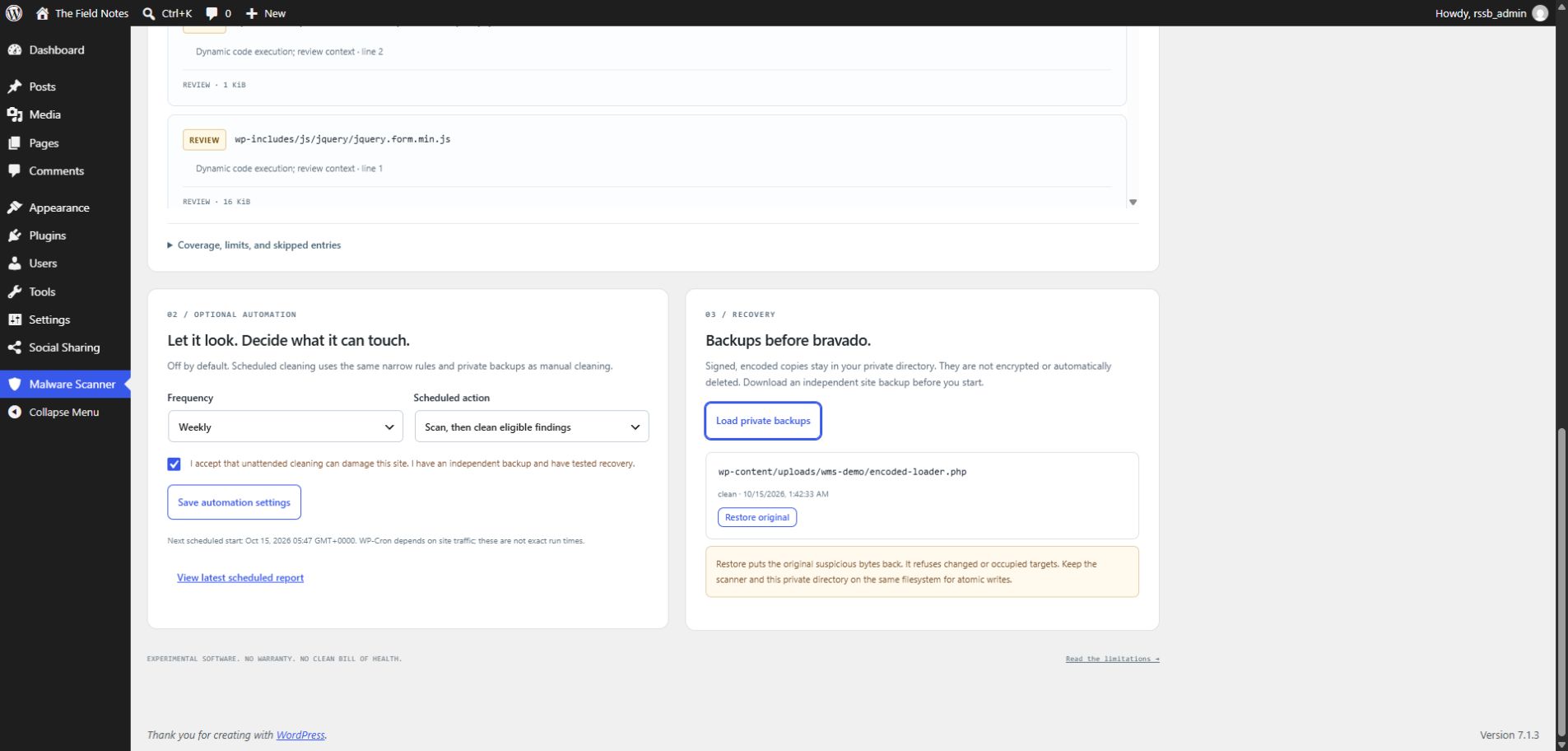
Install on a disposable site
Requires WordPress 6.3+, PHP 7.4+, a modern browser, and direct access to the site's local filesystem. Use a maintained PHP release. JavaScript is required for scan and recovery controls.
- Download this repository and place its contents in
wp-content/plugins/wpmalwarescanner/. - Activate WordPress Malware Scanner — Experimental.
- Open Malware Scanner in the WordPress admin.
- Choose Start read-only scan. Review the findings and coverage details.
On multisite, the console is in Network Admin and requires manage_network_options. On a single site it requires manage_options. It inspects the local ABSPATH tree; it is not a fleet scanner or a separate scan of every site's database.
Scanning works without a backup directory. Cleaning, quarantine, and restore remain disabled until one is configured.
Enable file changes, at your own risk
Create an existing directory that is writable by PHP, outside every public web root, on the same filesystem as the files you may change. Restrict directory access to the operating-system account running PHP. Do not use uploads, a plugin folder, or a publicly served quarantine folder.
Add the absolute canonical path to wp-config.php, before the “stop editing” line:
define('WMS_PRIVATE_DIR', '/srv/private/wms-recovery');If the server exposes additional document roots or aliases, declare those too:
define('WMS_PUBLIC_ROOTS', array('/srv/www/another-site', '/srv/www/shared-public'));The plugin rejects overlap with known public roots (ABSPATH, WP_CONTENT_DIR, the request's DOCUMENT_ROOT, and WMS_PUBLIC_ROOTS). It cannot discover your web-server aliases or verify your hosting configuration. You must ensure this directory is not served over HTTP. Paths must resolve directly; symlinks and junction aliases are refused.
Then:
- Finish a read-only scan and inspect each finding.
- Use Clean eligible findings for the supported edit, or Quarantine file for an individually reviewed content file.
- Accept the explicit risk prompt. A recovery copy is written, flushed, read back, and authenticated before the source is changed.
- Verify the site yourself and run another scan. A completed cleaning pass is not a clean bill of health.
What one-click cleaning can change
Only .php files with a standalone statement shaped like this are eligible:
eval(base64_decode('a long encoded literal ...'));Supported decoder names are base64_decode, gzinflate, gzuncompress, and str_rot13, including bounded nesting. The literal must contain at least 80 characters. The entire statement is replaced with a comment and an empty statement, keeping line counts. The resulting PHP must pass a parser check on the server's PHP version.
The plugin never decodes or executes the payload. It never includes scanned files. Variable-backed payloads, returned or assigned eval expressions, short literals, arbitrary signatures, and other suspicious constructs are not automatically rewritten. wp-config.php and the scanner's own files are protected.
An eligible shape can still be legitimate code. Removing it can break a theme, plugin, or site. The parser check checks syntax, not behavior.
Recovery copies
Recovery files use unpredictable names ending in .wmsq. They contain encoded data authenticated with HMAC-SHA256 and the installation's WordPress authentication salt. They are not encrypted. Treat them as sensitive copies of the original files, potentially including malware and secrets.
- Load private backups lists up to 200 recovery records and reports unavailable records.
- Restore original puts the original suspicious bytes back. Cleaning restores require the current cleaned checksum to match; quarantine restores refuse occupied paths.
- Changing WordPress authentication salts or moving the installation can invalidate these records. Keep a separate site backup and your own recovery procedure.
- Recovery copies are retained. There is no automatic deletion or retention job. Manage them outside the plugin after verifying your independent backups.
- Atomic replacement requires the same filesystem; quarantine restore also requires filesystem hard-link support. Unsupported writes fail with an error and retain the backup.
Optional scheduled runs
In Optional automation, choose Daily or Weekly, then an action:
- Scan and report only inspects files and retains the latest scheduled report.
- Scan, then clean eligible findings runs the same narrow cleaner after a completed scan. It requires private backups and the separate unattended-cleaning risk checkbox. Other findings are left for review; scheduled quarantine is not available.
Save the settings. The first start is scheduled approximately five minutes later. Subsequent batches use WordPress cron events. WP-Cron depends on site traffic and hosting configuration, so these are not exact start or completion times. A large site can take many events to finish. Runs older than a day are stopped; inspect the saved report for failures or incomplete coverage.
Use View latest scheduled report to inspect the latest run. Only the latest scheduled state is retained; export reports you need to keep. This version does not send email notifications.
Choose Off — manual only to disable future runs and cancel pending work. Switching to report-only prevents the next unattended cleaning batch. A file operation already running may finish. Deactivating the plugin removes its cron events.
Coverage and limitations
The built-in rules look for obfuscated PHP execution, request-driven execution, dynamic eval, encoded JavaScript execution, and PHP prepend/append directives. PHP comments and quoted strings are masked for pattern matching. These are simple heuristics with no malware intelligence feed or core checksum verification.
The scanner inspects PHP variants, inc, phar as file bytes, JavaScript, HTML, .htaccess, and .user.ini under ABSPATH, including uploads. It does not unpack archives.
| Limit | Current behavior |
|---|---|
| File size | Files over 2 MiB are skipped. |
| Scan size | Stops at 50,000 visited entries or 200 flagged files; report marked incomplete. |
| Directory depth | At most 64 levels. |
| Work per request | Up to 25 inspected files or 300 directory entries, with a roughly two-second processing budget. Slow filesystem calls can exceed it. |
| Skip details | Counts skipped entries; retains the first 50 explanations. |
| Manual progress | Per administrator, retained for one hour since the last saved batch. Reload and use Resume saved run after an interrupted request. Stop ends that run; start a new scan afterwards. |
Links/junctions, the scanner's own directory, version-control directories, unreadable files, and unsupported extensions are skipped. Content outside ABSPATH, including externally relocated content directories, is outside coverage. Very large flat directories can resume slowly. Directory changes during a run can cause entries to be missed or revisited.
There is no database scan, credential rotation, persistence removal, network inspection, root-cause analysis, or guarantee of complete cleanup. An attacker with filesystem or administrator access can tamper with the environment and signing material. Path and checksum checks reduce accidental damage; they do not make a compromised host trustworthy or eliminate filesystem race conditions. Back up independently, isolate the incident, and investigate the whole installation.
No matches means no matching signals in the files actually inspected. It does not mean the site is safe.
Custom literal signatures
The wms_malware_signatures filter remains available for extra case-insensitive literal matches:
add_filter('wms_malware_signatures', function ($signatures) {
    $signatures[] = 'an-exact-marker-you-have-investigated';
    return $signatures;
});
Up to 100 nonempty strings of at most 200 bytes are accepted. Custom signatures produce review findings only. Broad words such as system or curl create false positives and are not useful malware signatures.
Upgrading from the old scanner
Version 4 removes blanket signature replacement, bulk quarantine, the public uploads quarantine directory, adjacent plaintext backups, and the public malware_scanner_log.txt log. Legacy bulk AJAX operations are rejected. Requests now require an authorized administrator, POST, a valid nonce, and a current scan identifier; file changes require an additional acknowledgement.
Old logs and backups are not migrated, deleted, or exposed in the new recovery browser. Audit and secure any existing wp-content/malware_scanner_log.txt, public quarantine directories, and adjacent backups yourself. The new version cannot retroactively protect those files. Back up the old installation before replacing it and begin with a fresh read-only scan.
Development and verification
There is no build step or package install.
php -l scanner.php
php -l includes/engine.php
php -l includes/vault.php
node --check scanner.js
php tests/run.php
The standalone checks create temporary inert fixtures, inspect and modify them as text, and exercise cleaning, path containment, backup authentication, stale hashes, quarantine, restore, and failure cases. They never execute fixture PHP. Symlink checks are skipped when the host cannot create them.
For this update, 47 standalone checks and 36 integration checks on each of WordPress 6.3 and 7.1.3 passed using PHP 8.2.12 on Windows. The host could not create symbolic links, so that conditional check was skipped. These checks do not establish malware-detection accuracy or production readiness.
For integration checks, prepare a disposable WordPress installation with an administrator, activate this plugin, configure a private directory, and set define('WMS_TESTING', true); in that site's configuration. Then run:
php tests/wordpress.php /path/to/disposable-wordpress/wp-load.phpThis exercises actual WordPress AJAX authorization/nonces, manual operations, scheduling opt-in, cancellation, and admin assets. It temporarily changes scanner state and creates inert fixtures. Never run it against a production installation.
No warranty
This repository is an experiment, not incident response you can outsource to a button. Use it at your own risk. If it breaks your site, misses a backdoor, or flags perfectly good code, that is within the range of expected outcomes.