Dispatch for Telex WP Registry grade A. No security issues foundWP RegistryNo security issues foundOpen the reportA
The missing link between Telex and your WordPress site.
Install
Upload it under Plugins → Add New Plugin → Upload Plugin, then activate.
Install straight from GitHub with WP-CLI:
wp plugin install https://github.com/regionallyfamous/dispatch/releases/download/v1.6.2/dispatch-for-telex-1.6.2.zipDispatch for Telex
Install and operate Telex projects in WordPress without zip uploads.
Try it in WordPress Playground
Why Dispatch exists
Telex can generate full WordPress blocks and themes quickly. The friction usually starts at deployment: download zip, upload zip, activate, repeat for each revision.
Dispatch removes that manual loop:
- Connect your site once with OAuth Device Flow (no API key copy/paste).
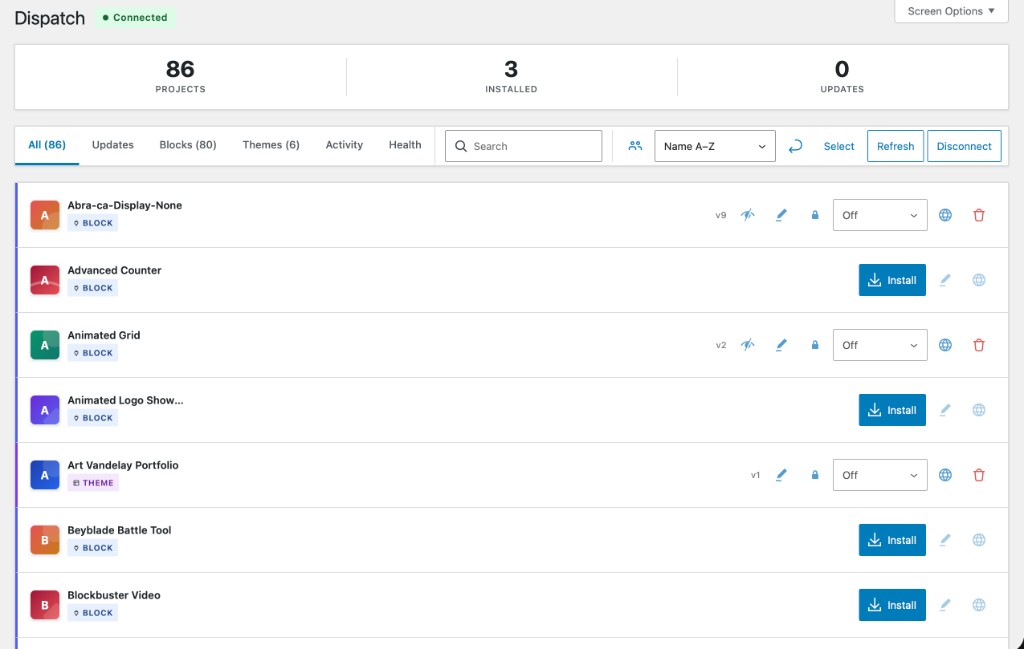
- Browse your Telex projects in WordPress admin.
- Install, update, and remove projects directly from WordPress.
- Use WP-CLI for automation across staging and production.
Who this is for
- Site owners/admins: reliable install/update workflows and recovery tools.
- Agencies/teams: multisite support, update controls, audit visibility.
- Automation-focused teams: WP-CLI command surface for deploy pipelines.
Quick start (site owner path)
Requirements: WordPress 6.7+, PHP 8.2+, Telex account.
- Install Dispatch from GitHub Releases or WP-CLI.
- Open Dispatch in WP Admin and click Connect to Telex.
- Approve the device code at the Telex URL shown on screen.
- Return to WordPress and install a project.
wp plugin install https://github.com/RegionallyFamous/dispatch/releases/latest/download/dispatch-for-telex.zip --activateExpected result: your Telex project list loads and install actions are available.
Verified core capabilities
- One-click install and update from Telex project library.
- Native WordPress update integration for installed Telex projects.
- Project organization with favorites, tags, and groups.
- Build snapshots for restore workflows.
- Version pinning and auto-update controls.
- Audit log, site health checks, and circuit breaker state visibility.
- WP-CLI commands for listing, install/update/remove, cache, snapshots, config, and diagnostics.
WP-CLI examples
wp telex list
wp telex install <id> --activate
wp telex update --all
wp telex snapshot create --name="Before deploy"
wp telex snapshot list
wp telex snapshot restore <snapshot-id>
wp telex pin <id> --reason="Awaiting QA sign-off"
wp telex health
Full syntax and options: WP-CLI Reference
Documentation (canonical: Wiki)
Primary user docs live in the GitHub Wiki:
- Wiki Home
- Getting Started
- Managing Projects
- WP-CLI Reference
- Site Health and Diagnostics
- Troubleshooting
- Security Model
- Multisite Setup
Repo-local docs define quality and maintenance standards for contributors:
docs/documentation-quality-standard.mddocs/documentation-coverage-matrix.mddocs/docs-release-checklist.md
Contributing
- Read
CONTRIBUTING.mdfor local setup and quality gates. - Read
SECURITY.mdfor vulnerability reporting. - Open issues at github.com/RegionallyFamous/dispatch/issues.
Built by [Regionally Famous](https://regionallyfamous.com) · [GPL-2.0-or-later](https://spdx.org/licenses/GPL-2.0-or-later.html) · [Changelog](CHANGELOG.md)
Releases
10 releases. Each count is every asset in that release; expand a row for the breakdown.