Install
This is the repository archive. It installs, but the folder name will carry the branch suffix and updates will not flow.
Install straight from GitHub with WP-CLI:
wp plugin install https://github.com/reaganm02/himuon-impreza-extension-color-scheme-switch/archive/refs/heads/main.zipNo built-in updater. New versions won't appear under Dashboard → Updates. Install new releases yourself, or let Git Updater track the repository.
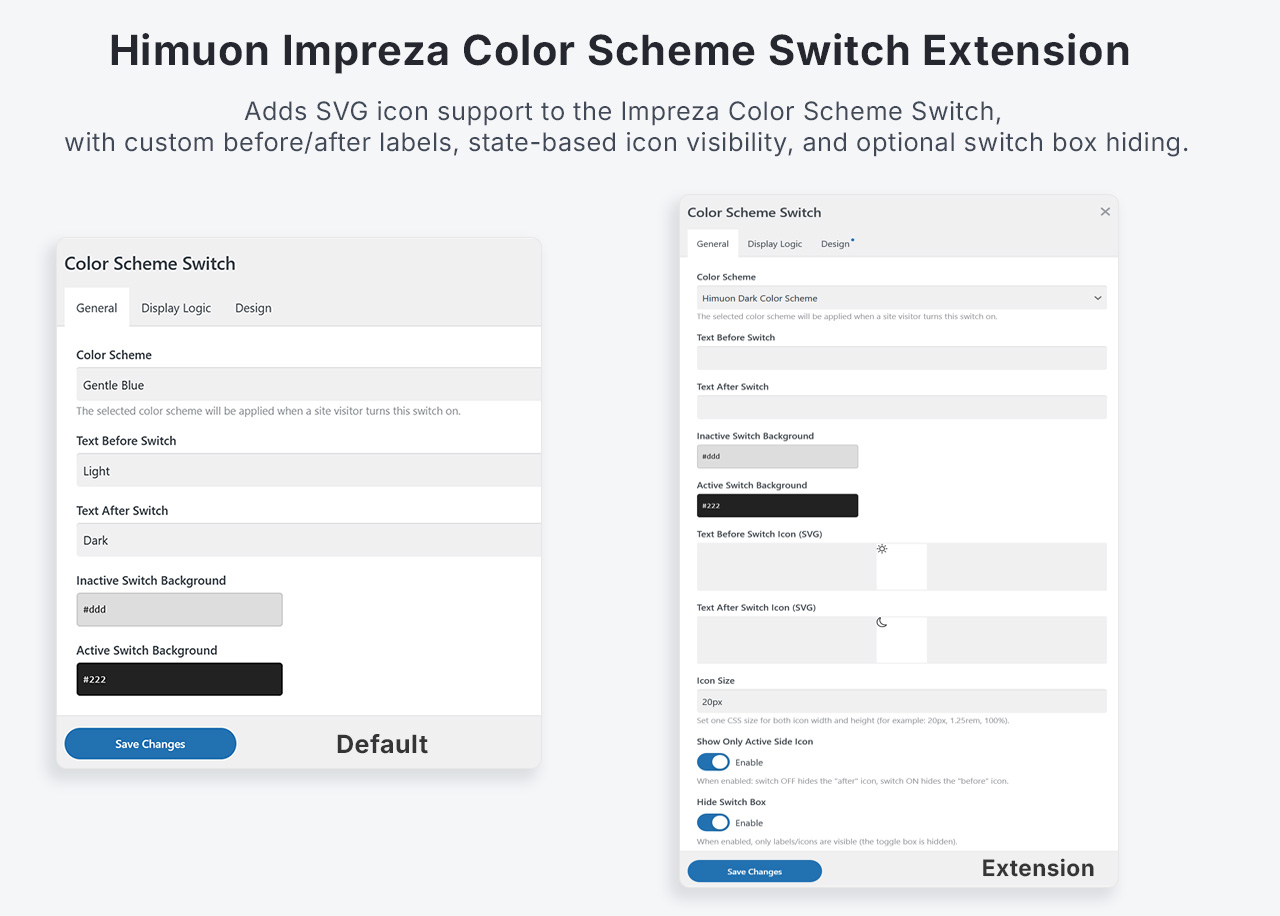
Himuon Impreza Color Scheme Switch SVG Extension
Adds SVG icon support, configurable icon sizing, and UI behavior extensions to the Impreza Color Scheme Switch element.
What This Plugin Does
This plugin overrides Impreza/US Core color_scheme_switch element config and template to add:
- SVG upload field for Text Before Switch
- SVG upload field for Text After Switch
- Icon size field for both SVG width and height (default
20px) - Optional setting to show only the icon on the active side:
- switch OFF: hides after icon
- switch ON: hides before icon
- Optional setting to hide the visual switch box (
.w-color-switch-box) - Label text output remains visible (if not empty), even when SVG icons are used
Requirements
- WordPress
- Impreza theme with US Core (
us-core) plugin active
This plugin depends on Impreza/US Core public APIs and file lookup (us_locate_file).
How It Works
On plugins_loaded, the plugin prepends its local us-addon/ directory to us_files_search_paths.
This lets Impreza load override files from this plugin before us-core:
us-addon/config/elements/color_scheme_switch.phpus-addon/templates/elements/color_scheme_switch.php
Added Element Settings
In Color Scheme Switch element settings, this plugin adds:
Text Before Switch Icon (SVG)(text_before_svg)Text After Switch Icon (SVG)(text_after_svg)Icon Size(icon_size, default20px)Show Only Active Side Icon(icon_visibility_by_switch_state)Hide Switch Box(hide_switch_box)
Output Behavior
- Before/after labels can render:
- icon only
- text only
- icon + text
- If a valid SVG attachment is set, SVG is inlined in output.
- SVG icon size is controlled by
Icon Size(applies to both width and height, default20px). - If
Hide Switch Boxis enabled, the box markup is not rendered. - Small style rules are injected once via inline `