Install
This is the repository archive. It installs, but the folder name will carry the branch suffix and updates will not flow.
Install straight from GitHub with WP-CLI:
wp plugin install https://github.com/raruto/wp-devops/archive/refs/heads/master.zipNo built-in updater. New versions won't appear under Dashboard → Updates. Install new releases yourself, or let Git Updater track the repository.
A useful helper plugin for every wordpress developer
It contains
- WP Dependecy Installer: automatically install required WordPress/Git plugins or themes as JSON dependencies (based on: afragen/wp-dependency-installer)
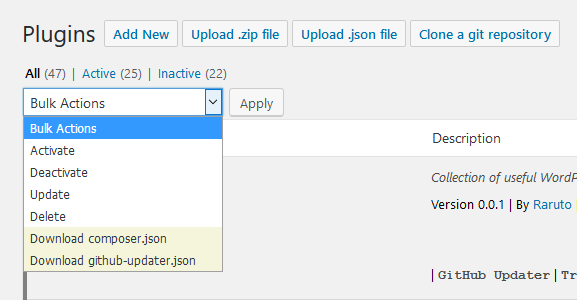
- Mass Import/Export: allows to mass import/export a list of the current installed plugins as "composer.json" or "github-updater.json" file (kudos to tomjn/composerpress)
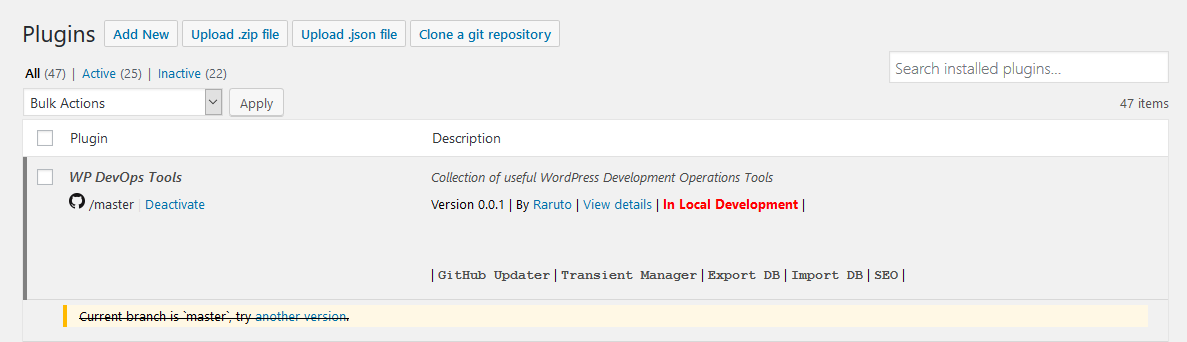
- Local Development: displays which plugins are in active development for the current machine
- Github Updater Icon Links: displays wich plugins are on the "wp.org/githost" directory (based on: szepeviktor/github-link)
- Hide Plugins: selectively hide plugins to other users within the plugins.php page (based on: ThemeBoy/hide-plugins)
- WP DevOps Links: add some handy links within the "wp-devops" plugin's row
- WP Menu: add some handy links within the "wpadminbar" menu and display a visual alert to allow us to easily distinguish a production/development site
How to use:
- download/install this plugin in the way that best suits you
- activate the plugin and then visit your plugins.php page
- an admin notice will ask you to automatically install the GitHub Updater plugin
- explore all the features offered by the plugin and propose your improvements!
Some Screenshots:
Plugins Page:
Plugins Bulk Actions:
Tested with: wordpress@5.0, github-updater@8.5.2
Contributors: Raruto