Install
This is the repository archive. It installs, but the folder name will carry the branch suffix and updates will not flow.
Install straight from GitHub with WP-CLI:
wp plugin install https://github.com/rankmyseo/rankmyseo-wp-plugin/archive/refs/heads/main.zipRankMySEO for WordPress
Free SEO that stays on your WordPress site. RankMySEO helps you write the titles, descriptions, and page details that search engines and shoppers see. Everything in the plugin works on your site, with no account.
Connect RankMySEO Cloud only if you also want keyword rank tracking, a verdict on which pages to update, and AI drafts. Until you connect, RankMySEO does not contact RankMySEO or any other service. It does not load Google Fonts.
Version 1.0.0. Works with WordPress 6.4 or newer and PHP 8.0 or newer. Tested up to WordPress 7.1. Licensed under GPL-2.0-or-later.
Who it's for
- Site owners who want search titles and descriptions without a complicated SEO suite.
- Bloggers who want a score, a search preview, and a short list of what to fix next.
- Agencies who set up many client sites and need the same tools in plain English or in full detail.
- WooCommerce store owners who want product brand, barcode, shipping, and returns details in search results.
You do not need to write code, use a terminal, or create an account to use the plugin.
What it looks like
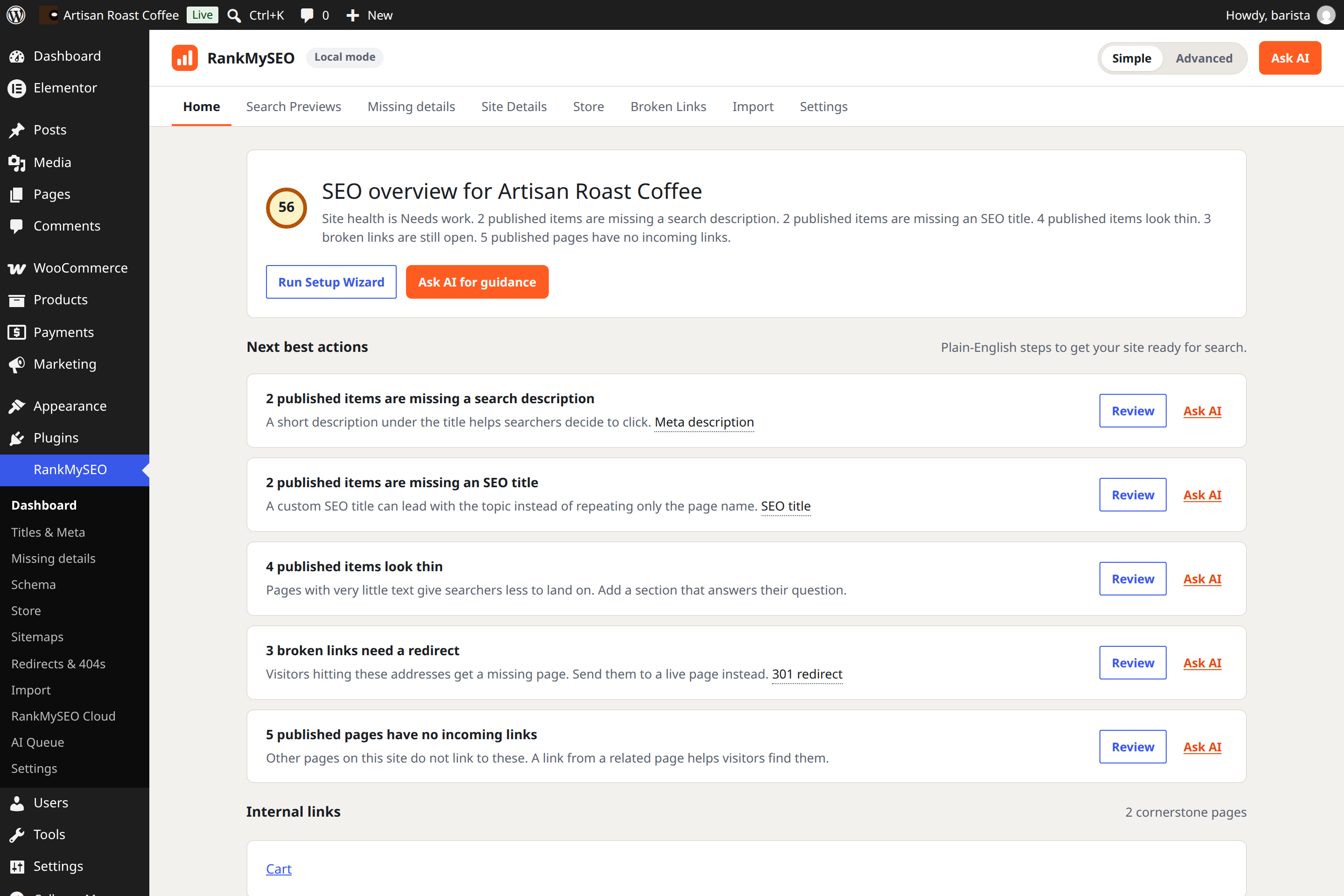
Simple Mode opens on a home screen that says what to fix next, in plain English.
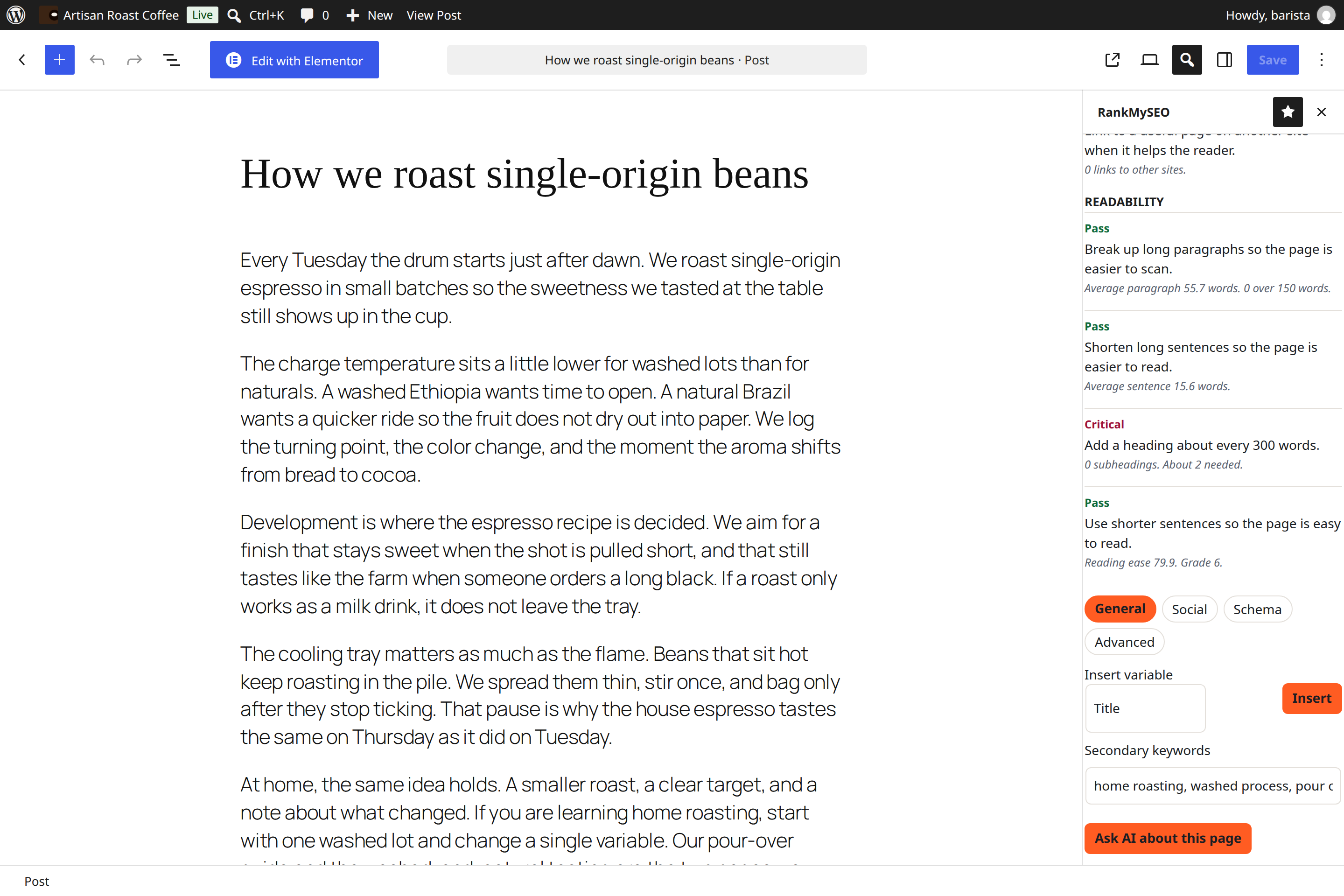
In the block editor, the sidebar scores the page, takes one main keyword plus secondary keywords, and has a Schema tab for the structured data on that page.
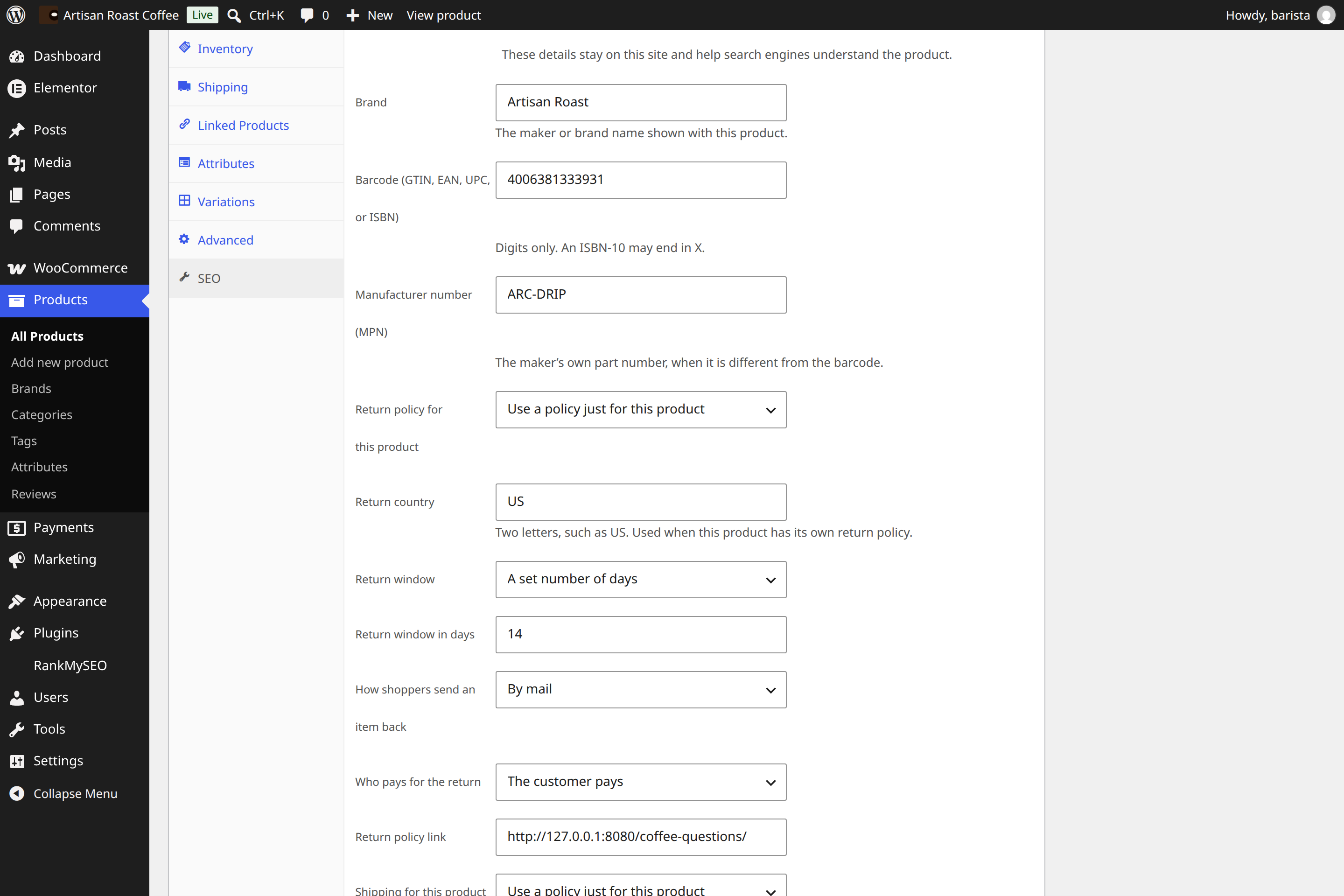
On a WooCommerce product, the SEO tab holds the brand, barcode, manufacturer number, and return details. Those stay on your site.
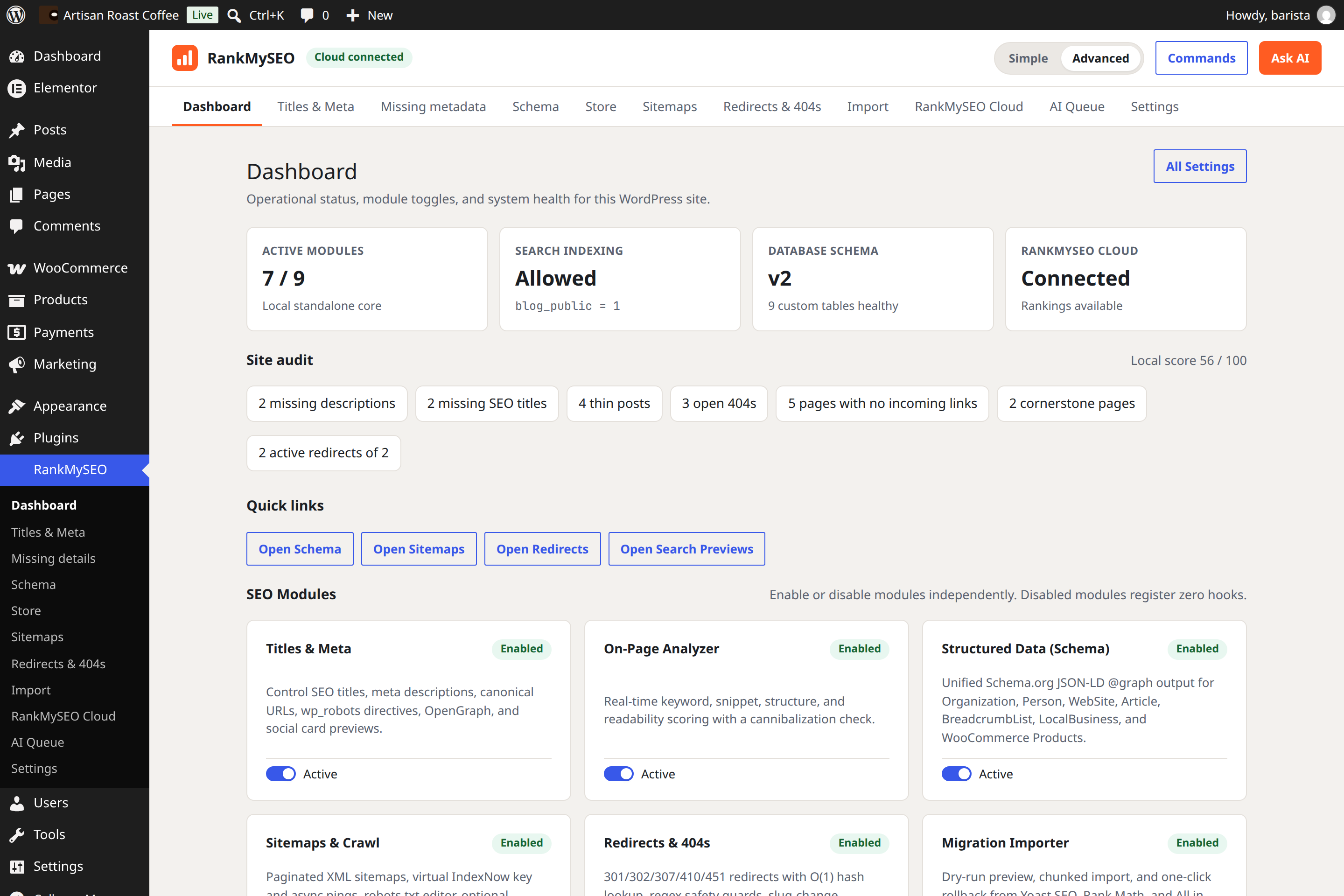
Advanced Mode shows the same data with the full set of switches. After you connect RankMySEO Cloud, the home screen says rankings are available.
Simple Mode and Advanced Mode
Every screen has two ways to look at the same settings. Switching does not delete anything. The choice is saved for each person who logs in.
| Simple Mode | Advanced Mode | |
|---|---|---|
| Who it is for | New installs, and anyone who wants plain English | People who want the full controls |
| What you see | Short explanations, safe defaults, and the next useful step | Module switches, templates, and the technical settings |
| How to switch | Stay here after the setup wizard | Choose Skip to Advanced Setup, or use the mode switch later |
Both modes read and save the same SEO data.
What you can do
On-page SEO and keyword scoring
On each post, page, and product you can set:
- The search title and the short description under it
- One main keyword, plus up to five secondary keywords
- A cornerstone flag for the pages that matter most
- The canonical address and whether search engines should skip the page
- A live preview of the Google result and the Facebook, X, and other social cards
RankMySEO scores the page from 0 to 100 while you write, in the block editor, the classic editor, Quick Edit, Elementor, and Divi. It also warns you when another page on the same site is already aimed at that keyword.
The public site prints the title, description, and social tags in the page head. It does not add a JavaScript file for visitors.
Internal links and pages nobody links to
RankMySEO reads the links already published on your site. It does not crawl the web.
- In the editor, it suggests other pages on your site that are a good match, and you choose whether to add the link.
- On the home screen, it lists orphan pages: published pages that no other page on the site links to.
- Cornerstone pages are held to a higher bar (they should link inward more often) and are preferred when RankMySEO suggests a link.
Missing titles and descriptions
The Missing details screen lists published posts, pages, products, and images that are missing a search title, a description, a main keyword, or an image description.
- Fill the empty fields from your title and description templates, preview the change, then apply it.
- Or, after you connect RankMySEO Cloud, ask for a draft and approve it in the queue before anything changes.
- On the normal WordPress list of posts, Bulk Edit can apply those templates or clear a custom title and description.
WooCommerce stores
When WooCommerce is active, the Store screen and the product SEO tab add shop details without sending them anywhere:
- Brand, barcode (GTIN, EAN, UPC, or ISBN), and manufacturer number (MPN) on each product
- Barcode and manufacturer number on each variation
- A separate offer in the structured data for each product option
- Return policy and shipping details for Google’s merchant results, off until you turn them on
- Cleaner catalog addresses: shorter product and category links, filtered shop links pointed at the main shop page, and sold-out products left out of search
Those address changes stay off until you opt in, so existing shop links keep working.
Elementor, Divi, and the block editor
- Elementor and Divi each get a RankMySEO panel inside that editor. The panel loads only while the editor is open.
- Elementor also has a RankMySEO breadcrumbs widget.
- The block editor has a Breadcrumbs block and an FAQ block. The visible trail and the questions are the same ones written into the page’s structured data.
- The block editor Schema tab picks the structured-data type for that page, including a how-to, or turns it off for that page. The site-wide Schema screen is still where you set the default.
- A theme can also show the trail with the
[rankmyseo_breadcrumbs]shortcode.
A small stylesheet is added only on pages that actually show the breadcrumb or FAQ block.
Sitemaps, robots.txt, and a guide for AI assistants
- An XML sitemap of your public pages, so search engines can find new and updated content
- A robots.txt editor that stays inside WordPress
- An optional
/llms.txtpage: a plain-language list of your important pages for AI search assistants. It is off until you turn it on, and it is built on your site. - Optional IndexNow, so participating search engines can be told when a public page changes. It is off until you turn it on. See the questions below.
Redirects and missing pages
Send visitors from an old address to a live page. RankMySEO supports permanent and temporary redirects, plus “gone” and “unavailable for legal reasons.” When you change a page’s link, it can add the redirect for you. A 404 log shows addresses people asked for that do not exist, and you can turn one of those into a redirect in one step.
Move from another SEO plugin
RankMySEO can copy titles, descriptions, keywords, and redirects from:
- Yoast SEO
- Rank Math
- All in One SEO
You get a preview first. Your old plugin’s data is not deleted, and you can undo the copy. If another SEO plugin is still active, RankMySEO can pause its own tags in the page head so the two plugins do not both print titles.
Optional RankMySEO Cloud and the assistant
The assistant drawer answers questions about this site from the data already in WordPress. That local helper does not contact a server.
After an administrator connects the site, RankMySEO can also:
- Show how a tracked keyword is ranking
- Show a verdict for a page: refresh it, tune it, expand it, rewrite it, merge it, or leave it
- Draft titles, descriptions, and other edits into an approval queue
Nothing is applied until a person approves it. A change can be undone. New articles are saved as drafts. High-risk rewrites of the page body stay in the queue. Automatic apply is off until you turn it on, and even then it is limited to the rules you set.
The connection token stays on the server. The browser never sees it and never calls RankMySEO directly.
Install RankMySEO
You install the release zip from the Plugins screen. You do not need Composer or Node on the site.
- Download
rankmyseo.zipfrom the GitHub Releases page for version 1.0.0. - In WordPress, open Plugins → Add New → Upload Plugin.
- Choose
rankmyseo.zip, choose Install Now, then Activate. - Open RankMySEO in the admin menu and walk through the setup wizard below.
The plugin is ready as soon as it is active. Search titles, structured data, the sitemap, and redirects all run on the site if you skip the optional Cloud step.
Setup wizard
The wizard is three short steps. You can leave it and come back, or choose Skip to Advanced Setup.
- Site basics. Say whether the site represents a business or a person, set the name that appears at the end of search titles, pick a separator, and add a logo if you want one.
- Local tools. Turn on the tools you want: search titles and social previews, structured data, the XML sitemap, and redirects. Search visibility still follows Settings → Reading in WordPress.
- RankMySEO Cloud, if you want it. Choose Skip for now — keep using locally to stay 100% on this site. Choose Review Cloud Setup only when you want to connect.
Common questions
Do I need a RankMySEO account?
No. Titles, descriptions, scores, structured data, sitemaps, redirects, the importer, the link suggestions, and the local assistant all run inside WordPress. RankMySEO Cloud is optional.
Does RankMySEO contact other websites?
Not during activation, deactivation, or a normal visit to your site. Two optional features can connect later, and only after an administrator turns them on:
- RankMySEO Cloud, after you connect the site
- IndexNow, after you enable it on the Sitemaps screen
While Cloud is disconnected and IndexNow is off, the plugin makes no outbound requests. Details and the privacy links are in readme.txt under External services.
Does it load Google Fonts?
No. Admin screens use the fonts already in WordPress. Public pages do not load a RankMySEO font.
Will this slow down my site?
The public page does not load RankMySEO JavaScript. Titles, descriptions, and structured data are printed with the page. A small stylesheet is added only when a page shows the breadcrumb or FAQ block.
Can I switch between Simple and Advanced mode?
Yes. The choice is stored for each user. Both modes use the same settings.
Can I move from Yoast SEO, Rank Math, or All in One SEO?
Yes. Open Import, preview what will be copied, then run it. You can undo the copy. RankMySEO does not delete the other plugin’s data. Turn the other SEO plugin off when you are ready for RankMySEO to print the tags, so two plugins do not both write the title.
Will AI change my pages by itself?
No. Suggestions wait in the approval queue until a person applies them. You can undo an applied change. Automatic apply exists, and it stays off until an administrator turns it on and sets limits.
What happens to my SEO data if I delete the plugin?
By default it stays in the database, so a reinstall does not lose titles, redirects, or the approval history. In Settings, turn off Keep SEO data if plugin is uninstalled before you delete the plugin if you want RankMySEO to remove its tables, options, and saved fields.
What is a cornerstone page?
A page you mark as one of the most important on the site. RankMySEO expects more internal links to it and prefers it when suggesting links.
What is an orphan page?
A published page that no other page on your site links to. The home screen lists them after RankMySEO has indexed your content. The index is built on your site.
What is the llms.txt page?
An optional text page at /llms.txt that lists important public pages in plain language for AI search assistants. It is off until you enable it. If a real llms.txt file is already in your site’s root folder, the web server serves that file instead.
For developers
Build, test, and package the pluginThe release zip already contains the compiled admin and editor files. Rebuild them only if you are changing the plugin.
Requirements: PHP 8.0 or newer, Composer 2, and Node.js 20 or newer. Continuous integration uses PHP 8.0–8.4 and Node.js 22.
composer install
npm install
npm run build
Quality checks:
composer lint:php
composer phpcs
composer phpstan
composer test
npm run typecheck
npm run lint:js
npm run lint:css
npm run test:js
Local WordPress:
npm run env:start
npm run env:stop
Release zip (after npm run build and composer install --no-dev --optimize-autoloader):
bash scripts/package-plugin.shThat writes dist/rankmyseo.zip. The zip keeps runtime PHP, compiled JS and CSS, languages/rankmyseo.pot, and readme.txt. It leaves out src/, tests/, node_modules/, and the PHP development tools.
Source: https://github.com/rankmyseo/rankmyseo-wp-plugin. License: GPL-2.0-or-later.