RS WooCommerce Orders On Profile WP Registry grade A. No security issues foundWP RegistryNo security issues foundOpen the reportA
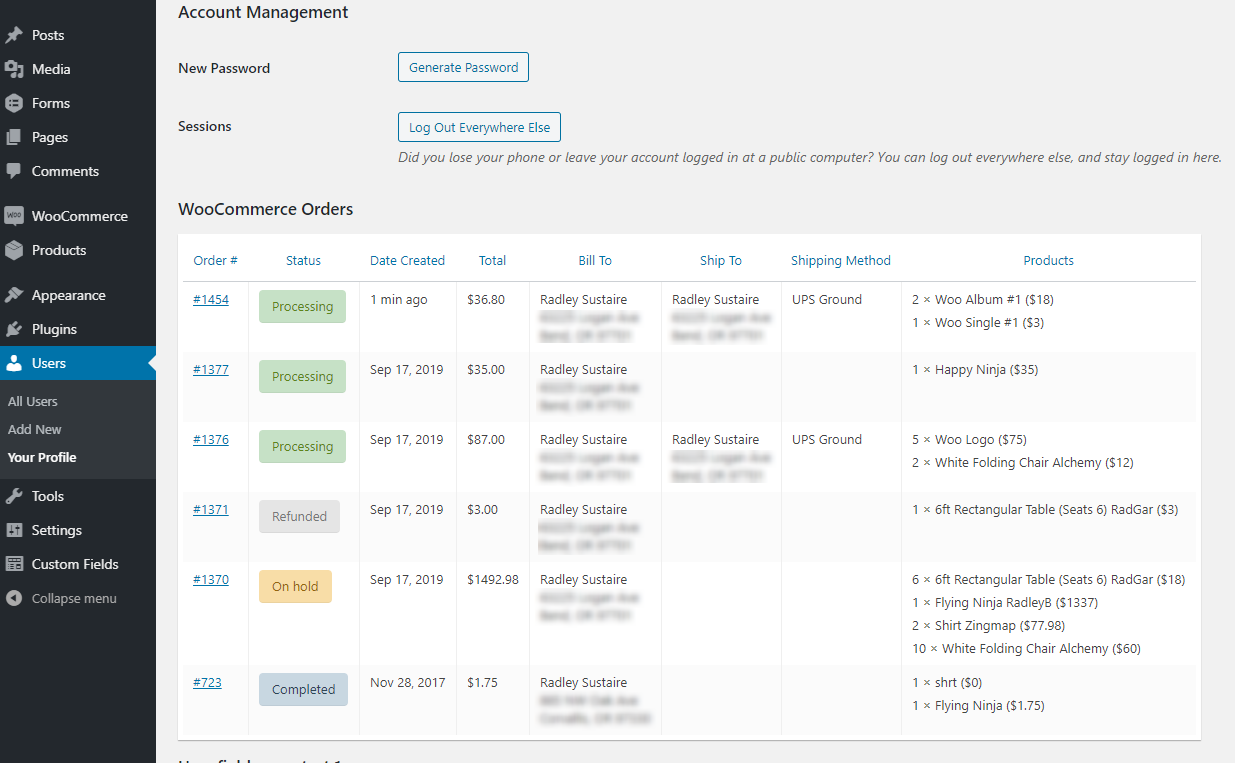
[WordPress Plugin] Displays a user's WooCommerce orders on their user profile, in a table.
Install
Upload it under Plugins → Add New Plugin → Upload Plugin, then activate.
Install straight from GitHub with WP-CLI:
wp plugin install https://github.com/radgh/rs-woocommerce-orders-on-profile/releases/download/1.1.4/rs-woocommerce-orders-on-profile.zipRS WooCommerce Orders on Profile (WordPress Plugin)
Displays a user's WooCommerce orders on their user profile, inside a table.
Contributors: radgh
Donate link: https://paypal.me/radgh
Tags: woocommerce, emails, debugging
Requires at least: 4.9
Tested up to: 5.3.1
Stable tag: 1.1.4
License: GPLv3
License URI: http://www.gnu.org/licenses/gpl-3.0.txt
Description
Displays a table of orders on user profile pages.
New columns can be added with the filter woop/table_headers. Data in the table can be customized with the filter woop/table_data.
Requires WooCommerce.
Installation
- Upload the plugin files to
/wp-content/plugins/rs-woocommerce-orders-on-profile/, or install the plugin through the WordPress plugins screen. - Activate the plugin through the 'Plugins' screen in WordPress
- Navigate to a user's profile screen
- Locate the WooCommerce Orders table
Frequently Asked Questions
What is Menu Order for?
Use that to re-order the messages, lower numbers come first. This is important when you display a message at the same spot for multiple products.
Screenshots
Changelog
1.1.4
- Fixed table sorting not working because of incorrect class name
1.1.3
- Released on Github
Upgrade Notice
None yet.
Releases
2 releases. Each count is every asset in that release; expand a row for the breakdown.
Active-site estimate ≈10 comes from the median of recent superseded releases. Method.