WP Manifestindependent plugin directory
manifest / ecommerce / rs-preview-woocommerce-emails

RS Preview WooCommerce Emails WP Registry grade C-. High-severity findings · 1 findingWP RegistryHigh-severity findings · 1 findingOpen the reportC-

[WordPress Plugin] Adds the ability to preview all WooCommerce order emails in a popup, without sending an email.

★ 1stars
35release downloads
≈10active sites
v1.2.4latest · 1 year ago

Install

Download RS-Preview-WooCommerce-Emails-1.2.4.zip From the v1.2.4 release on GitHub, Sep 24, 2025

Upload it under Plugins → Add New Plugin → Upload Plugin, then activate.

Install straight from GitHub with WP-CLI:

wp plugin install https://github.com/radgh/rs-preview-woocommerce-emails/releases/download/v1.2.4/RS-Preview-WooCommerce-Emails-1.2.4.zip
Updates itself. It ships its own updater, so new versions appear under Dashboard → Updates.

RS Preview WooCommerce Emails (WordPress Plugin)
RS Preview WooCommerce Emails featured image

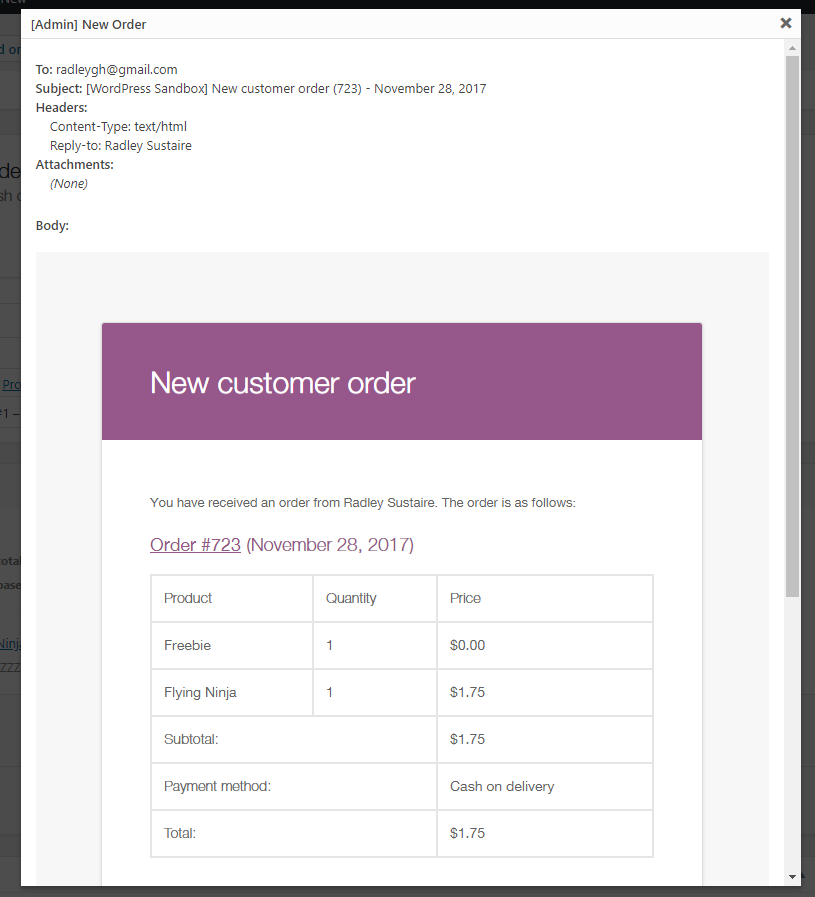
This plugin adds the ability to preview all WooCommerce order emails in a popup without sending an email. Accessible through the "Order Actions" dropdown when editing an order.

A bonus option includes the link to view a customer's "Completed Order" page - the same they see after they complete a purchase.

Installation

  1. Upload the plugin files to /wp-content/plugins/rs-preview-woocommerce-emails/, or install the plugin through the WordPress plugins screen.
  2. Activate the plugin through the 'Plugins' screen in WordPress
  3. Edit a WooCommerce order and find the new options in the Order Actions dropdown.
  4. Select an order action and click the arrow, or submit button, to view the email in a popup. No email will be sent.
  5. Note that you will have to change the order action dropdown back to the default in order to save an order.

Frequently Asked Questions

Are these email previews identical to what you would receive in your inbox?

They are very close, but not exact. There are a few small downsides:

  1. Some styles applied to the admin will apply in the popup. Most importantly, the fonts in the email preview may inherit from the dashboard and would not show in an email.
  2. Some fields like the password reset key, new password, and other generated content are filled with dummy text such as XXXXXX.
  3. Plugins that modify emails may not work properly in the popup. Although the popup uses official WooCommerce methods to generate content, it does not run any of the email filters which other plugins might otherwise hook into.

Screenshots
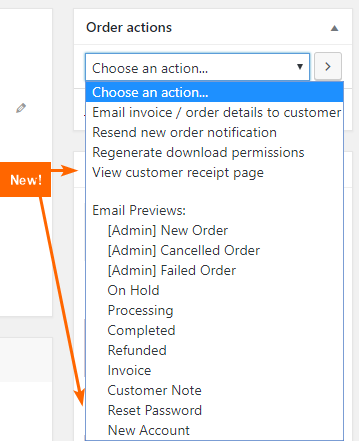
The new options added to the Order Actions dropdown. An example of the Email Preview shown in a popup.

Changelog

1.2.4

  • Added Alchemy Updater support for automatic updates

1.2.3

  • Updated to support WooCommerce 8.9.3

1.2.1

  • Added Git Updater support, allowing this plugin to automatically receive updates if installed.

1.0

  • First release

Releases

4 releases. Each count is every asset in that release; expand a row for the breakdown.

Tag
Published
Assets
Downloads
v1.2.4 latest
Sep 24, 2025 1 year ago
RS-Preview-WooCommerce-Emails-1.2.4.zip
10
Jun 10, 2024 2 years ago
RS-Preview-WooCommerce-Emails.zip
7
Jun 10, 2024 2 years ago
RS-Preview-WooCommerce-Emails.zip
3
Oct 18, 2018 8 years ago
rs-preview-woocommerce-emails.zip
15

Active-site estimate ≈10 comes from the median of recent superseded releases. Method.

C- grade

Security

RS Preview WooCommerce Emails 1.2.4 · audited by WP Registry

High-severity findings.

1 high
Audited release
1.2.4
Findings
1
Worst severity
high
Content hash
e17fdf59dcbf958a1f966cdc…

Findings

  • high Unauthenticated WooCommerce order-email disclosure via admin_init (no capability or nonce)

    missing_auth

    pwe_preview_email_page is hooked to admin_init and returns as soon as $_GET['pwe_preview_template'] is set. There is no is_user_logged_in, current_user_can('edit_shop_orders'|'manage_woocommerce'), or nonce check. It concatenates the raw query arg onto 'WC_Email_' and calls pwe_ajax_return_html_template(), which takes order_id from $_REQUEST, loads that WC_Order, and echoes the rendered email (recipient, subject, headers, HTML body). WordPress fires admin_init on admin-post.php and admin-ajax.php before auth_redirect / the is_user_logged_in ajax split, so an unauthenticated client can GET /wp-admin/admin-post.php?pwe_preview_template=New_Order&order_id=1 (or admin-ajax.php?action=1 with the same extra args) and receive another customer's billing email, shipping/billing address, line items, and typically the order-received URL that embeds the order key. Order IDs are sequential. The same renderer is also registered as 11 wp_ajax_pwe_get_email_preview_* actions with no capability or nonce, so any Subscriber/customer can IDOR the same data through admin-ajax.php while logged in. Preview does not send mail or persist status; impact is confidentiality of every order.

    includes/order-actions.php:17-27,86-136

    Recommendation

    In pwe_preview_email_page and pwe_ajax_return_html_template, require a logged-in user with current_user_can('edit_shop_order', $order_id) (or manage_woocommerce) and verify a nonce created only on the edit-order screen. Whitelist mail class names instead of concatenating $_GET['pwe_preview_template']. Do not hook the preview renderer to admin_init; use a capability-checked admin-post/AJAX action so admin-ajax.php guests cannot trigger it.

WP Registry hashes the installable build and reports on that exact bytes-for-bytes copy. Embargoed findings are withheld until they are disclosed, so a clean verdict means nothing public is outstanding. WP Manifest does not audit code itself.