Install
This is the repository archive. It installs, but the folder name will carry the branch suffix and updates will not flow.
Install straight from GitHub with WP-CLI:
wp plugin install https://github.com/radgh/rs-gravity-forms-user-entries-on-profile/archive/refs/heads/master.zipNo built-in updater. New versions won't appear under Dashboard → Updates. Install new releases yourself, or let Git Updater track the repository.
RS Gravity Forms - User Entries On Profile (WordPress Plugin)
_Displays form entries submitted by a user on their profile. Accessible only to administrators and anyone with the "gravityforms_viewentries" role.
Contributors: radgh
Donate link: https://paypal.me/radgh
Tags: gravityforms, users
Requires at least: 3.2
Tested up to: 4.9.8
Stable tag: 1.0.3
License: GPLv3
License URI: http://www.gnu.org/licenses/gpl-3.0.txt
Description
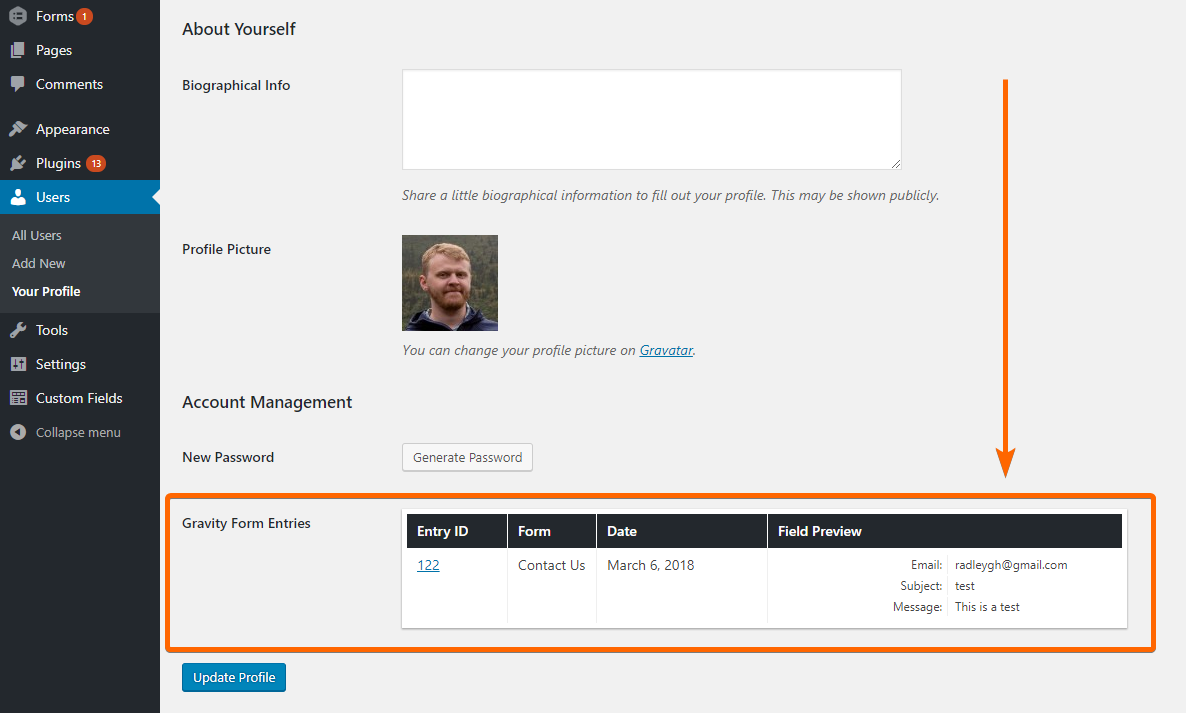
This plugin allows you to see a table of entries that have been submitted by the user whose profile you are viewing in the dashboard.
For entries to appear, the user must have been signed in when they submitted the form, or have had their account created (via Gravity Form User Registration Addon). Entries that were submitted as a guest (not logged in) will not appear.
Installation
- Upload the plugin files to
/wp-content/plugins/rs-gravityforms-user-entries-on-profile/, or install the plugin through the WordPress plugins screen. - Activate the plugin through the 'Plugins' screen in WordPress
- Edit a user's profile and locate the "Gravity Form Entries" field that will be listed below the "Generate Password" button.
Frequently Asked Questions
None yet.
Screenshots
Changelog
1.0
- First release
Upgrade Notice
None yet.