RS Gravity Forms Limited Entries WP Registry grade A. No security issues foundWP RegistryNo security issues foundOpen the reportA
[WordPress Plugin] Allows you to limit any Gravity Form to a single entry per user, or a set number of entries per user.
Install
Upload it under Plugins → Add New Plugin → Upload Plugin, then activate.
Install straight from GitHub with WP-CLI:
wp plugin install https://github.com/radgh/rs-gravity-forms-limited-entries/releases/download/v1.0.1/RS-Gravity-Forms-Limited-Entries.zipThis plugin allows you to limit any Gravity Form to a single entry per user, or a set number of entries per user.
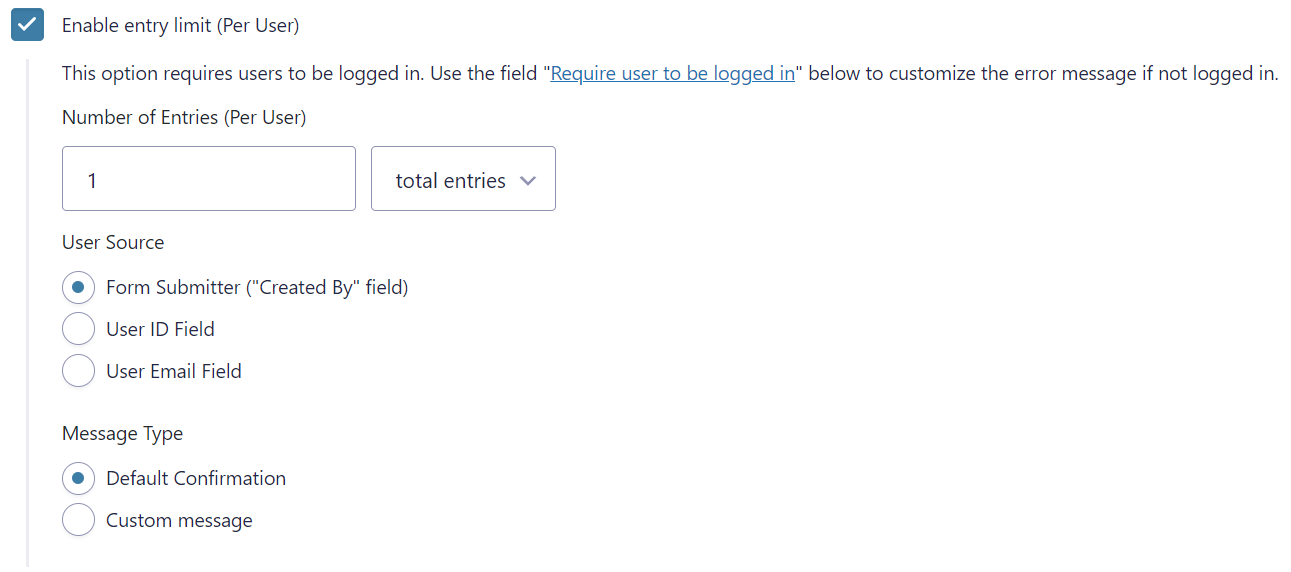
Find the setting under Form Settings > Restrictions after to the default "Enable entry limit" field (which does not limit by user).
New fields available:
Required Plugins
- Gravity Forms
How to use
- Install and activate the plugin
- Navigate to the form of your choice and go to the Form Settings
- Scroll down to the "Restrictions" section under Form Settings
- Check the box "Enable entry limit (Per User)"
Additional settings (once enabled)
- Number of Entries (Per User) - The maximum number of entries a user can submit, and the time frame to look within (All time, per day, per week, per month, or per year)
- User Source - How to compare the current user. Options include: form submitter (default), a user ID field, or an email field.
- Message Type - Choose to display the default confirmation message or a custom message which you can specify.
Developer Hooks
Filter the user's email: This filter can change the email address used to compare a user by email. You may need this if users support more than one email field.
$email = apply_filters( 'rs_gf_limited_entries/get_user_email', $email, $user_id );Filter the displayed message: This filter can change the message displayed when a user has reached their limit.
$message = apply_filters( 'rs_gf_limited_entries/get_limit_message', $message, $form, $settings );Changelog
1.0.2
- Added the filter
rsgf_limited_entries/get_user_entriesto allow for custom entry queries - Added the filter
rsgf_limited_entries/get_user_entries_resultsto allow filtering the query results
1.0.1
- Changed to only check active entries
1.0.0
- Initial release
Releases
2 releases. Each count is every asset in that release; expand a row for the breakdown.