PTD GTFS Schedules
PTD GTFS Schedules: public transport schedules from GTFS feeds for WordPress
Install
This is the repository archive. It installs, but the folder name will carry the branch suffix and updates will not flow.
Install straight from GitHub with WP-CLI:
wp plugin install https://github.com/publictransitdata/wp-gtfs-schedules/archive/refs/heads/main.zipA WordPress plugin that turns the GTFS feed of a transport operator or authority into public transport timetables on its website: lists of lines, line pages with route diagrams, stop timetables and departure boards from static data feed.
Import the feed once, add a block to a page, and the timetables stay current as the feed is updated.
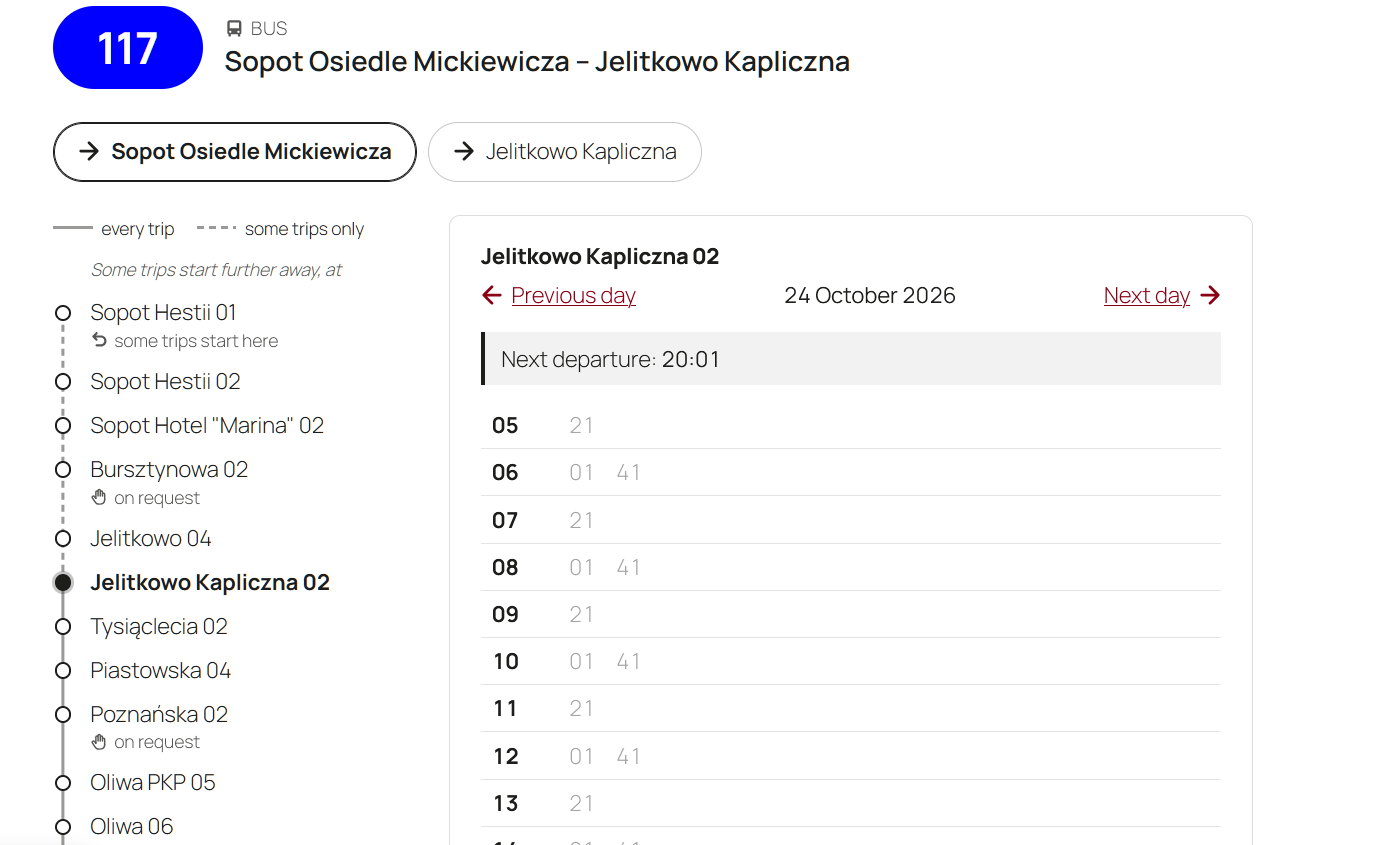
What it shows
- Lines: every line of the network, grouped by transport mode (trams, buses, night lines and so on), optionally in tabs. Each line links to its own page.
- Line pages: the directions of a line, a diagram of its route with the stops and the variants some trips take (detours, short workings, trips starting or ending elsewhere), and the timetable of the chosen stop. Departures that have left are greyed out and the next one is highlighted.
- Stop timetables: all departures from a stop on a given day, for every line or for one.
- Departure boards: the next departures from a stop, updating themselves while the page is open.
For riders
- The next departure at a glance: departures that have left are greyed out and the next one is highlighted, and both move on as time passes.
- No surprises about where a trip goes: trips that end early or take another way are marked with a letter, explained under the timetable: "a – to City Stadium A".
- Only the stops they can use: stops where nobody can get on or off are left out, and riders see where to signal the driver (stops on request) and where they can only get on or only get off.
- A clear picture of the route: the diagram shows where branches leave the route, where they come back and where some trips end.
- For everyone: every icon and diagram has a text equivalent for screen readers, and the pages work without JavaScript.
- Language support: English, Ukrainian and Polish.
For editors and admins
- Blocks for the block editor and shortcodes for any page.
- Import from the feed's address or from an uploaded .zip file, then update it automatically every night or week.
- Imports run in short steps with progress shown, so large feeds work on shared hosting too. Visitors keep seeing the old shedule until the new one is fully imported.
- A stop finder in the admin gives ready-to-paste shortcodes.
- A WP-CLI command for imports from the server.
Requirements
- WordPress 6.5 or later
- PHP 8.1 or later
Installation
- Download
ptd-gtfs-schedules.zipfrom the latest release. - In WordPress, go to Plugins → Add New Plugin → Upload Plugin, choose the file and install it.
- Activate the plugin.
Use the .zip attached to the release, not GitHub's "Source code" archive: the release .zip has the plugin in a ptd-gtfs-schedules folder, as WordPress expects.
Getting started
- Open GTFS Schedules in the admin menu. Enter the address of your GTFS feed, or upload its .zip file, and import it.
- Add the Lines block to a page, for example the home page.
- Create one page with the Line timetable block. Every Lines block on the site links to it.
- To show a single stop, look it up under Find a stop and paste its shortcode into any page.
Shortcodes
| Shortcode | Shows |
|---|---|
[ptd_gtfs_lines] |
The list of lines. Options: modes="tram,bus", layout="destinations", tabs="yes", night="mixed", heading="3". |
[ptd_gtfs_line] |
The line page. Put it, or the Line timetable block, on one page: every list of lines links there. |
[ptd_gtfs_timetable stop="123"] |
The timetable of a stop; add route="7" for one line only. |
[ptd_gtfs_departures stop="123" limit="8"] |
The next departures from a stop. |
WP-CLI
wp ptd-gtfs-schedules import                      # from the feed URL in the settings
wp ptd-gtfs-schedules import --file=feed.zip      # from a file on the server
wp ptd-gtfs-schedules import --force              # even if the feed has not changed
Automatic updates run at night through WP-Cron. On sites with little traffic, set up a real cron job for wp-cron.php, or run the import from the server's cron. Automatic updates import from the feed URL and replace data imported from an uploaded file.
Supported GTFS
The plugin reads agency.txt, stops.txt, routes.txt, trips.txt, stop_times.txt, calendar.txt and calendar_dates.txt, including extended route types, times after midnight and stations with several platforms.
Customising
- Styles: the markup uses
gtfs-CSS classes that themes can style. - Hooks:
ptd_gtfs_schedules_line_url(filter): the address of a line's page, for sites with their own routing.ptd_gtfs_schedules_is_night_line(filter): whether a line counts as a night line.ptd_gtfs_schedules_imported(action): runs after every import, with the feed's details.
Privacy and external services
The plugin does not use any service of its own. It downloads the GTFS feed only from the address that the site's administrator enters in its settings, when an import runs. No data about the site or its visitors is sent with the request. Departure boards update themselves through the site's own REST API.
Development
You need PHP 8.1+, Composer and, for translations, WP-CLI.
composer install
composer check      # coding standards (PHPCS), static analysis (PHPStan) and unit tests
composer lint:fix   # fix what PHPCS can fix on its own
GitHub Actions runs the same checks on every pull request and push to main, with the tests on PHP 8.1 to 8.5.
Code layout
| Path | What is there |
|---|---|
src/Feed, src/Import |
Reading GTFS files and importing them step by step into the plugin's own tables. |
src/Schedule |
Service days, departures and timetables. |
src/Network |
Lines, their directions and how trips differ from the usual route. |
src/Frontend |
Blocks, shortcodes, rendering and assets. |
src/Admin |
The admin page, the feed upload and the import progress. |
templates/ |
Markup that themes can override. |
blocks/ |
Block definitions and their editor scripts (plain JavaScript, no build step). |
languages/ |
Translations. |
Translations
After changing translatable strings, translate the new ones in languages/*.po, then rebuild every translation file:
composer i18nIt updates the template and the .po files, compiles .mo, .l10n.php and the JSON files for JavaScript, and fails if any string is left untranslated.
Conventions
- WordPress Coding Standards, PHPStan level 6.
- Commit messages follow Conventional Commits; pull requests are merged with merge commits.
Feedback
Something does not work, or a feature is missing? Open an issue or write to contact@publictransitdata.net.
Need a GTFS feed? Many transport authorities publish theirs as open data, or you can export one from your scheduling system. We can also help your company or municipality create and maintain one: publictransitdata.net.
Credits
Icons from other projects, both under the MIT licence:
- The arrow: @icons by Valentin Fossati.
- The "on request" hand: Tabler Icons.
Licence
GPL-2.0-or-later. See LICENSE.txt.