Single Sign-on with Microsoft Entra ID WP Registry grade D+. High-severity findings · 3 findingsWP RegistryHigh-severity findings · 3 findingsOpen the reportD+ #4 in Users & Membership
Single Sign-on with Microsoft Entra ID (for WordPress)
Install
Upload it under Plugins → Add New Plugin → Upload Plugin, then activate.
Install straight from GitHub with WP-CLI:
wp plugin install https://github.com/psignoret/aad-sso-wordpress/releases/download/v0.7.0/aad-sso-wordpress-0.7.0.zipSign Sign-on with Microsoft Entra ID (for WordPress)
A WordPress plugin that allows organizations to use their Microsoft Entra ID (formerly known as Azure Active Directory) user accounts to sign in to WordPress. Organizations with Office 365 already have Microsoft Entra ID (Microsoft Entra ID) and can use this plugin for all of their users.
- Microsoft Entra ID group membership can be used to determine access and role.
- New users can be registered on-the-fly based on their Microsoft Entra ID profile.
- Can always fall back to regular username and password login.
This is a work in progress, please feel free to contact me for help. This plugin is provided as-is, with no guarantees or assurances.
In the typical flow:
- User attempts to log in to the blog. At the sign in page, they are given a link to sign in with their Microsoft Entra ID work or school account (e.g. a Microsoft 365 account).
- After signing in, the user is redirected back to the blog with an authorization code, which the plugin exchanges for a ID token, containing a minimal set of claims about the signed in user, and an access token, which can be used to query Microsoft Entra ID for additional details about the user.
- The plugin uses the claims in the ID token to attempt to find a WordPress user with an email address or login name that matches the Microsoft Entra ID user.
- If one is found, the user is authenticated in WordPress as that user account. If one is not found, the WordPress user will (optionally) be auto-provisioned on-the-fly.
- (Optional) Membership to certain groups in Microsoft Entra ID can be mapped to roles in WordPress, and group membership can be used to restrict access.
Getting Started
The following instructions will get you started. In this case, we will be configuring the plugin to use the user roles configured in WordPress.
1. Download and activate the plugin
This plugin is not yet registered in the WordPress plugin directory (coming soon!), but you can still install it manually:
- Download the plugin using
gitor with the 'Download ZIP' link on the right. - Place the
aad-sso-wordpressfolder in your WordPress' plugin folder. Normally, this is<your-blog>/wp-content/plugins. - Activate the plugin in the WordPress admin console, under Plugins > Installed Plugins.
2. Register a Microsoft Entra ID application
With these steps, you will create a Microsoft Entra ID app registration. This will provide your WordPress site with an application identity in your organization's Microsoft Entra ID tenant.
-
Sign in to the Azure portal, and ensure you are signed in to the directory which has the users you'd like to allow to sign in. (This will typically be your organization's directory.) You can view which directory you're signed in to (and switch directories if needed) by clicking on your username in the upper right-hand corner.
-
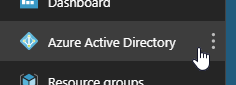
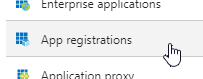
Navigate to the Microsoft Entra ID blade, and enter the App registrations section.
-
Choose New registration.
-
Fill out the initial form as follows:
-
Name: Enter your site's name. This will be displayed to users at the Microsoft Entra ID sign-in page, in the sign-in logs, in the list of Microsoft Entra apps, and in any consent prompt users may come across.
-
Supported account types: Choose "Accounts in this organizational directory" if you only expect users in your organization (including guest users who have been invited) to sign in to your app. Otherwise, choose "Accounts in any organizational directory" to allow users from any Microsoft Entra ID tenant to sign in.
Note: This plugin does not yet support the third option, "Accounts in any organizational directory and personal Microsoft accounts".
-
Redirect URI: Leave the redirect URI type set to "Web", and provide a URL matching the format
https://<your blog url>/wp-login.php, or whichever page your blog uses to sign in users.Note: If you're not sure what to enter here, you can leave it empty for now and come back and update this (under Microsoft Entra ID > App registrations > Authentication) later. The plugin itself will tell you exactly what URL to use.
Note: The URL you provide must invoke the
authenticateaction. (By default, this will bewp-login.php.)
-
-
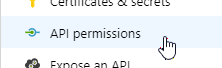
After clicking Register, enter the API permissions section.
-
Verify that the delegated permission User.Read for Microsoft Graph is already be selected. This permission is all you need if you do not require mapping Microsoft Entra ID group membership to WordPress roles.
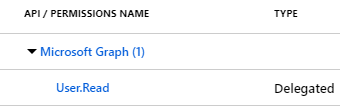
Note: If you do wish to map Microsoft Entra ID groups to WordPress roles, you must also select the delegated permission Directory.Read.All (click "Add a permission" > Microsoft Graph > Delegated > Directory.Read.All).
Important: Some permissions require administrator consent before it can be used, and in some organizations, administrator consent is required for any permission. A tenant administrator can use the Grant admin consent option to grant the permissions (i.e. consent) on behalf of all users in the organization.
-
Under Certificates & secrets, create a new client secret. Provide a description and choose a duration (I recommend no longer than two years). After clicking Add, the secret value will appear. Copy it, as this is the only time it will be available.
-
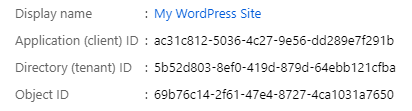
Switch to the Overview section and keep the tab open, as you will need to copy some fields when configuring the plugin.
3. Configure the plugin
Once the plugin is activated in WordPress (step 1), update your settings from the WordPress admin console under Settings > Microsoft Entra ID. Basic settings to include are:
Display name The display name of the organization, used in the link on the WordPress login page which will start the Microsoft Entra ID sign-in process. Client ID The Application ID. (Copy this from the Microsoft Entra ID app registration's **Overview** page.) Client Secret The client secret. (You copied this from the Microsoft Entra ID app registration's **Certificates & secrets** page.) Reply URL The URL that Microsoft Entra ID will send the user to after authenticating. This is usually the blog's sign-in page, which is the default value. Ensure that the reply URL configured in Microsoft Entra ID matches this value.4. (Optional) Set WordPress roles based on Microsoft Entra ID group membership
The Single Sign-on with Microsoft Entra ID plugin can be configured to set different WordPress roles based on the user's membership to a set of user-defined groups. This is a great way to control who has access to the site, and under what role.
This is also configured Settings > Microsoft Entra ID (from the WordPress admin console). The following fields should be included:
Enable Microsoft Entra ID group to WordPress role association Check this to enable Microsoft Entra ID group-based WordPress roles. Default WordPress role if not in Microsoft Entra ID group This is the default role that users will be assigned to if matching Microsoft Entra ID group to WordPress roles is enabled. If this is not set, and the user authenticating does not belong to any of the groups defined, they will be denied access. WordPress role to Microsoft Entra ID group map For each of the blog's WordPress roles, there is a field for the ObjectId of the Microsoft Entra ID group that will be associated with that role.Note: For the Microsoft Entra ID group to WordPress role mapping to work, the app in Microsoft Entra ID needs the delegated permission Directory.Read.All for Microsoft Graph. See step 5 of Register a Microsoft Entra ID application, above, for more details.
Example settings
The different fields that can be defined in the settings JSON in Settings > Microsoft Entra ID are documented in Settings.php. The following may give you an idea of the typical scenarios that may be encountered.
Minimal
Users are matched by their email address in WordPress, and whichever role they have in WordPress is maintained.
| Setting | Example value |
|---|---|
| Display name | Contoso |
| Client ID | 9054eff5-bfef-4cc5-82fd-8c35534e48f9 |
| Client Secret | NTY5MmE5Yj... |
| Reply URL | https://www.example.com/blog/wp-login.php |
| Field to match to UPN | Email Address |
Match on username alias
Users are matched by their login names in WordPress and the alias portion of their Microsoft Entra ID UserPrincipalName. Whichever role they have in WordPress is maintained.
| Setting | Example value |
|---|---|
| Display name | Contoso |
| Client ID | 9054eff5-bfef-4cc5-82fd-8c35534e48f9 |
| Client Secret | NTY5MmE5Yj... |
| Reply URL | https://www.example.com/blog/wp-login.php |
| Field to match to UPN | Login Name |
| Match on alias of the UPN | Yes |
Group membership-based roles, no default role
Users are matched by their login names in WordPress, and WordPress roles are dictated by membership to a given Microsoft Entra ID group. Access is denied if they are not members of any of these groups.
| Setting | Example value | ||||||||||
|---|---|---|---|---|---|---|---|---|---|---|---|
| Display name | Contoso | ||||||||||
| Client ID | 9054eff5-bfef-4cc5-82fd-8c35534e48f9 | ||||||||||
| Client Secret | NTY5MmE5Yj... | ||||||||||
| Reply URL | https://www.example.com/blog/wp-login.php | ||||||||||
| Field to match to UPN | Login Name | ||||||||||
| Enable Microsoft Entra ID group to WordPress role association | Yes | ||||||||||
| Default WordPress role if not in Microsoft Entra ID group | (None, deny access) | ||||||||||
| WordPress role to Microsoft Entra ID group map |
|
Group membership-based roles with default role
Users are matched by their login names in WordPress, and WordPress roles are dictated by membership to a given Microsoft Entra ID group. If the user is not a part of any of these groups, they are assigned the Author role.
| Setting | Example value | ||||||||||
|---|---|---|---|---|---|---|---|---|---|---|---|
| Display name | Contoso | ||||||||||
| Client ID | 9054eff5-bfef-4cc5-82fd-8c35534e48f9 | ||||||||||
| Client Secret | NTY5MmE5Yj... | ||||||||||
| Reply URL | https://www.example.com/blog/wp-login.php | ||||||||||
| Field to match to UPN | Login Name | ||||||||||
| Enable Microsoft Entra ID group to WordPress role association | Yes | ||||||||||
| Default WordPress role if not in Microsoft Entra ID group | Author | ||||||||||
| WordPress role to Microsoft Entra ID group map |
|
Group membership-based roles, default role, auto-provision
Users are matched by their email in WordPress, and WordPress roles are dictated by membership to a given Microsoft Entra ID group. If the user doesn't exist in WordPress yet, they will be auto-provisioned. If the user is not a part of any of these groups, they are assigned the Subscriber role.
| Setting | Example value | ||||||||||
|---|---|---|---|---|---|---|---|---|---|---|---|
| Display name | Contoso | ||||||||||
| Client ID | 9054eff5-bfef-4cc5-82fd-8c35534e48f9 | ||||||||||
| Client Secret | NTY5MmE5Yj... | ||||||||||
| Reply URL | https://www.example.com/blog/wp-login.php | ||||||||||
| Field to match to UPN | Email Address | ||||||||||
| Enable auto-provisioning | Yes | ||||||||||
| Enable Microsoft Entra ID group to WordPress role association | Yes | ||||||||||
| Default WordPress role if not in Microsoft Entra ID group | Subscriber | ||||||||||
| WordPress role to Microsoft Entra ID group map |
|
Groups
As described above, you can map Microsoft Entra ID groups to WordPress roles. Users who are members of the Microsoft Entra ID group will be granted the WordPress role(s) the groups were mapped to.
There are several ways Microsoft Entra ID groups can be created/managed. Some of them require the group owner/creator to be a tenant administrator, others not necessarily (depending on your organization's policy):
- Azure portal. The Azure portal (https://portal.azure.com), under Microsoft Entra ID > Groups > New group, allows admins and (optionally) users to create and manage groups.
- Access Panel. The Microsoft Entra ID Access Panel (https://myapps.microsoft.com) provides an interface for users to create and manage groups.
- Outlook. The Outlook web interface (https://outlook.office.com/) offers users the option to create Office 365 Groups. These groups are stored in Microsoft Entra ID and can be used with this plugin.
- Microsoft Teams. Creating a team in Microsoft Teams (https://teams.microsoft.com) also results in an Office 365 Group getting created.
- Microsoft Graph PowerShell. The Microsoft Graph PowerShell module allows admins and (optionally) users to create and manage groups. (e.g. New-MgGroup, and New-MgGroupMember cmdlets.)
- On-premises. Many large organizations use Microsoft Entra Connect (formerly known as Azure AD Connect) to sync their on-premises AD to Microsoft Entra ID. This usually includes all on-premises AD groups and memberships. Once these groups are synced to Azrue AD, they can be used with this plugin.
Advanced
Refreshing the OpenID Connect configuration cache
Most of the OpenID Connect endpoints and configuration (e.g. signing keys, etc.) are obtained from the OpenID Connect configuration endpoint. These values are cached for one hour, but can always be forced to re-load by adding aadsso_reload_openid_config=1 to the query string in the login page. (This shouldn't really be needed, but it has shown to be useful during development.)
Bypassing automatic redirect to Microsoft Entra ID to prevent lockouts
If you've configured this plugin to automatically redirect to Microsoft Entra ID for sign-in, but something is misconfigured, you may find yourself locked out of your site's admin dashboard.
To log in to your site without automatically redirecting to Microsoft Entra ID (thus giving you an opportunity to enter a regular username and password), you can append ?aadsso_no_redirect=please to the login URL. For example, if your login URL is https://example.com/wp-login.php, navigating to https://example.com/wp-login.php?aadsso_no_redirect=please will prevent any automatic redirects.
Releases
3 releases. Each count is every asset in that release; expand a row for the breakdown.