Pronamic Pay Restrict Content (Pro) Add-On WP Registry grade D+. High-severity findings · 2 findingsWP RegistryHigh-severity findings · 2 findingsOpen the reportD+
Restrict Content Pro driver for the WordPress payment processing library. http://www.wp-pay.org/extensions/restrict-content-pro/
Install
Upload it under Plugins → Add New Plugin → Upload Plugin, then activate.
Install straight from GitHub with WP-CLI:
wp plugin install https://github.com/pronamic/wp-pronamic-pay-restrict-content-pro/releases/download/v4.7.1/pronamic-pay-restrict-content.4.7.1.zipOn Packagist as wp-pay-extensions/restrict-content-pro:
composer require wp-pay-extensions/restrict-content-proWordPress Pay Extension: Restrict Content Pro
Restrict Content Pro driver for the WordPress payment processing library.
Restrict Content Pro
https://gitlab.com/pronamic-plugins/restrict-content-pro
To download the latest version of Restrict Content Pro the plugin updater API can be used.
You have to replace LICENSE and URL in the following command. If you need a beta
release you can set beta to 1.
curl --request POST https://restrictcontentpro.com/ \
    --data "edd_action=get_version&license=LICENSE&item_name=restrict-content-pro&item_id=479&version=1.0.0&slug=restrict-content-pro&author=Restrict Content Pro Team&url=URL&beta=0" \
    | jq '.package'
Edit Membership
In Restrict Content Pro version 3 or higher it is possible to edit memberships. Changes to a Restrict Content Pro membership can also influence the connected Pronamic Pay subscription:
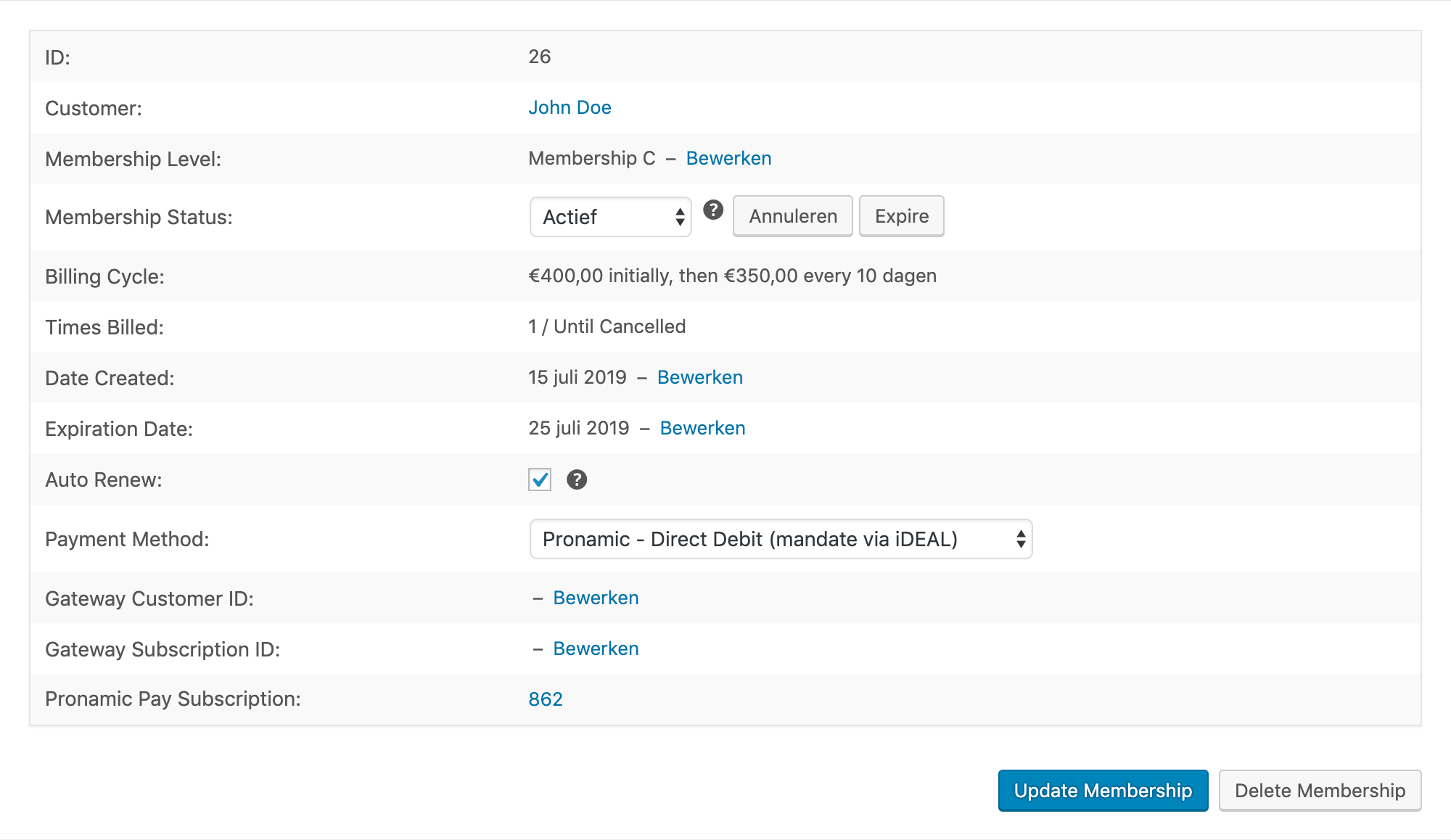
Edit "Membership Level"
When you change the "Membership Level" of a Restrict Content Pro membership the connected Pronamic Pay subscription will be cancelled. If you click the Restrict Content Pro "Change Level" button you will see a confirmation modal dialog with the following text:
Are you sure you want to change the membership level? The subscription will be cancelled at the payment gateway and this customer will not be automatically billed again.
If you confirm by selecting OK Restrict Content Pro will create a new membership.
The other Restrict Content Pro membership will be marked as disabled. The new
Restrict Content Pro membership will not be connected to a Pronamic Pay subscription.
Edit "Membership Status"
When you change the "Membership Status" of a Restrict Content Pro membership the connected Pronamic Pay subscription will be updated accordingly.
| Restrict Content Pro status | Pronamic Pay subscription status |
|---|---|
| Active | Active |
| Expired | Expired |
| Cancelled | Cancelled |
| Pending | Pending |
Edit "Date Created"
Editing the Restrict Content Pro membership "Date Created" value will not affect the connected Pronamic Pay subscription. The Pronamic Pay subscription date will not be updated.
Edit "Expiration Date"
Editing the Restrict Content Pro membership "Expiration Date" value will not affect the connected Pronamic Pay subscription. The Pronamic Pay subscription expiration date will not be updated. We are not updating this due to the following Restrict Content Pro notice:
Changing the expiration date will not affect when renewal payments are processed.

Edit "Auto Renew"
Editing the Restrict Content Pro membership "Auto Renew" value will not affect the connected Pronamic Pay subscription. The Pronamic Pay subscription will not be cancelled. We are not doing this due to the following Restrict Content Pro notice:
Changing the recurring indicator will not set up or remove a subscription with the gateway. This checkbox is for updating RCP records only.

Gateway supports
Foreach Restrict Content Pro gateway it is possible to define which features are supported. In Restrict Content Pro version 3 the following supports values are available:
| Support | Description |
|---|---|
one-time |
one time payments |
recurring |
recurring payments |
fees |
fees |
trial |
free trials |
Source: https://docs.restrictcontentpro.com/article/1695-payment-gateway-api
In the Pronamic Pay extension we try to set the supports values as correct as possible for the different gateways. Restrict Content Pro however will not hide/show gateways based on the supports values.
Restrict Content Pro membership levels with a recurring can be paid with a one-time payment gateway like iDEAL. And unlimited membership levels can be paid with a recurring payment gateway like Direct Debit (mandate via iDEAL).
Once a user pays a recurring membership level with a one-time payment gateway, it will not be automatically renewed. Restrict Content Pro is not very clear about this, so make sure you inform your users about this!
Test
- Not logged in new membership.
- Logged in new membership.
- Logged in upgrade membership.
- Cancel membership.
- Discount code.
- Lifetime membership.
- Free trial.
- Fee.
- Free member.
- Billing Cycle: €7.00 initially, then €3.00 every day.
WP-CLI
What is WP-CLI?
For those who have never heard before WP-CLI, here's a brief description extracted from the official website.
WP-CLI is a set of command-line tools for managing WordPress installations. You can update plugins, set up multisite installs and much more, without using a web browser.
Commands
$ wp pronamic-pay restrict-content-pro
usage: wp pronamic-pay restrict-content-pro upgrade-216 <command>

See 'wp help pronamic-pay restrict-content-pro <command>' for more information on a specific command.
Command pronamic-pay restrict-content-pro upgrade-216 execute
Execute 2.1.6 upgrade.
$ wp pronamic-pay restrict-content-pro upgrade-216 executeCommand pronamic-pay restrict-content-pro upgrade-216 list-payments
List payments for 2.1.6 upgrade.
$ wp pronamic-pay restrict-content-pro upgrade-216 list-paymentsCommand pronamic-pay restrict-content-pro upgrade-216 list-subscriptions
List subscriptions for 2.1.6 upgrade.
$ wp pronamic-pay restrict-content-pro upgrade-216 list-subscriptionsCommand pronamic-pay restrict-content-pro upgrade-216 upgrade-subscriptions
Upgrade subscriptions for 2.1.6.
$ wp pronamic-pay restrict-content-pro upgrade-216 upgrade-subscriptions$ wp pronamic-pay restrict-content-pro upgrade-216 upgrade-subscriptions --skip-no-match=true --reactivate=true --dry-run=falseLinks
Releases
Newest 25 of 29 recorded releases. Each count is every asset in that release; expand a row for the breakdown.