Pressbooks SAML2 Single Sign-On WP Registry grade F. Critical findings · 2 findingsWP RegistryCritical findings · 2 findingsOpen the reportF #3 in Users & Membership
SAML2 Single Sign-On integration for Pressbooks (Shibboleth, ADFS, Google Apps, Etc.)
Install
Upload it under Plugins → Add New Plugin → Upload Plugin, then activate.
Install straight from GitHub with WP-CLI:
wp plugin install https://github.com/pressbooks/pressbooks-saml-sso/releases/download/2.6.0/pressbooks-saml-sso-2.6.0.zipOn Packagist as pressbooks/pressbooks-shibboleth-sso:
composer require pressbooks/pressbooks-shibboleth-ssoSAML2 Single Sign-On integration for Pressbooks.
Description
Plugin to integrate Pressbooks with a SAML2 single sign-on service. (Shibboleth, Microsoft ADFS, Google Apps, Etc.)
Users who attempt to login to Pressbooks are redirected to a Shibboleth or SAML2 Identity Provider. After the user’s credentials are verified, they are redirected back to the Pressbooks network. If we match a Pressbooks user by UID ( stored in user_meta table), the user is recognized as valid and allowed access. If no match, then try to match a Pressbooks user by email (and store a successful match in user_meta table for next time). If the user does not have an account in Pressbooks, a new user can be created, or access can be refused, depending on the configuration.
Limitations: This plugin does not enable authentication with multilateral Shibboleth. For use in a non-federated, bilateral configuration, with a single IdP.
Installation
composer require pressbooks/pressbooks-saml-ssoOr, download the latest version from the releases page and unzip it into your WordPress plugin directory: https://github.com/pressbooks/pressbooks-saml-sso/releases
Then, create the necessary certificates:
cd vendor/onelogin/php-saml/certs
openssl req -newkey rsa:2048 -new -x509 -days 3652 -nodes -out sp.crt -keyout sp.key
Then, activate and configure the plugin at the Network level.
Security Considerations
Generating certificates in vendor/onelogin/php-saml/certs, without further changes, will expose them to malicious
users (Ie. https://path/to/vendor/onelogin/php-saml/certs/sp.crt).
Furthermore, your certificates are at risk of being deleted when updating packages using composer update or similar
commands. A competent sysadmin must make sure certificates are not accessible from the internet nor deleted. It is
highly recommended that you pass your certificates via configuration variables. Example:
add_filter( 'pb_saml_auth_settings', function( $config ) {
    $config['sp']['x509cert'] = file_get_contents( '/path/to/sp.key' );
    $config['sp']['privateKey'] = file_get_contents( '/path/to/sp.crt' );
    return $config;
} );
Or:
define( 'PHP_SAML_SP_KEY_PATH', '/path/to/sp.key' );
define( 'PHP_SAML_SP_CERT_PATH', '/path/to/sp.crt' );
IdP Setup
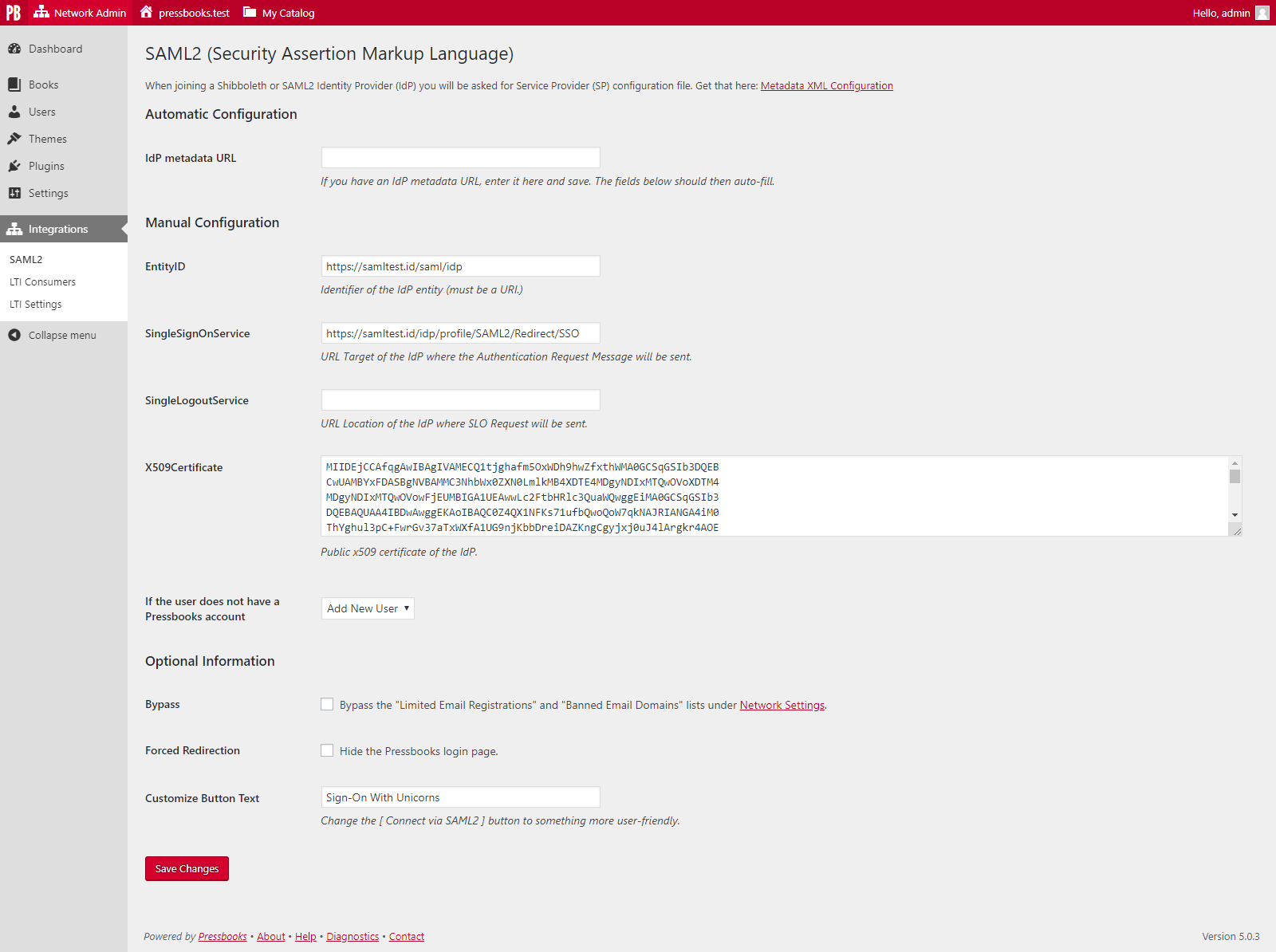
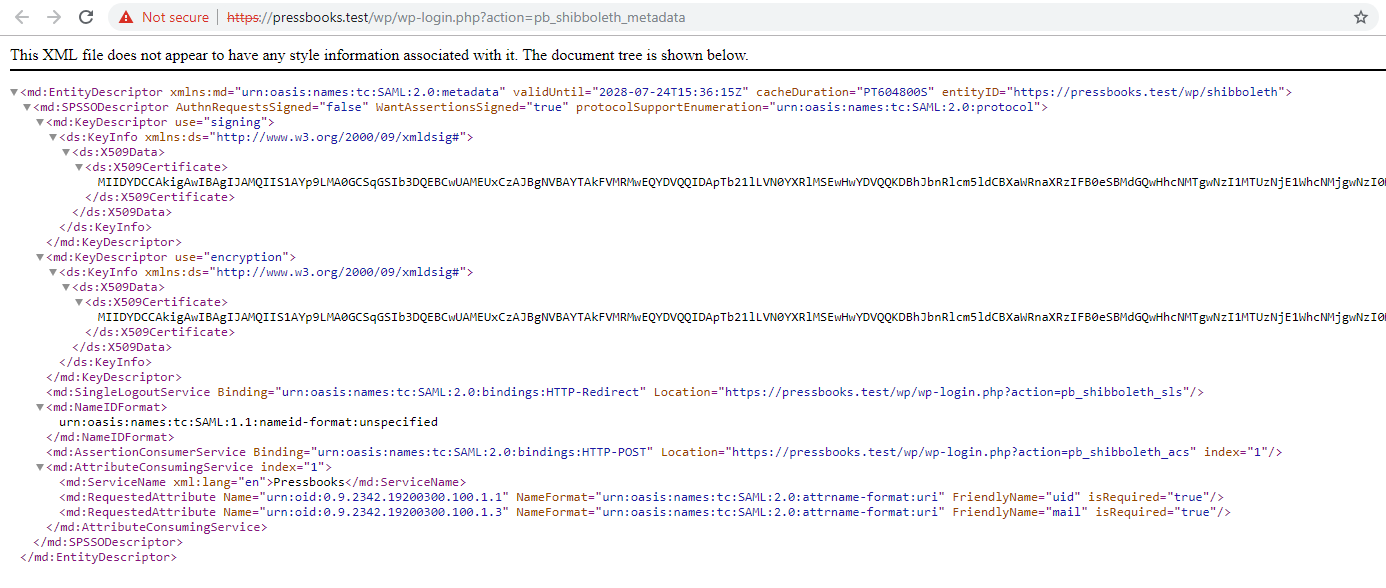
Upon activation of the plugin, a submenu item ("SAML2") is added to the Network Admin interface under "Integrations". This leads to the SAML2 settings page. Your metadata XML can be downloaded from this page.
The plugin requires the Assertion elements of the Response to be signed.
The plugin looks for the following Attributes in the Response:
- Requires:
urn:oid:0.9.2342.19200300.100.1.1(samAccountName or equivalent, ideally with FriendlyNameuid) - Strongly recommends:
urn:oid:0.9.2342.19200300.100.1.3(email-address or equivalent, ideally with FriendlyNamemail). If no value is available we fall back touid@127.0.0.1 - Optional:
urn:oid:1.3.6.1.4.1.5923.1.1.1.6(eduPersonPrincipalName or equivalent). Upon the first launch for a given user, if mail cannot match an existing person, and this value is present, we'll try to use it.
The email can be filtered,
example: add_filter( 'pb_integrations_multidomain_email', function( $email, $uid, $plugin ) { /* Custom use case, return $email */ }, 10, 3 );
Because this plugin uses the fabulous onelogin/php-saml toolkit, many other configuration variables can be tweaked.
Using a test IdP SAML app
If you want to test the plugin with a test IdP, you can use Auth0. Here are the steps to create a test IdP application:
- Create an Auth0 account (or ask the Operation Team for a test account).
- Create a new application in the Auth0 dashboard.
- Select "Regular Web Applications" as the application type.
- Go to the "Settings" tab of your application.
- Scroll down to the "Advanced Settings" section and click on "Ednpoints" tab.
- Copy the "SAML Metadata URL" and paste it on Pressbooks SAML2 settings page, in the "IdP metadata URL" field and save the changes.
- In Auth0, go to the "Addons" tab of your application, and click on "SAML2 Web App".
- In the Settings tab, under the Application Callback URL, add:
https://<NETWORK_DOMAIN>/wp/wp-login.php?action=pb_shibboleth_acs - In the PB Admin area, go to Integrations > SAML2 and click under the "Metadata XML Configuration" link displayed at the top of the page.
- Locate the
EntityIDvalue inside the<md:EntityDescriptor>tag in your metadata XML. You’ll use this value as the audience in the next step. - Update your Auth0 Settings JSON to include the following configuration. Be sure to:
- Replace
<URL_ENTITY_ID_FROM_METADATA_XML>with the actualEntityIDyou copied. - Replace
<NETWORK_DOMAIN>with the domain of your Pressbooks instance.{ "audience": "<URL_ENTITY_ID_FROM_METADATA_XML>", "recipient": "https://<NETWORK_DOMAIN>/wp/wp-login.php?action=pb_shibboleth_acs", "mappings": { "user_id": "urn:oid:0.9.2342.19200300.100.1.1", "email": "urn:oid:0.9.2342.19200300.100.1.3", "name": "http://schemas.xmlsoap.org/ws/2005/05/identity/claims/name", "given_name": "http://schemas.xmlsoap.org/ws/2005/05/identity/claims/givenname", "family_name": "http://schemas.xmlsoap.org/ws/2005/05/identity/claims/surname", "upn": "http://schemas.xmlsoap.org/ws/2005/05/identity/claims/upn", "groups": "http://schemas.xmlsoap.org/claims/Group" }, "createUpnClaim": true, "passthroughClaimsWithNoMapping": true, "logout": { "slo_enabled": true, "callback": "https://<NETWORK_DOMAIN>/wp/wp-login.php?action=pb_shibboleth_sls" }, "binding": "urn:oasis:names:tc:SAML:2.0:bindings:HTTP-Redirect" }Make sure you are using the correct
NETWORK_DOMAINfor your Pressbooks instance.
- Save the changes in Auth0.
- Create a new user in the "User Management" section of the Auth0 dashboard.
- Now you can log in using the new user you created in Auth0. Go to your Pressbooks instance and click on the "Login with SAML" button.
Sending logs
If you use AWS and want to log SAML attempts on your server, you will need define some environment variables on the server which is hosting your Pressbooks instance.
AWS S3
Define the following environment variables:
  LOG_LOGIN_ATTEMPTS (setting this value to true will enable this feature at the infrastructure level)
  AWS_ACCESS_KEY_ID
  AWS_SECRET_ACCESS_KEY
  AWS_S3_OIDC_BUCKET
  AWS_S3_REGION
  AWS_S3_VERSION
After these variables have been properly defined, basic information about SAML login attempts will be logged to your S3
bucket. A new CSV file will be created each month so that the logs remain readable. Log storage will take place in a
folder structure that looks like
this S3 Bucket > saml_logs > {ENVIRONMENT} > {Network URL hashed though wp_hash function} > {YYYY-MM} > saml_logs.log.
AWS CloudWatch Logs
Define the following envirnoment variables:
  LOG_LOGIN_ATTEMPTS (setting this value to true will enable this feature at the infrastructure level)
  AWS_ACCESS_KEY_ID
  AWS_SECRET_ACCESS_KEY
  AWS_S3_REGION
  AWS_S3_VERSION
After these variables have been properly defined, basic information about SAML login attempts will be logged in your AWS
CloudWatch Logs service in JSON format. You will need to create a new Log group called pressbooks-logs.
Screenshots
Changelog
Please see the CHANGELOG file for more information.
Releases
Newest 25 of 31 recorded releases. Each count is every asset in that release; expand a row for the breakdown.
Active-site estimate ≈560 comes from the median of recent superseded releases. Method.