Install
This is the repository archive. It installs, but the folder name will carry the branch suffix and updates will not flow.
Install straight from GitHub with WP-CLI:
wp plugin install https://github.com/pratik-londhe4/pratiks-block-grammar-editor/archive/refs/heads/main.zip
Pratiks Block Grammar Editor







Inspect, copy, format, validate, and edit Gutenberg block comment grammar for individual blocks in the editor.
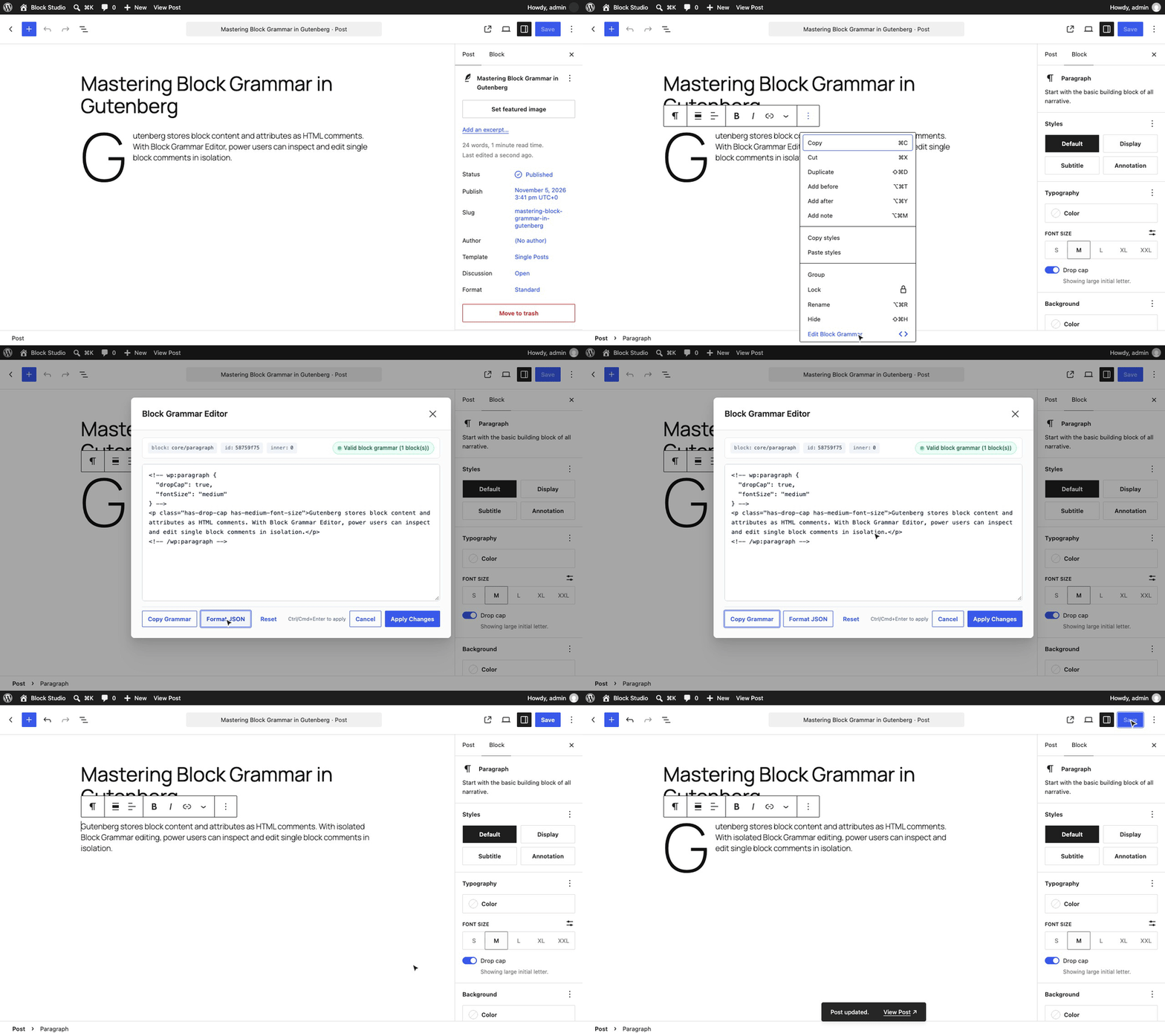
WordPress Gutenberg stores layout structures, block styles, and attributes inside structured HTML comments (...). Until now, working with block grammar meant choosing between two extremes:
- Switching the entire post into Code Editor mode (
Ctrl+Shift+Alt+M), which displays every block on the page in a giant raw text buffer and makes it easy to accidentally break unrelated blocks. - Selecting "Edit as HTML" on a block, which completely strips the Gutenberg comment grammar and converts the block into raw inner HTML, destroying attributes, inner blocks, and dynamic behaviors.
Pratiks Block Grammar Editor gives you an isolated, distraction-free grammar editor directly in the Gutenberg block toolbar.
[!NOTE] Free and open source under GPLv2+. No pro version, no upsells, no ads, no telemetry. Clean, lightweight, and accessible.
Features
- Isolated block grammar editor: Access the editor directly from the "More Options" menu in the block toolbar.
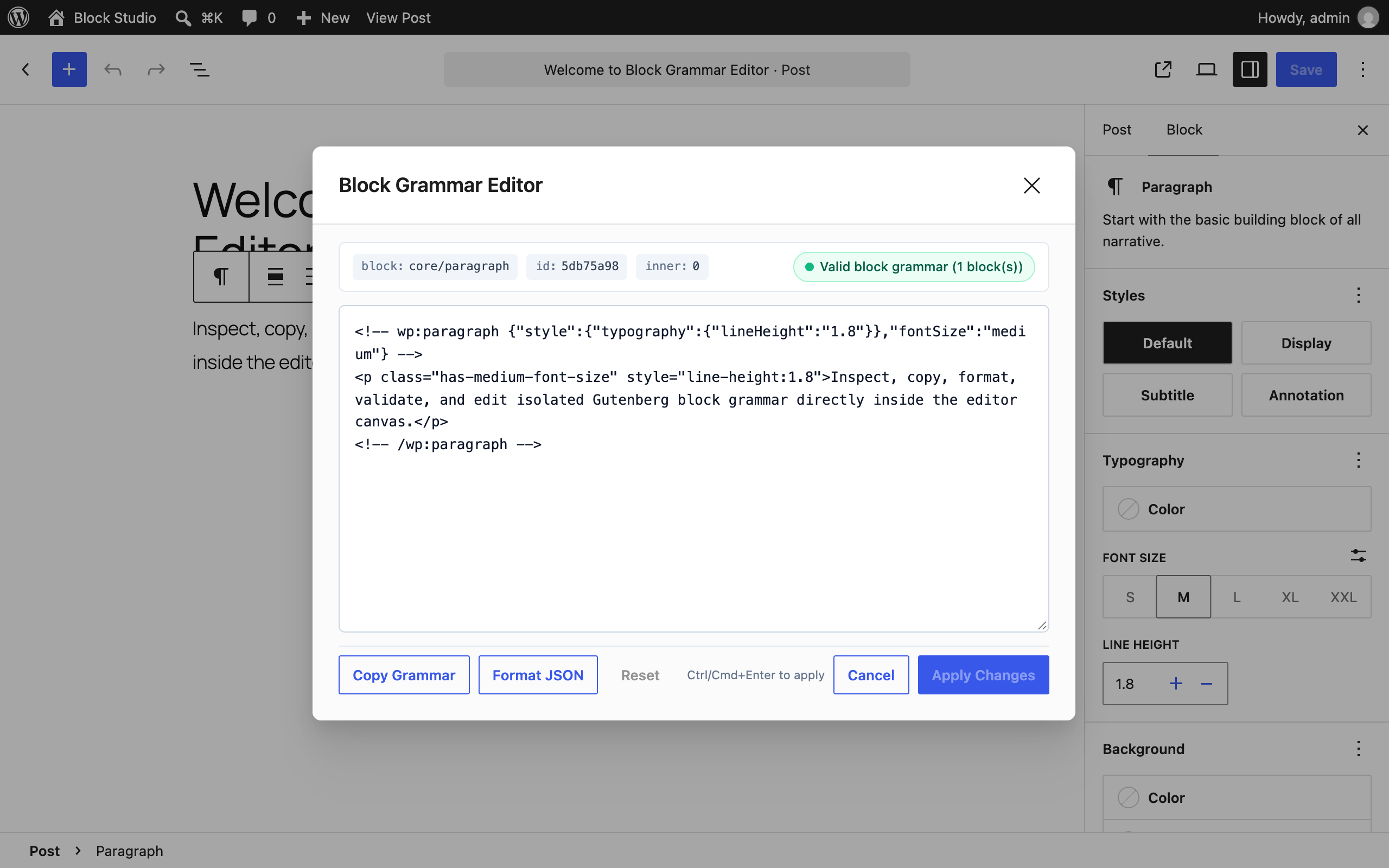
- Syntax validation: Real-time validation checks for unclosed tags, malformed JSON attributes, and parser errors on every keystroke. Prevents broken blocks before applying.
- One-click clipboard copy: Copy raw block comments with one click to easily paste into patterns, documentation, or codebases.
- Pretty-print JSON: One-click formatting tidies block comment JSON attributes into readable, multi-line format while preserving inner HTML.
- Safe replacements: Applies changes safely using native Gutenberg block replacement routines and history stack (undo/redo supported).
- Keyboard shortcuts: Press
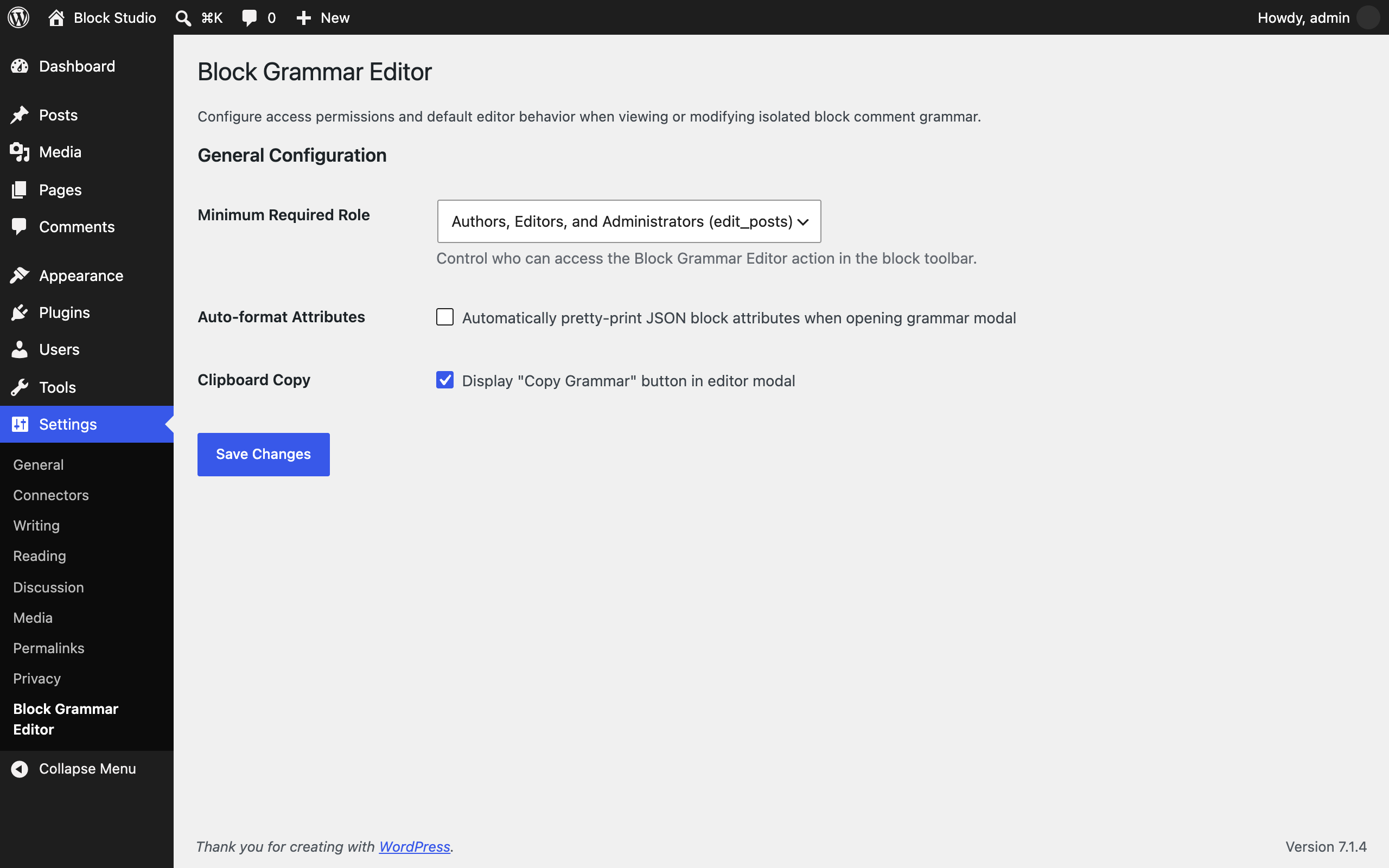
Cmd/Ctrl + Enterto apply changes instantly orEscapeto close. - Role-based permissions: Control who can access grammar editing under Settings > Block Grammar Editor (authors/editors or admins).
- WP-CLI support: Inspect and validate post block grammar directly from the terminal via
wp pratiks-block-grammar-editor inspectandvalidate. - WordPress 6.9+ Abilities API & MCP: Ready for autonomous AI agents and MCP workflows with discoverable
parse-grammarandvalidate-grammarabilities. - Accessibility: 100% WCAG 2.1 AA compliant, tested with axe-core.
Installation
- Download
pratiks-block-grammar-editor.zipfrom the latest release. - In WordPress, go to Plugins > Add New Plugin > Upload Plugin, choose the zip and activate it.
Or with WP-CLI:
wp plugin install https://github.com/pratik-londhe4/pratiks-block-grammar-editor/releases/latest/download/pratiks-block-grammar-editor.zip --activateRequires WordPress 6.6+ and PHP 7.4+. The Try in WordPress Playground badge runs a throwaway WordPress site directly in your browser with the plugin active and ready to test.
WP-CLI
Inspect post block grammar or validate raw block markup from the command line:
# Inspect all blocks in post 123
wp pratiks-block-grammar-editor inspect 123

# Inspect a specific block by zero-based index as raw grammar
wp pratiks-block-grammar-editor inspect 123 --block=0 --format=raw

# Inspect as JSON representation
wp pratiks-block-grammar-editor inspect 123 --format=json

# Validate a block grammar snippet
wp pratiks-block-grammar-editor validate '<!-- wp:paragraph {"fontSize":"small"} --><p class="has-small-font-size">Text</p><!-- /wp:paragraph -->'
Extensibility & Hooks
Block Grammar Editor is fully extensible through PHP and JavaScript hooks:
PHP Filters & Actions
// Customize required capability
add_filter( 'pratiks_block_grammar_editor_capability', function( $cap ) {
    return 'edit_posts';
} );

// Customize default settings
add_filter( 'pratiks_block_grammar_editor_default_settings', function( $defaults ) {
    $defaults['auto_format_attributes'] = 1;
    return $defaults;
} );

// Action triggered when plugin services boot
add_action( 'pratiks_block_grammar_editor_loaded', function( $plugin ) {
    // Custom integration logic
} );
JavaScript Hooks (wp.hooks)
// Filter modal title for custom post types or blocks
wp.hooks.addFilter(
    'pratiksBlockGrammarEditor.modalTitle',
    'my-plugin/custom-modal-title',
    ( title, block ) => `Block Grammar: ${ block.name }`
);

// Conditionally disable grammar editor for specific block types
wp.hooks.addFilter(
    'pratiksBlockGrammarEditor.canEditBlock',
    'my-plugin/guard-blocks',
    ( canEdit, block ) => block.name !== 'core/freeform'
);

// Listen to grammar apply events
wp.hooks.addAction(
    'pratiksBlockGrammarEditor.onApply',
    'my-plugin/track-apply',
    ( { oldBlock, newBlocks } ) => {
        console.log( 'Block grammar applied:', oldBlock.name, newBlocks );
    }
);
Screenshots
| 1. Block Grammar Editor in Gutenberg | 2. Settings Screen |
|---|---|
 |
 |
License
GPL-2.0-or-later. See LICENSE.md.