Install
This is the repository archive. It installs, but the folder name will carry the branch suffix and updates will not flow.
Install straight from GitHub with WP-CLI:
wp plugin install https://github.com/prangishviliabe/elbishion/archive/refs/heads/main.zip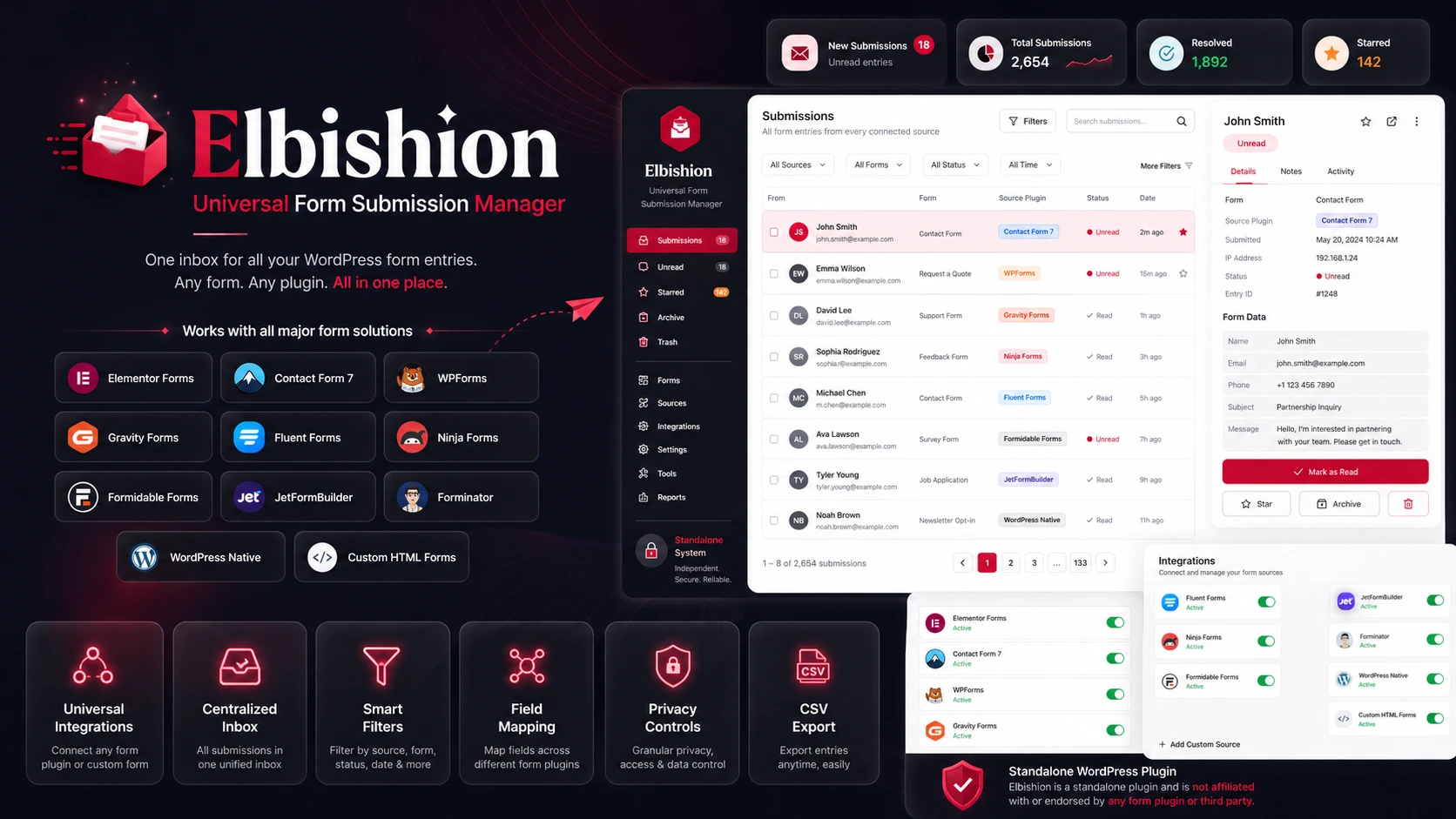
Elbishion is a standalone WordPress form submissions manager. It stores submissions from the built-in shortcode form, a small developer API, and optionally Elementor Pro Forms. The plugin adds a dedicated WordPress admin workspace for searching, filtering, viewing, status management, CSV export, notifications, and privacy-related storage controls.
Version
Current version: 2.0.6
Recommended Git tag: v2.0.6
Author: Abe Prangishvili
Features
- WordPress admin menu for all submissions, unread submissions, starred submissions, archived submissions, and settings.
- Built-in frontend shortcode form.
- Developer function and action hook for saving custom form submissions.
- Universal capture layer with normalized storage for multiple WordPress form systems.
- Automatic integrations for Elementor Pro Forms, Contact Form 7, WPForms, Gravity Forms, Fluent Forms, Ninja Forms, Formidable Forms, JetFormBuilder, Forminator, WooCommerce, WordPress native forms, Custom HTML forms, and API submissions.
- Source plugin tracking, source form IDs, source form names, user metadata, duplicate hashes, attachment metadata, raw data storage, and privacy controls.
- Submission detail view with field cards, message display, metadata, page URL, IP address, and user-agent where enabled.
- Search, form-name filtering, date filtering, ordering, pagination, and status filters.
- Bulk actions for marking read/unread, starring, archiving, exporting, and deleting submissions.
- CSV export for all, filtered, or selected submissions.
- Optional email notifications when new submissions are saved.
- Privacy controls for IP address and browser user-agent storage.
- Admin interface language switcher for English and Georgian.
- Optional data deletion on uninstall.
Requirements
- WordPress 5.8 or newer.
- PHP 7.4 or newer.
- MySQL/MariaDB supported by the active WordPress installation.
- Elementor Pro is optional and only required for automatic Elementor Forms capture.
Installation
-
Download or clone this repository.
-
Copy the plugin folder into:
wp-content/plugins/elbishion -
In WordPress admin, go to Plugins.
-
Activate Elbishion.
-
Open Elbishion in the WordPress admin menu.
On activation, the plugin creates a custom database table:
{wp_prefix}_elbishion_submissionsIt also creates default plugin settings if they do not already exist.
Shortcode Usage
Add the default frontend form to any post, page, or builder shortcode widget:
[elbishion_form]Use a custom form name:
[elbishion_form name="Contact Form"]The shortcode form stores:
- name
- phone
- subject
- message
- page URL
- IP address if enabled
- user-agent if enabled
The form includes nonce verification, server-side validation, sanitization, and a redirect confirmation flag after a successful submission.
Developer API
Use the helper function when saving submissions from custom theme or plugin code:
elbishion_save_submission(
    'Custom Quote Form',
    array(
        'name'    => 'Jane Doe',
        'email'   => 'jane@example.com',
        'message' => 'I would like a quote.',
    ),
    array(
        'page_url' => home_url( '/quote/' ),
        'status'   => 'unread',
    )
);
The function returns the inserted submission ID on success and false on failure.
You can also use the action API:
do_action(
    'elbishion_save_submission',
    'Custom Form',
    array(
        'email'   => 'client@example.com',
        'message' => 'Submitted from custom code.',
    )
);
After a submission is saved, the plugin fires:
do_action( 'elbishion_submission_saved', $submission_id, $form_name, $submitted_data, $args );This is useful for analytics, CRM syncing, custom notifications, or external automation.
The developer action API also accepts source and metadata:
do_action( 'elbishion_save_submission', $form_name, $submitted_data, $source, $meta );Developer helpers:
elbishion_save_submission( $form_name, $submitted_data, $args );
elbishion_get_submissions( $args );
elbishion_get_submission( $id );
elbishion_update_submission_status( $id, $status );
Elementor Pro Forms
Universal Integrations
Elbishion detects supported form plugins and registers lightweight capture hooks automatically when the integration is enabled.
Supported integrations:
- Elementor Pro Forms
- Contact Form 7
- WPForms Lite and Pro
- Gravity Forms
- Fluent Forms
- Ninja Forms
- Formidable Forms
- JetFormBuilder
- Forminator
- WooCommerce registration and optional checkout capture
- WordPress native registration, comments, login, and password reset
- Custom HTML forms
- Developer API submissions
Each integration can be enabled or disabled from Elbishion > Integrations. Integrations support capture-all mode, selected form allowlists, ignored form lists, per-integration IP/user-agent toggles, and notification toggles.
Elementor Pro Forms
If Elementor Pro is active, Elbishion listens to:
elementor_pro/forms/new_recordThe plugin reads the Elementor form name, page URL, field labels, field IDs, and submitted values, then saves them into the Elbishion submissions table as clean JSON.
Elementor capture is non-blocking. Elbishion does not stop Elementor's native emails, redirects, webhooks, or other form actions.
Settings:
- Enable Elementor Forms Capture captures all Elementor Pro form submissions when enabled.
- Capture only selected Elementor forms limits capture to the allowlist.
- Elementor form name allowlist accepts one form name per line or comma-separated form names.
If Elementor Pro is not active, Elbishion continues working normally with shortcode and API submissions.
Custom HTML Forms
Enable custom HTML capture from Elbishion > Integrations, then include these hidden fields in any custom form:
<input type="hidden" name="elbishion_capture" value="1">
<input type="hidden" name="elbishion_form_name" value="Contact Form">
Elbishion captures the submitted fields without preventing the original form handler from running.
Admin Workflow
After activation, WordPress administrators can manage submissions from the Elbishion menu.
Available sections:
- All submissions
- Unread
- Starred
- Archived
- Settings
Available actions:
- view submission details
- mark as read
- mark as unread
- star
- archive
- delete
- export selected records to CSV
- export filtered records to CSV
- export all records to CSV
Only users with the manage_options capability can access and mutate submissions.
Settings
The settings page controls:
- whether IP addresses are stored
- whether browser user-agent values are stored
- whether submissions/settings are deleted during uninstall
- admin pagination size
- email notification enablement
- notification recipient email
- Elementor Forms capture enablement
- selected-only Elementor capture
- Elementor form name allowlist
- duplicate prevention and duplicate time window
- IP masking
- automatic retention cleanup
- raw data storage
- hidden field exclusion
- sensitive keyword exclusion
Pagination is constrained between 5 and 100 items per page.
Data Storage
Submissions are stored in a custom database table with these core fields:
idform_namepage_urluser_ipuser_agentsourcesource_pluginsource_form_idsource_form_namesubmitted_dataraw_datasubmission_hashhas_attachmentsstatuscreated_atupdated_at
Submission field data is stored as JSON in submitted_data.
Source values:
shortcodeelementorcontact_form_7wpformsgravity_formsfluent_formsninja_formsformidable_formsjetformbuilderforminatorwoocommercewordpress_nativecustom_htmlapi
Supported statuses:
unreadreadstarredarchived
CSV Export
CSV exports are available from the admin list screens.
Export modes:
- selected submissions through bulk action
- currently filtered submissions
- all submissions
Exports are protected by WordPress capability checks and nonces.
Privacy And Security
Elbishion is designed around WordPress security primitives:
- direct file access protection with
ABSPATHchecks - nonce verification for frontend submission, admin actions, bulk actions, and exports
manage_optionscapability checks for admin access- WordPress sanitization before storage
- WordPress escaping before output
- prepared database operations for dynamic values
- safe redirects after frontend submission
- optional IP and user-agent storage controls
- optional IP masking
- duplicate submission prevention
- password, credit card, CVV, token, secret, and API key exclusion
- optional hidden field exclusion
- optional raw data storage
- optional retention cleanup
- optional cleanup during uninstall
Because form submissions may contain personal data, site owners should align usage with their privacy policy, retention policy, and local compliance requirements.
Uninstall Behavior
By default, uninstalling the plugin does not delete saved submissions.
To permanently remove plugin data during uninstall:
- Open Elbishion > Settings.
- Enable the delete-on-uninstall option.
- Save settings.
- Uninstall the plugin from WordPress.
When enabled, uninstall cleanup removes:
{wp_prefix}_elbishion_submissionselbishion_settingselbishion_db_version
File Structure
elbishion/
├── assets/
│   ├── css/
│   │   └── admin.css
│   └── js/
│       └── admin.js
├── includes/
│   ├── class-elbishion-activator.php
│   ├── class-elbishion-admin-list.php
│   ├── class-elbishion-admin-menu.php
│   ├── class-elbishion-database.php
│   ├── class-elbishion-export.php
│   ├── class-elbishion-settings.php
│   └── class-elbishion-submission-handler.php
├── elbishion.php
├── uninstall.php
└── README.md
Changelog
2.0.6
- Hide Elementor acceptance/terms fields from stored submissions.
- Hide previously stored acceptance fallback fields from the admin detail view.
- Avoid showing generated fallback IDs such as
Field (Field 5F00AAB)for placeholder labels.
Release Checklist
Before publishing a new version:
- Update the plugin header version in
elbishion.php. - Update
ELBISHION_VERSIONinelbishion.php. - Update the version section in this README.
- Run PHP syntax checks.
- Test activation on a clean WordPress site.
- Test shortcode submission.
- Test admin status actions.
- Test CSV export.
- Create a version tag, for example
v2.0.0.
License
Elbishion is licensed under the GNU General Public License v2.0 or later.
See LICENSE for the full license text.