Install
This is the repository archive. It installs, but the folder name will carry the branch suffix and updates will not flow.
Install straight from GitHub with WP-CLI:
wp plugin install https://github.com/plotbird/wordpress-plugin/archive/refs/heads/main.zipPlotBird Analytics for WordPress
Adds the PlotBird tracking code to a WordPress site, and shows the statistics inside the WordPress admin — no iframe, no third-party service, no cookies.
PlotBird itself is self-hosted, cookie-free web analytics in plain PHP and MySQL. This plugin is only the client: it sends pageviews to the installation you control and reads the numbers back through a read-only share link. That installation is the address you enter on the setup screen, so the plugin loads no code from a server of ours, and sends nothing anywhere else.
- Requires: WordPress 6.0+, PHP 7.4+
- Licence: GPL-2.0-or-later
- Languages: English, Русский (follows the site language, can be overridden)
What it does
- Injects the tracker on every public page — never in the admin, feeds, or previews, and never for logged-in administrators if you leave that option on.
- Setup wizard in four steps, with checks that actually test the connection
rather than trusting the fields: it fetches
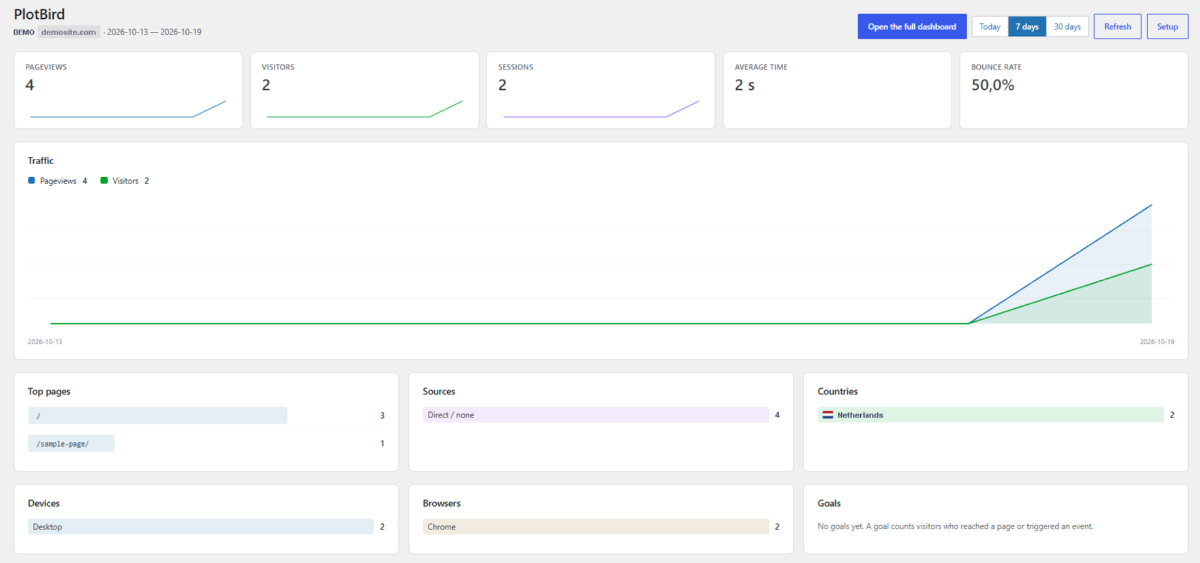
tracker.jsfrom your installation and looks for the tag on your front page. - Statistics screen in the admin: pageviews, visitors, sessions, average time, bounce rate, a traffic chart, top pages, sources, countries, devices, browsers and goals.
- Works with a PlotBird installation in a sub-directory (
/plotbird/) or on another domain.
Install
- Copy this folder to
wp-content/plugins/plotbird-analytics, or upload the release ZIP under Plugins → Add New → Upload Plugin. - Activate it.
- Open Settings → PlotBird and follow the four steps.
You need a running PlotBird installation. It is a folder of PHP files you upload to your hosting and open in a browser — see the installation guide.
The four steps
- Where PlotBird lives — paste the address, e.g.
https://example.com/plotbird. The button checks thattracker.jsanswers there and that it is really PlotBird. - Website id — the UUID from the site's code panel in PlotBird. Wrong ids are rejected before they can produce silent zeroes.
- Statistics inside WordPress — a share link from PlotBird (Websites → Links and goals). It is read-only and can be revoked at any time; the plugin never stores a password.
- Check it works — the plugin loads your front page and looks for the tracking tag in the HTML, which catches caching plugins.
Why statistics need a share link
Reading numbers requires a credential. Storing an administrator password in WordPress would be wrong, and a PlotBird session lives only in your browser. A share link is the narrowest thing that works: read-only, revocable, optionally expiring. The plugin shows a clear message if the link is revoked or belongs to another website.
"I see no statistics"
The most common reason: you are looking at your own site while logged in. With Do not track logged-in administrators enabled (the default), the plugin does not print the tag for you at all. Check in a private window, or untick the option.
Other things worth checking:
- A caching plugin may serve a page rendered before the tag was added — clear its cache and use the check in step 4.
- A hit appears in the dashboard within a minute; the plugin caches its own response for 60 seconds, and Refresh clears that.
- If your site answers on both
example.comandwww.example.com, make sure the website in PlotBird accepts the host you actually browse.
Privacy
No cookies are set and no personal data is stored. PlotBird derives a daily visitor id from a salted hash of the anonymised IP address and the user agent, then discards the raw values unless you explicitly enable storing IP addresses. The plugin itself sends nothing anywhere except your own PlotBird installation.
Development
php -l plotbird-analytics.php # syntax checkTranslation files live in languages/. The source strings are English; the
Russian catalogue is plotbird-analytics-ru_RU.po with the compiled .mo.
Licence
GPL-2.0-or-later. PlotBird Analytics (the server) is AGPL-3.0-or-later; this plugin contains no code from it.