Flex Videos WP Registry grade A. No security issues foundWP RegistryNo security issues foundOpen the reportA
A WordPress plugin that lets you easily embed YouTube videos on your site. Display single videos or customizable flexible grids. Yes it's free. Go check it out at the site below
Install
This is the repository archive. It installs, but the folder name will carry the branch suffix and updates will not flow.
Install straight from GitHub with WP-CLI:
wp plugin install https://github.com/planetoftheweb/flex-videos/archive/refs/heads/main.zip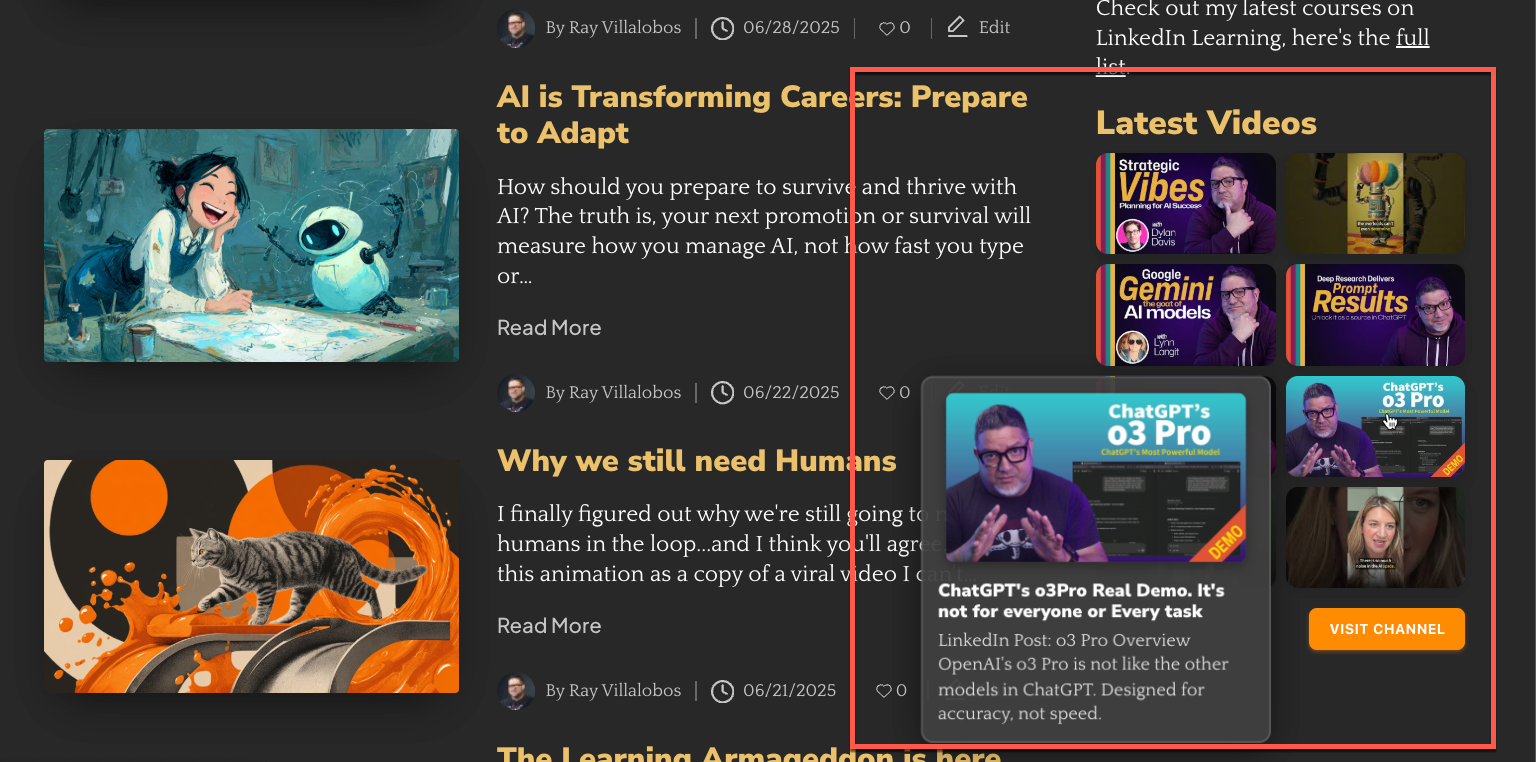 A WordPress plugin for displaying responsive YouTube video grids with modern flyout overlays and customizable styling. Full demo on itsPlaiTime.com
Key Features
- YouTube Grid Display - Show video thumbnails from any YouTube channel in a responsive grid
- Modern Flyout Overlay - Hover over thumbnails to see an animated overlay with full video details
- Customizable Button Colors - Admin color pickers for channel link button styling
- Responsive Design - Looks great on all devices with configurable column layouts
- Built-in Caching - API responses are cached for optimal performance
- Optimized Thumbnails - Medium resolution for grid performance, high-resolution for overlay quality
- WordPress Compatible - Follows WordPress coding standards and best practices
- Gutenberg Block - Insert video grids directly from the block editor
- Automatic Updates - Built-in GitHub update checker for easy upgrades
What Makes It Special
Smart Overlay System
- Fade-in animation with smooth transitions
- Never clipped - automatically repositions at viewport edges
- High-resolution thumbnail preview with full title and description text
- Left-aligned layout for consistent, professional appearance
Professional Grid Layout
- Semantic HTML wrapped in
wp-block-groupfor block theme compatibility - Optimized spacing with separate controls for grid gaps
- Configurable columns (1-10 columns supported)
Admin-Friendly Customization
- Color picker controls for button background, hover, and text colors
- Show/hide toggles for grid title, description, and channel link
- Custom text options for grid title, description, and button text
- Cache management and settings reset tools for troubleshooting
Installation
WordPress Admin (Recommended)
- Download the latest release ZIP from GitHub Releases
- Go to Plugins > Add New in WordPress admin
- Click Upload Plugin and select the ZIP file
- Click Install Now, then Activate Plugin
Manual Installation
- Download and extract the plugin files
- Upload the
flex-videosfolder to/wp-content/plugins/ - Activate through the Plugins menu in WordPress admin
Development Installation
cd /wp-content/plugins/
git clone https://github.com/planetoftheweb/flex-videos.git
Configuration
Go to Settings > Flex Videos in WordPress admin:
API Configuration (Required)
- YouTube Data API Key - Get free key from Google Cloud Console
- YouTube Channel ID - Find at YouTube Advanced Settings
Grid Display Options
- Number of Columns (1-10, default: 3)
- Gap Between Thumbnails (pixels, default: 15)
- Number of Videos to Show (1-50, default: 9)
Content Options
- Show Grid Title (checkbox, default: enabled)
- Show Grid Description (checkbox, default: enabled)
- Custom Grid Title (optional override text)
- Custom Grid Description (optional override text)
Channel Link Options
- Show Channel Link (checkbox, default: enabled)
- Channel Link Text (default: "Visit Channel", supports
{channel}placeholder) - Button Background Color (color picker, default: orange)
- Button Hover Color (color picker, default: darker orange)
- Button Text Color (color picker, default: white)
Admin Tools
- Test API Key - Verify your YouTube API connection
- Clear Cache - Remove cached API responses
- One-click Cache Reset - Instant AJAX cache clearing from settings
- Reset Plugin Settings - Restore all settings to defaults
Usage
You can insert the Flex Videos Grid block from the block editor or use the shortcode as documented below.
Video Grid Shortcode
Display videos from your configured YouTube channel:
[flex_videos]Shortcode Attributes
| Attribute | Default | Description |
|---|---|---|
columns |
3 |
Number of columns (1-10) |
count |
9 |
Number of videos to display (1-50) |
gap |
15 |
Space between thumbnails in pixels |
hashtag |
- | Filter videos containing hashtag in description |
Examples
Basic 3-column grid:
[flex_videos]4-column grid with 12 videos:
[flex_videos columns="4" count="12"]Tutorial videos only:
[flex_videos hashtag="#tutorial" columns="2" count="6"]Mobile-friendly single column:
[flex_videos columns="1"]Large grid with custom spacing:
[flex_videos columns="4" count="16" gap="20"]Single Video Embed
Embed individual videos with inline playback:
[flex_video url="https://www.youtube.com/watch?v=VIDEO_ID"]Automatically fetches title and description for YouTube videos using the API.
Visual Behavior
Grid Display
- Thumbnails only in the grid layout (clean, minimal appearance)
- Click to open video on YouTube in new tab (no inline playback in grid)
- Hover overlay shows large thumbnail, full title, and description
- Smooth animations with fade-in and brightness effects
Grid Content
- Single title above the entire grid (customizable, toggle-able)
- Single description below the grid title (customizable, toggle-able)
- Channel link button below the grid (customizable colors and text)
Overlay Details
- High-resolution thumbnail (1280x720 maxres quality)
- Full video title (not truncated)
- Complete description with proper text wrapping
- Smart positioning - never gets clipped at screen edges
Button Customization
The easiest way to customize the "Visit Channel" button appearance is through the WordPress admin:
- Go to Settings → Flex Videos
- Scroll to Channel Link Options
- Use the color pickers for background, hover, and text colors
- Save settings
The plugin handles all styling automatically based on your color choices.
Technical Requirements
- WordPress: 5.0 or higher
- PHP: 7.4 or higher
- YouTube Data API v3 Key (free from Google Cloud Console)
Performance Features
- Smart caching - API responses cached with WordPress transients
- Dual-resolution thumbnails - Medium quality for grid (320x180), high quality for overlays (1280x720)
- Optimized images - Proper thumbnail sizing and lazy loading ready
- Clean markup - Semantic HTML with minimal inline styles
- Background processing - Non-blocking API requests
- Efficient CSS - External stylesheet with CSS custom properties
Troubleshooting
Common Issues
Videos not displaying?
- Check your YouTube API key is valid
- Verify YouTube Data API v3 is enabled in Google Cloud Console
- Use the "Test API Key" button in plugin settings
- Ensure your channel ID is correct (starts with UC...)
Styling problems?
- Check for theme conflicts
- Clear any caching plugins
- Verify CSS is loading (check browser developer tools)
Performance issues?
- Use the "Clear Cache" button to refresh API data
- Reduce the number of videos displayed
- Check for plugin conflicts
Settings not saving?
- Try the "Reset Plugin Settings" button
- Check file permissions in WordPress
- Look for JavaScript errors in browser console
Debug Information
Enable WordPress debug logging in wp-config.php:
define('WP_DEBUG', true);
define('WP_DEBUG_LOG', true);
Contributing
Contributions are welcome! Please see our Contributing Guidelines.
License
GPL-2.0-or-later - see LICENSE file for details.
Author & Support
- Author: Ray Villalobos
- Website: Planet of the Web
- GitHub: planetoftheweb
Get Help
- Bug Reports: GitHub Issues
If this plugin helps you, please star the repository!
Releases
3 releases.
These releases are tags only. The author does not attach a packaged zip, so there are no download counts to report.