Install
This is the repository archive. It installs, but the folder name will carry the branch suffix and updates will not flow.
Install straight from GitHub with WP-CLI:
wp plugin install https://github.com/piotrsmaruj/linocut-composer/archive/refs/heads/main.zipLinocut Composer is a WooCommerce plugin for printmakers who sell made-to-order linocut artwork. A shopper arranges four prints in a live grid and buys one finished piece. The order gives the printmaker the design, ink color, and position of each print.
Polska instrukcja konfiguracji sklepu
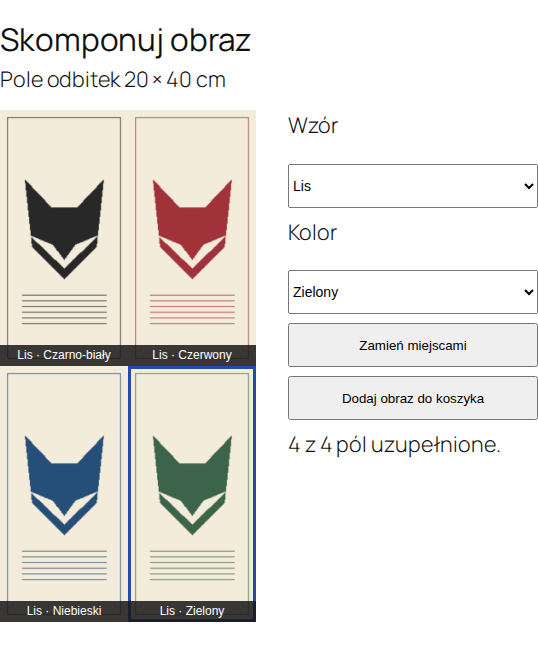
What it does
- Builds a 2 × 2 arrangement from shop-approved design and color variants. Shoppers can repeat a print, swap positions, and use the composer with a keyboard, mouse, or touchscreen.
- Sells the arrangement as one physical WooCommerce product. The product sets the price, stock, tax, and shipping. The print variants supply the artwork previews.
- Checks availability again at checkout. If a print has been withdrawn, the shopper gets a link back to the composer.
- Stores a snapshot on the order line. The shop can still read the original layout and labels after the source catalog changes. WooCommerce displays the labels in order confirmations.
Create a separate product for each artwork format and set its price in WooCommerce. For example, four 10 × 20 cm prints make a 20 × 40 cm print area, and four 12 × 18 cm prints make a 24 × 36 cm print area. The preview keeps the configured proportions, and the order records the purchased dimensions. The interface ships in Polish.
Try it locally
Requires Docker with Compose and make. Run these commands in a checkout of this repository.
make composer ARGS=install
make npm ARGS=ci
make demo PROFILE=blocks
Open the demo product. The demo includes synthetic designs and an offline test payment method. Local credentials and port settings are in .env.example. Set overrides in .env before setting up the demo. make down stops the containers and preserves their data.
Use PROFILE=classic to switch the same demo to Storefront with the classic cart and checkout. The default blocks profile uses Twenty Twenty-Five and the WooCommerce Cart and Checkout blocks. Run the profiles in sequence.
Install in a shop
The plugin requires PHP 8.3, WordPress 7.1 or later, and active WooCommerce. Tests use WordPress 7.1.5 and WooCommerce 11.3.0.
- Download the installable ZIP from GitHub Releases or run
make packageafter installing the development dependencies. Packaging useszipand writesvar/linocut-composer.zip. - In WordPress, go to Plugins → Add New → Upload Plugin, upload the ZIP, and activate Linocut Composer.
- Create a global color attribute. In each variable product, enter the width and height of a single print shared by its colors. Give each variant a single color and its own image.
- Create a simple physical product for each finished format. Set its price, enable the composer, enter the size of one print, and select variants of that size. The Polish setup guide gives the exact panel labels.
Existing configurations from version 0.1.0 use their original 10 × 20 cm print size until you supply explicit sizes. Existing orders preserve the dimensions recorded at purchase.
How it works
Domain defines the four positions, the canonical selection, and the versioned order snapshot. Application validates selections against a catalog of eligible prints. Infrastructure connects these rules to WooCommerce product data, Store API, and the order editor. The TypeScript composer submits the four positions and variant IDs. WooCommerce supplies the prices and product data on the server.
Position is part of the cart item identity. Identical arrangements combine into one line, and rearranging the same prints creates a separate line. Order snapshots preserve the production instructions independently of the catalog.
Development checks
make build
make unit
HPOS=1 make integration
HPOS=0 make integration
make stan cs
make js-test
make e2e PROFILE=blocks
make e2e PROFILE=classic
The GitHub Actions workflow runs these checks and builds the installable ZIP. Pull requests that change the cart or order behavior should include a test that exercises the affected WooCommerce flow.