Install
Upload it under Plugins → Add New Plugin → Upload Plugin, then activate.
Install straight from GitHub with WP-CLI:
wp plugin install https://github.com/philhoyt/quickpostr/releases/download/v0.20.0/quickpostr.zip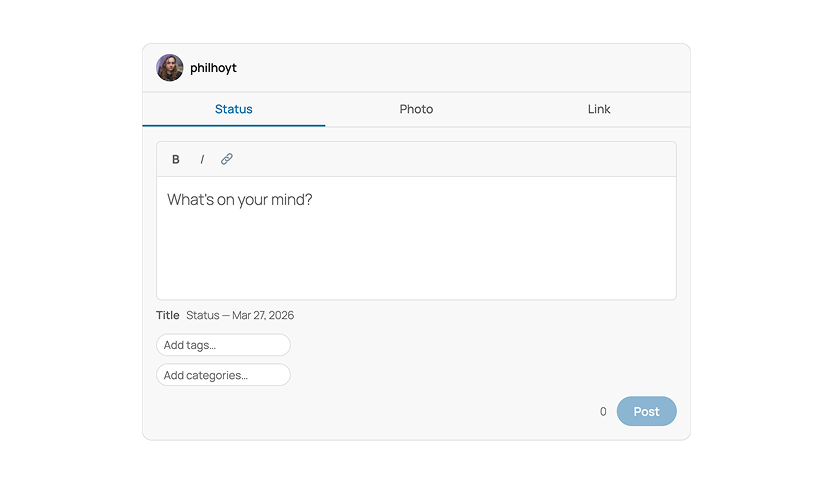
A front-end post composer for WordPress, delivered as a WordPress block. Logged-in users post status updates, photos, videos, and links without visiting /wp-admin.
Requirements
- WordPress 6.7+
- PHP 8.1+
- A theme that declares
add_theme_support( 'post-formats', [...] ) - PHP Imagick extension -- only required for EXIF stripping
Blocks
| Block | Description |
|---|---|
| QuickPostr Composer | The composer itself. Place once per page. Auth-gated server-side. |
| Post Actions | Kebab menu (⋮) with Edit and Delete actions for the current post. Edit opens the post in the WordPress editor. Place inside a Query Loop template. |
| Like Post | Heart button that lets visitors like a post and shows the like count. Place inside a Query Loop template. |
| Share Post | Calls navigator.share(). Requires HTTPS; button is hidden on HTTP. Place inside a Query Loop template. |
A QuickPostr Slider block style is also registered for core/gallery, turning a gallery into a scroll-snap slider with dot navigation, arrows, and swipe gestures.
Installation
- Go to the Releases page and download the
.zipfrom the latest release. - In WordPress, go to Plugins → Add New → Upload Plugin, choose the zip, and click Install Now.
- Click Activate Plugin.
- Place the QuickPostr Composer block on any page using the block editor.
- Configure access and behaviour at Settings → QuickPostr.
The build/ directory is included in the release zip -- no build step required.
Development
npm install
npm run build        # production build
npm start            # webpack watch
npm run lint:js      # JS linting (ESLint)
npm run lint:css     # CSS/SCSS linting (Stylelint)
npm run test:unit    # Jest unit tests
PHP tooling requires Composer dependencies:
composer install
composer lint             # PHPCS + WPCS
composer lint:fix         # phpcbf auto-fix
composer analyse          # PHPStan static analysis
composer test             # PHPUnit unit suite (no WordPress, no DB)
composer test:integration # PHPUnit against a real WordPress + DB
composer test:all         # both suites
composer test:coverage    # integration suite with line coverage (needs pcov)
The integration suite needs the WordPress core test library and a throwaway database — the harness drops all tables in it on every run:
bin/install-wp-tests.sh <db-name> <db-user> <db-pass> [db-host] [wp-version]Releases
Push a v-prefixed version tag to trigger the release workflow:
git tag v0.15.1 && git push origin v0.15.1The workflow (.github/workflows/release.yml) installs JS
dependencies, runs npm run build, packages the plugin with npm run plugin-zip, extracts the
matching = X.Y.Z = section from readme.txt as the release notes, and creates a GitHub release
with quickpostr.zip and readme.txt attached. Updates are delivered to installed sites through
Plugin Update Checker reading those release
assets.
Settings
Settings → QuickPostr
| Setting | Default | Notes |
|---|---|---|
| Allowed Roles | administrator, editor, author | Controls who sees the Composer block. |
| Default Post Status | publish | Set to draft to queue all posts for review. |
| Default Category | none | Applied to every new post. |
| Hide Admin Bar | on | Hides the admin bar for non-administrator roles. |
| Hide Admin Bar (Administrators) | off | Separate toggle for the administrator role. |
| Front-End Post Management | on | Enables the Edit and Delete actions in the Post Actions block. |
| Strip Photo Metadata | on | Strips EXIF on JPEG upload via Imagick::stripImage(). Silently skipped if Imagick is unavailable. |
Settings are stored in a single wp_options row under quickpostr_settings.
Composer Modes
Status -- Rich text editor. Supports bold, italic, and inline links. Auto-saves a draft every 800 ms. Title is generated server-side from the first 55 characters of content; the JS preview is for display only.
Photo -- Drag-and-drop upload or WordPress media library picker. Caption is optional but used for title generation if present. Selecting multiple images posts a gallery, which can be reordered before submitting.
Video -- Drag-and-drop video upload or media library picker. Embeds the uploaded video as a WordPress video block in the post content. When the VideoMuxr companion plugin is active, uploads route to Mux for transcoding and CDN-hosted playback.
Link -- Pastes a URL and fetches Open Graph metadata via the Better Bookmarks REST endpoint. If Better Bookmarks is not installed, posts a plain <a> in the post content with format link.
When the GeoTagr companion plugin is active, a Location button appears in the composer toolbar for tagging posts with a place via the browser Geolocation API or a manual address.
Post Titles
PHP generates the canonical title in rest_after_insert_post. The composer sends an empty title; the server overwrites it. Format:
- Content under 55 characters → content becomes the title.
- Content over 55 characters → truncated at the last word break before 55 characters, suffixed with
…. - No content (photo, video, or link with no caption) → a dated label such as
Photo — Mar 26, 2026orLink — Mar 26, 2026.
Titles are suppressed on the front end for QuickPostr posts via the the_title filter. They remain visible in /wp-admin and REST responses so ActivityPub and feed readers receive them.
Authentication
All REST requests use cookie authentication with an X-WP-Nonce header (wp_rest action). No Application Passwords. The nonce is injected via wp_add_inline_script in render.php -- the composer only works for users who load the page while logged in.
Taxonomy
A private quickpostr_source taxonomy is registered on post. Each QuickPostr post receives the terms app and one of status, photo, video, or link. The taxonomy is not publicly queryable and does not appear in the admin UI. You can use tax_query to filter or exclude QuickPostr posts in custom queries.
$query = new WP_Query( [
    'tax_query' => [ [
        'taxonomy' => 'quickpostr_source',
        'field'    => 'slug',
        'terms'    => 'app',
    ] ],
] );
Better Bookmarks
QuickPostr detects whether the Better Bookmarks plugin is active via class_exists( 'Better_Bookmarks' ) and passes a betterBookmarks flag to the front-end config.
When active: the Link composer fetches OG metadata from GET /better-bookmarks/v1/preview?url= and serializes a better-bookmarks/link-card block as the post content:
<!-- wp:better-bookmarks/link-card {"url":"...","title":"...","description":"...","image":"...","domain":"..."} /-->When not active: the same Link tab posts <p><a href="url">title</a></p> with post format link. The tab is always visible regardless of whether Better Bookmarks is installed.
Releases
Newest 25 of 28 recorded releases. Each count is every asset in that release; expand a row for the breakdown.
v0.20.0
latest
Oct 10, 2026 13d ago
quickpostr.zip
+1 asset
2
Oct 9, 2026 14d ago
quickpostr.zip
+1 asset
5
Aug 21, 2026 2mo ago
quickpostr.zip
+1 asset
6
Aug 21, 2026 2mo ago
quickpostr.zip
+1 asset
3
Jul 16, 2026 3mo ago
quickpostr.zip
+1 asset
5
May 30, 2026 4mo ago
quickpostr.zip
+1 asset
3
May 29, 2026 4mo ago
quickpostr.zip
+1 asset
3
May 29, 2026 4mo ago
quickpostr.zip
+1 asset
1
May 29, 2026 4mo ago
quickpostr.zip
+1 asset
0
May 29, 2026 4mo ago
quickpostr.zip
+1 asset
1
May 29, 2026 4mo ago
quickpostr.zip
+1 asset
1
May 29, 2026 4mo ago
quickpostr.zip
+1 asset
1
May 29, 2026 4mo ago
quickpostr.zip
+1 asset
0
May 28, 2026 4mo ago
quickpostr.zip
+1 asset
3
May 28, 2026 4mo ago
quickpostr.zip
+1 asset
3
May 28, 2026 4mo ago
quickpostr.zip
+1 asset
1
May 28, 2026 4mo ago
quickpostr.zip
+1 asset
1
May 28, 2026 4mo ago
quickpostr.zip
+1 asset
0
May 22, 2026 5mo ago
quickpostr.zip
+1 asset
2
May 20, 2026 5mo ago
quickpostr.zip
+1 asset
2
May 20, 2026 5mo ago
quickpostr.zip
+1 asset
1
May 20, 2026 5mo ago
quickpostr.zip
+1 asset
1
May 20, 2026 5mo ago
quickpostr.zip
+1 asset
1
May 18, 2026 5mo ago
quickpostr.zip
+1 asset
0
May 18, 2026 5mo ago
quickpostr.zip
+1 asset
0
Active-site estimate ≈10 comes from the median of recent superseded releases. Method.