PERT Estimator Dashboard Widget WP Registry grade A. No security issues foundWP RegistryNo security issues foundOpen the reportA
Dashboard widget for PERT estimation
Install
Upload it under Plugins → Add New Plugin → Upload Plugin, then activate.
Install straight from GitHub with WP-CLI:
wp plugin install https://github.com/pbiron/shc-pert-estimator/releases/download/0.9.1/shc-pert-estimator.0.9.1.zipDashboard widget for PERT estimation
Description
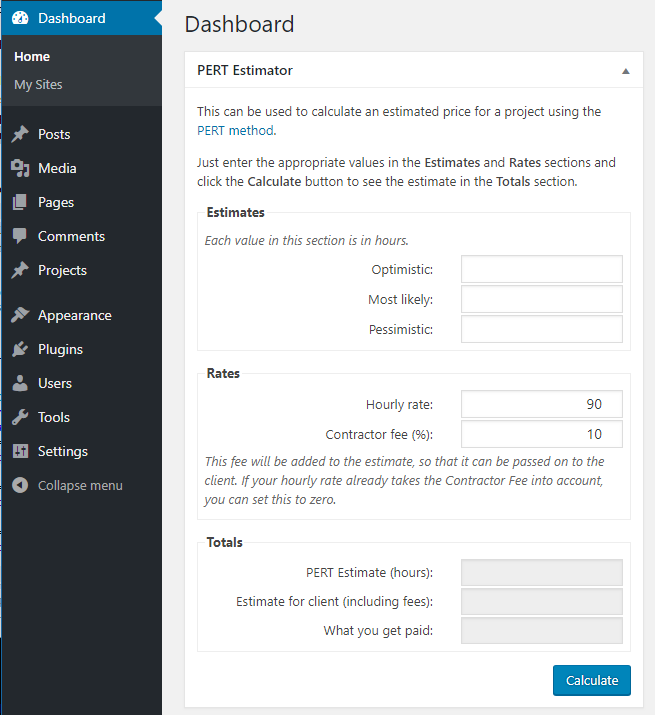
Adds a dashboard widget (including network dashboard for multisite) that allows you to calculate a project estimate based on the PERT method.
Just enter your optimistic, most likely and pessimistic estimates of how many hours the project will take and your hourly rate (and a consultant's fee, if applicable) and it will calculate the number of hours for the project and the total amount billable to the client.
Installation
Installation of this plugin works like any other plugin out there:
- Upload the contents of the zip file to the '/wp-content/plugins/' directory
- Activate the plugin through the 'Plugins' menu in WordPress
Alternatively, if you have the Guthub Updater Plugin you can use that to install (and update) this plugin.
If you install/update from GitHub Updater (or by locally cloning this repository), you will need to run the following commands:
npm install
grunt build
Screenshots
Frequently Asked Questions
What is the PERT method?
PERT stands for Program Evaluation and Review Technique and is a method for estimating the time a project will take in the face of uncertainty.
Basically, you come up with three ballpark time estimates:
- the optimistic estimate (if everything goes better than planned...and you know this is the one we all naively believe we can hit)
- the most likey estimate (if evertying goes just as planned)
- the pessimistic estimate (if everything goes wrong)
The method then calculates a weighted average of these three estimates according to:
estimated_hours = ( _optimistic + ( 4 * likely ) + pessimistic ) / 6This weighted average helps account for the uncertainty in each of the original estimates and helps control for the unknowable.
For the math geeks out there, PERT is a special case of Three-point estimation that uses the PERT distribution.
Changelog
0.9.1
- added "What you get paid" field to "Totals" section
0.9.0
- First version released on github
0.7.0
- save the
hourly_rateandconsultant_feeas user meta for next time
0.5.0
- tweaked the strings to better support localization
- produced the French translation to test the localization (I speak enough French to tell that Google Translate's translations were close enough for now)
0.3.0
- added localization
0.1.0
- init commit
Got Ideas?
Please let me know by creating a new issue and describe your idea. Pull Requests are welcome!
Other Notes
I was inspired to write this plugin when I saw this comment on the Codeable Community board (link private to the Codeable team).
Buy me a beer
If you like this plugin, please support it's continued development by buying me a beer.
Releases
2 releases. Each count is every asset in that release; expand a row for the breakdown.
Active-site estimate ≈10 comes from the median of recent superseded releases. Method.