Install
This is the repository archive. It installs, but the folder name will carry the branch suffix and updates will not flow.
Install straight from GitHub with WP-CLI:
wp plugin install https://github.com/pbiron/hide-try-gutenberg-callout/archive/refs/heads/master.zipConditionally hides the Try Gutenberg callout.
- Tested up to: 4.9.8-RC2
Description
There are several other "hide 'Try Gutenberg' callout" plugins out there. Every one that I have seen uses the "shotgun approach": that is, they hide the callout for all users, in all circumstances, as in,
remove_action( 'try_gutenberg_panel', 'wp_try_gutenberg_panel' );To prove to myself that showing/hiding the callout need not be an all or nothing proposition, I quickly threw together this little plugin.
In case you're wondering, the fact that I — one of the WordPress 4.9.8 release co-leads — am releasing this plugin does not mean that I do not have confidence in Gutenberg and/or the callout. Quite the contrary! It shows that I do have confidence that the hooks the callout and Gutenberg itself provide allow you to decide who will see the callout and be able to use Gutenberg.
While I've done some testing of this plugin, I make no guarantees that it "does the right thing" in all cases, nor that it's functionality will meet the needs of every site admin (or agency, hosting company, etc). It is just a "proof of concent" to show what is possible with the hooks that are provided. That said, I plan to use it on several sites I manage once WordPress 4.9.8 is released.
To Do
Note: I may or may not get around to these items, after all, I'm a little busy at the moment getting ready to get WordPress 4.9.8 out the door :-)
- add multisite support
- For example, it would probably be a good idea to allow site admins to specifty all of the existing functionality for all sites in a network and but allow them to override those settings on a site-by-site basis
- add unit tests
- and do more extensive "manual" testing
- consider releasing through the w.org repo
- once the above items are taken care of, of course
Settings
Once activated, this plugin adds some new settings to the Settings > Writing screen:
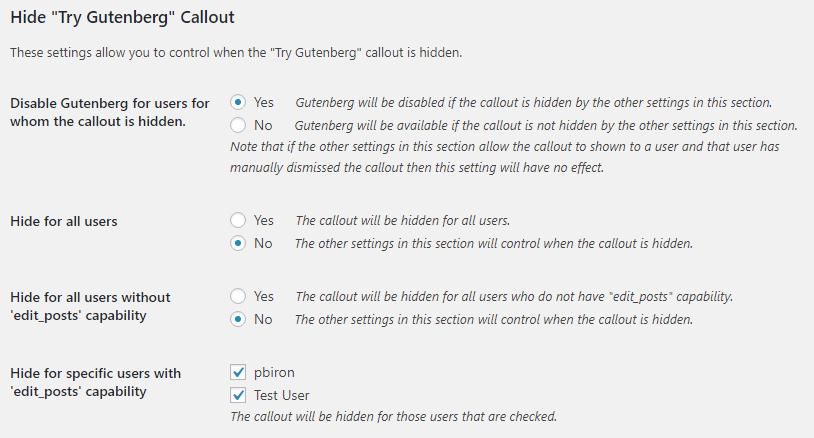
Hide for all users
When Yes is chosen for this setting, the "shotgun approach" is implemented.
Hide for all users without edit_posts capability
Some in the community have argued that the callout should not be shown to users who do not have the capabilities to edit posts. If you're in that camp...never fear!
When Yes is chosen for this setting, the callout will not be shown to such users.
Hide for specific users with 'edit_posts' capability
Do you want only a few "trusted" users to see the callout? We've got you coveverd!
Simply check all the users you do not want to see the callout.
Disable Gutenberg for users for whom the callout is hidden
Lastly, although it is the 1st setting in our settings section :-), do you want Gutenberg to be disabled for users who have not seen the callout? Again, you're in luck!
When Yes is chosen for this setting, then Gutenberg will be disabled for those users.
Installation
Installation of this plugin works like any other plugin out there:
- Upload the contents of the zip file to the '/wp-content/plugins/' directory
- Activate the plugin through the 'Plugins' menu in WordPress
Alternatively, if you have the Guthub Updater Plugin you can use that to install (and update) this plugin.
Changelog
0.2
- Added a setting to disable Gutenberg if the other settings hide the callout for a given user
- First version released on GitHub
0.1
- Initial commit
Ideas?
Please let me know by creating a new issue and describe your idea.
Pull Requests are welcome!
Buy me a beer
If you like this plugin, please support it's continued development by buying me a beer.